

Perchance Image Generator
Image GenerationUpdated October 5, 2026
Perchance is a free, uncensored AI image generator that creates stunning visuals from text without sign-up or limits.
We may earn a commission when you sign up through our links. It does not affect our reviews.
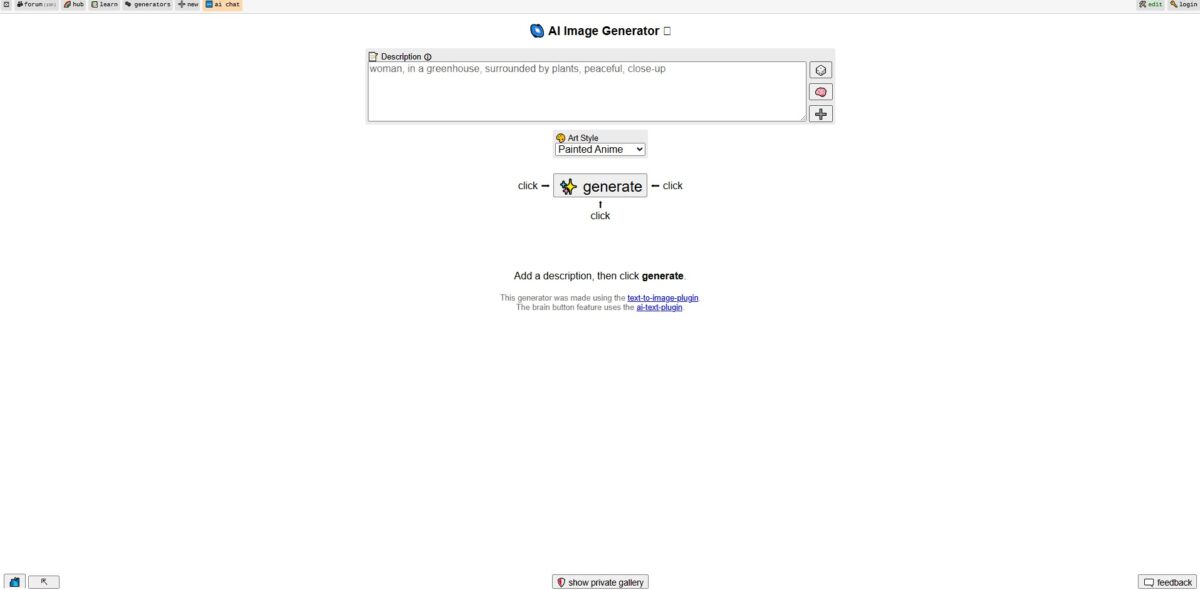
What is Perchance Image Generator?
Perchance Image Generator is a community-driven sandbox that strips away the filters and paywalls found in mainstream tools like DALL-E. It runs entirely in your browser without a login, removing the friction of account setups and subscription tiers. I noticed that while it utilizes models like SDXL and Flux for prompt accuracy, the default output resolution is often low, appearing slightly soft on high-density displays. It lacks the corporate polish of Midjourney, but that absence of oversight allows you to generate niche art styles and unrestricted concepts that standard safety bots would normally block. What you get is a raw, unregulated environment for creative brainstorming where you control the logic via community-made generators. The trade-off is a complete lack of persistent storage; if you refresh the page before downloading, your work vanishes instantly. Use this for zero-commitment experimentation when you need results that polite AI refuses to touch.
How to start using Perchance Image Generator?
Open the official Perchance AI image generator page in any modern web browser. You won’t find a login button or a credit counter because the tool skips the account creation process entirely. This immediate entry removes the usual friction of verifying emails or managing subscriptions. Since there is no user profile, your history lives in your local browser cache, so if you clear your data or switch devices, your previous prompts and generated images vanish.
Takeaway: Bookmark the specific sub-generator URL if you find a style preset you like.Type your idea into the main text box. Describe your subject, lighting, and composition using natural language. The AI understands plain English, but adding specific modifiers like “cinematic” or “pixel art” helps guide the model more effectively than generic requests. You can iterate on a visual concept without learning the rigid, weighted syntax required by more technical tools, which lowers the barrier for hobbyists who just need a quick visual for a blog or a roleplaying session.
Takeaway: Anchor your aesthetic with the “Art Style” dropdown before typing your prompt.Adjust the optional settings like aspect ratio or resolution before hitting the generate button. You can select portrait for social stories or landscape for presentation slides. The tool generates results in seconds, which is great for rapid brainstorming but less ideal for high-resolution print work where every pixel must be perfect. In the time a heavier model finishes one render, you can test dozens of variations, fail fast and refine your idea until it looks right.
Takeaway: The “Negative Prompt” field is where you list things you want to exclude, like “blurry” or “extra limbs.”Click the “Generate” button to see your result. If the image hits the mark, download it immediately to your local drive. The platform doesn’t host your files long-term, and images can eventually “expire” or disappear from the temporary view. I noticed that the site occasionally throws a connection error during peak hours, which forces a page refresh and clears your current unsaved session.
Takeaway: Download every version you like as you go to avoid losing a perfect draft to a browser crash.
Who is it for?
Privacy-conscious creators
If you hate the idea of your prompts being stored on a corporate server or tied to your personal email, this tool bypasses the login requirement entirely. You generate images in a temporary browser session, leaving no digital paper trail. Think of it as a digital “shredder” for your experimental or private ideas.
Uncensored art experimentalists
Most mainstream generators block words as simple as “spicy” or “violence,” but Perchance lets you explore darker themes or adult content without a lecture from a moderator. It handles 18+ tags that would get you banned on Midjourney or DALL-E instantly, without the artificial guardrails that often kill creative flow during concept art sessions.
Resource-strapped developers
When you need a hundred placeholder images for a UI mockup and don’t have a budget for API credits, the free-use model here is a lifesaver. You can generate variations of icons or background textures without worrying about a monthly subscription bill hitting your credit card. Your overhead stays at zero while you’re still in the “ugly” phase of building.
RPG Game Masters
Quickly visualize a gritty tavern or an eldritch horror to show your players during a session without fumbling through Pinterest. Since there are no usage limits, you can keep refining the prompt until the visual matches the mood of your campaign. The “styles” menu helps you maintain a consistent aesthetic across different NPCs, and abstract descriptions become shared visual references.
Low-spec hardware users
Because the heavy lifting happens on their servers rather than your local GPU, you can run this on a cheap Chromebook or an old phone. You don’t need a $2,000 gaming rig to experiment with models like Flux or SDXL. High-end generative models become reachable for people without technical setups.
Perchance Image Generator pricing
Perchance defies the standard SaaS playbook by offering a fully functional image sandbox without a single paywall or credit system. While competitors lock their best models behind monthly tiers, this platform provides unrestricted access to its generation engine for the cost of zero dollars. It operates as a community-driven project where the “price” is simply viewing a few ads on the sidebar if you aren’t logged in.
You get unlimited generations without hunting for “daily credits” or trial resets. So you can iterate on a single prompt fifty times to find the perfect composition without worrying about a bill.
The tool requires no credit card, email, or account creation to start rendering. You can jump from a blank browser tab to a finished character portrait in under thirty seconds, and there is no extra subscription to manage for casual hobbyist projects.
Small ads fund the GPU costs, allowing the developer to keep the service open to everyone. The trade-off is a less polished interface compared to premium tools, but the generation speed remains competitive. That keeps the platform sustainable without squeezing users for cash.
You won’t find a “Pro” button for higher resolutions or faster queue priority. Everyone gets the same access to the same hardware regardless of their budget. For students and creators who need tools but lack capital, that levels the playing field.
Perchance Image Generator key features
Instant web-based generation without account friction
You skip the typical email verification and password management cycles to get straight to prompting. That makes rapid, anonymous experimentation easy during a brainstorm.
Built-in style presets for visual consistency
You can toggle between cinematic, anime, or 3D renders using simple dropdowns instead of mastering complex prompt engineering. Non-artists who need a specific aesthetic save time on trial and error.
Uncensored output for creative freedom
The model lacks the aggressive safety filters found in corporate tools, permitting 18+ or edge-case conceptual art. You won’t hit a “content violation” wall when exploring unconventional or mature themes.
Negative prompt control to refine image details
You can explicitly list what to exclude, like “deformed hands” or “blurry backgrounds,” to tighten up the final result. In testing, this helped minimize common AI hallucinations that often ruin otherwise usable shots, giving you a layer of surgical control over the AI’s messy tendencies.
Flexible aspect ratio selection for platform-specific assets
You can switch between portrait, landscape, or square layouts before hitting generate. That way you avoid the loss of composition quality that comes with manual cropping later.
Perchance Image Generator Pros & Cons
Pros
Perchance eliminates the friction of sign-ups and credit systems, allowing you to generate batches of up to 32 images simultaneously without spending a dime. It handles unfiltered content and niche artistic styles, like 2D anime or fantasy illustrations, far more loosely than corporate-backed alternatives. It even includes a specialized “anti-description” box to manually prune unwanted elements from your renders. This matters because you can rapidly prototype diverse visual concepts without worrying about burning through a monthly allowance.
Cons
The platform struggles with anatomical precision and often produces malformed limbs or blurred facial features compared to paid models. Since it relies on random seeds and basic prompting, you lose the fine-tuned control over lighting or specific composition found in professional suites. The browser page occasionally reloads, which can wipe your current prompts if you haven’t saved them elsewhere. This matters because it makes the tool unreliable for professional projects requiring exact, repeatable results.
Use Perchance Image Generator if you want…
- Generate uncensored images without account registration friction
- Create unlimited AI art with zero subscription costs
- Develop unique character concepts for creative storytelling projects
- Produce instant visual drafts using simple text prompts
- Experiment with diverse art styles for social media content
- Visualize ideas quickly without complex software installation
- Access advanced Stable Diffusion models through a browser
- Build randomized creative assets using community-driven tools
Perchance Image Generator alternatives
 MidjourneyRead review →
 Adobe FireflyRead review →
 Leonardo AIRead review →
 SeaArtRead review →
 DeepAIRead review →
Perchance Image Generator Reviews
I love that this tool is genuinely free with zero hidden fees or signup walls; it is perfect for quick brainstorming without the usual subscription friction.
The freedom to generate uncensored content is a huge plus, though I find the human anatomy can be a bit hit-or-miss compared to paid models.
It is the most accessible AI tool I have used, and the ability to generate large batches in seconds makes it my go-to for rapid ideation.
FAQ
Do I need an account to use Perchance AI?
No, you do not need to sign up or log in to use the image generator; it is completely accessible without a personal account.
Are there any daily limits on image generation?
The tool is free to use with no specific usage limits, allowing you to generate as many images as you like.
Can I edit or modify the images after they are generated?
Perchance AI currently lacks built-in editing features, meaning you cannot fine-tune or repair specific parts of an image directly on the platform.
What AI model does Perchance use?
The platform primarily utilizes versions of the Stable Diffusion model to transform text prompts into visual art.
Does Perchance AI support adult content?
Yes, the generator is known for being uncensored and allows for the generation of content that may be restricted on other platforms, though user warnings may appear.
How can I download the images I create?
Because there is no direct download button on the site, users typically save their creations by right-clicking to save the image or taking a screenshot.
Is it possible to generate images in different aspect ratios?
Yes, the interface includes settings that allow you to choose between different shapes, such as portrait, landscape, or square.
Can I save my prompt history or generated images on the site?
Since the tool does not support user accounts, your work and settings are not saved once you close the browser tab.
Similar tools
 BannerbearTemplate-based API for generating on-brand images, PDFs, animations and videos at scale from your data via REST, Zapier, Airtable or AI agents.
 Generated PhotosLibrary of 2.6M+ AI-generated faces plus face and full-body human generators for model-release-free people images in design, ads and research.
 VheerBrowser-based AI studio for text-to-image, photo editing and image-to-video, with a free no-signup model plus credit access to Nano Banana, Sora 2