
Phot.AI
Image EditingUpdated November 12, 2026
AI platform for e-commerce brands that edits product photos, builds marketplace listings and generates ad creatives and videos in one workspace.
We may earn a commission when you sign up through our links. It does not affect our reviews.
What is Phot.AI?
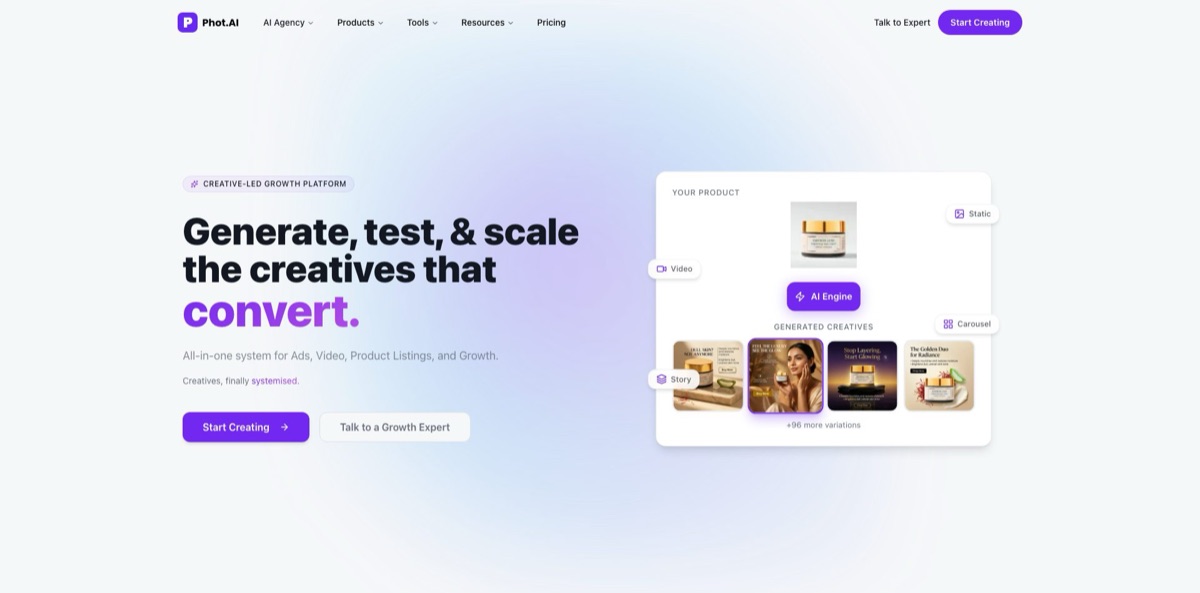
Phot.AI began as a browser-based AI photo editor with tools for background removal, object erasing and upscaling, and it now sells itself as a creative growth platform for D2C brands. The editing tools still live in its Studio, next to three products built on top of them: ListingLab turns raw product photos into marketplace listings with an 8-image gallery, title and bullets, AngleLab generates ad angles, hooks and static or carousel creatives, and VideoLab produces videos with AI presenters. The problem it targets is the cost of a photographer, designer and copywriter for each new SKU and ad refresh. The weak spot is focus and price: paid plans start at $49 a month, and someone who only wants to clean up photos pays for marketplace features they will never open. Pick it if you sell physical products on Amazon, Walmart or Shopify and want listings and ads from one workspace.
How to start using Phot.AI?
Click Start Creating on phot.ai to open the Studio at studio.phot.ai and create a free account with an email address or a social login. The free tier lets you try the core editing tools, while AngleLab and ListingLab only open on a paid plan. Single tools such as the Background Remover also work from their own pages: you drop in a JPG or PNG up to 5 MB, keep the result transparent or pick a solid colour, and download it.
For most sellers the first real scenario is a listing. Open Product Listing in the sidebar and choose Connect Store to sync Amazon (Professional sellers only), Shopify (by store URL), Walmart or WooCommerce. ListingLab pulls in your active products with their titles, prices and images, so you start by improving what is already live. If the product has not launched yet, use Custom Listings instead and upload JPG, PNG, WEBP or BMP photos of at least 512 × 512 px.
The screen to set up before generating anything is Brands. Store your logos and HEX colour palettes there as a brand kit, because both Labs read from it to keep output consistent. In AngleLab you then select or create a Brand Profile, paste a product URL from Shopify, Amazon or Walmart or upload images up to 5 MB, and add core benefits, target audience, selling points and price positioning. After you click Generate, the tool returns several messaging directions such as emotional hooks, problem-solution, social proof and value-led angles, and you pick Static, Carousel or Video format and a funnel stage like Awareness or Traffic.
Before anything goes live, read every generated title, bullet and caption, since all of them stay editable. ListingLab scores your photos and copy against each marketplace’s guidelines and flags issues, then publishes to the connected store with one click. In AngleLab each creative shows an Ad Success Score, and you can download, resize or open it in Studio for manual fixes. You do not need to connect an ad account to generate angles; that connection is only required when you launch tests through the platform.
Who is it for?
Amazon and Walmart sellers
Every new SKU needs a gallery of hero, lifestyle and infographic images plus keyword-heavy copy, and hiring for each one adds up fast. ListingLab builds the full image stack and the text from two raw photos and adapts the gallery to each marketplace’s limits. You spend your time on sourcing instead of briefing freelancers.
Shopify D2C founders
You run the store, the ads and the product pages yourself, usually with one design tool open and a copywriting tool in another tab. Phot.AI puts listings, static ads and editing in one Studio with shared brand kits. Expect to review every output, but the first draft arrives without a design brief.
Performance marketers and media buyers
Creatives fatigue and you keep recycling the same three messages because nobody has time to brief new ones. AngleLab splits ads into angle, hook and creative, generates variations per audience and organises them for parallel tests on Meta, Google, TikTok and Pinterest. You get more distinct ideas into each test window.
Small agencies managing several brands
Client work means switching between logos, palettes and tone of voice all day. The Growth plan includes two seats, a shared team workspace, a teams dashboard and up to 10 brand kits, and extra seats can be added. Brand consistency stops depending on who opened the file.
Developers building e-commerce tools
Your app needs background removal or object replacement without training a model. The Phot.AI API exposes remove and replace background, image extension, object removal and replacement, and text-to-art through a simple API key. A free developer account with 25 credits is enough to test it on your own images.
Phot.AI pricing
Phot.AI charges a flat monthly or yearly fee per plan, and each plan comes with a pool of credits that you spend on listings, ad creatives, image generations and AI tool uses. Unused credits roll over for up to three months before they expire, and every paid tier can buy add-on credits without upgrading. Yearly billing gives two months free, and all paid plans carry a full commercial license. Prices below are from the official pricing page in USD.
Lets you explore the core Studio editing tools before you pay. AngleLab and ListingLab are not included.
500 credits a month, 1 listing, 1 seat, 1 marketplace account, 2 brand kits, 2GB of storage, HD exports and watermark removal. The credits stretch to roughly 34 Nano Banana images, 50 GPT Image 1.5 images or 500 AI tool uses. AngleLab is not part of this plan.
1,500 credits a month for 4 listings or 30 ad creatives, multiple marketplace accounts, 5 brand kits, AngleLab with up to 30 ad angles, AI UGC and ad variants, batch angle testing, bulk editing and 10GB of storage.
3,000 credits a month (1,500 per seat), 8 listings or 60 ad creatives, up to 10 brand kits, unlimited angles per cycle, a shared team workspace, priority support with a 24 to 48 hour SLA and 10GB of storage per seat. Each extra seat adds $149 a month on monthly billing.
Custom. Custom credits and seats, unlimited brands and catalogs, and a dedicated point of contact, priced through sales.
quote-based. A dedicated creative team produces your ads, video and listings with ongoing optimisation and performance guarantees. VideoLab’s done-for-you video add-on starts at $1,000 a month on Pro+ and Growth.
Paid fees are non-refundable except where the law or the terms say otherwise, and cancelling keeps your access until the end of the billing period.
Phot.AI key features
ListingLab builds a complete product page from one product input: an SEO title, feature bullets, attributes, marketplace copy and an 8-image gallery covering hero, feature, before/after, lifestyle, technology, technical, trust and CTA shots. Phot.AI quotes an average of about 7 minutes per listing and support for 45+ languages, with listings rebuilt per market rather than just translated. It connects to Amazon, Walmart, Shopify and WooCommerce and resizes galleries to each marketplace’s limits, such as 9 images on Amazon and 10 on Walmart.
AngleLab treats an ad as three layers: the angle (the core belief), the hook (the attention grabber) and the creative (the execution). It generates variations across audiences, angles and hooks, so a matrix of 3 audiences, 5 angles, 4 hooks and 3 creatives yields 180 variations for one test window. Fatigue detection, basic competitor angle analysis and live web search sit on Pro+ and Growth.
The Studio editing suite covers the classic Phot.AI tools: background remover and replacer, object remover and replacer, generative fill, image extender, text removal, image enhancer, upscaler, old photo restorer, colorizer, light fix, background blur and a passport photo maker. Video tools remove backgrounds from clips and upscale old footage. Bulk Automation applies the same edit to dozens of images at once.
Image generation runs on several outside models behind one credit balance, including Nano Banana, Nano Banana Pro, Nano Banana 2, GPT Image-1 and GPT Image-1.5. Image GPT lets you edit or create images with plain-language prompts, AI Photography places products in virtual photoshoots, and Design from Reference applies the style of an ad or image you upload to your own product.
Brand kits store logos and HEX colour palettes and feed both Labs, so ads and listings share the same look
The Studio also includes an Artboard, design elements and templates for banners, product ads and social graphics. The Growth plan adds a shared team workspace and a teams dashboard.
VideoLab writes a script from a prompt or a product URL in 40+ languages and renders it with one of 300+ AI presenters with lip-sync. Formats range from UGC-style reels to product demos and brand films.
The developer API brings background removal and replacement, image extension, object removal and replacement, and text-to-art into your own product. Requests authenticate with an x-api-key header, usage is invoiced monthly by credits consumed, and a free developer account comes with 25 credits for testing. Phot.AI says a typical integration takes about two hours.
Phot.AI Pros & Cons
Pros
Phot.AI covers a lot of the e-commerce content pipeline in one login. You can cut out a product, generate lifestyle scenes, write the listing copy, publish to Amazon, Walmart, Shopify or WooCommerce and then spin the same product into ad angles without exporting files between tools. Brand kits keep colours and logos consistent across all of it. Credits roll over for three months, which softens the usual use-it-or-lose-it pressure, and every paid plan includes a full commercial license. The free tier and the standalone tool pages let you test editing quality before paying. Run a Custom Listing for one product on Starter and compare it with your current page before scaling.
Cons
The entry price has moved well above typical photo editors, with Starter at $49 a month for a single listing, and AngleLab only starts at $149. The product is also in transition: the website now speaks to D2C growth teams, while App Store reviews and older Product Hunt feedback come from people who used it as a simple editor. Users report that some tools burn credits quickly, that a redesign made reviewing and downloading images harder, and that face reconstruction and image fidelity can disappoint. Fees are non-refundable in most cases. Use monthly billing first and keep a backup editor for delicate retouching.
Use Phot.AI if you want…
- Turn two raw product photos into full listings.
- Publish optimised listings to Amazon, Walmart or Shopify directly.
- Generate dozens of distinct ad angles for one product.
- Test hooks across audiences before raising ad spend.
- Remove backgrounds and objects from product photos quickly.
- Keep ads and listings consistent with shared brand kits.
- Localise listings for different markets and languages.
- Add background removal to your own app through an API.
Phot.AI alternatives




Phot.AI Reviews
App Store reviewers rate the iOS app 4.2 out of 5, and one user with a lifetime Pro subscription calls the tools good enough overall but finds the brush area for selecting objects too small and wishes paid plans included more monthly credits.
Users on the App Store and Product Hunt praise the photo restoration and enhancement tools for bringing old family pictures back to life, and say you do not need editing skills to get there.
Another App Store reviewer felt the app was expensive for what it does, pointing out that a single object replacement used 8 credits and that the editing canvas shrank on a standard iPad.
A subscriber on Product Hunt said an interface overhaul made the service harder to use, with tiny thumbnails, WEBP downloads that many art programs reject and a push toward the built-in Artboard.
Most Product Hunt reviews describe a clean, beginner-friendly all-in-one editor that saves time on object removal, background changes and social visuals, though one user found generated faces did not resemble the originals.
FAQ
Is Phot.AI free?
Yes, there is a free tier that lets you try the core Studio editing tools. AngleLab and ListingLab require a paid plan, which starts with Starter at $49 a month.
How much does Phot.AI cost?
Starter costs $49 a month, Pro+ $149 a month and Growth $249 a month for two seats. Yearly billing costs $490, $1,490 and $2,490 respectively, and Enterprise and the managed AI Agency service are quote-based.
Do unused Phot.AI credits roll over?
Yes. Unused credits roll over for up to three months and then expire, and you can buy add-on credits on any paid plan if you run out.
Which marketplaces does Phot.AI connect to?
ListingLab syncs with Amazon, Walmart, Shopify and WooCommerce, and Phot.AI also lists Flipkart and eBay among supported marketplaces. The Amazon connection requires a Professional seller account.
Does Phot.AI use my product images to train its AI?
Phot.AI states that your product data stays yours and that it does not train on your proprietary content. Data is encrypted in transit and at rest, and when you delete your account it is deleted or anonymised within 30 days.
Can I use Phot.AI images commercially?
Yes. Every paid plan includes a full commercial license, and the terms say you keep ownership of the content you upload, create or generate.
Does Phot.AI have an API?
Yes. The API covers background removal and replacement, image extension, object removal and replacement, and text-to-art, with a free developer account that includes 25 credits. Paid API usage is billed monthly by credits consumed.
How do I cancel my Phot.AI subscription?
Open the billing page in your account and click Cancel Subscription. Your plan stays active until the end of the current billing period, and fees are generally non-refundable.
Similar tools
 HamaFree browser-based AI eraser that removes people, objects, text and blemishes from photos with a brush, plus an inpainting API for developers.
 BgEraserBrowser-based AI background remover that turns up to 20 photos per batch into transparent PNGs without an account, plus offline apps for
 ImgkitsBrowser-based set of AI photo tools for background removal, object cleanup, upscaling, old photo restoration, image generation and image-to-video.