
Picture to Drawing
Image EditingUpdated November 20, 2026
Browser tool that turns photos into pencil, charcoal, ink or watercolor drawings, cartoons and coloring pages, with free daily tries and one-time credit packs.
We may earn a commission when you sign up through our links. It does not affect our reviews.
What is Picture to Drawing?
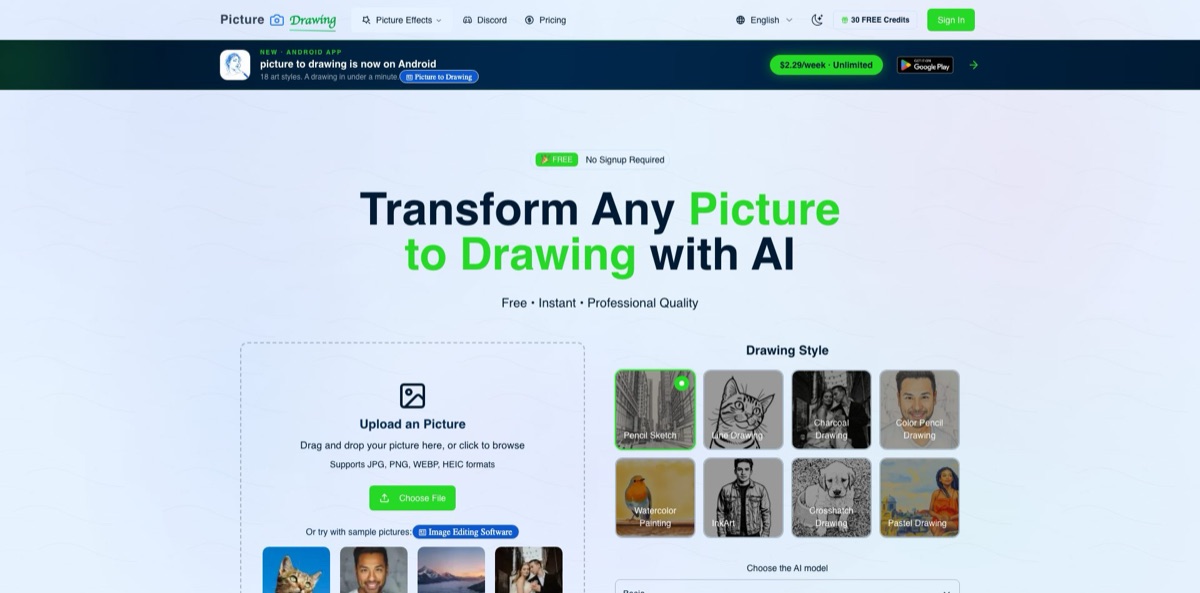
Picture to Drawing is a browser-based converter at picturetodrawing.org that redraws an uploaded photo in one of eight hand-drawn looks: pencil sketch, line drawing, charcoal, color pencil, watercolor, ink, crosshatch or pastel. You drop in a JPG, PNG, WEBP or HEIC file, pick a style and a model, and download the result instead of tracing the photo by hand. Around the main converter sit sibling tools for cartoon styles, coloring pages, stickers, face swaps and batch jobs on the same account. Guests get a few free images a day on a slow Basic model with a watermark, while paid credits come in one-time packs instead of a subscription. The weak spots are thin controls and site copy that contradicts itself about how much is free. It suits hobbyists, parents, teachers and crafters who want a quick drawing from a photo.
How to start using Picture to Drawing?
Open picturetodrawing.org. The converter sits at the top of the homepage, and the guest tier needs no account: drag a photo onto the upload box or click Choose File. The uploader accepts JPG, PNG, WEBP and HEIC files and rejects anything over 5 MB, so shrink large phone shots first. If you just want to see the output, the box also offers sample pictures. For more than the guest allowance, click Sign In; the header advertises 30 free credits for new accounts, and Google sign-in is one of the options. At 10 credits per conversion, that bonus covers three images.
Next, pick a Drawing Style. The list runs Pencil Sketch, Line Drawing, Charcoal Drawing, Color Pencil Drawing, Watercolor Painting, InkArt, Crosshatch Drawing and Pastel Drawing. Below it, Choose the AI model offers Basic, described as standard quality for everyday use, and Advanced, a premium option promising enhanced quality and faster processing. Press Convert to Drawing. A small counter under the button shows how many free and paid generations you have left. The site’s own FAQ says portraits and photos with a clear subject give the best results, so start with a well-lit headshot or a pet photo rather than a busy group scene.
Then wait. The FAQ puts the free Basic model at 20 to 50 seconds per image, and the loading screen warns it can take up to a minute; the Advanced model returns results in about 5 seconds. Guest images carry a watermark and the free pages show ads, both of which disappear while you have paid credits. For other output types, use the Picture Effects menu or the footer: Photo to Sketch has its own eight sketch variants, Photo to Cartoon offers eight cartoon looks, and Picture to Coloring Page turns a photo into printable line art.
Before you download, zoom in on faces, hands and edges, since that is where a drawing filter usually goes wrong. If one style mangles the subject, try another rather than rerunning the same one. When you have several photos for one album or gift, the Batch Convert page takes up to five images at once and lets you download them all as a ZIP file. If the drawing will end up on a product or a client project, note that the pricing page lists personal use rights for the free tier and commercial usage rights only for paid packs.
Who is it for?
Casual photo hobbyists
You have a nice portrait or holiday shot and want it to look hand-drawn without learning an editor. Upload, pick pencil or charcoal, and download. The three free daily tries are enough to decide whether you like the look.
Parents and teachers
Coloring sheets of your own kid, pet or classroom make a better activity than generic printouts, but tracing them by hand takes an evening. The coloring page tool turns a photo into black-and-white line art in a few clicks, with a simplified mode for younger children. You print the sheet and move on.
Gift and craft makers
A pencil or watercolor version of a family photo works for cards, invitations and framed presents. The pastel and color pencil styles aim for a softer, hand-colored look. Buy a credit pack first if you sell what you make, because commercial rights come with paid credits.
Social media creators
Cartoon, anime and sketch versions of a selfie make cheap profile pictures and post variety. The cartoon page bundles eight looks, from Ghibli Style to Retro 80s/90s, so you can test a few before committing to one. Batch Convert keeps a series in one consistent style.
Artists who need references
A line drawing or crosshatch version of a photo can serve as an underdrawing or a value study before you paint. You get a quick read on contours and shadows without sketching it out yourself. Treat the output as a starting point, since the tool offers no control over line weight.
Occasional light users
If you only need a dozen drawings a year, a subscription editor is overkill. One-time packs with no auto-renewal let you pay once and forget about it. Just watch the expiry date on the smaller pack.
Picture to Drawing pricing
The model is credits bought in one-time packs. The pricing page says every plan is a one-time payment through Stripe with no subscriptions or automatic renewals, and it accepts cards, Apple Pay, Google Pay and WeChat Pay. A single conversion costs 10 credits and batch conversion 8 credits per image. Each pack shows a struck-through “original” price next to the current one; the figures below are the current USD prices on the official pricing page in November 2026.
Three free images per day for guests, no registration, the Basic model, a watermark on guest images, standard speed and personal use rights. The allowance resets daily, and signing up adds 30 credits on top. The homepage FAQ still calls free conversions unlimited, so plan around the pricing page’s daily cap.
You get 1,000 credits valid for 3 months, enough for 100 images, with no watermark, all art styles, the fastest processing, commercial usage rights and no ads while paid credits are active.
3,000 credits valid for 12 months, or 300 images, with the same features as Starter.
6,000 credits valid for 24 months, or 600 images, which works out to about 5 cents per image against roughly 10 cents on Starter.
when your credits run out, the checkout dialog offers 10 more drawings for $1.99, which is the most expensive way to buy them.
the separate app terms list a US$3.90 weekly subscription with up to 60 successful generations and a US$119 yearly plan with unlimited generations, both billed and renewed through the app store.
Picture to Drawing key features
Eight drawing styles in the main converter
You choose between Pencil Sketch, Line Drawing, Charcoal Drawing, Color Pencil Drawing, Watercolor Painting, InkArt, Crosshatch Drawing and Pastel Drawing before you generate. Each style gives a different texture, from clean outlines to heavy charcoal shading. You can compare several looks for one photo in a few minutes.
Two AI models with different speeds
Basic is free and slow, with the FAQ quoting 20 to 50 seconds and admitting occasional stability issues. Advanced is the premium model, quoted at about 5 seconds per image without the watermark. Use Basic to test, then switch to Advanced for the final version.
Photo to Cartoon with eight looks
The cartoon page offers Ghibli Style, Pixar 3D, Disney 2D, Manga Style, Western Comic, Anime Cel-Shaded, Flat Vector and Retro 80s/90s. It uses the same upload, style and model flow as the drawing converter. Handy for avatars and posts that need a cartoon version of a real person.
Picture to Coloring Page
Four types are on offer: Full Line Art, Simplified Art, No BG and Classic. The page describes black-and-white output with shading and color removed, sized for printing. Simplified Art suits young children, while Full Line Art keeps more detail for older colorists.
Batch Convert for small sets
Upload up to five images of up to 5 MB each and apply one style to all of them. Each image costs 8 credits instead of 10, you can download everything as a ZIP file, and failed images are not charged. The feature needs credits, so guests cannot use it.
Extra photo effects on the same account
The menu also links to Photo to Sticker, Face Swap, Photo Head Swap, Selfie with Celebrities, AI Fat Effect, Minecraft Art and GTA Style. These are novelty tools rather than drawing tools, reachable from the same account.
Localized site and an Android app
The website is available in 17 language versions, including Simplified and Traditional Chinese, Japanese, Korean, Arabic and Hindi. An Android app on Google Play offers drawing, cartoon and sticker styles with Google sign-in to sync your creations. The app is new and small, with 50+ downloads listed on Google Play.
Picture to Drawing Pros & Cons
Pros
The barrier to entry is low. You can convert a photo without an account, without a card and without installing anything, and the eight drawing styles cover the looks most people want from a photo-to-sketch tool. Paid credits are a one-time purchase with no auto-renewal, so there is no subscription to forget about, and the per-image cost on the biggest pack drops to around 5 cents. Batch conversion, ZIP downloads and no charge for failed images make small series practical. The coloring page tool is a useful extra for parents and teachers. Start on the free tier with a clear portrait, and buy a pack only once you have found a style you would actually print.
Cons
The free allowance is confusing: the homepage FAQ promises unlimited free conversions, the pricing page caps guests at three images a day, and the terms of service still describe a completely free service with no payments. The privacy policy, dated January 2025, says no third parties are involved, even though the pages carry ad slots and a Stripe checkout. Free output is watermarked and slow, and the converter offers only a style and a model choice, with no control over detail or line weight. The homepage testimonials from named artists are vendor-published and unverifiable, and only the Google Play listing names a developer, VoidTech, LLC. Keep copies of your originals and pay with a card you can dispute if something goes wrong.
Use Picture to Drawing if you want…
- Turn a portrait into a pencil or charcoal sketch.
- Make printable coloring pages from family photos.
- Create cartoon or anime avatars from a selfie.
- Convert up to five photos in one style.
- Try drawing effects without creating an account.
- Pay once for credits instead of a subscription.
- Get line-art references for painting or tracing.
- Produce watercolor versions of photos for cards and gifts.
Picture to Drawing alternatives
 FotorRead review →
 BeFunkyRead review →
 CartoonizeRead review →
 ArtguruRead review →
 Deep Art EffectsRead review →
 PhotoleapRead review →
Picture to Drawing Reviews
Commenters on the 2025 Product Hunt launch say the sketches come out cleaner than in other photo-to-sketch apps they had tried, and one who started with cat photos found it worked better than expected.
Launch-thread users like that the upload works straight away without handing over an email address; one says a pencil sketch came out good enough to frame and another calls a moody charcoal selfie a fun experiment, though none of the comments cover the paid credits.
The few comments on its Fazier launch page are brief and positive about turning photos into sketches instantly, but no independent review site lists detailed or long-term feedback yet, so quality on harder photos is still unproven.
FAQ
Is Picture to Drawing free?
Partly. The pricing page gives guests three free images per day on the Basic model with a watermark and personal use rights, and new accounts get 30 bonus credits. Faster, watermark-free images with commercial rights need a paid credit pack.
Do I need an account to use it?
No, the guest tier works without registration. You need to sign in to receive the 30 bonus credits, buy credit packs or use Batch Convert.
Can I use the drawings commercially?
The pricing page lists commercial usage rights for the paid Starter, Standard and Pro packs and personal use rights for the free tier. Make sure you have the rights to the original photo too, as the site itself recommends.
What happens to the photos I upload?
The website’s privacy policy says images are processed in real time and auto-deleted within minutes of processing. The Android app works differently: its own policy says it stores your source images and creations while your account is active, sends them to Google Vertex AI for generation and does not use them to train a general model.
How long does a conversion take?
The FAQ quotes 20 to 50 seconds on the free Basic model and about 5 seconds on the premium Advanced model. Server load and image size can stretch both.
Do credits expire, and is there a subscription?
Website packs are one-time payments with no automatic renewal. Credits expire after 3 months on Starter, 12 months on Standard and 24 months on Pro, so match the pack to how often you will use it.
Which file formats and sizes are supported?
The uploader takes JPG, PNG, WEBP and HEIC images up to 5 MB each. Batch Convert accepts up to five such images per run.
Is there a mobile app?
Yes, an Android app is listed on Google Play, with drawing, cartoon and sticker styles and its own weekly or yearly store subscription. The app terms also mention Apple’s App Store, but the website links only to Google Play, so on an iPhone check the App Store or use the mobile browser.
Similar tools
 Retouch4meAI retouching plugins and cloud apps that automate skin cleanup, dodge and burn, culling and color grading for photographers and video editors.
 Pixelfox AIBrowser-based AI photo and video editor for object removal, background cutouts, upscaling, virtual try-on and AI video on one shared credit balance.
 123RF AI SuiteBrowser-based AI image toolkit from 123RF for upscaling, generative fill, image extension and background removal, tied to a 307M-asset stock library.