

Pipedream
AI AutomationUpdated October 5, 2026
Pipedream is a developer-first integration platform for connecting 3,000+ APIs with custom code; its Workflows product shuts down on March 31, 2027 as the company focuses on Pipedream Connect.
We may earn a commission when you sign up through our links. It does not affect our reviews.
What is Pipedream?
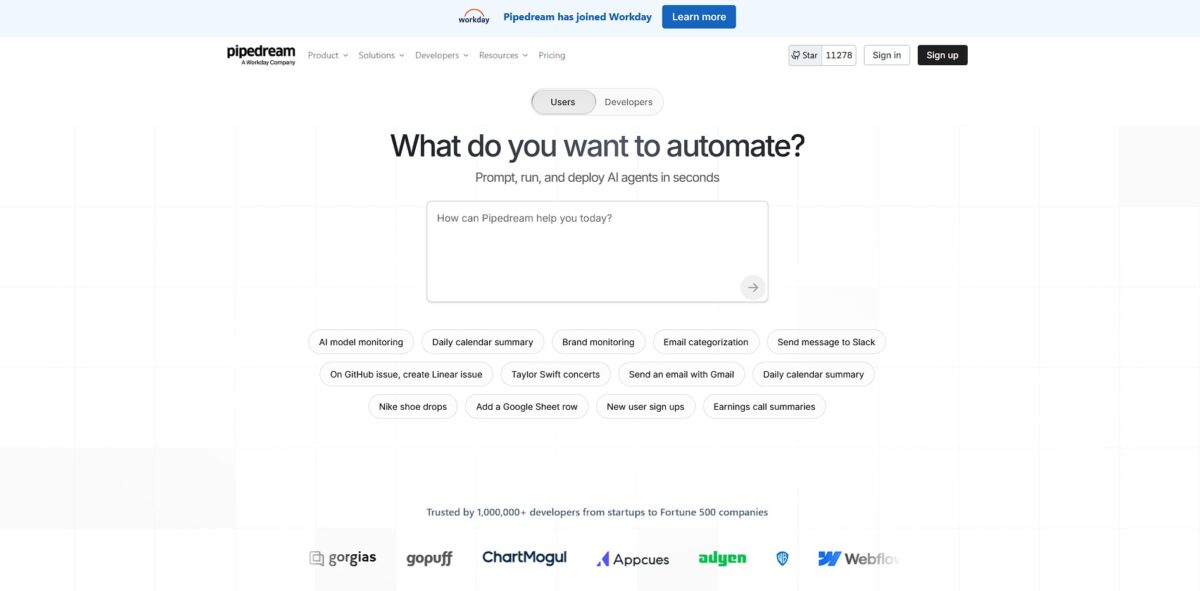
Pipedream is a developer-centric integration platform that functions as a serverless runtime for connecting over 3,000 APIs. You write real code—Node.js, Python, Go, or Bash—directly into workflow steps, which eliminates the friction of managing your own infrastructure or boilerplate authentication logic. While no-code tools force you into rigid boxes, this environment lets you pull in npm packages or pip libraries to handle complex data transformations that standard visual builders can’t touch. It excels at event-driven tasks like syncing CRMs or routing webhooks, though its observability can feel sparse compared to dedicated enterprise monitoring tools. Important: Pipedream Workflows, the product this review covers in depth, is now in maintenance mode; it stopped taking new signups and subscriptions at the end of September 2026 and shuts down on March 31, 2027. Workday agreed to acquire Pipedream in November 2025, and the company now focuses on Pipedream Connect, which gives AI agents and apps managed auth plus 10,000+ prebuilt tools and triggers across 3,000+ APIs.
How to start using Pipedream?
If you already have a Pipedream account, log in at pipedream.com with GitHub or Google. New Workflows signups and subscriptions closed at the end of September 2026, so newcomers can only start with Pipedream Connect, which is free in development with no credit card. Inside Workflows, create a project to keep your automations and environment variables organized. This prevents the “spaghetti folder” mess common in other tools where every single test script ends up in one giant list.
The real fun begins with the Pipedream CLI. Install it on your machine, then run the login command to link your terminal to your account. This setup allows you to develop locally in your favorite IDE instead of fighting with a browser-based code editor. Being able to run a simple command to deploy a local JavaScript file to a live serverless endpoint removes the usual friction of infrastructure management.
Every automation starts with a trigger, like an incoming HTTP request or a new row in a database. Choose a pre-built trigger or write a custom one to catch the specific events you care about. When building, send a real test event—like an actual webhook payload—so you have live data to map in later steps. This makes it much easier to verify that your logic handles the actual JSON structure coming from an external API.
Next, add actions to process that data. You can pick from thousands of pre-configured steps for apps like Slack or Discord, but you can also drop in a Node.js or Python block whenever you hit a wall. Writing your own data transformation logic directly in the workflow feels natural for anyone used to scripting. It lets you skip the tedious task of searching for a niche “formatter” tool for every minor string manipulation.
Finally, hit deploy to make your workflow live. Once it’s running, the inspector shows you the history of every execution, including the specific data passed between steps. If something breaks, the debugger lets you re-run the exact event that failed so you can fix your code without waiting for a new trigger. This feedback loop is significantly faster than standard cloud function logging.
Who is it for?
Backend developers who find visual builders too restrictive
You can write Node.js or Python directly into any step, which stops you from hitting the “no-code wall” when logic gets weird. You keep your existing habits and libraries rather than learning a new proprietary syntax.
DevRel and Solutions Engineers building fast API demos
It handles OAuth and token refreshes for 3,000+ apps, so you skip the boring auth boilerplate and get straight to the integration logic. This matters because it cuts the time from “idea” to “working webhook” down to minutes.
Data engineers handling messy webhook payloads
You can pipe event data into a code step to scrub, validate, or transform it using standard libraries before sending it to a database. That way, garbage data never reaches your production systems.
Security-conscious teams requiring auditable automation
Every integration component is open-source, allowing you to inspect exactly how data moves through the platform. This matters because it removes the “black box” risk common in closed automation platforms.
AI engineers orchestrating agentic workflows
It serves as a glue layer for LLMs, managing long-running tasks and external tool calls through a serverless runtime. In other words, it supplies the infrastructure needed to turn a prompt into a multi-step autonomous action.
Pipedream pricing
Pipedream’s pricing page now sells only Pipedream Connect. Workflows plans can no longer be bought, and existing Workflows subscriptions stay active until March 31, 2027, when they are cancelled automatically with a prorated refund. Connect is free while you build and test, and you pay once your integrations serve real users in production. Usage credits measure Connect API activity: running an action, calling a tool through MCP, sending a request through the Connect proxy or emitting an event from a deployed trigger uses 1 credit per 30 seconds of compute, while listing apps and other management calls are free.
Every Connect feature, 3,000+ connectors, 10,000+ prebuilt tools and triggers, MCP servers and unlimited team members, but for development only. It is perfect for building and testing an integration before launch.
Adds a production environment, 100 external users (then $2 per user), 10,000 usage credits per month (then $0.012 per credit) and email support. This is the plan you need once real users connect their accounts through your app.
Custom pricing on an annual contract. Adds volume pricing for users and usage, SSO, SCIM, HIPAA, dedicated static egress IPs, SLAs and dedicated Slack support.
no longer sold. Existing subscriptions keep running until March 31, 2027 and then end automatically with a prorated refund; monthly subscribers can cancel earlier from account settings, while annual subscribers contact support for early cancellation. All Workflows data, including credentials and OAuth tokens for connected accounts, is permanently deleted by April 30, 2027.
Pipedream key features
Write custom Node.js, Python, Go, or Bash scripts directly into any workflow step
You can import any npm package or PyPI library to handle weird data formats or complex logic that standard drag-and-drop boxes cannot touch. This stops you from hitting a wall when a simple API connector lacks a specific field you need.
Connect to 3,000+ apps using managed OAuth without writing your own auth flow or managing refresh tokens
Pipedream handles the handshake and token storage securely, so you can focus on the logic instead of credential headers. This saves hours of reading diverse API docs just to get a single “Hello World” request through.
Inspect every event, incoming payload, and execution log in real-time
If a webhook fails, you see exactly what the JSON looked like and where the script crashed, making debugging significantly faster than hunting through generic error messages. It turns “why didn’t this run?” into a quick fix.
Maintain state between different executions with a single line of code using built-in data stores
You can track whether you have seen a specific ID before or count occurrences without setting up an external Redis or PostgreSQL instance. This keeps your architecture lean for simple tracking tasks.
Deploy serverless triggers for HTTP, Email, or Cron schedules in seconds
You get a unique URL or email address immediately, allowing you to bridge legacy systems that only support basic webhooks or scheduled reports. It functions as the glue for systems that do not have native integrations.
Use the Workflow Builder to chain multiple apps together visually while keeping the option to drop into code
You can mix no-code steps for simple tasks like “Send Slack Message” with custom scripts for heavy lifting. This allows non-technical team members to understand the flow while you handle the edge cases.
Pipedream Pros & Cons
Pros
Pipedream gives you a real Node.js or Python environment for every workflow step. You can import any npm or pip package to handle custom encryption, data scrubbing, or weird API response formats that no-code builders choke on. The compute-based pricing model often saves money when running multi-step logic because you pay for execution time, not every individual action. I noticed you can inspect the raw HTTP request data and stack traces directly in the UI, which makes debugging webhooks a breeze. This visibility ensures you aren’t guessing why a payload failed to process. The managed auth and open-source component registry live on in Pipedream Connect, so the same strengths now power integrations inside your own app or AI agent.
Cons
The biggest con is the clock: Workflows stopped accepting new signups at the end of September 2026 and shuts down on March 31, 2027, so anything you build there has to be migrated. The interface feels like a technical IDE, which will likely alienate team members who aren’t comfortable looking at code blocks. While it connects to thousands of apps, it lacks the deep library of pre-configured “actions” found in Zapier, so you’ll often end up writing boilerplate code for basic tasks. The documentation for some niche triggers can be sparse, forcing you to dive into the open-source component registry on GitHub to understand the underlying logic. Stick to simpler tools if your team needs to manage their own workflows without calling a developer for every tweak.
Use Pipedream if you want…
- Build serverless workflows with Node.js, Python, or Go code.
- Connect 3,000+ apps using pre-built open-source components.
- Handle complex webhooks and event-driven data in real-time.
- Manage OAuth and API authentication without backend infrastructure.
- Scale automation quickly using a developer-first, low-code platform.
- Trigger instant actions from any HTTP request or schedule.
- Integrate custom logic into existing SaaS product stacks easily.
Pipedream alternatives


Pipedream Reviews
Finally, a tool that doesn’t box me in. The code-level control for custom API logic is a lifesaver compared to Zapier’s rigid blocks.
Fast, serverless, and handles complex event-driven workflows like a pro. The learning curve is steep if you can’t code, but the flexibility is unmatched.
Excellent for real-time debugging. Seeing the actual data flow through each step makes fixing broken webhooks significantly faster.
Great value for developers. Using npm packages directly in the browser to manipulate data before sending it to Stripe has streamlined our entire backend.
FAQ
How does workflow memory affect credits?
Pipedream charges credits proportional to the memory configuration. Running a workflow at the default 256MB memory costs one credit for every 30 seconds of compute time. If you increase memory to 1024MB, you are charged four credits for the same 30 seconds of execution.
Are unused credits rolled over to the next period?
Not on Workflows: daily credits on the Free tier and included monthly credits on paid Workflows plans did not roll over. On Pipedream Connect, the Startup plan includes 10,000 credits each month, and usage beyond that is billed at $0.012 per credit.
How do I cancel my paid plan?
Workflows subscriptions end automatically on March 31, 2027 with a prorated refund. To cancel sooner, monthly subscribers can do it themselves from account settings, while annual subscribers contact support for early cancellation and a prorated refund. Connect plans can be cancelled or downgraded self-serve at any time from your workspace’s billing settings.
Does Pipedream support TypeScript?
Yes, Pipedream supports TypeScript, allowing developers to build workflows with type safety and modern language features.
Can I trigger multiple workflows from the same event source?
Yes, Pipedream allows you to connect multiple workflows to a single event source, enabling various automated actions to trigger simultaneously from a single event.
How does Pipedream secure credit card data?
Pipedream does not store any payment method information directly. It uses Stripe as a payment processor to ensure all financial data is handled securely and in compliance with industry standards.
Similar tools
 GPT WorkspaceAI agent for Google Docs, Sheets, Slides, Gmail and Drive that edits your files, runs GPT formulas in bulk and automates routine
 FPT.AIVietnamese enterprise AI platform from FPT Smart Cloud for chatbots, call-center voicebots, document reading and eKYC that automate customer operations.
 Frigate NVROpen-source NVR that runs real-time AI object detection on your own hardware and sends camera events to Home Assistant and other MQTT