

Pixelcut
Image EditingUpdated October 18, 2026
AI photo and video editor for sellers that removes backgrounds, upscales, retouches and batch-processes product images, with an API and mobile apps.
We may earn a commission when you sign up through our links. It does not affect our reviews.
What is Pixelcut?
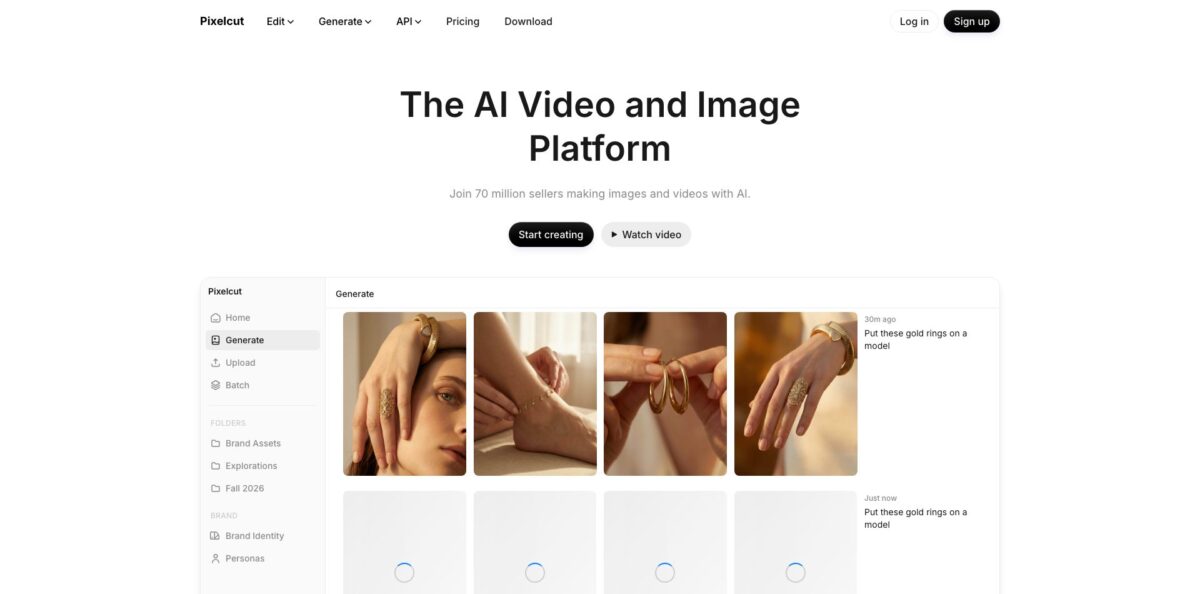
Pixelcut is a browser, iOS and Android editor built around one job: turning ordinary phone shots of products into listing-ready images and short videos. Its own models handle background removal, upscaling up to 16x, canvas expansion, shadows and object erasing, while a credit system gives you access to third-party generators such as Nano Banana, FLUX.2, ChatGPT Image, Kling and Veo for scenes, on-model shots and UGC-style ads. The pitch is speed for people who sell online: upload a folder, apply one edit to every file, download a ZIP. The weak spot is everything generative. Daily caps and credits run out faster than casual users expect, and the mobile app pushes paid upgrades hard. Pick Pixelcut if you list products on Shopify, Etsy, Amazon or Poshmark every week and want cutouts and catalog consistency more than fine art control.
How to start using Pixelcut?
Open pixelcut.ai in any browser or install the app from the App Store or Google Play. The single-purpose tools, like the background remover and image upscaler, work without an account: you drop in a JPG, PNG or HEIC file up to 50MB and 6000 × 6000 px and download the result with no watermark. Create a free account when you want your work saved in the workspace, shared folders and the full editor.
Your first real scenario is usually a product cutout. Upload a photo, let the AI detect the subject, then use Refine to brush any edge the model missed, such as a strap, a chain or a few loose hairs. From there you keep a transparent PNG, switch to a white background for a marketplace, or type a scene like “marble counter” to generate a new backdrop and add a realistic shadow.
The screen that saves the most time is the Bulk Image Editor. You drag in files or pull a whole folder from Dropbox, pick one batch tool (background remover, resize, upscale, watermark, logo, shadow, crop, expand, background changer or make square), set the parameters once and let Pixelcut apply them to up to 10,000 images. For new imagery, Product Studio takes one product photo and generates Studio, Lifestyle or On Model shots with your chosen angle, background colour, aspect ratio and resolution up to 4K.
Before you publish, open a few results at full size and fix individual images inside the batch, because one bad cutout repeated across a catalog looks worse than none. Then download the set as a single ZIP. If you plan to sell with the images, move to a paid plan first, since the commercial license is listed on Pro and Business.
Who is it for?
Marketplace resellers
You photograph clothing, shoes or bags on a bed or floor and need clean, uniform listings. Batch background removal and Make Square turn a pile of phone shots into consistent thumbnails. You spend evenings listing instead of masking.
Small e-commerce brands
Booking a studio for every new SKU is slow and expensive. Product Studio and AI Backgrounds create lifestyle and on-model variations from one upload, and the paid plans include a commercial license. Expect to keep your real photo as the main Amazon image and use AI shots as secondary ones.
Social media and UGC marketers
You need a steady stream of ad creatives and short vertical videos. The AI UGC Ads and Personas workflows build talking videos and consistent characters, and the video background remover isolates you for Reels or TikToks without a green screen. That cuts down on reshoots.
Small agencies and in-house teams
Several people touch the same assets and per-seat billing adds up. Pro includes three team members and Business includes ten, with shared folders and a common credit pool. Everyone works from one library instead of passing files around.
Developers and platform builders
You run a marketplace, print shop or listing tool and want cutouts inside your own product. The Pixelcut API covers background removal, upscaling, background generation, try-on and outpainting at a flat $0.01 per credit, and an MCP server plugs the same tools into Claude. You avoid training and hosting your own segmentation model.
Pixelcut pricing
Pixelcut mixes three limits on its web plans: unlimited basic edits (background removal and upscaling) on paid tiers, daily caps on heavier tools like Generative Fill, Expand Image, AI Backgrounds and Pro Eraser, and a monthly pool of AI credits spent on third-party image and video models. Seats are built into each plan rather than billed per person, and yearly billing saves 20%. In-app subscriptions bought through the App Store or Google Play are handled by those stores, so check the price shown there before you start a trial.
Limited background removal, limited upscaling and limited use of Magic Eraser, Generative Fill and Expand Image, with exports free of watermarks. Good enough for occasional cutouts.
600 AI credits a month, access to all AI models, unlimited background removal and upscaling, a 3-person team, 1,000 batch exports a month and a commercial license. Generative Fill, Expand Image, AI Backgrounds and Pro Eraser are capped at 300 uses a day.
3,600 AI credits a month, a 10-person team, 2,000 batch exports a month and the commercial license. Daily caps on the heavy tools rise to as many as 1,200, and the pricing table says credits on this tier can scale up to 180,000 a month at higher price points.
separate from the editor plans. You pick a monthly credit bundle from 1,000 credits for $10 up to 1,000,000 credits for $10,000, always at $0.01 per credit. Background removal costs 5 credits; upscaling, background generation, try-on and outpainting cost 10 credits each.
Custom. Volume pricing for more than 1 million credits a month through api@pixelcut.ai.
The credit table on the pricing page converts credits into image or video counts per model, and premium video models such as Veo3.1 or Seedance v2.5 burn credits much faster than image models, with video costs counted per 5 seconds of output.
Pixelcut key features
Background removal is Pixelcut’s own model for images and video
It detects the subject automatically, keeps the original resolution, and handles hair, fur, jewelry and thin glasses frames, with a Refine brush for touch-ups. The video version, launched in January 2026, exports transparent WebM or solid-colour MP4, free in 720p and in 4K on Pro.
The Bulk Image Editor processes up to 10,000 images in one batch on the web, with Dropbox import and ZIP export
Ten batch tools cover cutouts, resizing, upscaling, watermarks, logos, shadows, crops, expansion, background changes and square formatting. One upload can go through several tools without re-uploading.
The image upscaler enlarges photos to 4K, 8K or 16K and removes noise, blur and compression artifacts
Fast Upscale runs automatically, Creative Upscale lets you set creativity and resemblance levels, and Topaz upscaling was added in September 2025. Old product shots and small supplier images become usable for print and zoom views.
Product Studio generates studio packshots, lifestyle scenes and on-model shots from a single product photo
It keeps the uploaded product as the fixed part of the image, so logos, labels and shape stay intact, and produces up to four variations per run at up to 4K. A Graphics tool can then add dimension labels, callouts and spec tables for marketplace infographics.
A multi-model workspace puts dozens of image and video generators behind one credit balance, including Nano Banana, FLUX.2, ChatGPT Image, Ideogram, Recraft, Seedream, Kling, Veo3.1, Runway and Seedance. The compose box accepts several reference images on a canvas, exact hex colours and pasted URLs it reads for reference. The Creative Agent plans and runs multi-step edits from a plain prompt.
The developer API and MCP server bring the same tools into your own stack
The API accepts JPEG and PNG, is rate limited to 5 requests per second by default, stores processed files for at most 24 hours and lets you keep copyright of your images. The MCP endpoint connects Claude, Cowork and Claude Code to background removal, generation, 2x to 4x upscaling, object erasing and your asset library.
Pixelcut Pros & Cons
Pros
Pixelcut does the boring parts of product photography quickly. Background removal is free without sign-up, exports carry no watermark, and the cutouts handle fine edges well enough that App Store reviewers single them out. Batch processing of up to 10,000 images, Dropbox import and ZIP export make it practical for real catalogs rather than one-off edits. Pro is cheap for what it includes, with unlimited cutouts and upscales, three seats and a commercial license at $10 a month. The same engine is available as a simple per-credit API and as an MCP server, so a small team can grow from manual edits to automation without changing vendors. Use the free web tools to prove quality on your products, then pay only when batch volume justifies it.
Cons
The generative side is where friction builds up. Credits for third-party models and daily caps on Generative Fill, Expand and AI Backgrounds are easy to exhaust, and users report running out of credits mid-project without a clear warning. Mobile users complain about constant paywall prompts and about trials that converted to paid subscriptions without the reminder they expected. Retouching results vary, with some reviewers seeing blurred or blacked-out areas after erasing objects. There is no SLA on the API, which matters if cutouts sit in a checkout-critical flow. Buy on the web where pricing is transparent, set a calendar reminder before any trial ends, and keep a fallback editor for tricky retouching.
Use Pixelcut if you want…
- Remove backgrounds from whole product catalogs in one batch.
- Turn phone photos into clean white-background marketplace listings.
- Generate lifestyle and on-model shots from one product photo.
- Upscale small supplier images for print and zoom views.
- Create short UGC-style video ads without hiring creators.
- Cut people out of videos without a green screen.
- Add background removal to your own app through an API.
- Run image edits from Claude through an MCP connection.
Pixelcut alternatives


Pixelcut Reviews
Small business owners on the App Store say the background remover is the best they have tried, with clean edges and no rough outlines, though some find the app too eager to push upgrades.
Resellers like putting their clothing photos on AI models, but several say they burned through credits quickly and the credit limits were not explained up front.
The retouch eraser works well on simple objects, yet some users see blurred patches or black fills where the removed item used to be.
A recurring complaint on the App Store and Trustpilot concerns billing: trials that converted without the expected reminder, renewals that felt expensive, and refund requests that went nowhere.
FAQ
Is Pixelcut free to use?
Yes. The free plan includes limited background removal, upscaling, Magic Eraser, Generative Fill and Expand Image, and downloads have no watermark. The standalone background remover and upscaler even work without an account.
How much does Pixelcut Pro cost?
Pro is $10 a month or $8 a month billed yearly on the web, with 600 AI credits, unlimited background removal and upscaling, three team seats and a commercial license. Business costs $30 a month or $24 a month billed yearly.
Can I use Pixelcut images commercially?
Paid Pixelcut plans include a commercial license, so you can use generated and edited images on Shopify, Amazon, Etsy and in ads. Amazon still expects the main listing image to be a real photo.
How many images can I edit at once?
The web Bulk Image Editor handles up to 10,000 images per batch, while the mobile app batch editor works on up to 100 photos at a time. Monthly batch exports are capped at 1,000 on Pro and 2,000 on Business.
Does Pixelcut store my photos?
Images uploaded to the free web tools are removed after processing, and files sent through the API are kept for at most 24 hours before automatic deletion. For data saved in your account, the privacy policy says personal data is kept as long as needed for the purpose it was collected for.
Does Pixelcut have an API?
Yes. The API costs $0.01 per credit in monthly bundles from $10, with background removal at 5 credits and upscaling, background generation, try-on and outpainting at 10 credits each.
Does Pixelcut work with Claude?
Yes. You can add the Pixelcut MCP server as a custom connector in Claude, Cowork or Claude Code and sign in with your Pixelcut account. It uses the same credits as the web app, with no extra fee.
Can I cancel my Pixelcut subscription anytime?
Yes, web subscriptions can be cancelled at any time. Subscriptions started inside the iOS or Android app must be cancelled through the App Store or Google Play account settings.
Similar tools
 HamaFree browser-based AI eraser that removes people, objects, text and blemishes from photos with a brush, plus an inpainting API for developers.
 BgEraserBrowser-based AI background remover that turns up to 20 photos per batch into transparent PNGs without an account, plus offline apps for
 ImgkitsBrowser-based set of AI photo tools for background removal, object cleanup, upscaling, old photo restoration, image generation and image-to-video.