

Pixel Dojo
Art GenerationUpdated November 20, 2026
Subscription AI studio with 80+ image and 60+ video models, consistent characters, LoRA training and an agent that builds ads and short films.
We may earn a commission when you sign up through our links. It does not affect our reviews.
What is Pixel Dojo?
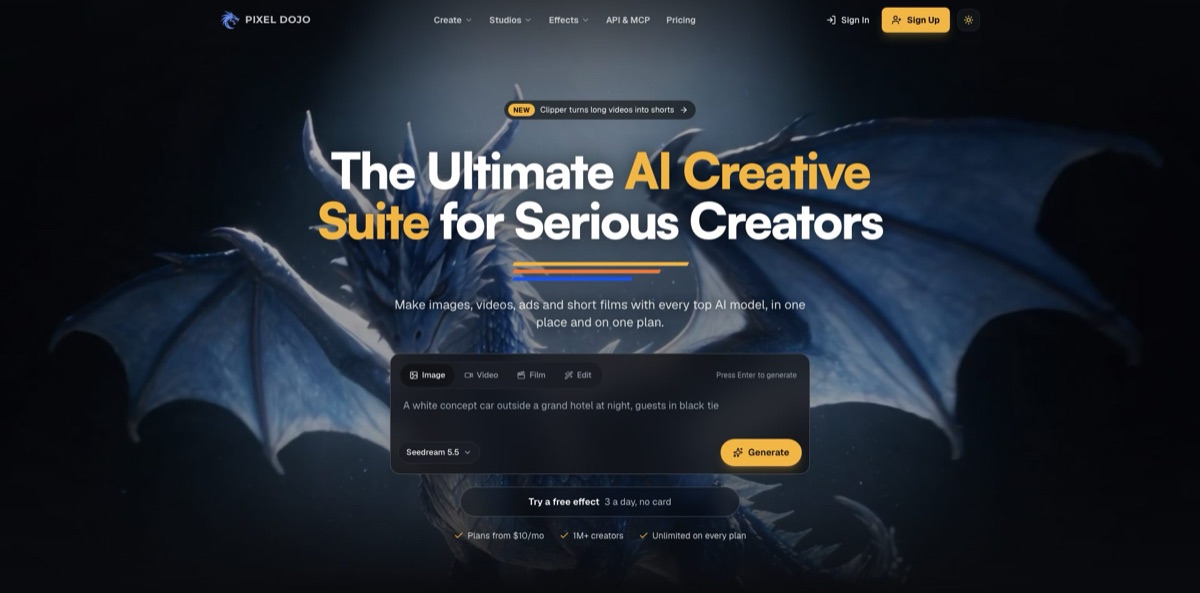
Pixel Dojo is a browser-based subscription studio that puts 80+ third-party image models and 60+ video models, including FLUX 3 Image, Ideogram 4.5, Nano Banana 2.1, GPT Image 2.5, Veo 3.1, Kling 4.0 and Seedance 2.5, behind a single credit balance. Around the models sit editing and upscaling tools, seven LoRA trainers, six task studios and Sensei, an agent that plans, generates and cuts a whole ad or short film from one message. It removes the cost and friction of paying for separate image, video and upscaling apps, and every paid plan adds unlimited slow-queue generations on a few lighter models. The weak spots are a thin independent review record, scattered complaints about support and billing, and an August 2026 policy change that upset some long-time members. Pick it if you switch models often and want one bill; skip it if one model already covers your work.
How to start using Pixel Dojo?
You can look around before paying. The Effects page gives a free account 3 video or photo effects a day, with a small watermark and no card required, which is enough to judge output quality and queue speed. For prompt-based work you subscribe from the pricing page, and Lite at $10/month is the cheapest way in. Every plan opens the same tools and studios, so the only decision is how many credits you want. One detail worth knowing: on the free plan your creations are published to the community gallery by default, unless you are in the EEA, UK or Switzerland.
For a first real project, open the AI image generator, write a prompt and pick a model in the selector. The composer shows the credit cost before you run anything: a 2K FLUX 3 Image or Nano Banana 2.1 render costs 1.5 credits, a 2K Seedream 5 Pro image 2.75 credits. If you need volume rather than peak quality, switch to Relax and use Flux 3 Klein, H3 Image or Qwen 2.1, which render at 1K without spending credits, one job at a time. Then send the best still to the AI video generator; a 5-second 720p Kling 4.0 clip with audio costs 23 credits.
The screen worth learning early is Character Studio. Upload a few clear photos or describe a person, save a primary reference, and every later shot sends those references to one of 10 supported image models, so the same face returns in new outfits and locations. Sheet mode builds front, three-quarter, side and back turnarounds in photoreal or anime style. When the identity starts to drift, pick 10 to 30 of your best shots and send them to a LoRA trainer in one click, then call the character with @Name in Video Studio or cast them in Film Studio and Marketing Studio.
Before you deliver anything, save the keepers to your Library: unsaved outputs are cleared after about 24 hours, while saved media stays until you delete it. Finish stills with Magnific or Clarity Pro, which upscale up to 16x for print, or with Portrait Upscaler when faces need detail back. If you hand a full brief to Sensei, read the priced plan it proposes and press Approve only when the shot list and total look right. Commercial use is included on every plan, but you remain responsible for rights to any people, logos or products you upload.
Spend your first week on the unlimited Relax models and save paid credits for the shots you actually plan to publish.
Who is it for?
Social video creators
You post Reels, Shorts or TikToks every day and need fresh motion without filming. The 310 one-click video effects and unlimited 5-second MiniMax H3 clips cover filler content, while credits go to Kling, Veo or Seedance for hero shots. Faceless Studio turns a topic into a narrated episode for channels that never show a host.
E-commerce sellers
Every product needs staged photos, lifestyle shots and a short ad. Marketing Studio imports the name, description and photos from a product page link and renders a vertical video ad with voiceover, and the product staging and background tools fill a listing gallery without a studio day.
Performance marketers and small agencies
You test many ad variations across clients and models. Sensei plans a brief, prices each step before spending and lets you save the finished chat as a recipe to rerun for the next product, so you stop rebuilding the same workflow by hand.
Illustrators and comic or storybook makers
Keeping one character consistent across pages is the hardest part of AI art. Character Studio stores references, builds turnaround sheets and trains a LoRA, so a mascot or storybook hero keeps the same face across a whole series.
Developers and agent builders
You want image and video generation inside your own app or assistant without wiring up a dozen vendors. One REST API with async jobs, webhooks, a TypeScript SDK and an OpenAPI spec, plus an MCP server for Claude, ChatGPT, Cursor, Codex and Grok, bills everything to the same credits.
Model hobbyists
You follow every model launch and do not want five subscriptions to try them. Lite opens the full lineup for $10 a month, so you can run one prompt through several engines and keep whichever wins.
Pixel Dojo pricing
Pixel Dojo sells one subscription in three sizes. Every plan includes every model, tool, studio and Sensei at the same generation speed, with no priority queue for bigger tiers; only the monthly credits and the price per credit change. Credits roll over while you stay subscribed, a failed or blocked generation returns its credits, and each run shows its cost first. A typical image costs 1.5 to 2.75 credits, a 5 to 8 second video clip 10 to 36. Every paid plan also includes unlimited Relax-queue runs on Flux 3 Klein, H3 Image and Qwen 2.1 at 1K, MiniMax H3 Video at 720p for 5 seconds, and all video and photo effects.
3 video or photo effects a day with a small watermark, no card needed. It works as a taste of the effects library rather than a working plan.
160 credits at 6.25¢ each, which the pricing page translates into about 58 to 106 images or 4 to 16 video clips a month on popular models, plus all unlimited Relax tools.
500 credits at 5¢ each, about 181 to 333 images or 13 to 50 clips. Prepaying 6 months costs $135 and lowers the effective price to 4.5¢ per credit.
1,100 credits at 4.55¢ each, about 400 to 733 images or 30 to 110 clips. A prepaid year costs $570, or 4.32¢ per credit.
Larger packs drop to 5.56¢ per credit at $500 for 9,000 credits, a size reserved for subscribers.
Sensei charges a small planning fee on top of the normal generation credits, and its running total is shown under the chat. Refunds apply only to a first purchase: ask within 7 days and you get a full refund if less than 20% of its credits are used, a pro-rated one otherwise. Renewals and top-ups are not refundable except where the law requires it.
Pixel Dojo key features
Multi-model image and video generator: The image tool lists 80+ models such as FLUX 3 Image, Ideogram 4.5, GPT Image 2.6, Nano Banana 2.1, Seedream 5.5, Qwen 3 Pro and Recraft V4.1, and the video tool covers 60+ models including Veo 3.1, Kling 4.0, Seedance 2.5, WAN 3.0, Runway Gen-4.5 and Luma Ray3.2. Each run shows its credit price, so you can compare engines on one prompt. New launches are added to the same subscription rather than sold as upgrades.
Unlimited Relax queue: Flux 3 Klein, H3 Image, Qwen 2.1 and MiniMax H3 Video run without credits on every paid plan, one job at a time, at 1K for images and 5-second 720p for clips. Switching to Fast spends credits for larger or longer results.
Character Studio and LoRA training: Saved characters carry their reference photos into every shot, support two or three characters as a cast, and produce turnaround sheets. Seven trainers (FLUX, Fast FLUX, FLUX.2, Qwen, Qwen 2.1, SDXL and Z-Image) turn 10 to 30 good shots into a custom model you own. The same face then appears in images, video clips, films and product ads.
Sensei creative director: Sensei uses GPT-6.2 Sol to plan shots, pick models and review results, with Grok 4.7 handling web research. It checks six frames from every clip for broken hands, faces and misspelled text, remakes takes that miss the brief, and waits for your approval before bigger jobs spend credits. Finished chats can be saved as recipes and rerun.
Task studios: Marketing Studio turns a product link into a vertical video ad with voiceover in styles such as UGC testimonial, unboxing or try-on. Film Studio writes a script, storyboards it and cuts several shots into a short film with dialogue, and Faceless Studio produces narrated episodes from a topic. Each studio uses the same credits as manual generation.
Editing and upscaling: Inpainting, outpainting, relighting, camera-angle changes, background removal, face swap and virtual try-on sit next to Magnific, Clarity Pro and Portrait Upscaler. Video tools add auto-captions, brand overlays, clip merging and video upscaling to 4K. You can finish an asset without exporting to a separate editor.
API, MCP and ComfyUI: The REST API exposes the model catalog through async jobs with webhooks, a TypeScript SDK and an OpenAPI spec, billed to your plan credits. The hosted MCP server lets Claude, ChatGPT, Cursor, Codex or Grok call Pixel Dojo tools from a chat, and a ComfyUI integration covers node-based workflows.
Pixel Dojo Pros & Cons
Pros
The main draw is breadth for little money. Lite at $10 a month opens the same 140+ models, studios and Sensei as Pro Max, and nothing is locked behind a higher tier, including generation speed. The unlimited Relax queue makes drafting essentially free, credits roll over while you stay subscribed, and failed runs refund their credits automatically. Character Studio with built-in LoRA training gives consistency tools that many single-model apps lack, and the API plus MCP server lets the same account power your code or AI assistant. Users also credit the founder for being reachable and the catalog for updating fast. Start with Pro if you generate weekly, because its lower per-credit price pays off quickly.
Cons
Independent feedback is thin and split: Trustpilot shows 3.3 from 10 reviews, There’s An AI For That shows 2.7 from 7 ratings, and Product Hunt has only three reviews. Negative reports mention a broken upload button, saved images disappearing, failed generations not refunded, and charges that users did not recognize because they appear under the payment processor’s name. A late-August 2026 policy change closed the Discord and removed some library content without warning, which the company later acknowledged. Credits also blur real costs, since a single 8-second Veo 3.1 Fast clip uses 36 credits. Download important work regularly and check your statement against Pixel Dojo receipts.
Use Pixel Dojo if you want…
- Test dozens of image models under one subscription.
- Animate stills with Kling, Veo, Seedance or WAN.
- Keep one character’s face consistent across scenes.
- Train a LoRA on your own face or style.
- Turn a product link into a vertical video ad.
- Draft images and clips without spending credits.
- Hand a full ad brief to an AI director.
- Upscale old photos up to 16x for print.
- Generate images and video from Claude or ChatGPT.
Pixel Dojo alternatives
 OpenArtRead review →
 KreaRead review →
 Leonardo.aiRead review →
 ImagineArtRead review →
 SeaArt.aiRead review →
 getimg.aiRead review →
 DzineRead review →
Pixel Dojo Reviews
Long-time subscribers praise the low entry price, a model lineup that keeps growing and a founder who answers questions directly, describing the platform as flexible and easy to use for both images and video.
One Lite subscriber reports an upload button that stayed broken for days, saved images that later vanished and failed generations that were not credited back, with the refund finally arriving through the payment processor.
Several older members were unhappy that an August 2026 policy change closed the Discord community and removed library content without notice, though the company replied, acknowledged the missing warning and offered to check lost files.
A user who has followed the product for over two years says it keeps improving, stays affordable and comes with plenty of learning material, but sometimes trails a little behind the very newest model releases.
Early adopters found the first Stable Diffusion 3 generations fast, then complained about slower queues and weaker output, which a reply blamed on the upstream model provider.
FAQ
Is Pixel Dojo free?
Partly. A free account gets 3 video or photo effects a day with a small watermark and no card. Prompt-based image and video generation, the studios and Sensei come with paid plans from $10 a month.
Can I use Pixel Dojo images and videos commercially?
Yes. Every plan, Lite included, allows commercial use, and the terms assign you the rights Pixel Dojo holds in your outputs. You still need to clear rights for any people, brands or third-party material you upload.
Do unused credits roll over?
Subscription credits roll over month to month while your subscription is active, and credit packs do not expire while your account is in good standing. Credits left on the account stay there if you pause or stop.
Does Pixel Dojo train AI models on my uploads?
The privacy policy says user content is not used for training without explicit consent, apart from custom LoRAs you ask it to train. Prompts and uploads are passed to the model providers that generate your results, and prompts help improve the prompt enhancement feature.
Does Pixel Dojo have an API or MCP server?
Yes. A REST API with async jobs, webhooks, a TypeScript SDK and an OpenAPI spec covers the model catalog, and the hosted MCP server connects Claude, ChatGPT, Cursor, Codex and Grok. Both spend the same credits as the web app.
Do higher plans generate faster?
No. Lite, Pro and Pro Max run at the same speed with no priority queue. Bigger plans only give more credits at a lower price per credit.
Can I cancel or get a refund?
You can cancel anytime from Settings and keep access until the paid period ends, or pause billing instead. Refunds cover a first purchase requested within 7 days, in full if under 20% of its credits were used and pro-rated otherwise.
Is there a Pixel Dojo mobile app?
The site footer links an Android app on Google Play. No iOS app is linked there, so iPhone users work through the website.
Similar tools
 ArtbreederBrowser-based AI art studio for mixing, breeding and editing images with gene sliders, prompts, collages and a remix-friendly community.
 mnml.aiAI rendering studio for architects and designers that turns sketches, photos and SketchUp, Revit or Rhino views into photoreal renders and short
 Hyper3D RodinAI 3D model generator from Deemos that turns text prompts or up to five reference images into textured, editable 3D assets with