

Pixelied
Image EditingUpdated November 10, 2026
Browser-based photo editor and design suite with templates, mockups, an SVG editor, one-click background removal and text-to-image AI.
We may earn a commission when you sign up through our links. It does not affect our reviews.
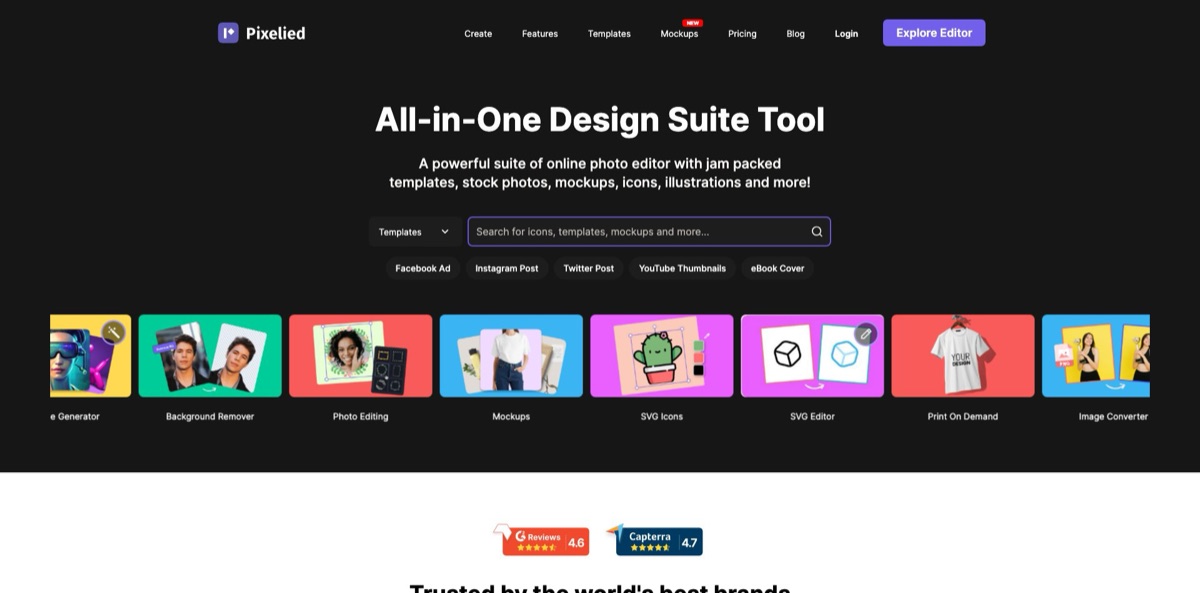
What is Pixelied?
Pixelied is a browser-based design suite from Pixelied LLC that puts a template editor, a photo editing toolkit and a set of AI tools behind one account. You start from a social, ad or ebook template or from your own upload, cut out the background, add stock photos, icons or a product mockup, and export in the size each channel needs. The AI layer covers text-to-image generation in the Image AI panel, a one-click background remover, an enhancer that exports at 2x to 5x, and sharpening, colorizing, face cutout and cartoon selfie tools on the top plan. It saves you from juggling separate apps for cutouts, mockups and social posts. The weak spots are a smaller template catalog than Canva, a desktop-only editor and AI features that at least one reviewer calls early-stage. Pick it if you are a solo marketer or small brand that prefers a cheap yearly plan.
How to start using Pixelied?
Open pixelied.com in a desktop browser and click Start Designing, or choose Start Free on the pricing page. The free plan needs no credit card, and Pixelied says the editor works best in Chrome, Firefox and Safari. Take the desktop part seriously: on a phone the editor shows a message that your screen is too small and asks you to switch devices. A new account comes with the basic editing tools, 200+ free templates, thousands of stock photos and graphics, and 2 GB of cloud storage.
For a first real job, pick a format from the Create menu, such as Instagram Post at 1080 x 1080 px or YouTube Thumbnails at 1280 x 720 px, or click Upload Image and drop in a JPG or PNG. The left sidebar holds the building blocks: Templates, Images, Image AI, Text, Mockups, Elements, Illustrations, Blend and My Files. A product shot is the typical starting point. Upload it, click Remove BG, place the cutout on a template, then add a headline and a brand color.
The panel worth learning next is Image AI. You type a prompt and Pixelied returns several variations that land on the canvas as editable objects, so a generated background, icon or pattern can be cropped, recolored and combined with your own text. If you handle more than one brand, set up Workspaces early. Each workspace keeps its own colors, designs, files and settings, and you can invite teammates to a single workspace instead of your whole account. Custom font uploads and unlimited brand presets come with Pro.
When the design is ready, click Download in the top right corner. You pick JPG, PNG, transparent PNG, WEBP, transparent WEBP, or PDF and SVG, which are both still marked Beta, then set the quality and a size multiplier from 1x to 5x. Those multipliers are also how the photo enhancer enlarges an image. The Resize menu turns one layout into another preset format, and Pro lists resizing into 30+ formats. Zoom in on cutout edges before you publish, because Capterra reviewers report the background remover can miss on the hardest images and offers no fine-tuning settings.
Who is it for?
Solo marketers and founders
You need ads, blog headers and social posts every week but have no designer on call. Pixelied gives you ready-made templates, stock photos and icons in one editor, so a campaign graphic takes minutes rather than a freelancer brief. The yearly price is low enough to keep it running even in quiet months.
Etsy and print-on-demand sellers
Listings sell better with realistic product shots, and photographing every variant is slow. Pro+ adds 2,000+ product mockups, including t-shirt, phone, stationery and print scenes, plus unlimited background removal. You can show a new design on a product the same day you finish it.
Social media managers and small agencies
Every client wants a different color palette, and every platform wants a different size. Workspaces keep each brand’s colors, files and designs apart, and resizing to 30+ formats turns one post into a full set. Client work stops bleeding into each other’s folders.
YouTubers, podcasters and streamers
Thumbnails, podcast cover art and Twitch banners all have strict pixel sizes. Pixelied ships presets for each, from 1280 x 720 thumbnails to 3000 x 3000 cover art, along with templates to start from. You spend your time on the next episode rather than on canvas math.
Marketers who get vector files from designers
Editing an SVG logo usually means asking for Illustrator time. The SVG editor lets you upload vectors, change the color of individual elements, group, ungroup and merge files. Small fixes no longer wait in someone else’s queue.
SaaS and app teams
Launch posts and landing pages need device mockups and clean screenshots. Pixelied’s mockup library and app and website mockups put your screens into a phone or laptop frame in a few clicks. Product updates get a visual without a design ticket.
Pixelied pricing
Pixelied keeps to a free plan and two paid tiers, and the pricing page lists annual billing only, with no monthly option shown. AI usage runs on credits: both paid plans include AI image generation credits, background remover credits are capped on Pro and unlimited on Pro+, and the page does not say whether credits reset monthly or yearly, so confirm that with support before you plan volume around them. There are no per-seat charges or team tiers on the pricing page. The refund policy states that subscriptions are not refunded, though you can cancel at any time from your dashboard and keep access until the billing period ends. An AppSumo lifetime deal existed, but that listing is now marked sold out.
Basic editing tools, 200+ free templates, thousands of stock photos and graphics, and 2 GB of cloud storage. No credit card is required to sign up.
Everything in Free, plus all Pro templates, 100 AI image generation credits, 50 background remover credits, 500,000+ premium icons and illustrations, resizing to 30+ formats, 100+ text styles, custom font uploads, unlimited folders, unlimited brand presets and priority support.
Everything in Pro, plus 300 AI image generation credits, unlimited background remover credits, 2,000+ realistic product mockups, and the AI photo sharpener, AI photo enhancer, AI face cutout, AI photo colorizer, AI blur background and AI cartoon selfie tools.
Pixelied key features
The template editor covers dozens of preset formats, from a 940 x 788 Facebook post to 2560 x 1440 YouTube channel art, a 1600 x 2560 ebook cover and a 728 x 90 leaderboard ad. Each template is built for that format’s safe zones, and the Resize menu moves a finished layout into another size. Free users get 200+ templates and Pro opens the full catalog.
The background remover detects a person or object and clears the rest with one click on Remove BG
You can then export a transparent PNG, drop the cutout onto a new backdrop, or change the background color with related tools. The site carries a Photoroom attribution badge, which suggests the cutouts run on Photoroom’s technology. Pro includes 50 removal credits and Pro+ removes the cap.
Image AI is a text-to-image generator inside the editor, launched on Product Hunt in May 2023
It is pitched for images, icons, illustrations, logos, gradients and patterns, and the AppSumo listing describes four variations per prompt that you can edit on the canvas. Because results are regular canvas objects, you can add text and brand colors without exporting to another tool.
AI photo tools on Pro+ handle common fixes: a sharpener, an enhancer, a face cutout, a colorizer for old black and white photos, a background blur and a cartoon selfie effect. The enhancer enlarges images through the 2x, 3x, 4x and 5x download options. Alongside the AI set you get regular filters and effects such as brightness, contrast, hue, vignette, sepia and grayscale.
The SVG editor is a less common feature in this category
You upload vector files exported from Illustrator or Photoshop, change the size, color, opacity and rotation of individual elements, group or ungroup parts, and merge several SVGs into one. It lets a marketer adjust a logo or icon set without opening desktop vector software.
The mockup generator includes device, phone, branding, stationery, print and advertising scenes, with sets such as Bella Canvas t-shirts, Instagram grids and YouTube channel frames. You can also build a scene from scratch and adjust layers, opacity, shadows and sharpness. Pro+ advertises 2,000+ realistic product mockups for e-commerce and print-on-demand listings.
The asset library and side tools round out the suite
The homepage cites 4+ million royalty-free stock photos and 700+ hand-drawn illustrations you can recolor, Pro adds 500,000+ premium icons and illustrations, and Pixelied says these assets can be used commercially without attribution. A free bulk image converter supports 100+ conversion options and says files are removed from its servers after 24 hours.
Pixelied Pros & Cons
Pros
The price is the first thing that stands out: $47 or $79 a year for a full template editor with AI credits is well below most design suites billed monthly. Reviewers on G2 and Capterra keep returning to the same strengths: a short learning curve for non-designers, quick one-click resizing for social formats, a solid background remover and a mockup library larger than many rivals offer. Vector upload with per-element color changes is rare in browser editors and saves trips to Illustrator. Workspaces make it practical to run several brands from one login. Use it as a fast, cheap production tool for recurring social and listing graphics.
Cons
The template catalog is thinner than Canva’s, and reviewers mention gaps for niche industries and social video. There is no video or animation editor, and the editor asks phone users to switch to a desktop, so on-the-go edits are out. One Capterra reviewer calls the AI features early-stage, and a Product Hunt user found regenerated faces barely changed between runs. Some free-tool landing pages lead to paywalls, a few AppSumo buyers reported third-party ads inside the editor and slow support replies, and subscription fees are not refunded. Treat the free plan as a trial, and keep a second tool for video and heavy retouching.
Use Pixelied if you want…
- Remove image backgrounds with a single click.
- Turn one design into 30+ social formats.
- Place your designs on realistic product mockups.
- Edit SVG logos and icons without Illustrator.
- Generate icons, patterns and images from text prompts.
- Keep separate brand workspaces for each client.
- Create YouTube thumbnails and podcast covers from templates.
- Pay a low yearly fee instead of monthly bills.
Pixelied alternatives


Pixelied Reviews
G2 and Capterra reviewers praise how quickly non-designers get professional-looking graphics, along with the mockups and one-click resizing, but several say the template choice is limited for niche industries and the app can slow down during heavy use.
AppSumo lifetime buyers call it a good Canva alternative for occasional users and like the monthly background removal credits and the upscaler, while noting that templates run thin in places and the canvas does not always feel smooth.
Low-rated AppSumo reviews complain about ads from other companies appearing inside the editor on a paid account, and about paid features staying unavailable after code redemption with no support reply for several days before a refund.
On Product Hunt, users with no design background say vector edits became manageable, while others ask for better color controls, a smoother UX and more variety when regenerating AI images.
Trustpilot ratings are split: early users praised the speed, templates and quick support, while later one-star reviews say tools advertised as free, such as resizing and unpixelating, turned out to require payment.
FAQ
Is Pixelied free?
Yes. The free plan includes basic editing tools, 200+ templates, thousands of stock photos and graphics and 2 GB of storage, with no credit card required. Pro templates, AI image credits, background remover credits and the AI photo tools need Pro or Pro+.
Does Pixelied offer monthly billing?
The pricing page lists only annual billing: Pro at $47 a year and Pro+ at $79 a year. No monthly plan is shown.
Can I get a refund or cancel my subscription?
You can cancel at any time from your account dashboard and keep access until the end of the paid period. The refund policy states that fees already billed are not refunded, apart from any rights local consumer law gives you.
Can I use Pixelied designs for commercial work?
Yes. Pixelied says its stock photos, mockups, icons, illustrations and elements can be used for commercial purposes without attribution, and downloaded images can be used for personal and commercial projects.
Does Pixelied work on mobile?
No. The editor runs in desktop browsers, works best in Chrome, Firefox and Safari, and shows a “screen is too small” message on phones. Mobile apps are only described as coming in the future.
Which file formats can I export?
You can download JPG, PNG, transparent PNG, WEBP and transparent WEBP, plus PDF and SVG in beta. Exports can be scaled from 1x to 5x, which is also how the enhancer enlarges images.
Is there still an AppSumo lifetime deal?
The AppSumo listing is marked sold out. Existing buyers keep lifetime access with per-code limits on workspaces, AI image credits and background removal credits, plus future Pro+ updates.
What happens to the images I upload?
For the free image converter, Pixelied says converted files are removed from its servers after 24 hours. Designs saved in the editor stay in your cloud storage, and the privacy policy lets you request access to or deletion of your personal data.
Similar tools
 HamaFree browser-based AI eraser that removes people, objects, text and blemishes from photos with a brush, plus an inpainting API for developers.
 BgEraserBrowser-based AI background remover that turns up to 20 photos per batch into transparent PNGs without an account, plus offline apps for
 ImgkitsBrowser-based set of AI photo tools for background removal, object cleanup, upscaling, old photo restoration, image generation and image-to-video.