
Pixlr
Image EditingUpdated October 18, 2026
Browser-based photo editor suite with AI generative fill, background removal, upscaling, and text-to-image, video and audio generation.
We may earn a commission when you sign up through our links. It does not affect our reviews.
What is Pixlr?
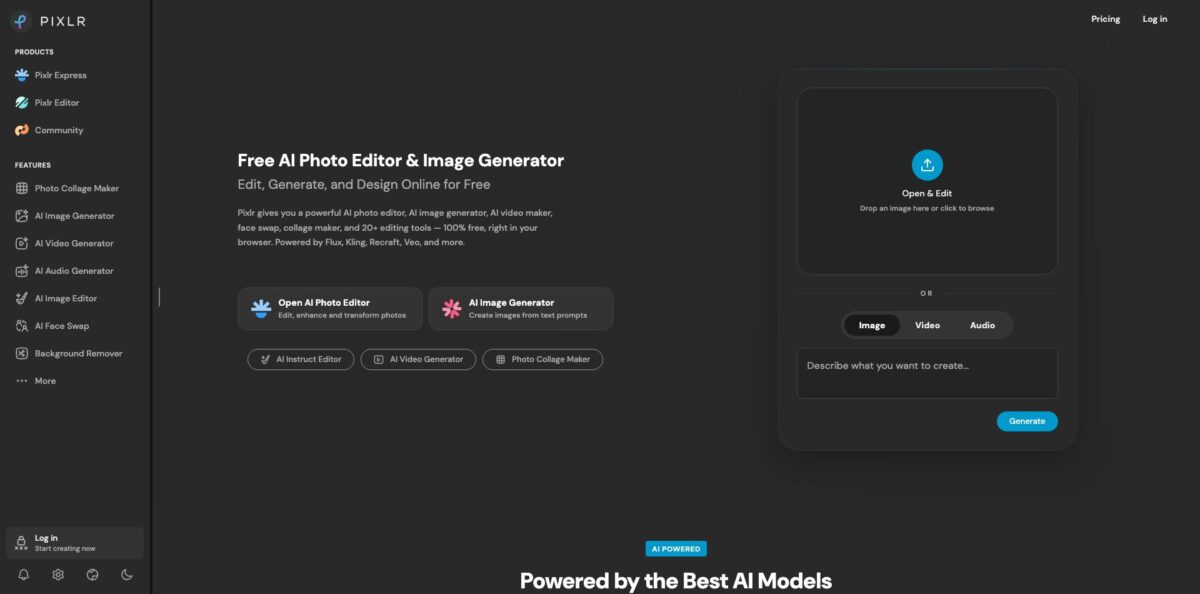
Pixlr is a browser-based photo editing suite that has been online for over 15 years and now wraps a stack of third-party AI models around two classic editors. Pixlr Express handles quick one-click fixes and AI tools such as Generative Fill, Generative Expand, Remove Object and Super Scale, while Pixlr Editor is the layered, Photoshop-style workspace with masks, blend modes, liquify, heal and clone. On top sit separate generators for images, video and audio that call models like Flux, Recraft, Kling, Google Veo and ElevenLabs, all paid for from one credit balance. The appeal is obvious: you retouch, cut out and generate visuals without installing anything or paying Adobe prices. The weak spot is the business side, since free saves are capped daily, refunds are not offered, and unused subscription credits vanish when you cancel. Pick it for fast, affordable everyday edits, not for print-grade production work.
How to start using Pixlr?
Open pixlr.com in Chrome, Firefox or Safari and drop an image onto the homepage box, or pick Open AI Photo Editor to land in Pixlr Express. You can edit without an account, but a free account is what lets you keep a history, collect AI credits and later move to a paid plan. The same login works in the iOS and Android apps, so a subscription bought on the web carries over to your phone.
For a first real job, try a product photo. Run the Remove Background tool, which detects the subject automatically and lets you save it on a transparent, black or white backdrop. If you have a batch of shots, select them all at once and download the results as a single zip. Then switch to Generative Expand to widen the frame for a banner, or use Remove Object to brush away a stray cable or price tag.
When you need finer control, open Pixlr Editor instead. Here you work with layers, the Cutout/Mask tool, marquee, lasso and magic wand selections, dodge and burn, and a crop tool with presets for Instagram posts, YouTube thumbnails, Facebook covers and A4 paper. The AI side lives in the toolbar too: Generative Fill lets you select an area and type what should appear there, while the AI Assistant accepts plain-language instructions like “make the sky warmer”.
Before you export, check how the project is stored. Editor history sits only in your browser cache, so clearing the cache deletes unfinished work. Save a .PXZ file if you plan to come back to the layered version later, then export the flat image for publishing.
Who is it for?
Social media managers
You need a dozen sized visuals a week and do not want to wait on a designer. Pixlr’s crop presets, templates and text tools cover the routine posts, and the image generator fills gaps when you have no suitable photo. Expect to finish a post in minutes rather than queueing it.
E-commerce sellers
Marketplace listings demand clean cutouts on plain backgrounds. Batch background removal and the white or transparent export options handle a full product shoot in one pass. Remove Object then cleans up props or reflections without a reshoot.
Teachers and school IT admins
Pixlr for Education gives approved schools and education NGOs an ad-free upgrade at no cost, with unlimited student registrations under the school email domain. The program lists GDPR, CCPA and COPPA compliance, which simplifies the paperwork for under-18 users. Students get a real layered editor without any software installs on Chromebooks.
Hobby photographers leaving Photoshop
If you mostly do exposure fixes, spot healing and the occasional composite, paying for a full Creative Cloud plan is hard to justify. Pixlr Editor gives you layers, masks and liquify in a familiar layout. You give up some precision tools, but you keep most of your workflow.
Small business owners
You want ad creatives, a few product videos and a voiceover without juggling five subscriptions. One Pixlr credit balance covers image, video and audio generation, and the Agent workflows offer presets for ads, branding and product shots. It is a cheap way to test creative ideas before hiring help.
Content creators on a tight budget
Thumbnails, stickers, face swaps and short AI clips all live in one place. The Plus plan costs less than a coffee per month and removes ads. Heavy video users will burn through credits quickly, so watch the meter.
Pixlr pricing
Pixlr runs on a freemium model with credits. The free tier lets you edit in the browser with ads and a limited number of daily free saves, and new users can try Premium free for 7 days. Paid plans remove ads, lift the save limit and add a monthly allowance of AI credits that every generator draws from. Subscription credits refill to the plan amount at renewal (they do not roll over) and drop to zero if you cancel, while separately bought Credit Packs never expire and are used only after your plan credits run out. Yearly billing saves about 20%.
Core editing tools in the browser and mobile apps, with ads and a daily cap on free saves.
Ad-free, unlimited saves, 1 concurrent AI generation and 80 AI credits per month (960 per year on annual billing). Pixlr estimates that covers roughly 80 fast AI images, 16 pro images or 4 fast videos.
Everything in Plus, access to all image, video and audio models, 4 concurrent generations, 1,000 AI credits per month (12,000 per year), private mode for generations, and the full library of fonts, templates, elements and animations. Pixlr estimates about 1,000 fast images or 50 fast videos.
Everything in Premium plus unlimited “fast” image generations under a fair-use policy, 8 concurrent generations, 5,000 monthly credits, a priority queue, extended high-res exports and mature content settings.
The same as Ultra with 10,000 monthly AI credits (up to 120,000 per year).
Free for approved schools and education NGOs, ad-free with access to AI tools.
Payment goes through Visa, Mastercard or PayPal on the web, or through the app store on mobile. Pixlr states it does not refund subscriptions once payment is processed, and plan upgrades work only with card payments, not PayPal.
Pixlr key features
Generative Fill, Expand and Transform
Select an area and describe what should replace it, extend the canvas in any direction with outpainting, or move and resize an object while the AI rebuilds the background behind it. These tools cover the most common reasons people open Photoshop’s generative features. You can turn a square product shot into a wide web banner in one step.
AI Background and Object Removal
The background remover isolates people, cars, animals and products automatically and supports batch processing with zip download. Remove Object erases whatever you brush over.
Layered Pixlr Editor
A full desktop-style workspace with layers, blend modes, masks, magnetic and bezier lasso, liquify, heal, clone, dodge and burn, plus social-size crop presets. Projects save as .PXZ files so you can reopen them with layers intact. For most everyday retouching it replaces a desktop editor entirely.
Multi-model image generator
Text-to-image and image-to-image run on models including Flux, Flux Pro, Recraft V4, Qwen, Stable Diffusion, SDXL, Seedream and Grok Imagine. You choose the model per job instead of being locked into one house style. Generated images drop straight into the editor for text, cropping and retouching.
AI video and audio generation
The video generator turns prompts or still images into short clips through Kling, Google Veo, Seedance, PixVerse, LTX Video and others, and the audio generator handles text to speech, speech to text and text to music. Everything bills from the same credit pool.
Super Scale, Super Sharp and Remove Noise
Upscaling preserves detail up to 25 megapixels, while the sharpening and denoise tools rescue low-light phone shots. These are handy for old product photos or images pulled from social media. Expect clear gains on mild blur, less on heavily compressed files.
Pixlr Agent workflows
Multi-step workflows chain generation, editing and effects, with presets grouped under ads, social media, branding, marketing, product and batch jobs. You pick a workflow or build your own instead of repeating the same five steps by hand. It suits teams producing recurring creative in bulk.
Pixlr Pros & Cons
Pros
Pixlr gives you a capable layered editor and a broad set of AI tools for the price of a cheap streaming subscription, and the free tier is usable for light work. Everything runs in the browser, so it works on Chromebooks and locked-down school or office machines where installs are blocked. Reviewers on G2 and Capterra keep coming back to the short learning curve and the Photoshop-like layout, which makes switching easy. Access to many third-party models through one credit balance means you can compare Flux, Recraft or Kling output without separate accounts. The education program is generous for schools. Use the free tier for a week of real tasks before paying anything.
Cons
The billing policies are the main friction. Pixlr does not refund subscriptions, subscription credits are wiped when you cancel, and Trustpilot holds many complaints about unexpected auto-renewals and credits that disappeared after plan changes. Free users hit a daily save cap and see ads. Power users point out gaps such as missing rulers and guides in the editor, limited file format support and slowdowns on large files, and the AI tools can produce uneven results on complex scenes. Projects stored only in browser cache are easy to lose. Pay monthly at first, keep receipts, and buy Credit Packs rather than upgrading if you only need occasional extra generations.
Use Pixlr if you want…
- Edit photos in the browser without installing software.
- Remove backgrounds from whole product batches at once.
- Extend or fill images with prompt-based generative tools.
- Replace an expensive Photoshop plan for everyday retouching.
- Generate images with Flux, Recraft and other models.
- Turn still images into short AI video clips.
- Give students a free, ad-free editor through school.
- Upscale and denoise old or low-light photos quickly.
Pixlr alternatives

Pixlr Reviews
Long-time users on Capterra describe it as a browser editor with much of Photoshop’s functionality at a fraction of the cost, and value the free tier, though some feel cheaper design tools now offer more.
G2 reviewers praise how quickly beginners pick up the interface and like editing without an install, while noting it lacks some advanced features of professional software and can be slow with certain files.
A veteran Photoshop user on AppSumo calls it a weak substitute for serious work, mainly because rulers and guides were promised but still missing a year later.
Several Trustpilot reviewers report auto-renewals they did not expect and a firm no-refund answer from support, plus hundreds or thousands of AI credits disappearing after a plan change.
FAQ
Is Pixlr free to use?
Yes. The free version works in the browser and mobile apps without charges, but it shows ads and limits how many images you can save per day. Paid plans start at $1.99/month billed yearly.
Is there a free trial of Pixlr Premium?
Pixlr offers a 7-day free trial of Premium. Since subscriptions are not refundable after payment, cancel in your Subscriptions settings before the trial converts if you do not want to continue.
Do Pixlr AI credits roll over?
No. Subscription credits reset to your plan amount at each renewal and drop to zero if you cancel. Credits bought as separate Credit Packs never expire and are spent after your plan credits.
Can I cancel Pixlr and get a refund?
You can cancel at any time and keep premium access until the paid period ends, but Pixlr states it does not refund processed payments. Mobile purchases must be refunded through the Apple or Google store.
Does Pixlr work on mobile and desktop?
Yes. Pixlr runs in web browsers and has iOS and Android apps, and one subscription covers web, desktop and mobile through your Pixlr account.
Which AI models does Pixlr use?
Pixlr integrates third-party models including Flux, Recraft V4, Qwen, Stable Diffusion, Seedream, Kling AI, Google Veo, Seedance, PixVerse, LTX Video and ElevenLabs, and adds new ones over time.
Is Pixlr free for schools?
Yes, approved schools and education-related NGOs get a free, ad-free upgrade for every account on the school email domain. A staff member must apply; individual students cannot apply on their own.
Where are my Pixlr Editor projects saved?
History is kept only in your browser cache, so clearing it deletes unsaved work. Download a .PXZ file to keep a layered project you can reopen on any device.
Similar tools
 HamaFree browser-based AI eraser that removes people, objects, text and blemishes from photos with a brush, plus an inpainting API for developers.
 BgEraserBrowser-based AI background remover that turns up to 20 photos per batch into transparent PNGs without an account, plus offline apps for
 ImgkitsBrowser-based set of AI photo tools for background removal, object cleanup, upscaling, old photo restoration, image generation and image-to-video.