

PlagiarismSearch
Content CreationUpdated November 10, 2026
Plagiarism checker and AI writing detector that scans web, archived and academic sources and returns color-coded reports with linked matches.
We may earn a commission when you sign up through our links. It does not affect our reviews.
What is PlagiarismSearch?
PlagiarismSearch is a web-based originality checker that breaks your text into phrases and compares them with live web pages, archived pages, journals, newspapers and an academic database the company puts at over 500 million indexed texts. Next to the plagiarism scan sits an AI writing detector that gives an overall probability and highlights individual passages, plus a free spell checker, a readability score and paid human paper analysis. The problem it solves is narrow but stressful: seeing what a teacher, client or editor will see before you hand in a draft. The weak spot is heavy paraphrasing, which the vendor’s own FAQ admits it may not catch, and East Asian languages are not supported. It fits students, teachers, freelance writers and Moodle-based schools that prefer paying per submission over a large annual license.
How to start using PlagiarismSearch?
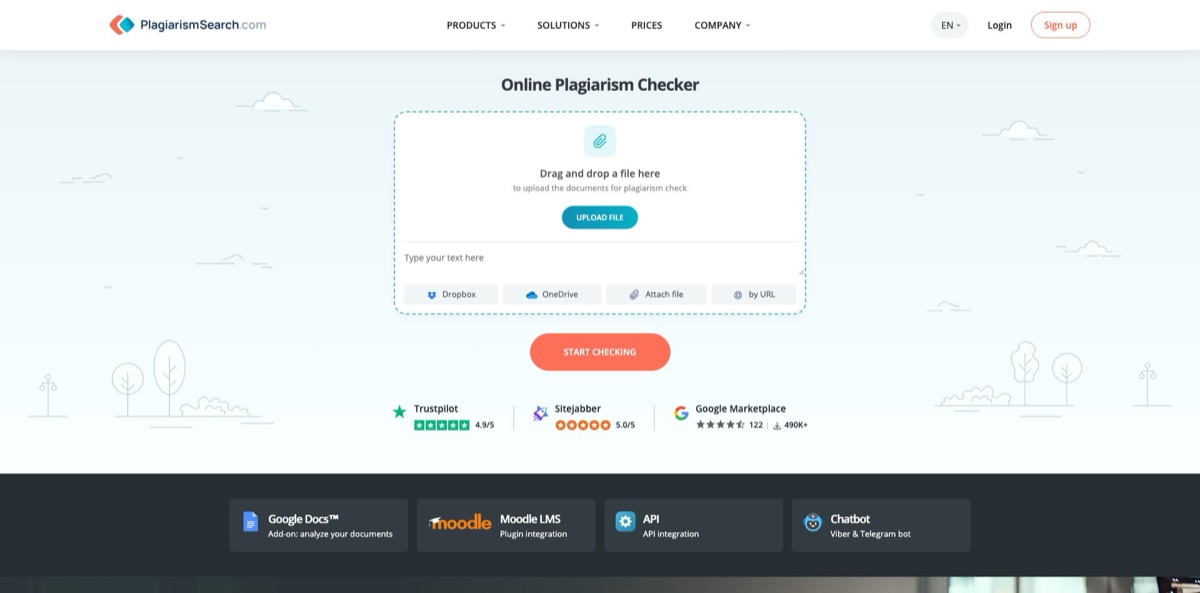
You can paste up to 150 words on the homepage without an account, which is enough to see what a report looks like. For anything real, click Check Text or Register and fill in the short form, or sign in with Google or LinkedIn. A free account raises the plagiarism allowance to 300 words a day and lets the AI detector take up to 1,000 words a day. If you write in Google Docs, install the add-on from the Google Workspace Marketplace as well, since it comes with 5,000 free words after installation.
Your first real job is usually a full essay or article. Upload it as a file, pull it from Dropbox or OneDrive, point the checker at a URL, or paste the text into the box, then press the red Check Your Text button. Billing runs on submissions of up to 1,000 words each, so a 2,500-word paper uses three. Short texts usually come back in about a minute, while long papers can take five to ten minutes, and the status reads processing until the report is ready on your Reports page.
The settings under the text box decide how useful the result is. Tick Only Latin characters to catch swapped Cyrillic letters, Exclude references and Exclude in-text citations so properly quoted material does not inflate the score, and choose between Search on the web and Search on my storage. You can also blacklist or whitelist specific URLs, which matters when a match is your own published page. In the report, red marks plagiarism, yellow marks similarities, violet marks citations, turquoise marks references and blue marks character replacement, and every highlight links to its source with a per-source percentage.
Before you submit, read the matched sources rather than the headline number, fix missing quotation marks or citations, and run the final version again. Download the PDF report if you need proof of a clean check. Reports stay in your account, move to an Archive after roughly 30 days and can be deleted by you at any time. For the newer interactive report layout, go to My profile, then System, and tick Use new reports design.
Who is it for?
Students
You need to know whether a term paper will raise eyebrows before your instructor sees it. PlagiarismSearch shows each matched sentence with its source, so you can fix missing quotation marks and citations in one sitting. Your personal reports are not visible to your instructor unless you share them.
Teachers and professors
Grading a stack of essays and checking each one by hand is not realistic. Upload papers, read the color-coded report and use the Only Latin characters option to catch students who swap in look-alike letters. The AI detector adds a second signal when a paper reads unlike the student’s earlier work.
Universities on Moodle
Your IT team wants plagiarism checks inside assignments, forums and workshops rather than in a separate tool. The official plugin connects Moodle to PlagiarismSearch, and a private Storage lets you compare new submissions against your own archive of past student work.
Freelance writers and bloggers
Clients expect original copy, and some now run AI detectors on everything you deliver. A quick plagiarism and AI check before delivery gives you a report to attach if questions come up later.
Editors and publishers
You review outside submissions and need to see where a manuscript overlaps with published work. Source-by-source percentages and the blacklist and whitelist settings help you separate real copying from shared boilerplate.
Platform developers
If your product takes in user writing, the API lets you run checks automatically. Pricing for API volume is quote-based, and the company offers free trial credits for testing.
PlagiarismSearch pricing
PlagiarismSearch sells checking capacity rather than seats. The unit is a submission of up to 1,000 words, and AI detection is either bundled into some packages or bought separately by the word. Monthly, 3-month and yearly packages each have two prices: a lower one with the Recurring payments switch on and a higher one when you buy the same term without auto-renewal. One-time packages have no expiry date. All prices below are the USD figures on the official pricing page.
Up to 150 words per check without an account, 300 words a day for plagiarism and 1,000 words a day for AI detection once you register. The Telegram and Viber bots add 5 free submissions, and the Google Docs add-on adds 5,000 free words after installation.
Light $9.95 for 1 plagiarism and 1 AI submission, Standard $17.95 for 10 of each, and Premium $41.95 for 50 of each, with unlimited time to use them.
You get 100 plagiarism submissions but no AI checks.
300 plagiarism submissions plus API access.
300 plagiarism and 300 AI submissions, API access and Storage.
Light $34.95 for 100 plagiarism and 100 AI submissions, Standard $64.95 for 300 of each with API and Storage, and Premium $89.95 for 500 of each. Standard and Premium also include bonus checks on the company’s companion platform Edulegit.
Light $114.95/year for 1,000 plagiarism submissions, Standard $174.95/year for 3,000 plagiarism submissions with API access, and Premium $259.95/year for 3,000 plagiarism and 3,000 AI submissions with API and Storage. Without auto-renewal the same tiers cost $137.95, $209.95 and $311.95.
from $4.95 for 10,000 words and $9.95 for 50,000 words, through $12.95/month for 100,000 words, up to $215.95/year for 5 million words.
Custom. The university page quotes institutional plans from $145.95/month, while API volume and VIP packages with a personal manager and longer report storage are priced on request.
PlagiarismSearch key features
Multi-source plagiarism scan splits your text into sentences and phrases, filters easy-to-swap characters and compares the result with live web pages, archived pages, journals and the academic database. The pricing page also lists homoglyph detection and sentence structure checking in every subscription. You get one similarity score with every matched source listed and scored separately, which makes it easy to spot a single heavily copied source.
Search settings control what counts as a match
You can exclude references and in-text citations, restrict the check to Latin characters, search only specific sites, exclude a user ID and blacklist or whitelist URLs. A paper with correct citations therefore does not get punished for them.
The AI content detector reports an overall AI probability, a Total AI rate and highlighted passages that deserve a closer look. The vendor says the model is tuned to recognize output from GPT-5, Claude, Gemini, LLaMA 2 and Mistral, and recommends treating the score as an indicator rather than a verdict. According to the FAQ, a result above 70% generally means the text is likely mostly AI-written.
Storage lets you upload your own archive and check new texts against it, which catches self-plagiarism and recycled student work. It is included in the Premium packages and the 3-month Standard package, and through Moodle a school can keep its own repository separate from other institutions. You can tick or untick Search on my storage per check so old drafts do not clutter every report.
The Moodle plugin and API bring checks into existing systems
The plugin works with assignments, forums and workshops, supports Moodle 2.7 through 5.2 and includes a free trial of 100 submissions, while the API is quoted per organization. Canvas and Blackboard integrations are only described as planned, so check before committing if your school uses them.
The Google Docs add-on and the Telegram and Viber bots let you check text without opening the website
The add-on checks text inside Docs, returns a PDF report after each check and holds a 4.4 average from 104 ratings on the Workspace Marketplace. The bots send a result notification, a PDF and a link, and share one balance with your web account once you link them.
Writing extras round out the toolkit
The spell checker is free, the readability checker scores text with the Flesch-Kincaid formula with paid detailed advice from $0.99, and the Paper Analysis service has a human editor review grammar, structure and citations from $3.50.
PlagiarismSearch Pros & Cons
Pros
The pay-per-submission model is easy to reason about: 1,000 words equals one submission, one-time packs never expire, and a failed check returns the balance instead of eating it. Reports are practical, with each match linked to its source, a percentage per source and separate colors for citations and references, so you can tell a quoting problem from real copying. The privacy terms are clear for a tool in this space: the FAQ says your paper is not added to any database, and the terms say submitted content is not used to train the company’s AI models. Moodle support and about 150 languages make it usable well beyond English coursework. Start with a one-time pack and keep the PDF report for every final draft.
Cons
The pricing grid is crowded, with more than twenty price points across one-time, monthly, 3-month, yearly and AI word packages, and the cheapest monthly plan includes no AI checks at all. By the vendor’s own admission, heavily paraphrased text can slip through, and East Asian languages are not supported. Canvas and Blackboard users have no native integration yet. Independent feedback is thin and overwhelmingly positive, and Trustpilot notes the company has not recently invited reviews, so you have less outside evidence than with bigger checkers. Refunds are voluntary, limited to 5 days after a charge and only when nothing was used. Test the free allowance on a document you know well before paying for anything recurring.
Use PlagiarismSearch if you want…
- Check essays for plagiarism before your instructor does.
- Detect AI-written passages alongside a plagiarism report.
- Pay per document instead of a yearly license.
- Add plagiarism checks to Moodle assignments and forums.
- Catch students swapping Cyrillic letters into copied text.
- Compare new submissions against your own document archive.
- Run plagiarism checks directly inside Google Docs.
- Check texts quickly from Telegram or Viber on your phone.
PlagiarismSearch alternatives

PlagiarismSearch Reviews
Trustpilot reviewers describe it as a useful uniqueness check for content work that has paid for itself several times, while still calling the pricing somewhat steep.
G2 reviewers credit it with accurate matches and detailed reports, though some find it a bit pricey on a student budget and mention occasional slow loading.
Students on Product Hunt call the interface easy to follow and the reports clear about what needs fixing; the main complaint is that regular checking means paying.
Free-tier users on Trustpilot and Reviews.io find the daily word allowance handy for a quick check, but say the cap pushes anything longer toward a paid package.
Multilingual users value that it checks non-English texts, such as Polish, against web and academic sources, and several reviewers point to fast turnaround and responsive support.
FAQ
Is PlagiarismSearch free?
There is a free tier. Guests can check up to 150 words, registered users get 300 words a day for plagiarism and 1,000 words a day for AI detection, and longer documents need a paid package starting at $9.95.
Does PlagiarismSearch store my documents?
The FAQ says your paper is not added to any database, and the terms say submitted content is not used to train AI models. Reports stay in your account until you delete them, move to an Archive after about 30 days and may be removed after five years.
Can PlagiarismSearch detect AI-generated text?
Yes. The AI detector shows an overall AI probability and highlights passages, and the vendor advises treating the score as an indicator and checking full documents rather than short excerpts for better accuracy.
How many words count as one submission?
One submission covers up to 1,000 words. A 1,500-word essay uses two submissions, a 2,500-word paper uses three, and so on.
Which languages and file formats are supported?
The company says it supports around 150 languages in Latin and Cyrillic scripts but not East Asian languages. Accepted formats include DOC, DOCX, PDF, TXT, RTF, ODT, HTML, EPUB, XML, XLS and XLSX, with files up to 64 MB for registered users.
Does it integrate with Moodle, Google Docs or other tools?
There is an official Moodle plugin, a Google Docs add-on, Telegram and Viber bots and an API. Canvas and Blackboard integrations are described as planned rather than available.
Is there an API?
Yes. API access is included in Standard and Premium subscriptions, larger volumes are quoted on request, and you can ask support for a free API trial after registering.
How do I cancel a subscription or get a refund?
Cancel from the subscriptions page in your account to stop future renewals. Refunds are voluntary and considered only if you ask within 5 calendar days of the charge and have not used the paid balance.
Similar tools
 RunableGeneral AI agent that turns one prompt into websites, slide decks, social carousels, videos and apps, with plugins and scheduled tasks.
 AISEOAI writing suite with a text humanizer, article and Outrank generators, AI detector and plagiarism checker, plus AI search visibility tools.
 Octopus.doVisual sitemap builder that drafts page structure, block copy and SEO tags with AI, crawls existing sites and connects to ChatGPT, Claude