

Planable
Content CreationUpdated October 21, 2026
Collaboration-first social media platform where teams and clients draft, review, approve and schedule posts for nine networks, with built-in AI captions.
We may earn a commission when you sign up through our links. It does not affect our reviews.
What is Planable?
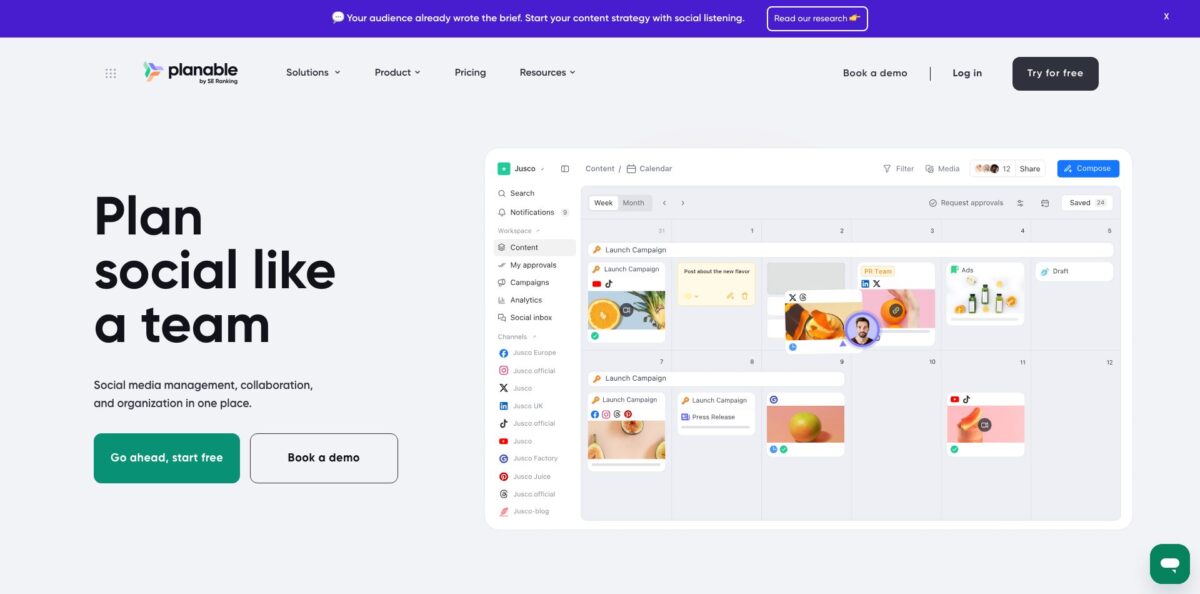
Planable is a social media management platform built around collaboration and approvals rather than scheduling alone. Each client or brand gets its own workspace, where your team drafts posts for Facebook, Instagram, LinkedIn, X, TikTok, YouTube, Pinterest, Threads and Google Business Profile, sees native-looking previews, leaves comments and text suggestions, and routes content through an approval flow before it publishes. Planable AI sits inside the composer and the Social inbox, writing captions from prompts or media, rewriting copy and drafting comment replies at no extra cost. Blogs, newsletters and briefs can live in the same calendar as Universal Content. The weak spots are the per-workspace bill, which climbs fast for agencies with many clients, and analytics and inbox features sold as paid add-ons. Since August 2025 the company belongs to SE Ranking but still runs as a separate product. Pick it if client sign-off is your main bottleneck.
How to start using Planable?
Click Try for free on planable.io and create a company account with Google or an email address. No credit card is needed. The free trial covers your first 50 posts with no time limit, but those 50 never reset, and every post in a group counts separately, so a draft duplicated to Facebook, X and LinkedIn uses three. X publishing is off during the trial.
Next, create one workspace per client or brand and add pages to it. Connect real social accounts, or build a mockup page that copies a profile’s name, avatar and cover so you can plan content before the client hands over access. Add a Universal Content page if you also want blog posts or newsletters in the same calendar. Then invite people and assign each one a Team or Client membership, plus rights to edit, approve or publish.
Now open the composer and write your first post. Select the pages, drop in images or video, and adjust the version for each network: carousels and Reels for Instagram, PDF carousels for LinkedIn, offers and events for Google Business Profile, titles and thumbnails for YouTube. Use the AI options to generate a caption from a prompt or from the uploaded media, then rewrite it shorter or punchier. Before that, fill in Brand context in workspace settings so the AI writes in the client’s voice.
Finally, set the approval workflow in the workspace’s Approval settings: None, Optional, Required (Pro) or Multi-level (Enterprise). Share a review link with occasional approvers who don’t need an account, or let regular clients work from My approvals. Turn on auto-scheduling so a post with a date goes live the moment it is approved, and lock approved posts to stop late edits.
Who is it for?
Social media agencies
Client feedback usually arrives through email threads, screenshots and spreadsheets. Planable puts every client in a separate workspace with its own approval flow, and clients comment right on the post preview. Internal drafts and team-only notes stay hidden until the post is ready to show.
Multi-location brands
A franchise or retail chain with dozens of local pages needs central control without writing every post itself. Workspaces per location, the List view and bulk actions on Enterprise let a head office approve, schedule or duplicate content across locations in one pass.
In-house teams with legal or executive sign-off
When a post needs a team lead, then legal, then a VP, multi-level approvals stack those steps in order, and the post publishes only after the last one. Version history shows who changed what, which helps in regulated industries.
Freelance social media managers
You get unlimited users on every plan, so inviting each client costs nothing extra. The Basic plan’s four pages and 60 posts a month per workspace fit a small client with a light posting schedule.
Content leads planning beyond social
Universal Content pages put blog posts, newsletters and campaign briefs on the same calendar as social posts, with the same comments and approvals. Campaigns group strategy briefs, assets and posts for one launch.
Teams working with AI assistants: The MCP connector lets Claude, ChatGPT or Gemini browse workspaces, draft and schedule posts, check approval status and pull analytics. It suits an agency lead who wants a daily summary of what is still waiting for sign-off.
Planable pricing
Planable charges per workspace, not per seat, and every plan includes unlimited users. One workspace equals one client, brand or location, so five clients mean five subscriptions. Annual billing gives two months free. Analytics, Social inbox and Social listening are separate add-ons, also priced per workspace, each with a 30-day trial on a paid plan. Planable AI is included on all plans with no usage limits.
First 50 posts in total (no monthly reset), 4 pages per workspace, unlimited users, Feed and Calendar views, MCP connector; no X publishing.
60 posts and 4 social pages per workspace per month, None and Optional approvals, Feed and Calendar views, 3 campaigns, 5 labels, 10 GB storage, 1 week of version history, one published tweet per 24 hours, Zapier, Canva and Slack.
150 posts and 10 pages per workspace, Required approvals, Grid view, 10 campaigns, 50 GB storage, team-only drafts and notes, bulk approvals, syncing of previously published content, public API and chat support.
Custom. Unlimited posts, 50 pages per workspace, multi-level approvals, List view, SSO, dedicated account manager, priority support, bank transfer, and the Analytics and Social inbox add-ons included. The help center says custom deals typically start around $2,500/year.
Analytics $14 per workspace/month ($12 billed yearly), Social inbox $9 ($7.5 yearly), Social listening $99 ($990/year).
Planable key features
Native-looking previews: posts in the Feed view look the way they will on each network, and the Calendar shows actual previews instead of titles. Approvers judge the real post, not a caption in a spreadsheet, which cuts the “how will this look?” round of questions.
Comments, suggestions and annotations: you highlight part of a caption to suggest an edit, annotate media, or leave a threaded comment, and the author accepts or declines in one click. Internal notes stay with the team while clients see only the polished version. Version history lets you restore any earlier draft.
Approval workflows per workspace: choose None, Optional, Required or Multi-level for each client, add automated approval reminders, lock posts once approved and auto-schedule them on approval. Review links let outside stakeholders comment without creating an account.
Planable AI in the composer and inbox: generate captions from a prompt or from an image or video, add hashtags, get post ideas based on your previous posts, and rewrite copy (shorter, expand, punchier, or custom instructions). Brand context per workspace feeds up to 4,000 characters of tone, values and terminology into generation, and “Answer with AI” drafts comment replies.
Scheduling across nine networks: Planable publishes to Facebook, Instagram, LinkedIn, X, TikTok, YouTube, Pinterest, Threads and Google Business Profile, including Stories, Reels, carousels, first comments and recurring posts. A Grid view (Pro) lets you arrange the Instagram feed by drag and drop, including posts published outside Planable.
Universal Content and campaigns: plan blog posts, newsletters, press releases and briefs in the same calendar with the same approval rules, then mark them as published manually. Campaigns hold briefs, assets, posts and analytics for one launch inside the main calendar.
MCP connector and public API: AI assistants can create and schedule posts, manage labels and campaigns, read comments and approvals, and pull analytics or listening data. The public API (Pro and up) and Zapier connect Planable to the rest of your stack. Treat MCP access like a developer token, since the assistant can also delete content.
Planable Pros & Cons
Pros
Approvals are the core of the product, not a bolt-on, and reviewers on Capterra and Software Advice keep naming them as the reason they switched. Clients can approve from a link without an account, and comments sit next to the preview, so feedback stops scattering across email. Pricing per workspace with unlimited users means adding an approver, a designer or a legal reviewer costs nothing. The interface gets high marks for ease of use, which matters when your clients are not social media people. Planable AI comes with every plan without credits to track, and Brand context gives each client its own voice. Start with one client whose approvals are slowest and measure the turnaround time before and after.
Cons
Costs scale with every client, so an agency running 15 workspaces on Pro pays for 15 subscriptions before any add-on. Analytics and the Social inbox are not in the base plans, which several reviewers say they dislike, and the analytics are lighter than in dedicated suites. Post limits count drafts and every network version, so a busy client can hit the 60 or 150 cap quickly. Some users report publishing failures on Facebook videos or Instagram Stories and gaps in platform-specific options. Basic allows just one published tweet per 24 hours. Before signing, count the posts per client per month and the add-ons you need, and compare the total with seat-based tools.
Use Planable if you want…
- Get client approval on posts without email threads.
- Keep each client in a separate workspace with its own rules.
- Show approvers native previews instead of spreadsheet captions.
- Stack approval steps for legal, managers and clients.
- Generate captions from images or videos inside the composer.
- Plan blogs and newsletters next to social posts.
- Add unlimited collaborators without paying per seat.
- Let your AI assistant check pending approvals across workspaces.
Planable alternatives
Planable Reviews
Agency users say clients approve and comment without any training, and that one place for drafts, feedback and scheduling replaced their email back-and-forth, though the price adds up as client numbers grow.
Reviewers praise the visual calendar and at-a-glance overview for collaboration, but several would rate it higher if analytics were part of the subscription instead of an add-on.
Some long-term users like the unlimited users and easy approval process, yet complain that drafts count toward the monthly post limit.
A recurring complaint is missing platform-specific options, such as custom thumbnails for YouTube Shorts, and occasional failed publishing of Facebook videos or Instagram Stories.
Product Hunt users highlight the clean interface, responsive support and the ability to plan blogs, newsletters and social posts in one calendar.
FAQ
Does Planable have a free plan?
Planable offers a free trial instead of a permanent free plan. You get your first 50 posts with no time limit and no credit card, but the count never resets, and you need a paid plan once you use them.
Is Planable priced per user?
No. Pricing is per workspace, and every plan includes unlimited users, so you can invite clients, designers and approvers at no extra cost.
Is Planable AI included in the price?
Yes. Planable AI for captions, hashtags, ideas, rewrites and comment replies is included on every plan with no usage limits and no add-on.
Do clients need an account to approve posts?
Not necessarily. Review links let external collaborators view posts and leave feedback without signing up; regular approvers can join the workspace as Client members.
Which social networks does Planable support?
Facebook, Instagram, LinkedIn, X, TikTok, YouTube, Pinterest, Threads and Google Business Profile. Universal Content covers blogs, newsletters and other non-social content.
Is analytics included?
Analytics is an add-on at $14 per workspace per month on Basic and Pro, with a 30-day trial. It is included on Enterprise along with the Social inbox.
Does Planable have an API or MCP integration?
Yes. The MCP connector is available on all plans and connects tools like Claude, ChatGPT and Gemini; the public API starts on Pro. Zapier, Canva and Slack integrations are on every paid plan.
Is Planable GDPR compliant, and can I cancel anytime?
Planable says its terms, privacy and cookie policies follow GDPR. You can upgrade, downgrade or cancel from the Billing Dashboard at any time, and annual plans keep access until the end of the paid period.
Similar tools
 RunableGeneral AI agent that turns one prompt into websites, slide decks, social carousels, videos and apps, with plugins and scheduled tasks.
 AISEOAI writing suite with a text humanizer, article and Outrank generators, AI detector and plagiarism checker, plus AI search visibility tools.
 Octopus.doVisual sitemap builder that drafts page structure, block copy and SEO tags with AI, crawls existing sites and connects to ChatGPT, Claude