
Playground
Image GenerationUpdated October 28, 2026
AI design tool that pairs editable templates with image models like Playground v3 and GPT Image to make logos, t-shirt graphics, stickers and posters.
We may earn a commission when you sign up through our links. It does not affect our reviews.
What is Playground?
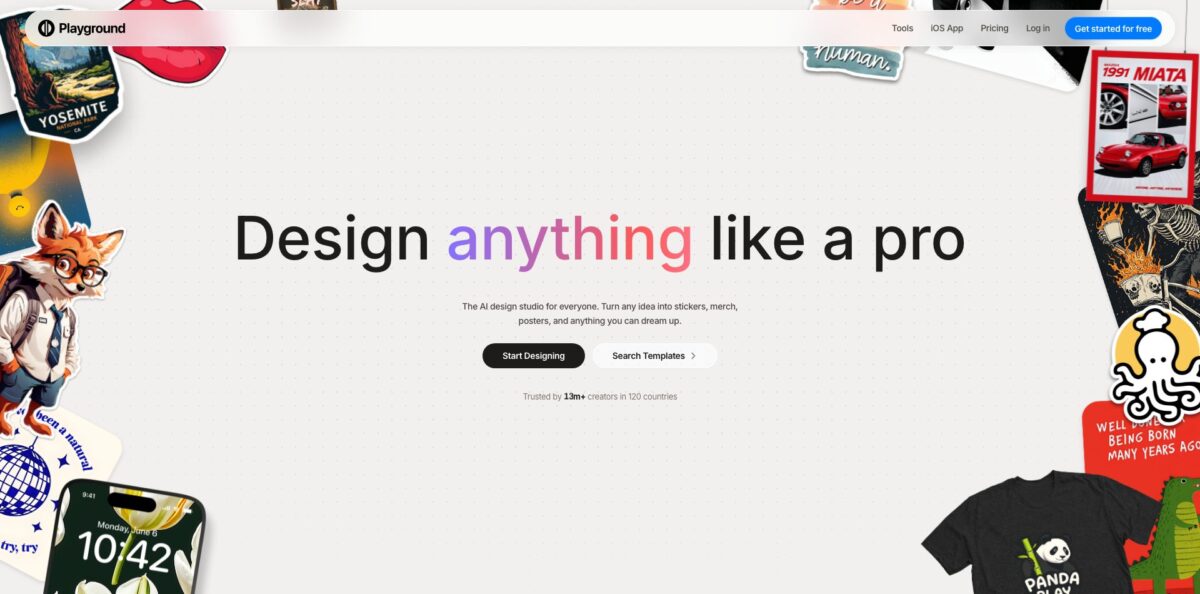
Playground is a browser and iPhone design app that combines a library of editable templates with a choice of image models, so you describe a logo, t-shirt graphic, sticker or poster and then refine it in a layered editor instead of re-rolling prompts. It began as Playground AI, a text-to-image generator built on its own models, retired that legacy Board product in January 2025 and now presents itself as an AI-native design tool. You can switch between the in-house Playground v3 and third-party models such as GPT Image 2, Nano Banana Pro, Seedream and Meta’s Muse Image, then export PNG, JPEG or layered SVG. The problem it solves is the gap between a pretty AI picture and a file you can actually print or post. The weak spot is a small monthly credit allowance for the premium models. It suits print-on-demand sellers, crafters and small businesses best.
How to start using Playground?
Go to playgroundai.com (the old playground.com address now redirects there) and click “Get started for free” to create an account. You do not need one for the standalone image tools: the background remover, upscaler, logo generator, mockup generator, AI resizer and file converter all run without sign-up. An account is what saves your projects, and there is also an iPhone app called Playground: AI Design & Editor. The site and support are English-only, so plan on browser translation if you work in another language.
For your first real project, open the Design page. It asks “What do you want to design today?” and offers Start new design, Upload and edit image, and a row of categories such as Logo, T-shirt, Stickers, Poster, Mockups, Cards & Invites and Social Media Post. Click a category, then either pick a template or type into the prompt box at the bottom of the page to generate a design from scratch. The Help Center notes that text-to-design works in every category except a few, including Art, Memes, Phone Case Covers and Spotify Album Covers.
Once a design is open, you work through plain-language instructions rather than sliders. Type changes like “make the cat into a dog” or “add the text Happy birthday, Henry! at the top”, or click an object to select it and recolor, replace or remove it. The Add text button above the canvas gives you fonts, alignment and color, though the Help Center says text editing is web-only for now. Keep an eye on which model is running: Auto picks Muse Image for free users and GPT Image 2.5 Flare on paid plans, while Nano Banana Pro costs 4 credits per generation instead of 1.
When the design looks right, click Export in the top right and then Download. Pro users get a Remove Background option in the same export menu, which is what you need for transparent t-shirt and sticker files. Every project is saved under My Designs in the left sidebar, where the ellipsis menu lets you duplicate or delete it. Before ordering prints, check resolution with Playground’s own rule of thumb: pixel width divided by 300 gives the print size in inches, so a 4096-pixel file prints sharp at about 13.65 inches.
Who is it for?
Print-on-demand sellers
You need a steady flow of shirt, sticker and mug designs with transparent backgrounds and print-ready resolution. Playground covers generation, background removal, upscaling and mockups in one place, and its Sandbox connects Etsy, Printify and Printful listings to an AI assistant. Most sellers will outgrow the 2 free downloads a day quickly.
Cricut and Silhouette crafters
Cut machines need clean vector files, not flat JPEGs. Playground exports layered SVGs where each color becomes its own cut path in Cricut Design Space, which suits vinyl, iron-on and cardstock projects. SVG vectorization is a Pro feature, so budget for it if cutting is your main use.
Small business owners
You want a logo, a flyer and a few social posts without hiring a designer or learning Figma. Templates give you a sensible layout to start from, and the free logo generator works without an account. For a full brand identity system, treat the output as a strong draft rather than the final answer.
Social media creators
Templates come sized for Instagram, TikTok, YouTube, X and LinkedIn, and AI resize recomposes a design for new dimensions instead of cropping it. That saves you rebuilding the same graphic for each platform. The daily download cap on Free is the first limit you will feel.
Claude and ChatGPT users: Playground ships an MCP server, so you can ask your assistant to search templates, generate images, upscale or remove backgrounds without leaving the chat. Results land on your Playground board for later editing. Usage still draws on your Playground plan’s credits.
Event planners and hobbyists
Wedding invitations, birthday cards, save-the-dates and wall art are all built-in categories. You can upload a photo, restyle it and add your own text in minutes. Free commercial rights matter less here, but the template variety does.
Playground pricing
Playground uses a freemium subscription with two kinds of limits: a rolling 3-hour cap on its own Playground v3 model and a monthly credit pool shared across third-party models (Muse Image, Nano Banana, GPT Image 2, GPT Image 2.5 and Seedream at 1 credit per image, Nano Banana Pro at 4). Prices below are from the official pricing page in USD; the same amounts appeared when the page was loaded through a US connection, and the Help Center states that all pricing is in U.S. dollars.
3 monthly credits for the premium models, a limited Playground v3 allowance per rolling 3-hour window (5 images in the comparison table, “up to 10” on the plan card), 2 downloads a day, slower generation at peak hours and a worldwide royalty-free commercial license. The Help Center lists background removal, upscaling and SVG vectorization as Pro features of the plan, even though the standalone web tools offer free background removal and upscaling.
150 monthly credits, up to 75 Playground v3 images every 3 hours, 10 Nano Banana Pro images a month, unlimited downloads and SVG exports, the full premium template library, upscaling and background removal, and AI editing up to 2048×2048 with GPT Image 2 and 2.5.
1,000 monthly credits including Nano Banana Pro (up to 250 images), no cap on Playground v3 generations, unlimited upscaling and background removal, editing up to 3840×2160, plus priority support and API access.
Extra credits are sold as top-ups: $8 per 100 credits on Pro and $6 per 100 on Pro Plus. They stack on your monthly allowance, expire at the end of the next billing cycle and are non-refundable. Payment is by credit or debit card only. The US App Store lists different in-app prices, such as Design Pro Monthly at $14.99 and Design Pro Plus Monthly at $50.00, so compare before subscribing on iPhone. Cancelling ends the plan at the end of the term with no pro-rated refund.
Playground key features
Template-first design across 24 categories
Logos, t-shirts, stickers, posters, mockups, cards and invites, wallpapers, e-book covers, flyers and more each have their own template library and prompt box. You start from a working layout and swap in your text, colors and imagery. It removes the blank-canvas problem that slows most beginners down.
Several image models in one account
Playground v3, the company’s own model trained for graphic design, sits next to GPT Image 2 and 2.5, Nano Banana and Nano Banana Pro, Seedream and Meta’s Muse Image. Auto mode chooses a default for you, or you pick the model that fits the job, such as GPT Image 2 for legible typography.
Click-to-select editing with plain-language instructions
Segmentation powered by SAM3 lets you click a person, product or block of text and edit, recolor, replace or remove just that region. Homepage tools like Swap style, Remove object, Add to mockup and Smart layers apply non-destructively. You fix one element without regenerating the whole design.
A layered editor for finishing touches
You get more than 2,000 fonts with natural-language font search (“chunky retro serif”), vector shapes, masks, groups and alignment tools. Text, image and shape layers stay independently editable. That is the difference between an AI picture and a design you can adjust for a client.
Print preparation built in
Background removal, a dedicated 4× upscaler, AI resize that recomposes a layout for new dimensions, and SVG vectorization that separates colors into cut layers all live next to the generator. Exports come as PNG, JPEG or SVG.
Free standalone image tools
A background remover that accepts files up to 50 MB, a mockup generator, a logo generator, an upscaler, an AI resizer and a converter for formats such as PNG, JPG, WebP and AVIF run in the browser without sign-up. They are handy for one-off jobs when you do not want another subscription.
MCP connection and Sandbox for sellers
Add https://playgroundai.com/mcp to Claude or ChatGPT and your assistant can search templates, generate and edit images, upscale and remove backgrounds. Sandbox adds Etsy, Printify, Printful and RankHero connections with a Needs attention view and ready-made jobs, and store actions are review-first: listings are created as unpublished drafts.
Playground Pros & Cons
Pros
Playground puts generation, editing and print preparation in one workspace, so a shirt or sticker idea goes from prompt to transparent, upscaled file without bouncing between three apps. The template library gives non-designers a layout that already works, and click-to-select editing means you change one element instead of gambling on a full regeneration. Access to several leading image models under one subscription lets you pick GPT Image 2 for clean text or Playground v3 for volume. Every plan, Free included, carries a commercial license, and designs are private by default. Layered SVG export is a genuine time saver for Cricut users. Use templates as your starting point and save premium-model credits for the final polish.
Cons
The free plan is tight: 3 premium-model credits a month and 2 downloads a day are enough to test, not to run a shop, and transparent backgrounds inside the editor need Pro. Users on the App Store and Trustpilot report regressions after updates, spotty background removal and upscaling, and prompts that drift from instructions while still spending credits. Long-time fans of the original art generator lost the Board product in January 2025, and some never warmed to the design-tool pivot. Billing complaints about charges after cancelling appear repeatedly, and Trustpilot has withheld the company’s score over a guideline issue. Cancel well before renewal and keep the confirmation.
Use Playground if you want…
- Design print-ready t-shirt and sticker graphics with AI.
- Turn a text prompt into an editable logo template.
- Export layered SVG cut files for Cricut projects.
- Remove backgrounds and upscale artwork for print-on-demand listings.
- Compare GPT Image, Nano Banana and Seedream in one place.
- Edit one object in an image by clicking it.
- Resize social media graphics for every platform automatically.
- Generate and edit designs directly from Claude or ChatGPT.
Playground alternatives
 CanvaRead review →
 IdeogramRead review →
 RecraftRead review →
 Adobe FireflyRead review →
 Leonardo.aiRead review →
Playground Reviews
Print-on-demand sellers and first-time designers on the App Store call it a quick, friendly way to turn ideas into shirts, gifts and logos, and one crafter says they now prefer it to the Cricut subscription they already pay for.
Several longtime App Store users say recent updates made things worse, with mockups that stop applying and background removal or upscaling that sometimes fails or turns the background black.
Recent Trustpilot reviewers praise the clean interface and responsive support, although one notes they used up a month of credits in about two weeks.
Critical Trustpilot reviews focus on billing and cancellation trouble, including charges after cancelling and a disabled delete button, plus a sense that image quality and freedom dropped after the move away from the original art generator.
G2 reviewers rate it highly for ease of use and simple prompts, while listing free-version limits and occasionally slow generation as the main drawbacks.
FAQ
Is Playground free to use?
Yes. The Free plan includes a commercial license, a limited Playground v3 allowance every 3 hours, 3 monthly credits for premium models and 2 downloads a day. The standalone background remover, logo generator and mockup generator also work without an account.
Is Playground the same as Playground AI?
Yes. The brand calls itself Playground (formerly Playground AI), and playground.com now redirects to playgroundai.com. The legacy Board text-to-image product was retired in January 2025 and images made there are no longer accessible.
Can I sell designs I make with Playground?
Yes. Under the terms you own the assets you create, and commercial use is included on Free, Pro and Pro Plus, so you can sell on Etsy, Printify, Printful or use them in client work.
Are my Playground designs private?
Yes. The Help Center states that all images created on Playground are private by default.
Does Playground have an API?
Only for selected partners. The pricing FAQ says API access is currently prioritized for partners generating more than 1 million images a month, and you apply through a form.
Can I use Playground inside Claude or ChatGPT?
Yes. Add the MCP server URL https://playgroundai.com/mcp in your assistant’s connector settings and sign in to authorize your account. It works on every plan, but generations count against your Playground limits.
How do I cancel my Playground subscription?
On the web, open your Account page and click Cancel subscription; access continues until the term ends with no pro-rated refund. Plans bought on iPhone must be cancelled in your Apple ID subscription settings.
Does Playground support languages other than English?
Not officially. The site and customer support are English-only, and the Help Center suggests Chrome’s built-in translation as an imperfect workaround.
Similar tools
 BannerbearTemplate-based API for generating on-brand images, PDFs, animations and videos at scale from your data via REST, Zapier, Airtable or AI agents.
 Generated PhotosLibrary of 2.6M+ AI-generated faces plus face and full-body human generators for model-release-free people images in design, ads and research.
 VheerBrowser-based AI studio for text-to-image, photo editing and image-to-video, with a free no-signup model plus credit access to Nano Banana, Sora 2