

Plerdy
AI AssistantsUpdated November 17, 2026
Website analytics and CRO suite with heatmaps, session replay, free A/B testing, SEO audits and an MCP connector for asking Claude or ChatGPT about your data.
We may earn a commission when you sign up through our links. It does not affect our reviews.
What is Plerdy?
Plerdy is a website analytics and conversion optimization suite that runs from one tracking script and records how real visitors click, scroll, tap and give up on your pages. Around that core it bundles session replay, funnels, e-commerce revenue reports, error monitoring, pop-ups, a free A/B testing tool and a daily SEO audit tied to Google Search Console. The AI side is newer and narrower: paid plans include read-only MCP connectors that let Claude, ChatGPT or Cursor query your Plerdy reports in plain language, and two Chrome extensions sell AI-predicted attention heatmaps and SEO reports per use. The weak spots are a busy dashboard that takes time to learn and limits counted in daily page views. It suits store owners, marketers and agencies who want Hotjar-style behavior data plus SEO checks under one subscription.
How to start using Plerdy?
Create an account at app.plerdy.com. No credit card is needed, and paid tiers come with a 14-day trial that runs on Scale-plan limits. Then install the tracker in whichever way matches your stack: the Shopify app, the WordPress plugin from WordPress.org, Google Tag Manager, or the JavaScript snippet pasted before the closing body tag on every page. One package covers one site, but subdomains and related domains such as site.com and site.de can sit in the same account and share its limits. Heatmaps and recordings start with the first visit, so there is no per-page setup.
For a first real scenario, pick the page closest to money: a product page, the cart or your main landing page. Open its heatmap and check the scroll map first to see how many visitors ever reach your call to action, then switch to the click map to find elements people tap that do nothing, such as a product photo. Compare mobile against desktop, because layout problems usually hide on phones. Plerdy’s own heatmap playbook suggests this order.
Next, set up the screens that tie behavior to revenue. Define conversion goals such as button clicks or a thank-you page in event tracking, which needs no code and can forward events to GA4, and connect Google Search Console so the SEO checker can flag pages that lose clicks. If you run a store, e-commerce tracking and the Traffic Value report match orders to visits and show revenue, orders and average order value by channel, product and page block. Session replay then lets you jump to recordings with rage clicks, errors or drop-offs instead of watching random visits.
Once you have a hypothesis, test it. The A/B testing tool lets you change colors, widths, margins or raw HTML and CSS in a visual editor, target by device, country or traffic source, and pick a goal before launch; it needs its own extra tracking code. On a paid plan or trial, open Settings → AI Connectors, create an access token and add Plerdy as a connector in Claude or ChatGPT. Then ask which pages lost the most money last week.
Who is it for?
Online store owners
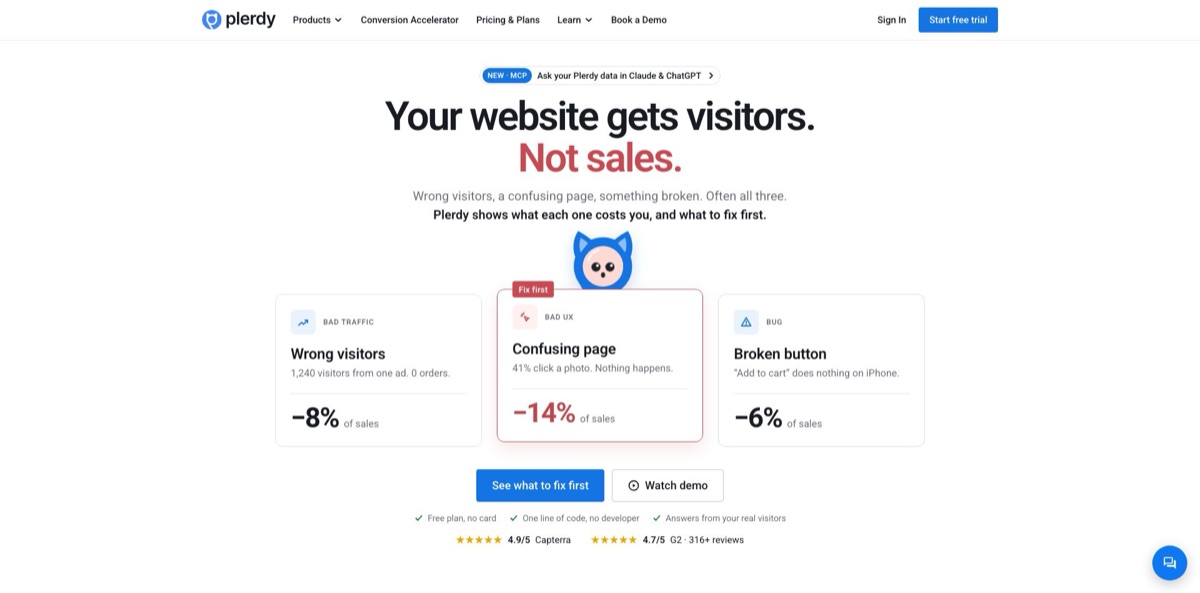
You see traffic in GA4, but orders do not match the ad spend and you have no analyst to dig into why. Plerdy puts a price on each problem, from a dead Add to cart button on iPhone to a campaign that brings visits and zero orders. You get a ranked fix list instead of another dashboard to interpret.
Performance marketers
You need to know which campaigns and UTMs bring buyers, not just clicks. Traffic Value and channel-segmented heatmaps put revenue per visit next to on-page behavior, so a gap between the ad promise and the landing page shows up fast. Cutting one dead campaign can cover the subscription.
SEO specialists
A daily site audit with Search Console alerts warns you when a page loses Google clicks, for example after a theme update strips its title. The SERP Checker add-on and the Chrome SEO extension handle rank comparisons and one-off on-page checks. You catch regressions within days instead of in a month-end report.
CRO and UX designers
Heatmaps with click sequence, dynamic element tracking and device segmentation show what people ignore, and the free A/B tool lets you test a fix without waiting for a developer. The Chrome UX extension adds AI-predicted attention maps for pages that have no traffic yet. Design debates turn into measurable tests.
Agencies managing client sites
Unlimited guest access lets clients and freelancers view reports without paid seats, and the MCP connector lets you switch between sites by name inside Claude or ChatGPT. Each site still needs its own package, so price per client.
Owners who already use an AI assistant: If you would rather ask than click through filters, the read-only MCP connector answers questions such as why conversions dropped yesterday with numbers from your account. Plerdy says no visitor personal data leaves its servers.
Plerdy pricing
Plans are priced per website and scale by usage limits rather than seats: daily heatmap page views, a total pool of video sessions, SEO audit pages, pop-up displays, e-commerce and conversion tracking volume, error history, daily AI requests and data retention. Annual billing cuts every paid plan by 35%, A/B testing is unlimited on every tier including Free, and the 14-day trial uses Scale limits with no card required. Hitting a limit never triggers automatic overage charges. Instead you buy add-ons, such as extra heatmap page views per day, video recordings or daily pop-up displays, priced from $9/month for +1,000 to $49/month for +10,000.
100 heatmap page views per day on up to three pages, 500 video sessions, 5,000 SEO audit pages, 100 daily pop-up displays, basic e-commerce and conversion tracking, the top error with 5 days of history and 1 month of storage. No AI connectors.
500 daily heatmap page views, 5,000 video sessions, 10,000 SEO audit pages, top 5 errors over 15 days, 100 AI requests per day and 3 months of storage.
The most popular tier: 1,500 daily heatmap page views, 10,000 video sessions, 25,000 SEO audit pages, top 10 errors over 30 days, 300 AI requests per day and 3 months of storage.
3,000 daily heatmap page views, 30,000 video sessions, 50,000 SEO audit pages, top 20 errors over 60 days, 600 AI requests per day and 6 months of storage.
7,000 daily heatmap page views, 55,000 video sessions, 120,000 SEO audit pages, 1,500 AI requests per day and 12 months of storage.
15,000 daily heatmap page views, 120,000 video sessions, 300,000 SEO audit pages, 3,000 AI requests per day and 12 months of storage.
50,000 daily heatmap page views, 250,000 video sessions, 500,000 SEO audit pages, the full error list over 365 days and 5,000 AI requests per day.
A few extras sit outside the plans. The SERP Checker costs $8/month for 50 tracked keywords up to $39/month for 500, and the Chrome SEO and UX AI Analyzers sell report packs from $5 for one report to $89 for 60. Refund requests only cover payments made in the last 30 days.
Plerdy key features
Heatmaps built on real clicks
Plerdy records clicks, scroll depth, mouse movement and click sequence, including clicks on dynamic elements such as pop-ups, menus, sliders and dropdowns. You can segment by device, country, traffic channel and new versus returning visitors, and historical click data stays available when you build a report later.
Session replay with rage-click and error flags
Recordings follow rules you set, and Plerdy flags rage clicks and site errors so you can open the sessions where a buyer got stuck. The newer error tracking module lists JavaScript, 404 and 5xx errors and the pages they hit, with the number of top errors and days of history set by your plan. You hand a developer a clip and an error message instead of a vague bug report.
Revenue attribution through Traffic Value and e-commerce analytics
Orders from your store are matched to visits, so you see revenue, orders and average order value by channel, campaign, product and page block. Campaigns with plenty of visits and no orders stand out immediately.
Free A/B testing with a visual editor
You can run unlimited tests on every plan, edit variants visually or through HTML and CSS, target by device, country or source, and send goal events to GA4. Reports show the winning variant alongside average session duration and scroll depth per variant.
Daily SEO audit and Search Console alerts
The SEO checker collects on-page data from pages that receive clicks, uses a mobile-first model and adds no load to your server, while the Search Console link highlights missed keywords and sudden click drops. The free Chrome SEO extension covers one-off checks of titles, meta tags, headings, hreflang, schema markup and load timings.
AI connectors over MCP
Paid plans expose read-only tools for traffic, lost revenue, page reports, session search, conversions, A/B results, site errors, SEO issues and Search Console data to Claude, ChatGPT, Cursor, VS Code or any remote MCP client. Built-in prompts cover a weekly money review, checkout diagnosis and A/B readouts, and each plan caps daily requests between 100 and 5,000. The AI cannot change settings or your site, and Plerdy says it sees only which report was requested, not your chat.
AI-predicted UX heatmaps in Chrome
The Plerdy UX extension generates a predicted attention heatmap, scan pattern, scroll depth estimate and AI UX advice for any page without a tracking code, in desktop and mobile layouts. Plerdy states plainly that this is a model-based prediction, not recorded behavior. Use it to review a landing page before launch, then confirm with real heatmaps once traffic arrives.
Plerdy Pros & Cons
Pros
Plerdy packs heatmaps, replay, funnels, error tracking, pop-ups, A/B testing and SEO monitoring into one script and one bill, with paid plans from $21/month on annual billing. Its own comparison sets Scale at $42/month against $384/month for Hotjar, VWO and Screaming Frog combined; that is a vendor figure, but the feature overlap is real. Unlimited A/B testing on the Free plan is rare, and unlimited guest access suits agencies. The MCP connector is a practical AI addition because it answers from your own account data and stays read-only. Reviewers on G2, TrustRadius and the Shopify App Store often mention quick, helpful support. Start the trial on one revenue page and judge it by whether it surfaces a fix in the first week.
Cons
The breadth is also the main complaint. G2 reviewers repeatedly describe a steep learning curve and a dashboard that feels overwhelming at first, and one TrustRadius reviewer called the interface a bit dated. Limits are counted in daily heatmap page views and a fixed pool of video sessions, so busy sites can outgrow a tier quickly, while the Free plan analyzes heatmaps on only three pages and keeps data for a month. Some Shopify merchants reported blank screens, server errors or recordings that did not capture screens, and one said support never replied, which Plerdy disputed publicly. Free users get no MCP access. During the trial, confirm that recordings play correctly on your theme before paying.
Use Plerdy if you want…
- See which ad campaigns bring visits but no orders.
- Find buttons and images visitors click that do nothing.
- Watch only the sessions with rage clicks or errors.
- Run unlimited A/B tests without paying for a testing tool.
- Get alerts when Google clicks to a page drop.
- Ask Claude or ChatGPT about your site’s lost revenue.
- Preview predicted attention heatmaps before a page goes live.
- Replace separate heatmap, pop-up and SEO audit subscriptions.
Plerdy alternatives
Plerdy Reviews
Merchants on the Shopify App Store praise how easy it is to run across several stores and how quickly support fixed setup issues, though a minority report blank screens and server errors when opening the app.
One Shopify reviewer said Plerdy replaced three or four separate tools and support was excellent, while a lifetime-deal buyer complained that session recordings did not capture screens and support was slow.
G2 reviewers like the detail of the heatmaps and the price for the feature set, but a recurring complaint is a steep learning curve and a dashboard that feels overwhelming at first.
On TrustRadius, a buyer who came for lead-capture pop-ups ended up using the heatmaps and Search Console view as well and got a support reply within two hours, but found the interface a bit old and publishing a form fiddly.
FAQ
Is there a free plan?
Yes. The Free plan costs $0 with no time limit and includes 100 heatmap page views per day on up to three pages, 500 video sessions, unlimited A/B testing and one month of data storage, with no credit card required.
How long is the free trial?
Paid plans come with a 14-day trial that uses Scale-plan limits. When it ends, the account drops to Free package limits.
Can I connect Plerdy to ChatGPT or Claude?
Yes, on any paid plan or paid-plan trial. Create a token under Settings → AI Connectors and add Plerdy as an MCP connector; access is read-only and capped at a daily number of AI requests, from 100 on Startup to 5,000 on Enterprise 3.
Does Plerdy collect visitors’ personal data?
Plerdy describes itself as GDPR ready with no personal data collected, and the MCP connector does not pass visitor personal data to AI assistants. You can also block IP addresses and set data privacy rules in the account.
Which platforms does Plerdy work with?
Any website that accepts a JavaScript snippet, plus Shopify through its app, WordPress through its plugin and Google Tag Manager. It also supports single-page applications and cross-domain tracking.
How many websites does one plan cover?
One package covers one site. Subdomains and related domains such as site.com and site.de can share one account and its limits.
What happens if I hit my limits?
Plerdy does not charge overages automatically. You can upgrade or buy add-ons, such as extra heatmap page views or video recordings from $9/month.
Can I cancel or get a refund?
You can cancel or switch plans in Settings → Pricing. Refund requests go through Support in your account and only cover payments made in the last 30 days.
Similar tools
 MyMapAI canvas that turns a prompt, PDF or YouTube link into editable mind maps, flowcharts, SWOTs, genograms and slides, with GPT, Claude
 FirstupEnterprise employee communications platform with AI search, AI writing help and targeted delivery to app, email, intranet and signage.
 VapiDeveloper platform for building, testing and running voice AI agents that answer and place phone calls or talk to users inside apps.