

Powerdrill
Data AnalysisUpdated October 27, 2026
AI data analysis workspace where a team of agents turns spreadsheets, PDFs and public datasets into charts, checked insights and slide decks.
We may earn a commission when you sign up through our links. It does not affect our reviews.
What is Powerdrill?
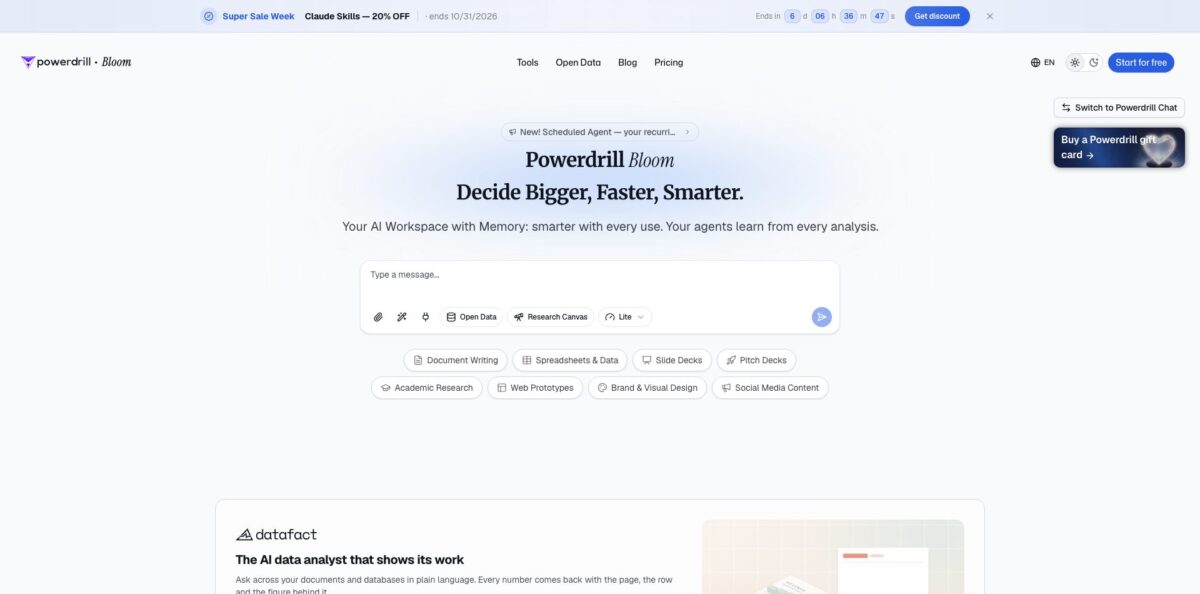
Powerdrill is a browser-based AI data analysis service whose flagship product, Powerdrill Bloom, turns uploaded spreadsheets, PDFs and documents into charts, written findings, reports and slide decks while you ask questions in plain English. Behind the chat sits a team of agents: the company describes Analyst, Engineer and Detective agents that clean, query and mine the data, plus a Verifier that cross-checks calculations to cut down on invented numbers. Workspaces keep files and context between sessions, and a built-in Open Data layer adds SEC filings, economic indicators and research papers. The weak spot is cost transparency, because plans are sold in credits and the pricing page does not say how many credits a typical analysis consumes. Pick it if you are a non-technical analyst who needs presentation-ready output rather than a code notebook.
How to start using Powerdrill?
Go to powerdrill.ai and click Start for free. The sign-in screen offers Sign In with Google, Sign In with GitHub or a plain email address, and new accounts begin on the Free plan with 1,000 credits that refresh every day, so you can test with your own data before paying anything. The same screen has a Switch to Powerdrill Chat link if you prefer the older chat-style interface to the Bloom workspace.
For a first real scenario, upload a file you already know well, such as last quarter’s sales export in Excel or CSV. According to the Bloom product page, the agents read the structure, clean the data and then propose three exploration paths to start from. Follow one of them or type your own question, for example which region drove the drop in margin, and the canvas fills with charts and short text insights that you can rearrange and extend with follow-up questions.
The setting that shapes long-term results is the Workspace. Since the June 2026 update, each workspace keeps uploaded files indexed across chat sessions, can have its own skills and MCP servers switched on, and stays isolated from your other projects. Create one workspace per client or business area so context from one job never leaks into answers for another. If the same report repeats every Monday, the Scheduled Agent lets you describe the task once, pick daily, weekday, weekly or monthly runs, and find the finished report in the workspace.
Before you share anything, check where each number came from. Insight Trail, added in January 2026, links every insight back to the spreadsheet, document or web source it was drawn from, and the Verifier agent flags inconsistencies. When the canvas looks right, export a PowerPoint deck or share the canvas itself. Per the Bloom FAQ, recipients can view the insights and slides and keep exploring, but they do not get access to the original dataset.
Who is it for?
Business and operations analysts
You spend more time building weekly decks than analysing the numbers inside them. Powerdrill takes an Excel or CSV export, produces charts and written findings, and turns the canvas into slides. The Scheduled Agent can rerun the same analysis on a timetable, so the Monday report is already waiting instead of being rebuilt by hand.
Marketers and growth teams
Campaign exports from ad platforms and analytics tools pile up faster than anyone can pivot them. You can ask why conversions dipped in a given week and get a chart plus a plain-language explanation without writing SQL. Expect to double-check attribution logic, because the agents only see the columns you upload.
Consultants and agency staff
Clients want a polished deck, not a notebook full of code. The path from canvas to PowerPoint export shortens the gap between finding something and presenting it, and separate workspaces keep each client’s files apart. Sharing a canvas lets a client explore the findings without receiving your raw data.
Investors and market researchers
The Open Data layer covers SEC filings, real-time and historical market prices, FRED and World Bank indicators, patents and company data. You can combine a public dataset with your own spreadsheet in a single question. Treat the output as a research starting point and confirm key figures against the original filings.
Academic and healthcare researchers
Literature reviews start with finding the right papers and trials. Powerdrill searches more than 40 million papers from arXiv, PubMed, bioRxiv and medRxiv, plus clinical trial records from ClinicalTrials.gov, and summarises what it finds with links back to sources. It saves time on scoping, though it does not replace a systematic review protocol.
Students and budget-conscious freelancers
The free tier’s 1,000 daily credits and a low entry price make it a cheap way to get charts and summaries from coursework or client data. You do not need to learn SQL or Python first. The trade-off, according to independent comparisons, is less statistical depth than code-first tools.
Powerdrill pricing
Every plan is built around credits. All accounts, including Free, get 1,000 credits that refresh daily, and paid tiers add a monthly credit pool on top, along with more scheduled tasks and access to heavier agent work. Annual billing equals roughly two months free (time-limited first-year promotions also appear on the pricing page). One-time credit packages are sold on any plan, including Free; they stack on top of plan credits and stay valid for 12 months. The page does not state how many credits a typical analysis or slide deck uses, so watch your balance during the first week.
1,000 daily refreshed credits, uploads of Excel, CSV, PDF and document files, built-in open data search, insights, charts and summaries, built-in agent skills, basic slides, docs, sheets and images, and 1 scheduled task.
Adds 5,000 monthly credits on top of the daily 1,000, what the page calls Claude Code and Codex-level agent tasks, advanced open-data retrieval, custom agent skills and Claude Skills workflows, Office documents, Excel analysis, Nano Banana image generation and 20 scheduled tasks.
Same feature list as Pro with 11,000 monthly credits.
60,000 monthly credits, higher-capacity agent execution and more quota for skills, aimed at finance, market, competitor and product analysis.
$999/month and $1,999/month, listed as monthly plans with 400,000 and 850,000 monthly credits for very heavy workloads.
Everything in Pro, plus a team where members draw on shared Team Credits; each member uses one seat.
on-premise or private-cloud deployment is sold through the sibling product DataFact, where pricing is quote-based and scoped per project.
Powerdrill key features
A multi-agent analysis team handles each question
The company describes Analyst, Engineer and Detective agents that clean data, run the analysis and hunt for patterns, with a Verifier agent that cross-checks entries and calculations, including against web sources. You get a second pass on the numbers before they reach a slide, which is useful when the output goes to a client or a board.
The visual AI canvas replaces a long chat thread
Charts, text insights and follow-up questions sit side by side as cards, and Bloom suggests three exploration paths after each upload. Comparing several angles is faster than scrolling back through a conversation to find the chart you liked an hour ago.
Report and slide generation turns an exploration into a deliverable
Bloom gathers the insights and charts you selected into a PowerPoint deck with a choice of themes, and separate tools convert PDFs, Excel files or a plain topic into slides, reports and infographics. The step from analysis to presentation shrinks from an afternoon of formatting to a download.
Workspaces with memory keep context between sessions
You upload a file once, it is indexed whether it is a PDF, slide deck, spreadsheet, image, audio or video file, and it stays available to every new chat in that workspace. Each workspace can run its own skills and MCP servers, and projects stay isolated from each other.
Open Data search adds 12 public datasets you can query in plain English
They include academic papers, clinical trials, drug databases, SEC filings, market prices, economic indicators from FRED and the World Bank, prediction markets, shipment tracking, US patents and LinkedIn company and people data. You can enrich your own spreadsheet with outside context without hunting for downloads.
Insight Trail and the Scheduled Agent cover trust and repetition
Insight Trail traces each insight back to the file, row or web page behind it, while the Scheduled Agent reruns a natural-language task daily, on weekdays, weekly or monthly, even when nobody is signed in, and drops the result into your workspace. Free accounts get 1 scheduled task and paid plans get 20.
Chat and developer integrations extend the workspace
You can connect Slack or Telegram and request analysis from a conversation, and the documentation covers an Enterprise Open API for datasets, data sources, sessions and jobs, with an open-source MCP server on GitHub. Teams that already live in Slack can get answers without opening another tab.
Powerdrill Pros & Cons
Pros
Powerdrill covers the whole path from a raw file to something you can present, a step most chat-with-your-data tools leave to you. Upload a spreadsheet, follow the suggested exploration paths, and export a themed PowerPoint deck without touching a formula. The Verifier agent and Insight Trail give you a way to trace numbers back to their source, and persistent workspaces mean you upload a file once instead of every session. G2 reviewers single out how easily non-experts can get started, and the entry price undercuts many rivals, with 1,000 free credits refreshing daily. Built-in public datasets add context you would otherwise collect by hand. Start on the Free plan with a familiar file to see whether the outputs match your own numbers.
Cons
The credit model is hard to predict: plans list monthly credit pools, but the pricing page never says what a typical analysis or deck costs. Independent reviews are thin, with only a handful on G2, Product Hunt and Trustpilot, and the low ratings mention inconsistent answer quality and a billing dispute. Editorial comparisons note less statistical depth than code-first tools, and G2 users ask for more chart types. The Terms of Service say subscriptions renew automatically, cancelling renewal means contacting support, and fees are non-refundable unless the law requires otherwise. Product names also shift between Bloom, Powerdrill Chat and DataFact. Test your credit usage on a monthly plan first and set a reminder before any annual renewal.
Use Powerdrill if you want…
- Turn Excel and CSV exports into charts without formulas.
- Generate PowerPoint decks straight from your data analysis.
- Ask plain-English questions about spreadsheets and PDFs.
- Trace every AI insight back to its source.
- Schedule recurring reports that run without you.
- Combine your files with SEC filings and economic data.
- Keep client projects in separate workspaces with memory.
- Get data answers inside Slack or Telegram.
Powerdrill alternatives




Powerdrill Reviews
G2 reviewers like that people without data skills can upload a file and start asking questions with no code, but they want more chart types and more accurate answers to some questions.
One G2 reviewer calls it one of the better tools for pulling insights from several data sources at once, while saying it needs more algorithms and features to compete with Power BI.
Early Product Hunt users describe it as free and easy for querying their own files, and the single formal review there sees it as lightweight AI reporting that still needs enterprise features and case studies.
The two Trustpilot reviews are negative: one says answer quality was inconsistent and an app built on a dataset ignored that dataset, and the other alleges a billing problem without giving details.
Hacker News commenters on the 2024 Show HN thread found it handy for non-programmers, but questioned the user-count and leaderboard claims on the homepage at the time.
FAQ
Is Powerdrill free?
Yes. The Free plan costs $0 and includes 1,000 credits that refresh daily, file uploads, open-data search, charts, summaries, basic slides and 1 scheduled task. Paid plans start at $19.90 per month.
What file types can I upload to Powerdrill?
The pricing page lists Excel, CSV, PDF and document files on every plan, and the Bloom FAQ also mentions TSV. Workspaces index PDFs, slides, docs, spreadsheets, images, audio and video, and the API documentation adds formats such as JSON, Markdown, TXT, DOCX and PPTX.
Is my data secure with Powerdrill?
Powerdrill states that it is SOC 2 Type II certified and runs a public trust center. When you share a Bloom canvas, recipients see insights and slides but not the original dataset, and deleting a canvas removes its uploaded file, insights and presentations.
Can Powerdrill connect to SQL databases?
The features list includes Chat with Database, AI SQL Chatbot and Text to SQL tools that turn questions into SQL queries against your databases. For data that cannot leave your network, the company points to DataFact, which runs on-premise or in a private cloud.
Does Powerdrill have an API?
Yes. The documentation describes the Powerdrill Enterprise Open API, which authenticates with API keys and covers datasets, data sources, sessions and jobs, and the company publishes an open-source MCP server on GitHub. The docs price Enterprise usage by jobs and storage rather than by the credit plans, so confirm current terms before building on it.
What languages does Powerdrill support?
The company says the service is available in 19 languages, and the website has versions in Spanish, French, German, Japanese, Korean, Chinese, Arabic, Hindi and more. The Bloom FAQ says this lets you explore and analyse data in your preferred language.
How do I cancel a Powerdrill subscription?
Subscriptions renew automatically at the end of each monthly or annual cycle. The Terms of Service say you stop renewal by contacting Powerdrill support from your account, and paid fees are not refundable unless the law requires it.
What is the difference between Powerdrill Bloom and Powerdrill Chat?
Bloom is the current flagship at powerdrill.ai: an AI workspace with a visual canvas, an agent team, memory and slide export. Powerdrill Chat, at chat.powerdrill.ai, is the original chat-based interface for asking questions about uploaded files, and you can switch to it from the sign-in page.
Similar tools
 HexCollaborative analytics workspace that mixes SQL, Python and AI agents in notebooks, then publishes results as data apps and plain-language answers.
 WindwardMaritime AI platform that fuses AIS, satellite and ownership data into vessel risk scores, sanctions screening, alerts and container ETAs.
 Delve AIAI market research platform that builds personas from analytics, CRM and social data, then lets you chat with them or run synthetic