

PromeAI
Art GenerationUpdated November 12, 2026
Browser-based AI design studio that turns sketches, photos and 3D views into photorealistic renders, then edits, upscales or animates them into video.
We may earn a commission when you sign up through our links. It does not affect our reviews.
What is PromeAI?
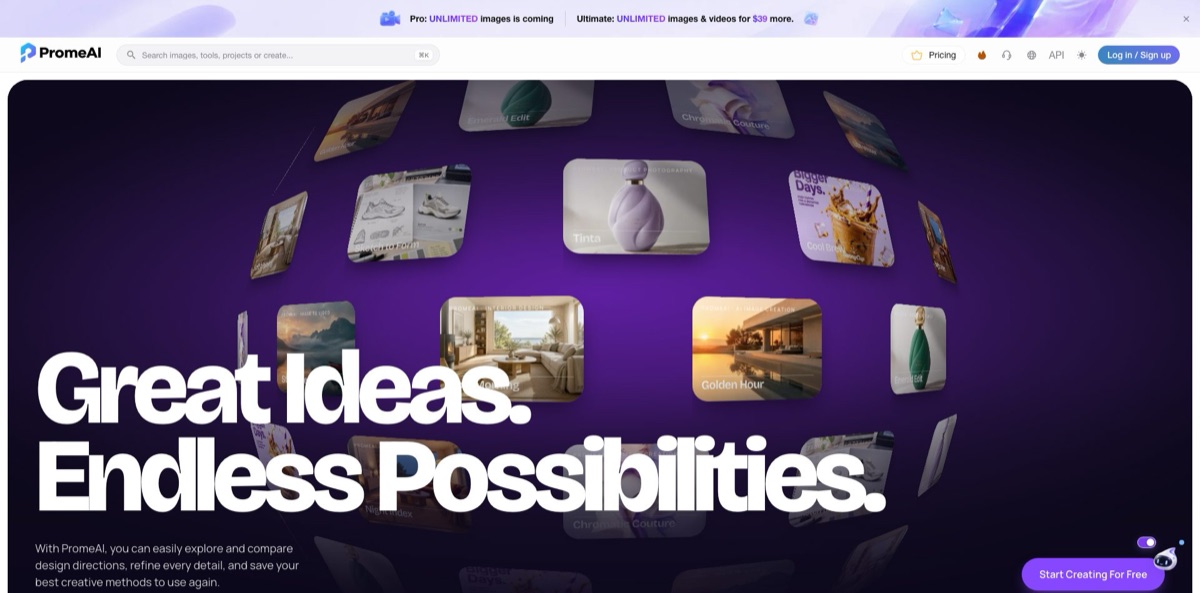
PromeAI turns rough design input into photorealistic visuals inside a browser. Its signature tool, Sketch Rendering, takes a hand drawing, a photo or a 3D view, combines it with a prompt, a style and scene preset and a creativity slider, and returns a render you can show a client. Around that core sit a text-to-image generator with 15 image models, image-to-video with 13 video models, erase and replace, outpainting, relighting, an HD upscaler and image-to-3D. Everything runs on monthly coins, and the higher plans add unlimited generation on selected models. The weak spot is fine control: users report results that drift from the intended concept, and newer video models eat coins quickly. Pick it if you are an architect, interior or product designer who needs fast concept images rather than final production renders.
How to start using PromeAI?
Open promeai.pro and click Log in / Sign up; the page offers Google, Apple and Microsoft sign-in. The terms require you to be at least 18. The Start Creating For Free button drops you into the AI image generator, and a free account level exists, but the pricing page lists only paid plans, so expect a small allowance meant for trying the tools rather than real project work.
For a first real job, open Tools, then Rendering, and choose Sketch Rendering. Drop in a sketch, photo or 3D model view (one file at a time), add a short prompt describing materials and mood, and optionally upload a reference image for style. Pick a model version (V1, V2 or V3), a Style and Scene preset, and a rendering Mode. The gallery underneath filters examples by architecture, interior, landscape, fashion, jewelry, footwear, vehicle and packaging design, which helps you see what each preset is good at.
The settings that change results most are the Creativity slider and the Advanced panel. Low creativity keeps your lines and proportions; higher values let the model invent more. Advanced adds a negative prompt, an Artistry value, and Perspective, Lighting and Detailed options. Fast Mode speeds up generation, and each run returns 3 images by default. Your plan sets how many Fast Mode runs you get each month and how many jobs can run at once.
Before you send anything to a client, compare the three outputs and fix local problems with Erase & Replace or Region Rendering instead of regenerating the whole scene. Run the keeper through HD Upscaler if you need print size, or send it to Image to Video for a short MP4 walkthrough. Add finished images to your saved assets, and check that your plan includes commercial rights before the render leaves your desk.
Start with a clean, tightly cropped sketch and a low creativity setting, then raise it one step at a time until the render stops respecting your lines.
Who is it for?
Architects
Producing early concept renders in V-Ray or Lumion takes hours you rarely bill for. PromeAI turns a hand sketch or a SketchUp-style screenshot into several photoreal options in one run. You can show clients a direction at the first meeting instead of the third.
Interior designers
Clients struggle to picture a room from a plan or a mood board. Sketch Rendering, Erase & Replace and Relight let you test furniture, finishes and lighting on the same base image. Swapping a sofa or flooring material no longer means rebuilding the whole scene.
Product and industrial designers
Early ideation produces dozens of rough sketches that never get rendered. PromeAI gives each one a quick realistic treatment, plus an Image to 3D Model tool for a first volume. It works for concept reviews, not for CAD-accurate tolerances.
Fashion and accessories designers
Turning flat sketches into lookbook-style visuals usually needs a photographer or a 3D artist. The rendering gallery covers fashion, jewelry and footwear, and the platform includes model and try-on style tools. You can test colorways before sampling anything.
Marketers and social media creators
Product shots and renders need motion for Reels, TikTok and ads. Image to Video animates a still with a motion prompt, start and end frames, and MP4 output, while Background Remover and AI Background Generator handle cleanup. One subscription covers both stills and short clips.
Design students and educators
Rendering software is expensive and slow to learn. PromeAI runs in a browser, and the pricing page includes an application for education licensing. Students can present portfolio projects as rendered images rather than bare line drawings.
PromeAI pricing
Everything is paid in coins. Each plan refills a monthly coin balance, every model and setting has its own coin cost, and the pricing page converts each plan into the maximum number of generations per model. Higher tiers also make extra coins cheaper, raise concurrency and Fast Mode quotas, and add unlimited generation on eligible models. Prices below are the current USD prices on the official pricing page on November 11, 2026. The page shows them as a sale against higher crossed-out prices ($29, $59, $119 and $138 a month), with a countdown timer and up to 26% off on yearly billing, so recheck before you pay.
500 coins a month, 2 concurrent image generations, 50 Fast Mode generations a month and up to 10 queued jobs. Output is for personal use only, with no commercial rights. Extra coins cost $10 for 200.
2,000 coins a month, a full commercial license, 5 concurrent image generations, 100 Fast Mode generations and a 20-job queue. Extra coins are 20% cheaper at $10 for 250. PromeAI’s pricing data lists a 7-day free trial on the monthly Standard plan.
6,000 coins a month plus one unlimited benefit you choose: unlimited images or unlimited videos on eligible models. Commercial license, 10 concurrent generations, 200 Fast Mode runs and a 40-job queue, with extra coins at $10 for 400. Three GPT Image models are unlimited only at 1K low quality.
Both unlimited benefits at once, images and videos, plus the same 6,000 monthly coins for models and settings outside the unlimited list.
Adds email invites, account allocation, and private plus shared team workspaces.
Coins matter most for video. Base’s 500 coins cover at most 3 clips on Seedance 2.5, while Pro and Ultimate cover up to 80. Cancellations take effect at the end of the billing cycle, after which the account drops to the Free plan. Refunds within 7 days of an order are calculated on the remaining days, and later refunds are limited to cases such as long outages or duplicate charges.
PromeAI key features
Sketch Rendering is the core tool
You upload a sketch, photo or 3D view, add a prompt and an optional reference image, then steer the result with model versions V1 to V3, Style and Scene presets, a rendering Mode and a Creativity slider. Advanced options add a negative prompt, Artistry, Perspective and Lighting.
A multi-model image generator puts 15 image models on one bill, including GPT Image 2.5, Nano Banana Pro, Seedream 5.0 Pro, Qwen Image 3.0 and PromeAI’s own V1 to V3. The pricing page shows how many images each plan buys per model, from 50 Nano Banana Pro images on Base to 5,000 on the older in-house models. You can pick a cheap model for exploration and a premium one for the final shot.
Image to Video animates a still image from a motion prompt
You can set a start frame and an end frame, choose the model and mode, and download an MP4 draft. Thirteen video models are available, including Seedance 2.5, Wan 3.0, MiniMax H3 and LTX 2.3, and some of them are unlimited on Pro (video choice) and Ultimate. It suits product reveals, real estate walkthrough drafts and social hooks.
The editing toolkit fixes renders without starting over
Erase & Replace swaps an object with AI, Region Rendering edits a masked area, Relight changes the lighting mood, Outpainting extends the frame, and HD Upscaler raises resolution. Background Remover, AI Background Generator and an AI PNG Generator cover product cutouts.
Image to 3D Model turns a picture into a detailed 3D model, and Image Variation produces several creative alternatives from one image. Together they help product and game designers move from a single concept image to a set of options and a rough volume to review.
Canvas is the newer workspace for comparing design directions side by side, refining details and saving creative methods so you can reuse them. A SkillHub, a community gallery and design challenges sit in the same navigation. It turns one-off prompts into a repeatable house style for a studio.
PromeAI Pros & Cons
Pros
Sketch-to-render is a real workflow here rather than a prompt trick: reference image, presets, creativity, negative prompt, perspective and lighting all sit on one panel. You get image, editing, video and 3D tools from several model vendors under one subscription, so you are not tied to a single provider. The pricing page is unusually transparent, translating coins into generation counts per model, and annual billing brings Standard down to $29 a month. Paid plans include permanent private history, and Standard and above include commercial rights. Reviewers consistently say it saves hours at the concept stage. Use the per-model table to plan your month before choosing a plan.
Cons
Control over fine detail is the most common complaint: renders can miss key details or change elements you wanted to keep, and fixing them takes several rounds. Video is expensive in coins on the newest models, and “unlimited” only covers eligible models, durations and modes. Base gives no commercial rights, and the free tier is not documented on the pricing page. Some users report slow processing on complex designs and occasional freezes. The privacy policy is short and says uploads are not retained after processing, which sits oddly with saved history, and there is no published API reference. Keep sensitive client files out until support confirms how storage works.
Use PromeAI if you want…
- Turn hand sketches into photorealistic architecture renders.
- Test interior finishes and furniture on one base image.
- Render product concept sketches before investing in CAD.
- Animate renders and product photos into short MP4 clips.
- Use Nano Banana, Seedream and GPT Image models together.
- Remove or replace objects without regenerating whole scenes.
- Upscale concept images for print-size client presentations.
- Turn a single picture into a rough 3D model.
PromeAI alternatives
 KreaRead review →
 Leonardo.aiRead review →
 MidjourneyRead review →
 RecraftRead review →
 OpenArtRead review →
 Adobe FireflyRead review →
PromeAI Reviews
G2 reviewers praise how quickly simple sketches and short text prompts become realistic images, singling out Sketch Rendering and Background Diffusion for architectural concepts and product mockups, but say there is little room to fine-tune a result that comes out slightly off.
A G2 user who refines doodles into finished visuals likes the realistic output but finds the back-and-forth over small details irritating, because the AI keeps altering parts it does not understand.
On Techjockey, mostly graphic designers rate it 4.0 out of 5 and like the realistic images from basic prompts and the range of styles; the recurring complaints are the price and slow processing on more complex designs.
One G2 reviewer warns that generated images are deleted after 30 days unless you manually add them to saved assets, and another mentions the site occasionally freezing mid-session.
FAQ
Is there a free plan for PromeAI?
A free account level exists, and cancelled subscriptions drop back to it, but the pricing page lists only paid plans. PromeAI’s own blog describes it as 10 coins a month with watermarked, personal-use output, so treat it as a trial.
Can I use PromeAI renders commercially?
Yes on Standard, Pro, Ultimate and Team plans, which include a commercial license. Base is marked personal use only, and you remain responsible for third-party rights in anything you upload.
What can I upload for sketch rendering?
The tool accepts sketch drafts, photos and 3D model views, one file at a time, plus an optional reference image. Clean, tightly cropped line work with a specific prompt gives the most faithful results.
How do PromeAI coins work?
Each plan refills a monthly coin balance, and every model and setting has its own coin cost. Unlimited benefits on Pro and Ultimate cover only eligible models, and extra coins cost $10 for 200, 250 or 400 depending on your plan.
Can I cancel and get a refund?
You can cancel anytime from your membership page, and access continues until the end of the billing period. Refund requests within 7 days are calculated on the remaining days; after that, PromeAI only considers long outages and duplicate payments, and a wrong package can be exchanged.
Does PromeAI have an API?
The site header links to an API key tab in your profile settings, but PromeAI does not publish public API reference documentation. Contact tech@promeai.pro for details on access and limits.
Is my data private?
The privacy policy says uploads are processed in the cloud with encryption and not retained after results are returned, while paid plans advertise permanent private history. For confidential client work, ask support how storage applies to your account.
Does PromeAI offer team plans?
Yes. Team plans are billed annually from $3,900 a year and add email invites, account allocation, and private plus shared team workspaces.
Similar tools
 CustomuseAI 3D creation platform that chains image, video and 3D models into node workflows for game-ready assets, Roblox items and scenes.
 VisualGPTCredit-based AI image and video studio that runs Nano Banana, GPT Image, Seedream, Flux and Kling for product photos, photo edits and
 LovartAI design agent that turns a chat brief into logos, social posts, product shots, slides and videos on one editable infinite canvas.