

PXZ AI
Image GenerationUpdated November 17, 2026
Credit-based AI image and video hub that bundles Nano Banana, Seedream, GPT Image, Sora 2, Veo and Kling models with 150+ photo and video effects.
We may earn a commission when you sign up through our links. It does not affect our reviews.
What is PXZ AI?
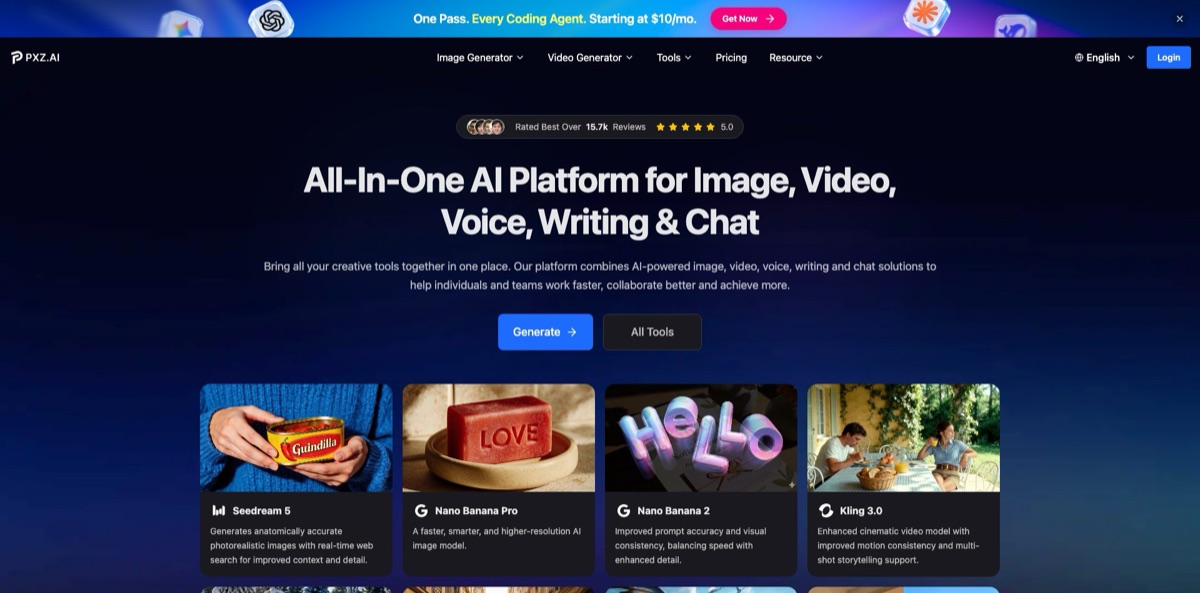
PXZ AI is a browser-based creative hub that puts third-party image, video and music models behind one login and one credit balance. The image generator lists twelve models, including Nano Banana Pro, Nano Banana 2, GPT Image 2.0, Seedream 5, Qwen 2 and Midjourney V8.1, while the video side carries Sora 2, Veo 3.1, Kling 3.0, Hailuo 2.3, Seedance 2.0 and PixVerse V5. Around them sit more than 150 one-click photo and video effects, an upscaler, a background remover and a song generator. The pitch is simple: compare models side by side without paying for four separate subscriptions. The weak spots are trust and transparency. No company name appears on the site, the legal pages still describe an AI music service, and independent user reviews are almost nonexistent. Pick it for cheap model sampling and social effects, not for client work that needs airtight licensing.
How to start using PXZ AI?
Click Login in the top bar and create an account; the terms mention third-party sign-in such as Google, and every generator shows a “Sign in to Generate” button until you do. New accounts start on the free plan, which the site describes as access to essential tools for testing before you upgrade. The interface comes in 12 languages, including German, Spanish, Japanese, Korean and both Chinese scripts, so switch the language picker first if English is not your working language.
For a first real job, open Image Generator from the AI Image menu. The model picker can be filtered by vendor (Google, OpenAI, ByteDance, Qwen, Midjourney), and each card shows an estimated wait and a credit cost. Nano Banana runs at 100 credits, while Nano Banana Pro, GPT Image 2.0 and Midjourney V8.1 sit at 200. Type a prompt of up to 5,000 characters, or press AI Enhance to let the assistant pad out a short idea. For product shots or edits, attach reference images in the upload slot.
Before you generate, set the output. Aspect ratios run from 1:1 through 16:9 and 9:16 to ultra-wide 21:9 and 9:21, resolution goes from 1K to 2K or 4K, and you can save as PNG or JPG. There is also a Public Visibility switch. Video works the same way in Video Generator: pick a model, add a start image and an optional end frame, then choose length (4, 8 or 12 seconds on Seedance 1.5 Pro), 480P or 720P, Fixed Lens and Generate Audio.
When results land, compare them in your project history and download the keeper. Check your plan before you publish anything: Basic exports video at 540p with a watermark, free-plan outputs are licensed for personal use only, and the privacy policy says generations may be publicly viewable unless you mark them private. Turn Public Visibility off for anything client-related, then re-run the best prompt on a second model to confirm it is the model, not luck, giving you the result.
Who is it for?
Short-form video creators
You need a fresh hook for TikTok or Reels every day and do not want to learn five apps. PXZ offers ready-made effects such as AI Hug, Muscle Surge, Old Photo Animation and Earth Zoom that turn one photo into a clip. You trade originality for speed, which is usually the right call for trend content.
Small online sellers
Studio product photos cost more than your monthly margin. With reference-image models like Nano Banana Pro you can drop a packshot into a styled scene and export at up to 4K. Expect a few retries per image, so budget credits for iteration, not just final renders.
Model-curious hobbyists
You read about Seedream 5, GPT Image 2.0 and Midjourney V8.1 and want to see the difference on your own prompt. PXZ puts them in one picker with the credit price on each card, which beats juggling separate trials. The catch is that you depend on PXZ keeping each model online.
Performance marketers on TikTok
You need many ad variations fast, and PXZ has a TikTok Business Center page for connecting a business identity and creating ad accounts. Pair that with the video effects and you can produce test creatives without a designer in the loop. Given the thin licensing pages, clear any creative you plan to put ad spend behind with your legal team first.
Casual photo editors
Upscaling an old family photo, colorizing it or removing a background are one-step tools here. You do not need a separate subscription for each small fix. The 2x, 4x and 8x upscale options cover both screen use and print.
PXZ AI pricing
Everything on PXZ runs on credits. Each plan refills a monthly credit balance, and every model or effect has its own price: an image effect costs 200 credits, a video effect 750, Nano Banana 100 and video models anywhere from about 150 to over 2,100 credits for Kling O1. Plans also differ on watermark, resolution, clip length, queue speed and how many jobs you can run at once. Annual billing cuts the monthly rate, and one-time credit packs top you up when you run dry. Credits are valid for the plan period and reset when it expires. Prices below are in USD from the official pricing page.
Access to essential tools for trying the platform. The terms limit free-plan outputs to personal, non-commercial use, and the pricing page does not state a fixed free credit amount.
6,000 credits per month, quoted as up to 2,760 images or 480 videos a year, 1 concurrent task, normal queue, basic-quality images and 5-second video at 540p with a watermark. Fine for testing models; weak for anything you plan to post.
16,000 credits per month plus a 10% bonus, up to 7,380 images or 1,272 videos a year, 2 concurrent tasks, watermark-free 720p/1080p video, 50+ templates and effects, and support replies within 24 hours.
50,000 credits per month plus a 35% bonus, up to 23,076 images or 3,996 videos a year, 3 concurrent tasks, high-speed queue, 10-second 1080p video, 200+ templates and effects, and a dedicated support channel promising replies within 12 hours.
one-time top-ups of 5,000 credits for $10, 10,000 for $20 ($18 on Plus, $16 on Pro) and 30,000 for $60 ($45 on Plus, $30 on Pro).
Payment goes through Visa, Mastercard or PayPal, with Apple Pay and Google Pay in some regions. Subscriptions renew automatically and can be cancelled from the account dashboard, but refunds only cover technical failures, duplicate or unauthorized charges and billing errors reported within 7 days.
PXZ AI key features
Multi-model image generator with twelve engines in one picker: Nano Banana, Nano Banana 2, Nano Banana 2 Lite, Nano Banana Pro, GPT Image 2.0, GPT Image 1.5, GPT 4o Image, Seedream V4, 4.5 and 5, Qwen 2 and Midjourney V8.1. Each card shows estimated wait and credit cost, so you can weigh speed against price before you click. Output goes up to 4K in PNG or JPG across eleven aspect ratios.
Video generator covering 16 models, including Sora 2, Sora 2 Pro Storyboard, Veo 3 and 3.1, Kling 2.5, 2.6, 3.0 and O1, Hailuo 02 and 2.3, Seedance 1.0 Pro Fast, 1.5 Pro and 2.0, PixVerse V4.5 and V5, and HappyHorse 1.0. You can start from text or an image, add an end frame and toggle generated audio. Costs swing widely, from roughly 150 credits on Seedance 1.5 Pro to 800+ on Veo 3.1, so check the card before you queue a batch.
Effects library with more than 150 photo and video presets
Photo effects include Studio Ghibli, AI Headshot Generator, Pet to Human, Action Figure Generator and AI Family Portrait; video effects include AI Hug, AI Fight, AI Angel Wings and Old Photo Animation. Photo presets cost 200 credits and video presets 750, which makes video effects the fastest way to drain a Basic plan.
Image utilities for cleanup work: an AI Image Upscaler with 2x, 4x and 8x scales, a Background Remover, a Photo Colorizer and a Logo Generator. These sit next to the generators, so you can upscale a result without exporting it to another app. That suits quick fixes, not detailed retouching.
Video utilities including Video Enhancer and Multi Face Swap Video at 80 credits each, plus a video compressor, trimmer and format converter. These are basic post-production steps, handy when a generated clip needs a lighter file or a different format for upload.
Music generator built on a model listed as MusicV4.5 at 150 credits per run, with Simple, Normal and Instrumental modes
You paste lyrics or describe a mood, then extend the track if you like the melody. It is a side tool rather than a reason to subscribe, but it saves a separate music app for short background tracks.
TikTok Business Center connection that lets you authorize a TikTok business identity, pick or create a Business Center and set up advertising accounts from inside PXZ. It points at the platform’s real audience: social marketers who produce volume creative for paid short-form ads.
PXZ AI Pros & Cons
Pros
The model range is the main draw. Nano Banana Pro, GPT Image 2.0, Seedream 5 and Midjourney V8.1 for images sit next to Sora 2, Veo 3.1 and Kling 3.0 for video, all paid from one balance. Credit prices appear on every model card, so you see the cost before you commit. Annual Plus at $14/month removes watermarks and opens 1080p video, a low entry point for this many engines. The effects catalog is wide enough to feed a daily posting schedule. Start on Plus annual only after a month on monthly billing proves you will actually use the credits.
Cons
Trust signals are thin. The site names no company or address, the terms and refund policy still talk about AI music generation, and the homepage “5.0 from 15.7k reviews” badge is not tied to any review platform you can check. The only Trustpilot review complains about cancellation. Licensing is muddled too: the terms grant commercial use to paid users, while the pricing FAQ ties full commercial rights to Pro. Generations may be public by default, and the homepage promise that data is never used for training sits next to terms that let PXZ use anonymized free-tier outputs. Save cancellation and licensing screenshots before you pay.
Use PXZ AI if you want…
- Compare Nano Banana, Seedream and GPT Image outputs side by side.
- Test Sora 2, Veo 3.1 and Kling without separate subscriptions.
- Turn a single selfie into a viral video effect.
- Place product packshots into styled scenes at 4K.
- Produce many TikTok ad variations on a small budget.
- Upscale, colorize or cut out old photos in one place.
- Generate short background songs from lyrics or a mood.
- Pay per credit instead of committing to several AI tools.
PXZ AI alternatives
 KreaRead review →
 OpenArtRead review →
 ImagineArtRead review →
 Leonardo.aiRead review →
 getimg.aiRead review →
 SeaArt.aiRead review →
 DzineRead review →
PXZ AI Reviews
The single Trustpilot review is a one-star complaint from a subscriber who could not find a way to cancel or get back into the account, ended up blocking the card through the bank, and found the tools themselves underwhelming.
A hands-on write-up on AIBase praises having many image and video models in one clean, beginner-friendly interface and says image-to-video handled camera motion well, but notes the free quota is never clearly explained.
An independent 2026 review on Digitalizelife likes PXZ for fast social posts, thumbnails and ad tests, yet says credits disappear quickly on video and that 540p watermarked video on a paid Basic plan feels stingy.
A comparison article on CompareBestAI rates the image-to-video side and the effects catalog as strong for social media, while warning that models burn credits at very different rates, so heavy video work pushes you toward Plus or Pro.
FAQ
Is PXZ AI free to use?
Yes, there is a free plan with access to essential tools, but outputs on it are licensed for personal, non-commercial use only. The pricing page does not list a fixed free credit amount, so check your dashboard after sign-up.
Can I use PXZ AI images and videos commercially?
The terms give paid users a non-exclusive commercial license, while the pricing FAQ says Pro users get full commercial rights. If you sell client work, confirm with support@pxz.ai in writing which plan covers your use.
Which AI models does PXZ AI include?
Image models include Nano Banana, Nano Banana 2, Nano Banana Pro, GPT Image 2.0, GPT Image 1.5, Seedream 5, Qwen 2 and Midjourney V8.1. Video models include Sora 2, Veo 3.1, Kling 3.0, Hailuo 2.3, Seedance 2.0 and PixVerse V5.
Are my generations private?
Not automatically. The privacy policy says generated content may be publicly viewable unless you mark it private, so switch off Public Visibility in each generator before you create anything sensitive.
Do unused PXZ AI credits roll over?
No. Credits stay valid for the duration of your plan and reset when the plan expires, so plan your heavy video jobs early in the billing cycle.
How do I cancel and can I get a refund?
You can cancel from the account dashboard and keep access until the current period ends. Refunds are only granted within 7 days for technical failures, duplicate or unauthorized charges and billing errors, by email to support@pxz.ai.
Does PXZ AI have an API?
The site does not offer a public API or developer documentation. PXZ AI is built for use in the browser, so automation-heavy teams should look at developer-focused model hosts instead.
What payment methods does PXZ AI accept?
The pricing FAQ lists Visa, Mastercard and PayPal, plus Apple Pay and Google Pay in some regions. Plans renew automatically until you cancel.
Similar tools
 RunComfyCloud ComfyUI platform with per-second GPU billing, 200+ ready workflows, hosted image and video models, LoRA training and a serverless API.
 ImgGen AIBrowser-based AI image generator and photo editing suite with background removal, 8K upscaling, restoration and an API on one credit balance.
 Bulk Image GenerationBatch AI image generator that turns a prompt list or one brief into up to 100 images per run, with five models,