

Quadratic
Data AnalysisUpdated November 19, 2026
AI spreadsheet with Python, SQL and formulas in every cell, live database connections, and linked docs and slides that agents build from your data.
We may earn a commission when you sign up through our links. It does not affect our reviews.
What is Quadratic?
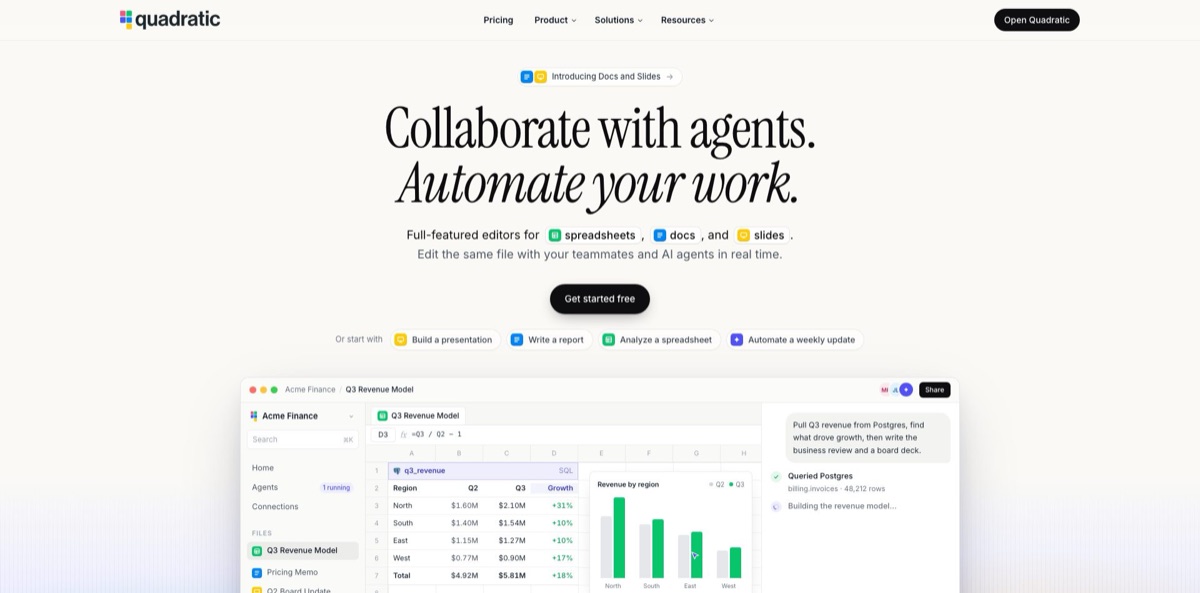
Picture a browser spreadsheet where any cell can hold a formula, a Python script, a JavaScript block or a live SQL query, and an AI agent edits the same grid you do. That is the core of Quadratic, and since November 2026 the same workspace also includes Word-style documents and PowerPoint-style slides whose numbers point back to the cells that produce them. It targets a familiar mess: analysis in one tool, the report in another, and copied figures going stale in between. The company advertises datasets up to 100 million rows and direct connections to Postgres, Snowflake, BigQuery and other sources. The weak spots are maturity and limits: Docs and Slides shipped only weeks ago, and the free plan’s AI allowance is small. Pick it if you analyze data with code or SQL and want results your team can audit cell by cell.
How to start using Quadratic?
Click Get started free on the homepage to open the web app at app.quadratichq.com. There is nothing to install, and Chrome or another Chromium browser gets first-tier support, while Safari and Firefox are second tier and slower. If you prefer a native window, a desktop app exists for macOS, Windows and Linux, and it also lets Python and JavaScript make API calls that browser CORS rules would block. Your first sheet opens with the AI chat already visible, and you can start blank, from an example file or from a template.
Your first real scenario is bringing data in and asking a question about it. Drag a CSV, Parquet or Excel file onto the grid, use File > Import > From Google Sheets, or attach a PDF with the paperclip so the AI can pull tables out of it. Then ask something specific, such as revenue by region for the last two quarters. Type @ to point the chat at a particular sheet, table, range or database connection, which gives the model exact context. When a request is ambiguous, the AI asks a multiple-choice clarifying question before it acts.
The cell is the screen that matters most. Click any cell and press / to open the command palette, then choose Python, JavaScript, SQL or Formula as the cell type. In Python, a single referenced cell arrives as a variable, a range arrives as a DataFrame, and the last line of code is returned to the sheet. For live data, open Dashboard > Connections, pick a database and allow Quadratic’s two published IP addresses on your firewall. For a REST service, choose Connect to anything and the AI walks you through an agent connection, storing keys as write-only team secrets.
Before you share results, right-click any important number and choose Trace value. The AI explains which formula, code cell, table or connection produced it and what sits upstream. Read the code cells the agent wrote the way you would review a colleague’s pull request. When the numbers hold up, invite teammates as editors or viewers, set a scheduled task so the sheet refreshes in the cloud, and ask the agent to turn the analysis into a document or deck that stays linked to the cells.
Who is it for?
Data analysts
You already write SQL and pandas, but your stakeholders live in spreadsheets. Quadratic lets you run the query in one cell, transform the result in Python next to it, and hand over a grid anyone can read. Analysis and presentation stop living in separate tools.
Finance and FP&A teams
Models built from exported CSVs go stale the moment someone re-pulls the data. Live connections to sources like Postgres, Snowflake, QuickBooks or Stripe, plus scheduled refreshes, keep the model and the board deck built on it in sync. Familiar formulas, pivot tables and Excel import and export stay available.
Engineers and technical founders
You want a scratchpad that speaks Python and JavaScript, calls APIs and can be driven from code. The Developer API and the hosted MCP server let scripts or assistants such as Claude and Cursor create files, write cells and run code. Ad hoc analysis becomes something you can automate.
Teams handling regulated data
Healthcare, finance and other compliance-heavy companies need answers before a security review. Quadratic lists SOC 2 Type II and HIPAA, zero-day data retention with its AI providers, admin controls that block downloads, and a self-hosting route. Procurement moves faster when those boxes are already ticked.
Students, teachers and researchers
The Education plan is free with a school email and lifts limits on sheets, code, teammates and connections. AI prompts stay at free-tier levels, so heavy AI users may still need Pro. You get Python and SQL without configuring a local environment.
Operations and business users
You do not write code, but you keep hitting exports that Excel refuses to open. Ask in plain English and the AI writes the formulas or Python, with every change visible in the sheet. A technical colleague can review the logic later.
Quadratic pricing
Pricing is per user, and every paid seat includes a monthly AI credit allowance measured in dollars rather than message counts. Only AI work you start counts against it: chat messages, code assistant conversations, PDF imports and web searches. Background AI such as autocomplete, chat naming and agent connection setup is free. Annual billing saves 10% on the paid plans, and all list prices are in USD.
Limited AI usage under a monthly message limit, the default model only, limited editable files, and limited sharing and connections. The plans table in the docs shows no file export to Excel, CSV or .grid on this tier, so treat it as a trial.
Each user gets $20 in AI credits per month, access to all models, additional privacy controls, unlimited sharing, files and connections, and file export. Pro is billed for the whole team, so every existing and new member pays the Pro price once you upgrade.
The AI allowance doubles to $40 per user per month, and you can buy additional AI usage on demand when it runs out. Everything in Pro is included.
Custom. Custom AI usage, single sign-on (SSO), a self-hosting option and dedicated support, quoted after you contact sales.
Sheets, code, teammates and connections are unlimited, but AI prompts follow free-plan limits.
Upgrades take effect immediately with prorated billing, and downgrades apply at the end of the current period. Payment goes through Stripe with cards, Stripe Link, Google Pay or Apple Pay.
Quadratic key features
Code in every cell
A cell can hold a formula, Python, JavaScript or SQL, and each code cell writes its output straight into the grid at its own position. Python ships with pandas, NumPy and SciPy, and micropip installs extra pure-Python packages at runtime. You get notebook power without leaving the layout your colleagues already understand.
An AI analyst that works inside the sheet
The chat writes formulas and code into real cells instead of answering with prose you have to trust, and it can generate datasets, debug broken code and build charts. @-mentions pin it to specific tables or connections, and memory keeps context at personal, team and connection level.
Live data connections
Native connectors cover PostgreSQL, MySQL, SQL Server, Snowflake, BigQuery, Supabase, Neon, MariaDB, CockroachDB, Databricks and MongoDB, plus apps like QuickBooks, Stripe, Google Analytics and Mixpanel, and 12,000+ financial institutions through Plaid. Agent connections extend this to any REST API, with credentials stored as team secrets that never appear in your code. Your sheet reads the source instead of last week’s export.
A grid built for big files
The company advertises datasets up to 100 million rows and native opening of multi-gigabyte CSV and Parquet files, compared with Excel’s 1,048,576-row ceiling. Rendering runs on a WebGL canvas, so you can zoom out over a whole dataset.
Linked Docs and Slides
Version 0.26.18 (November 2, 2026) added Word-style documents and PowerPoint-style presentations with .docx and .pptx import and export, and the AI can draft both from a description. Figures and charts point to the cells that produce them, so a data change flows into the report and the deck. That removes the copy-paste step where most reporting errors creep in.
Scheduled tasks
Cloud runners execute a whole file, a single sheet or a selection hourly, daily or on a custom cron schedule, with no browser left open. You can also ask the AI to create, pause or edit schedules in plain English. Runs are capped at once per hour, which suits reporting rather than real-time monitoring.
Developer API, MCP and multiplayer
A team-scoped Developer API with TypeScript and Python clients, and a hosted MCP server, let your code or assistants like Claude, ChatGPT and Cursor read and write Quadratic files. Teammates and agents edit the same file live with visible cursors. Files cannot be deleted through the API, which limits the damage a buggy script can do.
Quadratic Pros & Cons
Pros
Auditability is the standout. AI output lands as formulas and code in cells, so you can open any number and see how it was built, and Trace value walks the lineage for you. Mixing SQL, Python, JavaScript and formulas in one grid removes the export and import loop between a notebook, a BI tool and Excel. Live connections plus scheduled refreshes keep figures current, and linked documents and decks carry those numbers forward without copy-paste. Per-seat pricing is easy to forecast, and the security answers (SOC 2 Type II, HIPAA, zero-day AI retention, self-hosting) are ready for procurement. Rebuild one recurring report end to end before migrating anything else, so you see the full payoff early.
Cons
Docs and Slides only arrived in November 2026, so expect rough edges next to Word and PowerPoint and frequent changes from release to release. AI credits are capped in dollars per seat, long prompts on some models bill at a higher rate, and only Business can buy extra usage on demand, so Pro teams can stall at month end. The free plan restricts files and connections and lacks export. Performance depends on your browser and hardware: Safari and Firefox are second tier, WebGL must be enabled, and very large files can hit memory limits on iOS. Early marketing called the code open source, yet the license was source-available, and the main repository is no longer public on GitHub. Watch credit usage weekly in your first month to size the plan.
Use Quadratic if you want…
- Run Python, SQL and formulas in one shared grid.
- Query Postgres, Snowflake or BigQuery straight into a spreadsheet.
- Open CSV and Parquet files too large for Excel.
- Check every AI-generated number down to its source cell.
- Refresh recurring reports on an hourly or daily schedule.
- Turn spreadsheet analysis into linked reports and board decks.
- Let Claude or Cursor edit your spreadsheets through MCP.
- Give students a free Python-ready spreadsheet without local setup.
- Keep sensitive data on your own infrastructure through self-hosting.
Quadratic alternatives




Quadratic Reviews
A Product Hunt user who had worked with Quadratic for two months found its AI noticeably stronger on table-based files than other platforms, while another user who still loves the product regretted that the grid dropped negative cell coordinates.
Commenters on the 2025 Product Hunt launch liked the fast rendering and being able to zoom out over an entire dataset, but asked how it copes with really large files, and the team answered that a few hundred thousand rows ran without issues at the time.
Hacker News developers liked that JavaScript runs locally in the browser rather than round-tripping to a server as Google Apps Script does, though several asked what Quadratic offers that Google Sheets and Excel cannot.
Early adopters on the multiplayer launch saw real-time co-editing as the missing piece for a Figma-style spreadsheet, yet asked for clearer pricing and data storage details before rolling it out to a team.
Some engineers on Hacker News objected to the early open-source label because the code was only source-available, and one commenter said they would not evaluate it for their organization without a clear license and pricing path.
FAQ
Is Quadratic free to use?
Yes. The Personal plan costs $0 with limited AI usage, files, sharing and connections, and the Education plan is free for students, teachers and researchers with a valid school email.
Do I need to know how to code?
No. You can ask questions in plain English and the AI writes the formulas, Python or SQL for you, with every change visible in the sheet so you can review it.
Can I import and export Excel, Word and PowerPoint files?
Yes. Quadratic opens, edits and exports Excel workbooks, Word documents and PowerPoint decks, and also imports CSV and Parquet files and Google Sheets. According to the plans table in the docs, file export is included on Pro and Business.
Which databases can Quadratic connect to?
Native connections include PostgreSQL, MySQL, SQL Server, Snowflake, BigQuery, Supabase, Neon, MariaDB, CockroachDB, Databricks and MongoDB. Agent connections add any service with a REST API.
Is my data used to train AI models?
No. Quadratic says every AI provider it uses runs under a zero-day data retention policy, and team admins can disable prompt storage in settings. The company also lists SOC 2 Type II and HIPAA in its trust center.
Can I self-host Quadratic?
Yes. Docker and AWS deployments are officially supported, Azure and GCP are possible with help, and you need a license key that is free for individuals and priced per user for businesses. Self-hosted setups can also bring their own AI models.
Does Quadratic have an API?
Yes. The Developer API uses team-scoped tokens to create files, write cells, run code and read results, and a hosted MCP server lets assistants like Claude, ChatGPT and Cursor work in your files.
Can I cancel or downgrade my plan?
Yes, you can cancel or downgrade at any time. Downgrades take effect at the end of the current billing period, while upgrades apply immediately with prorated billing.
Similar tools
 RossumIntelligent document processing platform that uses a proprietary transactional LLM to capture, validate and export data from invoices and orders.
 VeryfiDocument AI platform whose OCR APIs turn receipts, invoices, checks and bank statements into JSON, with built-in fraud checks and a mobile
 SprigEnterprise survey platform where AI agents design studies, run adaptive surveys across email, panels and apps, and turn responses into reports.