

Quickchat
Chatbot BuildersUpdated October 5, 2026
Build human-like AI assistants that resolve queries by grounding LLMs in your specific business data and documentation.
We may earn a commission when you sign up through our links. It does not affect our reviews.
What is Quickchat?
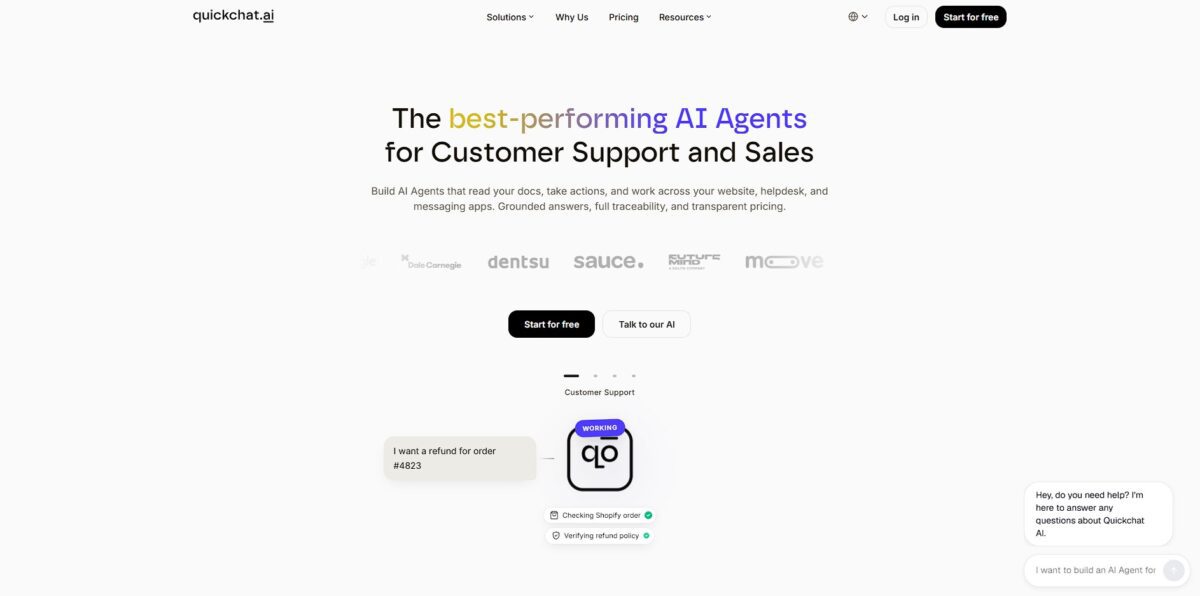
Quickchat AI is a conversational platform that connects Large Language Models to your specific business data via Retrieval-Augmented Generation. It skips the generic chatbot fluff by pulling facts directly from your PDFs or website URLs to answer customer queries. It focuses heavily on “resolution rates,” essentially trying to handle a refund request or a product compatibility question without a human ever touching it. While it integrates with everything from WhatsApp to Zendesk, the real value is the control it gives you over the AI’s persona and guardrails. This matters because it prevents the AI from hallucinating or going off-script during sensitive customer interactions. It works well for automating repetitive support tickets but might feel like overkill if you just need a basic FAQ bot.
How to start using Quickchat?
Start by creating an account on the Quickchat AI dashboard. You can sign up using an email or link a Google account to skip the manual forms. Once inside, you’ll land on a clean interface that isn’t cluttered with unnecessary tabs. This immediate access allows you to visualize the agent’s identity before committing to deep configurations. Getting the login sorted quickly means you spend more time on logic and less on setup.
The real work happens in the Identity tab. You name your agent and define its role in a short description. Being specific here keeps the bot from giving generic “I am an AI” responses. Instead of a vague helper, you can define it as a technical specialist or a friendly concierge. Defining these boundaries early ensures the bot remains helpful without overstepping its purpose.
Next, you populate the Knowledge Base. You can drag in PDFs, paste raw text, or just point it at a website URL to scrape relevant data. It’s better to upload clean, text-heavy docs rather than messy slides or images that confuse the parser. This step turns the blank slate into a functional tool that actually knows your specific business rules. Providing factual data ensures the agent provides accurate answers instead of hallucinating details.
The final phase involves testing and deployment. Use the AI Preview to chat with your creation and see if it retrieves information correctly. If it misses the mark, you hit the Retrain button to refresh its memory after updating the source docs. When it feels ready, you grab the embed code from the channels tab and paste it into your site’s HTML. Testing in small batches of data first prevents you from having to troubleshoot a massive, broken knowledge base later.
Who is it for?
Technical Support Leads
Best for those managing dense internal documentation or complex product wikis. It saves your team from digging through PDFs to answer the same “how-to” questions repeatedly. Your staff stop acting as human search engines and get back to solving actual technical hurdles.
Early-Stage Founders
Ideal for small teams that need to handle spikes in user queries without hiring a support department. You can sync your website data and let the AI handle the initial triage. Your burn rate stays low while you maintain a 24/7 presence.
Customer Success Managers
Useful for maintaining a consistent voice across global time zones. It prevents the frustration of “let me check and get back to you” during off-hours. Instant, accurate answers keep users from churning during their first week.
E-commerce Operators
Works well for stores with high inquiry volumes regarding shipping or simple product specs. It acts as a first-line filter for “Where is my order?” or basic compatibility checks. With the inbox clutter cleared, you can focus on high-value sales.
Project Managers
Good for teams that need to surface specific internal data points from a massive log of meeting notes or project files. Instead of scrolling through Slack history, you ask the bot for the specific deadline or decision. No more time wasted on internal information retrieval.
Quickchat pricing
Quickchat AI skips the obscure enterprise “call for quote” gatekeeping for its primary tiers, though the jumps between levels are steep. It uses a tiered subscription model that scales based on how many conversations your bot actually resolves or the depth of features your team needs to manage those chats. The platform offers a path for everyone from solo experimenters to scaling support teams, but the costs add up quickly if you need the full suite of automation tools.
This serves as your testing ground to verify logic before spending a dime. You can make sure the AI understands your specific documentation without financial risk.
A budget-friendly entry for low-volume sites needing an active bot presence. The trade-off is limited advanced automation, making it better for simple FAQ deflection than complex workflows.
This is where the platform starts feeling useful for small businesses with consistent traffic. It unlocks better performance and integration options for teams moving past the hobbyist stage.
Best for established brands that prioritize high resolution rates over human handoffs. It can pay for itself by keeping your support inbox from overflowing with repetitive technical queries.
This high-tier option provides the most headroom for scaling operations without moving into custom contracts.
This usage-based model aligns your bill with actual customer successes. It ensures you only pay for the work the AI successfully completes on your behalf. Start with the Free tier to crawl your website and test response accuracy; only jump to the Essential plan once your monthly chat volume outpaces the basic limits.
Quickchat key features
Upload your PDFs, website URLs, and FAQs to ground the AI in your specific business data
That keeps the bot from hallucinating generic internet facts when a customer asks about your specific refund policy or technical specs, and your support team stops answering the same five questions every hour.
The interface handles over 100 languages automatically without you manually translating a single string
I noticed it shifts between languages mid-conversation if the user changes their phrasing. You can scale to global markets without hiring a multilingual support staff.
Connect the agent to your CRM or internal database via API and MCP actions to automate task execution
Instead of just talking, the bot can actually look up an order status or update a lead record while the visitor is still on the page. A passive chat window becomes a functional member of your operations team.
The dashboard tracks “resolution rates” to show exactly how many tickets the AI closed without human intervention
You get a clear view of where the bot gets stuck, allowing you to patch knowledge gaps in the editor immediately. That also gives you a data-driven way to justify the software spend to your CFO.
Deploy the same bot across your web widget, messaging apps, and internal helpdesks from a single source
The trade-off is that while it works well for standard text platforms, complex custom UI elements might feel limited compared to a dedicated front-end build. Either way, you keep a consistent brand voice across every digital touchpoint.
Quickchat Pros & Cons
Pros
Quickchat stands out for its deep integration with your existing knowledge base. It ingests your documentation or FAQs and transforms them into a responsive assistant that rarely strays from the provided facts. I noticed it handles specific technical jargon better than general-purpose bots, which prevents frustrating loops where a customer asks for a part number and gets a generic apology. You spend far less manual labor scripting every single conversation flow. Use it to automate technical support if you have well-maintained internal docs.
Cons
The interface feels utilitarian and might frustrate users looking for flashy visual elements. While the AI mimics human conversation well, it lacks the creative flair needed for complex storytelling or brand-heavy marketing campaigns. I found that if your source data is messy or contradictory, the bot reproduces those errors with unsettling confidence. This matters because the bot is only as reliable as the PDF or URL you feed it during setup. Audit your knowledge source before the first sync to avoid spreading misinformation.
Use Quickchat if you want…
- Turn static knowledge bases into active conversation engines.
- Automate technical troubleshooting using your specific product documentation.
- Scale customer support globally with multilingual AI capabilities.
- Bridge the gap between raw data and human-like interactions.
- Improve resolution rates by grounding AI in verified facts.
- Free your team from answering repetitive product inquiries.
- Deploy a custom-trained virtual assistant without writing code.
Quickchat alternatives
 ChatbaseRead review →
 Fin (Intercom)Read review →
 Kore.aiRead review →
 Microsoft Copilot StudioRead review →
Quickchat Reviews
The RAG integration is flawless. Our bot actually stays on script now.
Best resolution rates we have seen. 50% cheaper than the big names.
Multilingual support is a game changer for our global customer base.
FAQ
What types of data can I use to train the AI Agent?
You can upload domain knowledge in various formats including text articles, website URLs, sitemaps, and files like PDFs or Word documents up to 32 MB.
Which messaging channels does Quickchat AI support?
Quickchat AI can be deployed across numerous platforms including your own website, WhatsApp, Telegram, Slack, Discord, and through a dedicated API.
Can the AI Agent perform actions in other systems?
Yes, AI Agents can be connected to external APIs, databases, or internal tools to automate tasks like checking orders, verifying policies, or updating records.
Is Quickchat AI compliant with data privacy regulations?
Yes, the platform is GDPR compliant and follows privacy-by-default practices, ensuring no LLM training on customer data and no sharing with external parties.
Does it integrate with existing helpdesk software?
Quickchat AI provides integrations with popular business tools and helpdesks including Zendesk, Intercom, HubSpot, Jira, and Shopify.
How does Quickchat AI ensure accurate responses?
The system uses proprietary Retrieval-Augmented Generation to ground responses in your specific business knowledge, preventing the AI from hallucinating generic information.
Similar tools
 Expertise AIWebsite AI agent, formerly Chatsimple, that answers B2B visitors, identifies and qualifies leads, books meetings and syncs chats into HubSpot or Salesforce.
 BotnoiThai no-code builder for AI chatbots and agents that answer customers on LINE, Facebook Messenger and the web, billed per bot message
 VoiceflowPlatform for building, testing and running AI customer support agents across web chat, phone and SMS, with playbooks, workflows and tools.