
Raphael AI
Image GenerationUpdated October 27, 2026
Free browser-based AI image and video generator that routes prompts to Seedream, Nano Banana, GPT Image, Veo and Kling, with paid plans for clean outputs.
We may earn a commission when you sign up through our links. It does not affect our reviews.
What is Raphael AI?
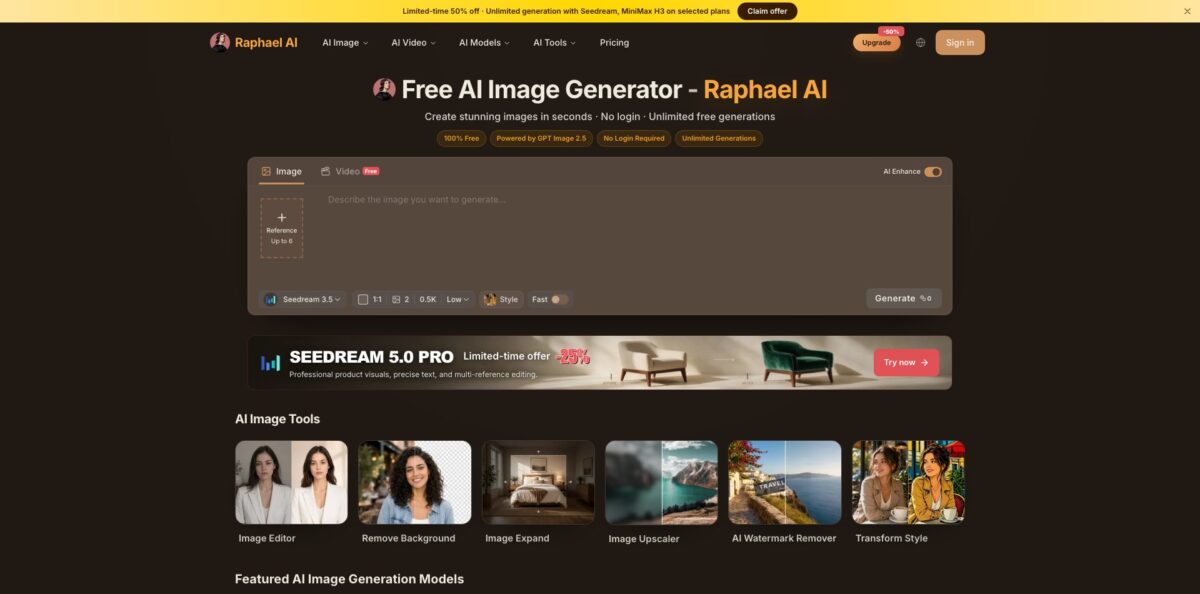
Think of Raphael AI as one web front end for a rotating set of image and video models. It launched in early 2025 as a free, no-login FLUX.1-Dev generator and now sends prompts to Seedream, Nano Banana, GPT Image, Grok Imagine, Veo, Kling and other models from a single prompt box. The main draw is the free lane: Seedream 3.5 at 0.5K costs zero credits, and signed-in users can keep generating in a slow queue without a daily cap. The catch sits in the fine print. Free images carry a watermark, are limited to personal and non-commercial use, and come out at low resolution, so anything client-facing pushes you toward credits or a subscription. Pick it if you want to sample many models cheaply from one account; skip it if you need an API or dependable professional output.
How to start using Raphael AI?
Open raphael.app and type a prompt straight away, because no account is needed to start. The prompt box takes up to 3,000 characters, and the default model is Seedream 3.5 at 0.5K, which the generator labels as a free slow queue with an estimated wait of about 60 seconds. Results made as a guest are temporary: sign in within 10 minutes if you want to keep them in History. You can sign up with email, Google or GitHub, and a free account adds 10 credits a day on top of the free lane.
For a first real job, try a square social post or a blog header. Set the aspect ratio (1:1, 4:3, 3:4, 5:4 or 4:5 on the default model), choose how many outputs you want from one to four, and decide whether to keep AI Enhance on. AI Enhance expands a short idea into a fuller prompt, so switch it off when you have already written a detailed brief. You can also attach up to six reference images if you need a character, product or style to carry through.
The screen that matters most is the model picker. Every model shows its credit cost, resolution and rough wait time before you press Generate, so you can see what a run will cost first. Nano Banana 2 Lite, for example, is listed at 11 credits for fast 1K generation and editing, while Seedream 3.5 stays at zero. The same panel has a Video tab, where MiniMax H3 Turbo clips at 480P and four seconds are free.
Before you use anything, check the download. Free images include a watermark and are licensed for personal, non-commercial use only, so a client deliverable needs a paid plan. Assets stay in your account for 30 days, which means you should download keepers rather than treat History as storage. If a result is close but not right, send it to the AI Image Editor or the Image Upscaler instead of regenerating from scratch, and proofread any lettering, since the editor’s own FAQ warns that spelling and small text can come out wrong.
Who is it for?
Students and hobbyists
You want to play with AI images without entering a card or picking a subscription first. Raphael AI lets you generate in the browser for free, and a free account removes the daily cap on the basic model. The trade-off is waiting in a queue and accepting low-resolution, watermarked results.
Parents and teachers
Picture books, phonics cards and classroom visuals rarely need commercial rights or 4K detail. Users in this group report getting fairly consistent characters with patience and prompt tweaks. Budget time for many attempts, because the free model does not lock a character in on the first try.
Social media creators
Thumbnails, story backgrounds and short vertical clips are the bread and butter here. The video tab covers 9:16 output with native audio on several models, and MiniMax H3 Turbo clips are free at 480P. Monetized channels should still check the plan terms, since commercial use comes only with a subscription.
Small online sellers
Product photos need clean backgrounds, a bit of extra canvas and sharper resolution more than they need art. The background remover, uncrop tool and 2× or 4× upscaler sit next to the generator, so one account covers the whole cleanup. Plan on Pro at minimum, because watermark-free files and commercial rights are paid features.
Designers comparing models
Paying separately for several image services just to see which one handles a brief best adds up quickly. Raphael AI puts Nano Banana, GPT Image, Seedream and Grok Imagine behind one credit balance, with the cost shown per run. You get a quick bake-off without juggling multiple logins.
Raphael AI pricing
The model mixes three things: a free lane on Seedream 3.5, a credit balance that pays for faster or stronger models, and subscriptions that bundle credits with perks such as no watermark, priority queues and commercial rights. Credit costs vary by model, resolution, clip length and output count, and the estimate updates on screen as you change settings. All prices on the official pricing page are listed in US dollars, and the yearly toggle currently halves the monthly rate, which the page banner presents as a limited-time offer.
Unlimited Seedream 3.5 generations in the slow queue once you sign in, 10 credits per day for Fast Mode or other models, and free MiniMax H3 Turbo videos at 480P and four seconds. Images are watermarked and limited to personal, non-commercial use.
You get 2,000 credits a month, which the page equates to up to 2,000 fast images or up to 200 basic videos, plus a priority queue, no watermarks, batch processing with the AI tools and private generations.
Credits rise to 5,000 a month, Seedream 3.5 Pro becomes unlimited, and you move to the highest priority queue.
This tier doubles the allowance to 10,000 credits and adds unlimited MiniMax H3 Turbo and MiniMax H3 video generation.
Packs stay valid for six months, and subscribers receive 50% more credits for the same price.
Custom. Unique use cases go through the support email, and there is no public API yet.
Check the policies before paying. Digital purchases are generally non-refundable, direct plan changes are not supported, and you switch tiers by cancelling renewal and picking a new plan after the current period ends. The pricing FAQ also says prices will probably rise, while existing annual plans will be honored.
Raphael AI key features
Free Seedream 3.5 lane
The default model costs zero credits and renders at 0.5K in a slow queue, while Fast Mode moves the job to a priority queue for credits. Signed-in users have no daily cap on this lane, which makes it a practical scratchpad for testing prompts.
Multi-model picker with visible costs
One prompt box reaches Nano Banana 2, 2.1 and Pro, GPT Image 2 and 2.5, Seedream 4.5 and 5.0, Grok Imagine Image 2.0 and more, each showing credits, resolution and wait time before you run it. Some models reach 2K, and Nano Banana 2.1 is listed at up to 4K. You can compare outputs from different labs without opening separate accounts.
Reference images and AI Enhance
You can attach up to six reference images, write prompts of up to 3,000 characters and request up to four outputs per run. AI Enhance rewrites a short idea into a richer prompt, which helps beginners but can override a carefully written brief. Turn it off when wording matters.
AI Image Editor
Upload a JPG, PNG or WebP file of up to 20 MB and describe the change in plain language, or switch to dedicated modes for erasing objects, replacing text and brushing over one area for local inpainting. You can prepare an edit as a guest, but submitting it requires an account.
Image utility tools
A background remover, an uncrop tool for extending borders, an upscaler with 2× and 4× options up to 4K, a watermark remover for images you have the right to edit, and style templates all sit in the same workspace. Paid plans add batch processing across these tools. That covers most cleanup work without a separate photo editor.
AI video generation
Text-to-video and image-to-video run on MiniMax H3 Turbo for free at 480P and four seconds, with Seedance 2.5 for clips up to 30 seconds, MiniMax H3 for 2K and Veo 3.1 for up to 4K on credits. Several models add native audio, and image-to-video supports a first and last frame. Most free clips are ready in 30 to 60 seconds, according to the video page.
Privacy and retention rules
Guest requests are processed temporarily and dropped unless you sign in within 10 minutes, account assets are kept for 30 days, and paid plans keep generations out of the public gallery. Raphael says it never sells prompts or images.
Raphael AI Pros & Cons
Pros
The barrier to entry is about as low as it gets. You can generate without an account, and a free login gives you a queue-based lane with no daily cap plus 10 daily credits for better models. Having Seedream, Nano Banana, GPT Image and Grok Imagine behind one balance saves you from paying for several separate services just to compare them, and the per-run credit estimate keeps spending predictable. The editor, background remover, uncrop, upscaler and video tab live in the same workspace, so simple projects rarely need another app. The annual Pro price of $10 a month is low for this model range. Use the free lane to settle the prompt, then switch to a paid model for the final render.
Cons
The marketing promises free, unlimited generation, yet the free output is watermarked, capped at 0.5K, queued and restricted to non-commercial use, and several user reviews call that gap misleading. Users also report unexplained errors and a canvas editor that sometimes produces a new image instead of editing the original. There is no public API, purchases are generally non-refundable, plan changes require cancelling first, and the platform runs only in the browser for now. The content policy blocks all NSFW material, and Google models apply stricter checks to prompts and reference images. Read the pricing FAQ and run your exact use case on the free tier before you pay.
Use Raphael AI if you want…
- Generate AI images without creating an account first.
- Compare Nano Banana, GPT Image and Seedream in one place.
- Turn short ideas into detailed prompts with AI Enhance.
- Edit photos by describing the change in plain text.
- Remove backgrounds and upscale small images up to 4K.
- Animate a still photo into a short video clip.
- Create vertical 9:16 clips for TikTok, Reels and Shorts.
- Replace several model subscriptions with one credit balance.
Raphael AI alternatives









Raphael AI Reviews
A parent who makes pictures for home phonics books says the free tier is enough to keep characters fairly consistent with some tweaking, but getting a usable image takes many generations and the resolution is often low.
One reviewer found generation unreliable, with unexplained errors, female faces that look alike whatever the prompt, and a canvas editor that creates a new picture instead of changing the uploaded one.
A recent reviewer felt the free and unlimited claim did not hold up once credits were needed, and rated the image quality as poor even on the higher quality setting.
Early users on an AI tool directory praised the quality they got for free and the unlimited number of generations, while later comments there complain that the free features are weak and the canvas tool is buggy.
FAQ
Is Raphael AI really free?
Yes, with limits. Seedream 3.5 at 0.5K costs no credits and is unlimited in the slow queue for signed-in users, and free accounts get 10 credits a day, but free images carry a watermark and are for non-commercial use only.
Do I need an account to use Raphael AI?
No, you can generate images and try free videos as a guest. Guest results are temporary unless you sign in within 10 minutes, and submitting edits in the AI Image Editor requires an account.
Can I use Raphael AI images commercially?
Only on a paid plan. Subscribers may use generated images for personal or commercial purposes under the Terms of Use, while free users are limited to personal and non-commercial use.
Does Raphael AI have an API?
No. The pricing FAQ says there is no public API at the moment and that one is planned, so developers should ask support about requirements rather than build on it today.
Which models can I use on Raphael AI?
Image models include Seedream 3.5 to 5.0, Nano Banana 2, 2.1 and Pro, GPT Image 2 and 2.5, and Grok Imagine Image 2.0. For video, the list covers MiniMax H3, Seedance, Veo 3.1, Kling 3.0 and Wan 3.0.
How long does Raphael AI keep my images?
Account assets are kept for 30 days, so download anything you want to keep. Guest requests are processed temporarily, and Raphael states that it never sells prompts or images.
Can I cancel or get a refund?
You can cancel renewal at any time and keep benefits until the billing period ends. Digital purchases are generally non-refundable, though billing issues can be raised with support, which aims to reply within three business days.
Which website is the official Raphael AI?
The service covered here runs at raphael.app, and the company says that is its only official domain. Look-alike sites use the same name, including the Product Hunt listing that points to raphaelai.org, so check the address before paying.
Similar tools
 BannerbearTemplate-based API for generating on-brand images, PDFs, animations and videos at scale from your data via REST, Zapier, Airtable or AI agents.
 Generated PhotosLibrary of 2.6M+ AI-generated faces plus face and full-body human generators for model-release-free people images in design, ads and research.
 VheerBrowser-based AI studio for text-to-image, photo editing and image-to-video, with a free no-signup model plus credit access to Nano Banana, Sora 2