

Rask AI
AI AssistantsUpdated November 12, 2026
AI video localization platform that transcribes, translates and dubs videos into 135+ languages with voice cloning, lip-sync and an editable script.
We may earn a commission when you sign up through our links. It does not affect our reviews.
What is Rask AI?
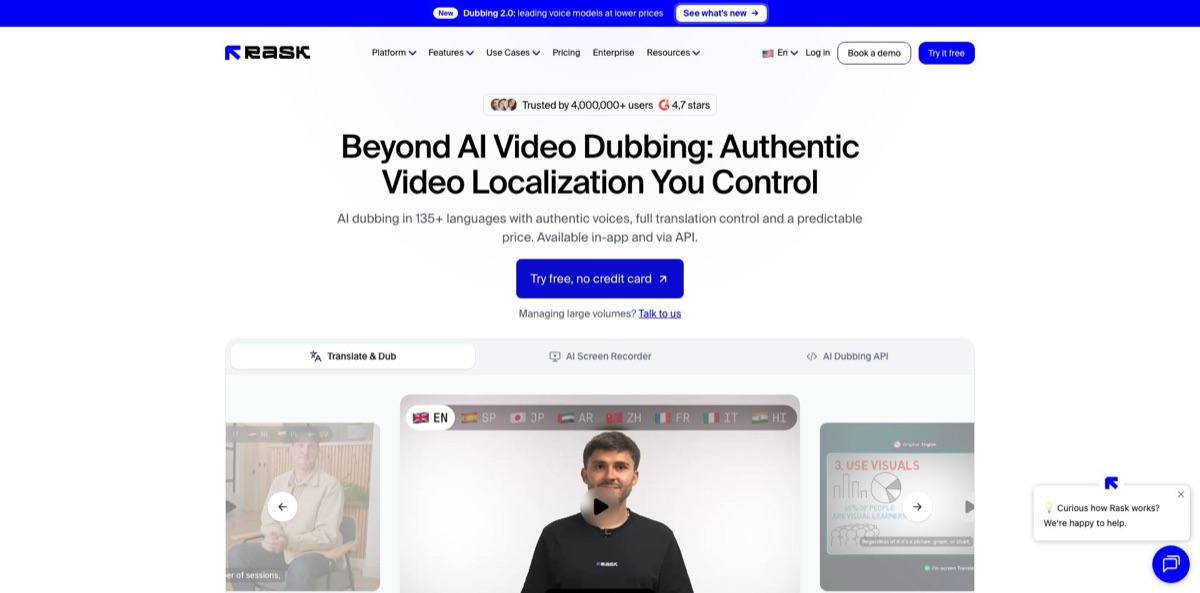
Built for teams that publish the same video in several languages, Rask AI is a browser-based localization platform that transcribes the speech in a finished video or audio file, translates it into 135+ languages and voices it again, optionally in a clone of each original speaker. It replaces the studio loop of translators, voice actors and subtitle editors. The current engine, Dubbing 2.0, translates with the context of the whole script, runs on voice models that include Eleven v4 and clones voices in 57 languages. A line-by-line editor lets you fix the transcript, translation, timing and voices, and re-dubbing after edits costs no extra minutes. The weak spots are the per-minute cost on the entry plan, lip-sync that renders slowly and starts at Creator Pro, and a run of support and refund complaints on Trustpilot. Pick it if you localize video regularly and want control over every line.
How to start using Rask AI?
Sign up at app.rask.ai to start the free trial: 3 minutes of localization, no credit card, voice cloning and the built-in editor included. Click Translate Video, then add a file or paste a YouTube, Google Drive or Vimeo link. Rask accepts MP4, MOV, WEBM and MKV video plus MP3 and WAV audio, up to 5 hours long, and recommends keeping files under 10 GB with H.264 video and AAC audio. The file must contain speech, because everything starts from the transcript.
Next, choose your target languages. You can pick up to 10 at once, and Rask creates a separate project for each one, so every language draws on its own minutes. Dubbing 2.0 is selected by default for most languages; if you prefer the older sound, Dubbing 1.0 is still available in the upload window. On Creator Pro and higher, this is also the moment to attach a Translation Dictionary, so brand names stay untranslated and technical terms come out the same way every time. Then click Translate.
Open the project when it is ready and work through the editor before you spend time on audio. Click any wrong word in the transcript or translation, fix it and press Apply changes; editing the original text retranslates that segment. Drag the sliders to adjust timestamps, split or merge segments, and check that each speaker has the right voice: an Instant Voice Clone, a clone from your Voice Clone Library or one of the AI voice presets. Voiceover Preview plays single segments, which is the quickest way to catch lines that came out sped up or slowed down.
When the script looks right, click Dub Video. Rask’s help center puts a 20-minute video at roughly 10 minutes of processing. On Creator Pro and higher you can then run Lip-sync check, choose whether the video has 1 or 2+ faces and start lip-sync, but plan for a long wait: the official estimate for a 10-minute 1080p clip with one speaker is about 4 hours. Finally, click Download and pick the MP4 (with or without lip-sync and burned-in subtitles), a WAV track with voice only or voice plus background, or SRT subtitle files.
Spend the three trial minutes on your hardest clip, with jargon and several speakers, rather than an easy intro.
Who is it for?
Course creators and EdTech teams
Recording a course again in Spanish or German is rarely an option, and studio dubbing quotes add up per hour. Rask keeps your own voice through cloning, and the translation dictionary holds course terminology steady across dozens of lessons. Editing the script before dubbing means a subject expert can proofread text instead of rewatching video.
YouTubers and podcasters
Opening a second-language channel used to mean hiring a voice actor for every upload. With a cloned voice and SRT export, you can publish a dubbed version and subtitles from the same project. Watch the minute balance, though, since each extra language costs the full length of the episode.
L&D and HR teams
Training videos have to reach staff in many countries, and they change whenever a process does. Business adds batch uploads across several videos and languages, a shared brand glossary and reviewer roles, so a local manager can approve the translation before it ships. Free re-dubs make small script fixes painless.
Marketing teams
Product demos, webinars and ads lose impact when only English speakers can follow them. Rask translates the voice track, and on Business it can also translate on-screen text such as slides, captions and charts. Lip-sync on Creator Pro and higher helps talking-head ads look less obviously dubbed.
Localization agencies and freelancers
You still deliver human-checked quality, but the first draft no longer needs a recording booth. The segment editor, speaker controls and version history work like a production desk, and Teamspaces let you invite translators or proofreaders. Translation prompting for tone and formality, however, requires Enterprise or a paid Booster.
Developers building content pipelines
When video arrives daily from a CMS or LMS, clicking through a web app does not scale. The Rask API handles upload, translation, dubbing, lip-sync and SRT or VTT subtitles through REST calls or a Python SDK. Business includes a production API with webhooks.
Rask AI pricing
Rask charges for minutes of finished video, not seats. One minute of translation equals one minute of final dubbed output in each language, so a 5-minute video translated into 2 languages uses 10 minutes. Enhanced Lip-sync costs 3 minutes per minute of video on top of that (Rask marks this rate as beta), and on-screen text translation also costs 3 minutes per minute. Re-dubbing segments after edits is free. On monthly plans unused minutes expire at the end of each billing cycle; on annual plans they roll over for as long as the subscription stays active.
3 minutes, no credit card, voice cloning in 57 languages and the full editor. Enough for one short test, not for a real project.
Covers dubbing and editing, but not lip-sync or saved custom voices, and extra minutes require moving up to Creator Pro.
Adds multi-speaker lip-sync, voice control, a personal glossary, 3 saved custom voices, a Teamspace for up to 3 members, limited API access and extra minutes at $3 each.
Adds on-screen text translation, a shared brand glossary, multi-video batch translation, reviewer roles, up to 5 members plus guest reviewers, 10 shared team voices, priority processing and a production API with webhooks.
Custom. Custom minute volumes, an SLA, dedicated API capacity and integrations, managed quality assurance, translation prompting, and security reviews, contracts and invoicing.
Rask AI key features
Dubbing 2.0 is the default engine for new projects
It translates with the meaning of the whole video rather than line by line, voices the result on top-ranked models including Eleven v4, and adapts the wording to the timing so speech flows at a human pace instead of being squeezed into each slot. It covers 54 languages, and your dictionary and custom instructions still apply.
Voice cloning keeps each speaker’s own voice in 57 target languages
An Instant Voice Clone keeps each speaker’s voice inside a project, while Custom Voice Clone lets you upload up to 10 samples of 1 to 10 minutes each and save them in a library for reuse. Creator Pro stores 3 custom voices and Business 10, and the voice control settings adjust similarity, accent and expressiveness.
The line-by-line editor is where most of the work happens
You correct transcript and translation, move timestamps, reassign speakers, split or merge segments, preview single lines and roll back with version history. Because you pay once for the final minutes, you can re-dub a segment as often as you need.
Multi-speaker lip-sync matches mouth movement to the new audio and, in Dubbing 2.0, moves only the lips of whoever is talking, for up to 20 speakers. A Lip-sync check tells you first whether the footage is suitable: faces need to be clearly visible, well lit and free of mics or hands over the mouth. Expect hours of rendering for longer clips.
Translation control combines the Translation Dictionary with translation prompting
Dictionaries mark terms as Do not translate or fix their translation, and you can import an existing term list from a CSV template. Prompting sets tone and formality before translation, but it is limited to Enterprise unless you buy it as a Booster.
The Rask API covers the whole pipeline in three requests: get an OAuth 2.0 token, upload a file or a YouTube, Drive, S3, Vimeo or direct link, and create a project per target language. You get back the dubbed video, audio tracks, SRT and VTT subtitles and a transcript with speaker labels in 75 source languages, and Rask says there are no rate limits or concurrency quotas.
The AI Screen Recorder, still in beta, records through a browser extension and then cuts long pauses, filler words and false starts and zooms in on focus areas. During the beta it is free for paid users and does not consume minutes.
Rask AI Pros & Cons
Pros
Rask gives you real control over a dub instead of a one-shot render. Every segment of the transcript, translation, timing and voice can be edited, previewed and re-dubbed without spending more minutes, a point that positive G2 reviews keep singling out. Voice cloning in 57 languages keeps a creator’s own voice across channels, and Dubbing 2.0 translates with the context of the whole script rather than line by line. Teams get dictionaries, reviewer roles, SOC 2 Type II certification and an API that handles dubbing, lip-sync and subtitles in one project. Annual Creator Pro brings the cost to about $0.67 per minute. Build your translation dictionary before the first big batch so recurring terms never need fixing twice.
Cons
Costs climb fast once you add languages or lip-sync. Every language is billed at the full length of the video, lip-sync triples the minute cost, and the monthly Creator plan works out to about $1.56 per minute with no option to buy extra minutes. Lip-sync is slow, with official estimates of about 4 hours for a 10-minute 1080p clip, and Trustpilot reviewers repeatedly describe disappointing results. That page also collects one-star reviews about unanswered support, billing after cancellation and refusals once minutes were spent. Translation prompting is Enterprise-only. Test lip-sync on a short clip before committing, and pause rather than cancel if you want to keep your minutes.
Use Rask AI if you want…
- Dub training videos into dozens of languages quickly.
- Keep your own voice across foreign-language YouTube channels.
- Edit every translated line before paying for audio.
- Re-dub small script fixes without spending extra minutes.
- Lock brand terms with a reusable translation dictionary.
- Translate slides and on-screen text inside your videos.
- Automate video localization from your CMS through an API.
- Export SRT subtitles alongside every dubbed video.
Rask AI alternatives

Rask AI Reviews
Transcription and translation do the job well and a renewal problem was fixed quickly by support, although the translated script still benefits from a professional proofread before publishing.
Cloned voices sound close to the original speaker and editing the translation before rendering is a big plus, but paying the full minutes again for every extra language makes multi-language projects expensive.
The workflow is quick and saves hours, yet the translated voice can come out with a foreign accent and sound stilted in places.
Lip-sync results looked off on real footage, and a refund request was turned down because too many minutes had already been used.
Monthly charges kept arriving while support messages went unanswered, and finding a way to cancel the subscription was a struggle.
FAQ
Does Rask AI have a free plan?
There is a free trial with 3 minutes of localization and no credit card required. It includes voice cloning in 57 languages and the built-in editor, enough to test one short clip.
How are minutes counted?
One minute of translation equals one minute of final video in each target language, so a 5-minute video in 2 languages uses 10 minutes. Enhanced Lip-sync and on-screen text translation each cost 3 minutes per minute of video, and re-dubbing edited segments is free.
Which plans include lip-sync?
Lip-sync is available on Creator Pro, Business and Enterprise, not on the free trial or Creator. Run the Lip-sync check first, because faces must be clearly visible and well lit.
How many languages does Rask AI support?
Translation covers 135+ languages, voice cloning works in 57 target languages and the Dubbing 2.0 engine supports 54. The API transcribes speech in 75 source languages.
Does Rask AI have an API?
Yes. A REST API and Python SDK cover upload, transcription, translation, dubbing, voice cloning, lip-sync and SRT or VTT subtitles. Creator Pro includes limited API access, Business adds a production API with webhooks, and Enterprise gets dedicated capacity.
Is my data secure with Rask AI?
Rask AI is SOC 2 Type II certified and publishes a Trust Center for security reviews. Its encryption policy lists TLS 1.2 in transit and AES-256 server-side encryption at rest.
Can I cancel or pause my subscription?
You can cancel anytime from your account menu, and access ends after the current billing period along with any remaining minutes. To keep minutes, pause instead, which is allowed once every 12 months for up to one month.
What is the maximum video length?
You can upload video or audio up to 5 hours long, and Rask recommends files under 10 GB. Very long recordings process more reliably if you split them into parts.
Similar tools
 FreedomGPTMulti-model AI app that puts hundreds of chat, image and video models, including its own censor-free Liberty models, behind one credit balance.
 ElephasPrivate desktop AI for Mac and Windows that answers questions from your own documents with page-level citations and hides personal details first.
 MagaiPaid AI workspace that puts ChatGPT, Claude, Gemini, Grok and dozens of image and video models in one chat, with memory and