

Replicate
Developer ToolsUpdated October 5, 2026
Replicate lets you run machine learning models in the cloud via a simple API for seamless production workflows.
We may earn a commission when you sign up through our links. It does not affect our reviews.
What is Replicate?
Replicate functions as a cloud-based API that lets you run machine learning models without touching a single GPU driver or configuring a Linux server. You pick a model from their library or upload your own using Cog, and they handle the scaling, queues, and container orchestration. It eliminates the “it works on my machine” headache by standardizing the environment in production-ready Docker containers. In practice, you can integrate Stable Diffusion or Llama 3 into your app with a simple POST request instead of building a whole ML ops team. Cold-start times can be annoying for real-time apps, but the pay-per-second model prevents massive bills during quiet hours. This allows you to focus on the product logic rather than fighting CUDA version conflicts. Use Replicate to ship AI features in days, but look elsewhere if you need the absolute lowest latency for high-frequency trading or gaming.
How to start using Replicate?
Start by signing in with your GitHub account. This links your identity and billing to a familiar platform. You will find your API tokens in your account settings immediately. Grab the token starting with r8_ and keep it safe. This allows you to authenticate requests without managing complex server infrastructure.
Browse the model library to find a starting point. Whether you need Llama for text or Stable Diffusion for images, everything is ready to run. You can test models directly in the browser using the playground. It’s a quick way to verify whether a model fits your specific data before writing any code, so you don’t waste credits on incompatible architectures.
Install the Replicate Python or JavaScript library. A simple pip or npm command gets the client ready on your local machine. Use the API token as an environment variable rather than hardcoding it. This keeps your credentials secure when pushing to public repositories. You are now ready to run predictions with just a few lines of code.
Predictions happen via a single function call. Pass your inputs as a dictionary and wait for the results. Replicate handles the heavy lifting of spinning up GPUs and scaling them down when finished. The catch is a slight cold-start delay for rarely used models. On the plus side, you only pay for the exact seconds your code executes.
Who is it for?
The Prototype Hustler
You have a weekend to prove an AI feature works without wasting 48 hours on Dockerfiles or CUDA drivers. You drop a model into your app via a POST request and move straight to user testing. You can validate product-market fit before hiring an expensive ML engineer.
The Frontend-First Developer
You know React or Next.js but find GPU orchestration intimidating. Replicate provides a clean API that feels like any other SaaS tool, allowing you to trigger heavy Llama 3 or Stable Diffusion runs from a simple serverless function. Web development and complex machine learning meet without a steep learning curve.
The Budget-Conscious Experimenter
You need to run massive models but can’t justify a $400/month idle GPU bill. The pay-per-second model ensures you only spend money when your code is actually executing, which works well for apps with bursty or low traffic. The trade-off is a 10-20 second cold start delay for less popular models. Still, it puts high-end hardware within reach of solo founders and side projects.
The Open-Source Explorer
You want the latest fine-tunes from the community without local hardware limitations. Replicate hosts thousands of niche models that you can swap out by simply changing a string in your API call. Popular models are always “warm,” though some community uploads can be flaky or slow to boot. Either way, you get a massive, ready-to-use library for specialized tasks like background removal or voice cloning.
The Custom Model Packager
You’ve trained a specific model and need a stable way to share it with your team. By using Cog, you package your environment into a standardized container that Replicate handles at scale. Goodbye to “it works on my machine” errors during the handoff from research to production.
Replicate pricing
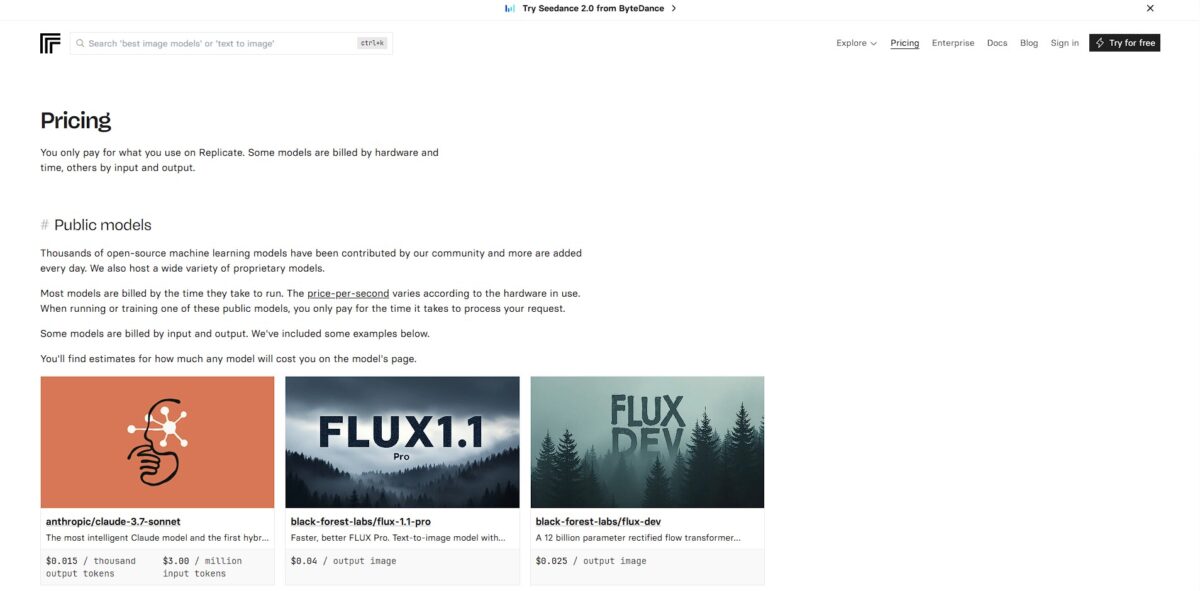
Replicate operates on a pay-as-you-go model that bills you for the exact compute time your models occupy on their hardware. This setup eliminates the overhead of renting idle GPUs, letting you scale from zero to thousands of requests without touching a driver. You pay only for active processing time on public models; setup and idle periods are free. Experimental bursts or inconsistent traffic carry no financial penalty.
Billed per second of execution time. Prices depend on the specific hardware required, like an Nvidia T4 ($0.000225/sec) or a high-end A100 ($0.001400/sec).
Often feature predictable, output-based pricing. You might pay $0.06 per image for Flux 1.1 Pro or $0.05 per second for specific video models.
I noticed that while public setup time is free, private deployments charge for the full time an instance remains online, including idle time.
Includes initial credits to test models in the playground before adding a credit card. That’s enough to verify a model’s output before committing to a production budget.
Replicate key features
Run open-source models through a standardized API
You skip the headache of local CUDA version mismatches or managing Python virtual environments. You can test Llama or Stable Diffusion in your app using just a few lines of code.
Scale from zero to thousands of GPUs automatically
You only pay for the seconds your model actually processes a request, avoiding expensive idle server bills. For small projects, hosting niche or massive models becomes financially viable.
Deploy your own custom Cog-packaged models
You wrap your training results into a production-ready container that includes all necessary system dependencies. Your model runs exactly the same on Replicate as it did on your local machine.
Access a massive library of community-contributed weights
You can swap between different fine-tunes for image generation or text processing without setting up new infrastructure for each. The discovery page makes it easy to find optimized versions of popular models that are already “warmed up,” which cuts the time spent on model research.
Integrate webhooks to handle long-running async tasks
Your application gets a notification the moment a heavy video generation or complex fine-tune finishes. This matters because you don’t have to keep a client connection open or constantly poll for results.
Replicate Pros & Cons
Pros
Replicate removes the friction of managing GPU clusters or local environment hell. You call an API and get back a prediction. You can prototype AI features in minutes without touching a single Dockerfile. The model library is vast, covering everything from Llama to SDXL. In testing, boot times for cold starts were manageable, though noticeable. You only pay for the seconds your code actually runs, which saves thousands in idle cloud costs for low-traffic apps. Use it for rapid experimentation and production-ready inference without the infrastructure headache.
Cons
Costs can spiral if you have high, consistent traffic. A dedicated instance on AWS might be cheaper for heavy workloads. Once you scale beyond a certain point, your margins disappear. Custom model deployment requires a Cog configuration, which has its own learning curve. You might find the abstraction layer frustrating if you need deep, low-level hardware optimizations. I noticed logs can be a bit sparse when a custom model fails to build. This matters because debugging becomes a black box experience. Stick to Replicate for agility, but consider alternatives for massive, steady-state volume.
Use Replicate if you want…
- Run open-source models without managing heavy GPU infrastructure.
- Deploy custom machine learning models with one simple command.
- Scale from one API call to thousands instantly.
- Pay only for the exact seconds your code runs.
- Experiment with Flux or Llama via a single endpoint.
- Integrate advanced image generation into your web app quickly.
- Build production-ready AI features without a DevOps team.
- Focus on building products instead of provisioning servers.
Replicate alternatives



Replicate Reviews
Replicate is the ultimate cheat code for shipping AI features. I can drop a model into my backend with a few lines of code and zero infra headache. The cold starts are a pain for real-time apps, but for async processing, it is unbeatable.
The community model library is massive, but it is a bit of a gamble. Some models are rock solid, while others break without warning. I love the pay-per-second billing for testing, though costs can sneak up on you if you are not careful.
Perfect for moving from a laptop prototype to a scalable API in minutes. Cog makes packaging custom models relatively painless. Support is slow to respond, so you are mostly on your own if something goes sideways with a specific deployment.
Great for trying the latest open-source models without renting a beefy GPU. The web UI is clean and makes it easy to show demos to non-technical stakeholders. It is definitely more expensive than raw AWS if you have high volume, but the time saved is worth it.
FAQ
What programming languages are supported by Replicate?
Replicate provides official client libraries for Python and JavaScript, but its HTTP API allows integration with any programming language capable of making web requests.
What is Cog and why do I need it?
Cog is an open-source tool used to package machine learning models into standard containers. It simplifies the process of defining environment dependencies and prediction logic so your custom model can run consistently in the cloud.
Does Replicate support private models?
Yes, you can create private models that are only accessible to you or your organization. These run on dedicated hardware to ensure consistent performance without queue wait times.
How are cold starts handled on the platform?
For public models that have not been used recently, Replicate must load the model into GPU memory before processing a request. For public models, this setup time is not billed; you pay only for active processing time.
Can I fine-tune existing models on Replicate?
Replicate supports fine-tuning for several popular open-source models, including Flux for images and HunyuanVideo for video. You can perform these trainings via the web interface or programmatically through the API.
What hardware options are available for running models?
Users can choose from various hardware configurations including CPUs and multiple GPU tiers like the Nvidia T4, L40S, A100, and H100 to balance cost and processing speed.
Does Replicate offer a free trial?
New users typically receive a limited amount of free compute credit to test models in the playground or via the API before being required to add a credit card for pay-as-you-go billing.
Similar tools
 Novita AIDeveloper cloud with one API for 200+ open-weight AI models, plus GPU instances, dedicated endpoints and isolated sandboxes for AI agents.
 You.comDeveloper platform of web search, content extraction, cited research and model inference APIs that feed AI agents and RAG apps real-time web
 QodoAI code review platform that runs specialized agents on every pull request, enforces team rules and checks changes against tickets and linked