

Repurpose.io
Content CreationUpdated November 20, 2026
Automation service that takes videos, images, Stories and podcasts from one channel and republishes them to TikTok, Reels, Shorts and other platforms.
We may earn a commission when you sign up through our links. It does not affect our reviews.
What is Repurpose.io?
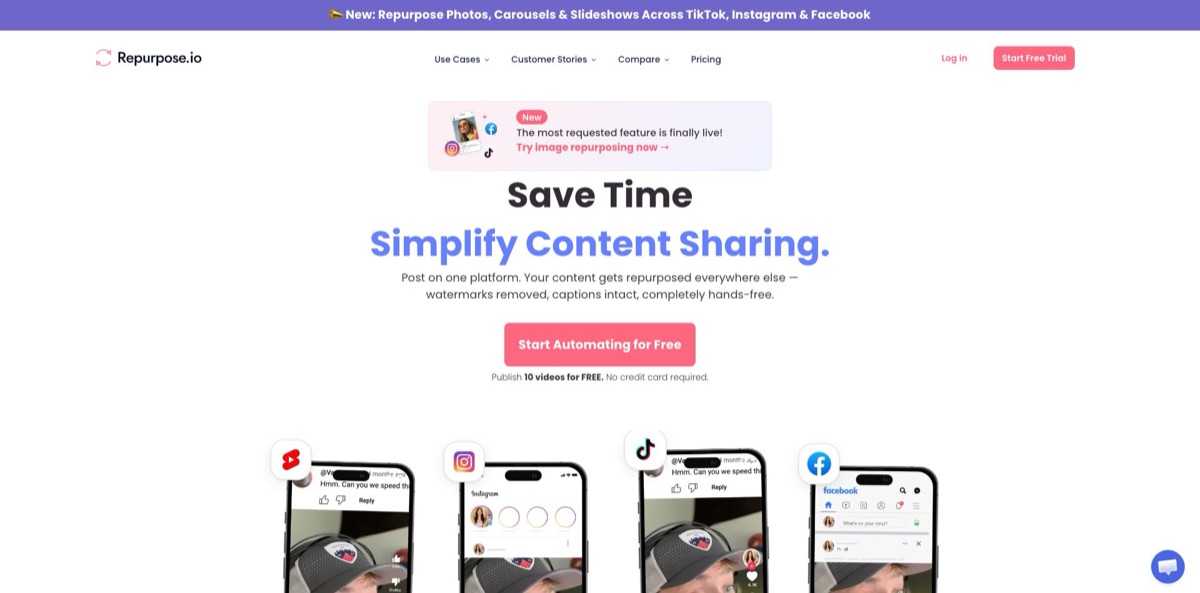
Repurpose.io is a cross-posting automation service. You connect a source such as TikTok, Instagram, YouTube, a podcast RSS feed, Zoom or a Google Drive folder, and a workflow republishes each new item to destinations like YouTube Shorts, Reels, Facebook, Snapchat Spotlight, Pinterest, LinkedIn, Threads, X or Bluesky. It downloads the original file, strips the platform watermark, resizes it through a template and posts it with the caption intact, so you stop uploading the same clip five times by hand. Podcast episodes become audiogram videos, and long recordings can be cut into clips by timestamps. The weak spots are just as concrete: there is no direct file upload, no built-in captioning or AI highlight detection, and auto-publishing checks for new content only about every two hours. Pick it if you already publish steadily on one platform and want the others filled without extra work.
How to start using Repurpose.io?
Click Start Free Trial on repurpose.io and create an account; no credit card is needed. The standard trial lasts 14 days or 10 published videos, whichever comes first, and lets you connect one account per network. YouTube works only as a destination during this trial, not as a source. If all you want is to send TikToks and Reels to YouTube, the separate YouTube Trial runs for 90 days with unlimited publishing, but YouTube is its only destination.
Next, click + Create Workflow in the left menu. Pick a source platform, choose the media type (videos, photos or Stories), then select one or more destinations, connecting each account through its official login window as you go. Everything has to come from a connected source: Repurpose.io does not accept direct uploads, so put unpublished files in a Google Drive or Dropbox folder and use that folder as the source. Workflows where the source and destination are the same platform, such as Instagram to Instagram, are no longer supported, even between two different accounts.
Open the workflow settings with the gear icon. The Publish tab holds Auto Publish Mode: As Soon As Possible posts new items after they are detected, while the schedule mode lets you set publishing days and up to five time slots per day. The Content Filter decides whether the workflow handles Only Future Content, Existing Content or All Content, which is how you drip an old back catalogue out gradually. Here you also choose a Predefined Template or one from My Templates, set the default snippet duration and enable Burn Captions Into Video for sources that already have captions.
Before you trust the automation, publish one item by hand. Click Check Now under the Content section to fetch the latest posts, then hit Schedule next to a video to see the template preview, adjust the headline or caption position, and choose Publish now or a date. Check the Calendar view and the failed-job reasons afterwards. Keep in mind that the As Soon As Possible mode publishes only the last three videos found in each detection window and marks the rest as Skipped.
Who is it for?
Short-form video creators
You film for TikTok or Reels and rarely get around to Shorts, Spotlight or Facebook. One workflow sends each new video to those destinations without the watermark and in the right format. The YouTube Trial covers the TikTok-to-Shorts route for 90 days at no cost, which is a cheap way to see whether a second audience exists.
Podcasters
Paste the RSS feed from Libsyn, Buzzsprout, Captivate, Podbean, Transistor or another host, and each episode turns into a video for YouTube or Facebook with your background, sound wave, progress bar and episode image. Timestamps in the show notes can become separate clips for Shorts and Reels, so one recording feeds several channels.
Coaches and webinar hosts
Zoom cloud recordings (on a paid Zoom plan) and Webex recordings can feed workflows directly. A recorded workshop turns into square or vertical clips with a headline and progress bar instead of sitting unwatched in a cloud folder.
Agencies managing several brands
The Agency plan connects up to 25 accounts per network, and the Creator Invite Link lets creators sign up, connect their own accounts and send them to you for approval. You skip collecting client passwords and run dozens of distribution workflows from one dashboard.
E-commerce sellers
Reels and TikToks can go to an Amazon US storefront as drafts, and Repurpose.io picks up Amazon product links from video titles or descriptions. Photo carousels move from Instagram to TikTok and Facebook, so one product shoot covers several feeds.
Teams that plan visuals in Google Drive
Drop images into a Drive folder and each subfolder publishes as a carousel to Instagram, TikTok, Facebook, LinkedIn, Pinterest, X or Snapchat Stories. Files added later are picked up automatically, which suits a designer who hands off assets in batches.
Repurpose.io pricing
There is no free plan, only two trials and three paid tiers. The tiers differ mainly in how many accounts you can connect per social network and in the monthly publishing cap, not in per-post fees. Prices are shown in USD, annual billing costs roughly ten months of the monthly rate, and you choose a plan when the trial ends. Payments are processed by Stripe.
14 days or 10 published videos, whichever comes first. No credit card, one account per network, and YouTube is not available as a source.
Unlimited publishing, but only from TikTok and Instagram to YouTube; every other source and destination stays locked until you upgrade.
Up to 3 accounts per social network (for example 3 Instagram, 3 TikTok and 3 YouTube) and 5,000 published videos per month. Built for solo creators and small businesses.
Up to 10 accounts per network and unlimited published videos, aimed at growing teams and marketers running several brands.
Up to 25 accounts per network and unlimited published videos for agencies handling many clients.
Repurpose.io key features
Source-to-destination workflows
Each workflow links one source, such as a TikTok account, a YouTube playlist, a podcast feed or a Zoom account, to one or more destinations. Auto Publish either posts new items As Soon As Possible, with checks roughly every two hours, or follows a schedule of up to five slots a day (50 for Snapchat). Manual scheduling has no daily limit, so you can still push a large batch by hand.
Watermark removal, resizing and templates
Repurpose.io removes platform watermarks and fits each video to the destination’s format. The template editor offers square, vertical and horizontal canvases with a dynamic headline, sub-headline, caption area, progress bar, shapes and a background you upload or import from Canva. Each workflow can use its own template, which keeps a horizontal webinar readable as a 9:16 clip.
Audio-to-video for podcasts
Connect any podcast RSS feed and episodes are rendered as videos with a sound wave, progress bar, your fonts and an episode-specific image pulled from the feed. Finished audio can also go out to SoundCloud, Libsyn or Captivate.
Clips and snippets
The snippet tool shows the player on the left and a clip list on the right; the default clip runs from 0 to 55 seconds, and pressing X creates a snippet at the playhead. Auto Create Snippets cuts one clip per video from a set start time, while auto-detected snippets split a video wherever its description has timestamps such as 02:15 Main Topic. There is no AI highlight detection, so clip quality depends on your timestamps.
Captions and first comments
Repurpose.io does not transcribe audio itself, but it can burn in captions taken from YouTube or Facebook, from an SRT file you upload per video, or from an SRT with the same name sitting next to the video in Drive or Dropbox. Workflows can also post a first comment automatically, and @ mentions in captions work across supported platforms.
Images, carousels and Stories
Photos, carousels and slideshows move between Instagram, TikTok and Facebook, and Stories sync across Instagram, Facebook and Snapchat. Google Drive folders publish as carousels, with up to 20 images on LinkedIn, up to 5 on a Pinterest carousel Pin and up to 4 on X. TikTok destinations can save posts as drafts or add trending music to photo posts automatically.
Backups, extra sources and agency tools
Google Drive and Dropbox work as both source and destination, so every video can be archived automatically. Twitch, Webex and HeyGen serve as sources, Amazon US storefronts accept video drafts, and Threads and Bluesky accept video. Agencies get a Creator Invite Link and a Creators page for approving accounts that creators connect themselves.
Repurpose.io Pros & Cons
Pros
Repurpose.io handles the dull part of distribution from start to finish: it fetches the original file, removes the watermark, resizes it through your template and posts it to a long list of destinations without a manual download. The source list is unusually broad, covering podcast RSS feeds, Zoom, Webex, Twitch, HeyGen, Google Drive and Dropbox next to the social apps, so audio shows and recorded meetings get the same treatment as Reels. Connections run through official logins, and built-in caps on auto-publishing reduce the risk of platform flags. Pricing is flat rather than per post, and even Starter allows 5,000 videos a month. Start with one source and two destinations, then add workflows once the first runs cleanly for a week.
Cons
The product is a pipeline, not a creative tool. It cannot generate captions, find highlight moments or write new copy; clips come from manual trimming, a fixed-length auto snippet or timestamps you add yourself. Direct uploads are not possible, auto-publishing checks for new content only about every two hours, and same-platform workflows were retired in June 2026, which broke some existing setups. User reviews mention workflows failing until accounts are reconnected, reach dropping on some reposted accounts, and frustration with cancellations and refunds. Watch the failed-jobs list closely during the first weeks, and set a reminder before an annual renewal if you pay yearly.
Use Repurpose.io if you want…
- Send every TikTok to Shorts, Reels and Spotlight automatically.
- Turn podcast episodes into branded audiogram videos for YouTube.
- Cut long videos into clips using description timestamps.
- Remove platform watermarks before reposting your own videos.
- Publish Google Drive image folders as social carousels.
- Back up your social videos to Google Drive or Dropbox.
- Drip an old video back catalogue out on a schedule.
- Distribute Zoom and Webex recordings across social channels.
- Manage many client accounts from one Agency dashboard.
Repurpose.io alternatives

Repurpose.io Reviews
Many Trustpilot reviewers credit it with ending the chore of reformatting one video for every platform and praise quick, hands-on support during setup, although about a third of the ratings on the profile are one-star.
One reviewer found cross-posting easy but hit the cap of three Instagram Trial Reels per day, had to upload the rest manually and felt the subscription cost too much for that workflow.
A long-time user lost scheduled content when an active same-platform workflow was switched off after a policy change, and other one-star reviews describe sync failures and a hard time getting cancellations or refunds processed.
A SourceForge reviewer liked the concept and found some templates useful, but workflows kept failing until accounts were reconnected, automatic cross-posting from YouTube and TikTok did not work, and support was polite without fixing it.
On Reddit, creators like posting once on YouTube and having Shorts land on Facebook, Instagram and TikTok, yet several threads ask whether automated reposting is why their reach dropped, and others look for a cheaper or free alternative.
FAQ
Is there a free plan?
No. You get a 14-day trial capped at 10 published videos with no credit card, or a 90-day YouTube Trial with unlimited publishing from TikTok and Instagram to YouTube only. After that, plans start at $35 a month.
Do I have to share my social media passwords?
No. Accounts connect through each platform’s official login and API, so Repurpose.io never sees your passwords. The company says it is an approved partner of Meta, YouTube, Snapchat, TikTok and Amazon.
Can I upload video files directly?
No. All content must come from a connected source. For files you have not posted anywhere, place them in a Google Drive or Dropbox folder and use that folder as the workflow source.
Does Repurpose.io add captions automatically?
It does not generate captions. It can burn in captions from YouTube or Facebook, or from an SRT file you upload or store next to the video in Drive or Dropbox; this works for video-to-video workflows only.
How many posts can it publish per day?
As Soon As Possible mode publishes up to three new videos per detection window, and schedule mode allows up to five slots a day (50 for Snapchat). Manual scheduling has no daily limit, while the Starter plan caps you at 5,000 published videos a month.
Can I repost between two accounts on the same platform?
Not directly. Same-platform workflows were retired in 2026, so you route content through an intermediate platform, for example TikTok to YouTube and then YouTube to the second TikTok account.
Does it work with languages other than English?
Titles and descriptions in any language that uses alphanumeric characters are supported, though some special characters and emojis can occasionally cause issues. The app interface itself is English only.
How do I cancel my subscription?
Open the Billing page and click the cancel link at the bottom, or go straight to the cancellation page from your account. A free trial simply expires on its own, so there is nothing to cancel.
Similar tools
 WritefullAcademic writing AI for Word, Overleaf and the browser, with journal-trained language edits, an Academizer, a paraphraser and title and abstract generators.
 TypefaceEnterprise marketing AI platform that turns brand guidelines into AI agents for on-brand emails, ads, web pages and campaign variants at scale.
 Storyboarder.aiAI pre-production platform that turns scripts or ideas into shot lists, consistent storyboard frames, animatics and pitch decks for film and ad