

Roboflow
Data AnalysisUpdated October 5, 2026
Roboflow is a unified computer vision platform for building, training, and deploying high-accuracy models with automated dataset tools.
We may earn a commission when you sign up through our links. It does not affect our reviews.
What is Roboflow?
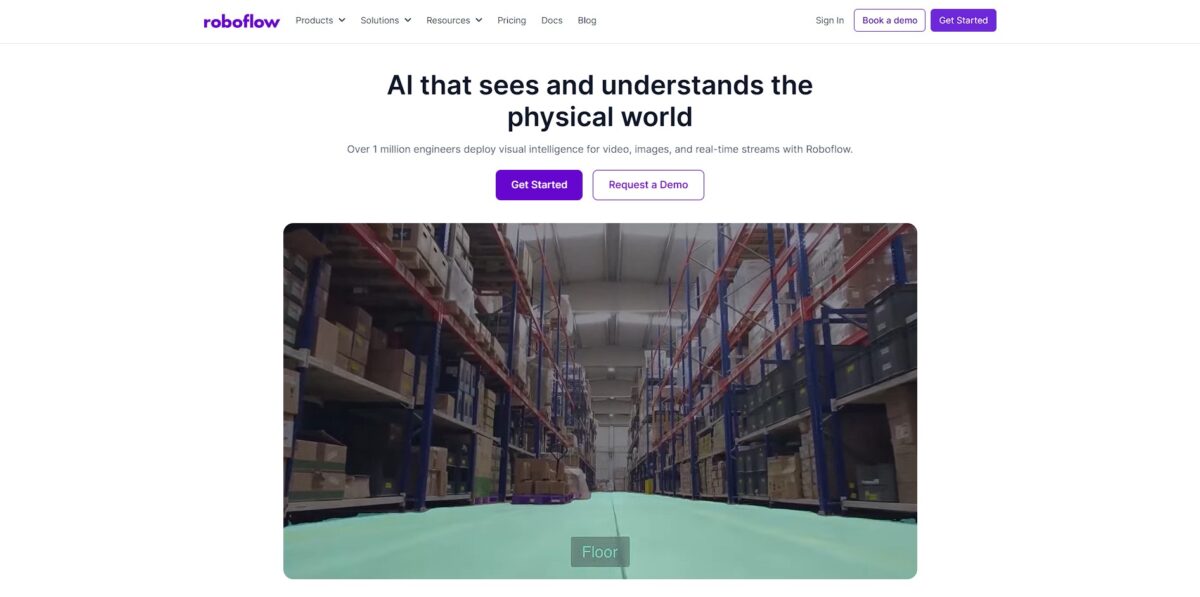
Roboflow replaces the fragmented mess of computer vision scripts with a unified workspace for managing datasets and deploying models. You stop wasting days manually resizing images or fighting with CUDA drivers. Instead, you use a browser-based interface to label frames, augment data to fix lighting gaps, and push weights to edge devices like a Raspberry Pi. It excels at accelerating the journey from raw video to a working API, though the abstraction can feel restrictive for researchers who want to tweak every individual hyperparameter. This matters because it shifts your focus from infrastructure maintenance to solving the actual visual problem. Use Roboflow to skip the boilerplate setup and get a prototype running in an afternoon.
How to start using Roboflow?
Start by creating a free account and setting up a workspace. You can invite collaborators immediately to help with the heavy lifting of labeling images. This is where you decide between the free tier or a trial of the premium features. Starting with a clear workspace structure helps keep different vision projects from becoming a tangled mess of data later on.
Drag your raw images or videos directly into the upload tab to begin building your dataset. If you use video, the tool lets you pick a frame rate to extract specific stills for training. This saves you from manually taking hundreds of screenshots. High-quality data depends on consistent frames, so choosing the right capture frequency here prevents redundant images from bloating your set.
Labeling happens in the browser with tools like Smart Polygon or bounding boxes. If you have an existing model version, use Label Assist to automatically predict tags and speed up the manual clicking. I noticed that setting up keyboard shortcuts early makes the repetitive task of drawing boxes much less draining. Quick labeling means you can move from raw data to a trainable version in one afternoon rather than a week.
Before training, generate a dataset version to freeze a snapshot of your images and augmentations. You can apply steps like resizing or auto-orient to ensure the model sees data exactly how your application will provide it. This creates a point-in-time reference, which matters because it allows you to experiment with different preprocessing settings without losing your original work.
Finally, hit the train button to start a cloud-hosted session or export the data to train locally using a notebook. Once finished, test the results by dragging a new image into the dashboard to see if the model identifies objects correctly. Real-time feedback helps you spot if your model is confused by specific backgrounds or lighting before you write a single line of deployment code.
Who is it for?
Solo Indie Hackers
You need to ship a visual MVP before your motivation dies. Skip the manual labeling grind by using prompt-based object detection to generate a working model in minutes. This prevents you from getting stuck in infrastructure hell instead of validating your product.
Manufacturing Engineers
The production line is spitting out dents and scratches that human eyes eventually miss due to fatigue. You can train a model on specific defect types like cracks or misalignments and deploy it to a Raspberry Pi or edge device right on the factory floor.
Logistics Managers
Tracking inventory across a massive warehouse usually involves a clipboard and a lot of walking. Automated counting through a camera feed allows you to monitor stock levels in real-time without manual data entry errors.
Academic Researchers
You have thousands of microscopic images or satellite frames but no army of undergrads to annotate them. Roboflow Universe gives you access to over a million public datasets so you don’t have to start from scratch.
Computer Vision Beginners
Building a custom YOLO environment often breaks because of conflicting Python dependencies. The web-based interface lets you upload, augment, and train without writing a single line of fragile boilerplate code.
Computer Vision Experts
You know exactly how you want to tune your training loop but hate building custom data ingestion pipelines. You can use the platform to clean and organize your data, then export it in any of the 40+ supported formats to use in your local environment.
Roboflow pricing
Roboflow pricing centers on a credit system that shifts your costs based on whether you are labeling, training, or deploying. It avoids flat fees for everything, which helps when your project alternates between heavy development and quiet maintenance.
Public (Free)
Zero dollars buys you a sandbox for experimentation. Everything you build here—images and models—stays public on Roboflow Universe. You get $60 in monthly credits for 2 users, which covers roughly 1.5 hours of GPU training or 6,000 AI-labeled images. It works for open-source hobbyists but fails anyone needing privacy for proprietary data.
Why this matters: You can validate a computer vision concept without a credit card.
Core ($79/mo billed annually or $99/mo monthly)
This tier keeps your data private and adds a third user seat. It includes the same $60 monthly credit allowance but allows for prepaid bundles if you scale up. You gain the ability to download model weights, giving you ownership of the training results to run on your own hardware. I noticed the $4 per-credit overage fee can sneak up if you run massive batches of augmentations without checking your balance.
Why this matters: It provides the privacy and model portability required for small commercial builds.
Enterprise (Custom)
Large-scale operations get tailored limits and role-based access control. This is where you find specialized add-ons like HIPAA compliance, SSO, and dedicated machine learning engineer support. It scales for high-volume vision events, like monitoring 50+ camera streams simultaneously.
Why this matters: Dedicated infrastructure ensures your production inference doesn’t hit consumer-tier bottlenecks.
Roboflow key features
Browser-based Labeling
Skip the local environment setup and annotate frames directly in your tab using bounding boxes or polygons. This eliminates the headache of managing conflicting CUDA drivers or Python dependencies just to mark a few datasets. Why this matters: You spend your time defining edge cases instead of fixing your terminal.
Synthetic Data Augmentation
Generate thousands of new training samples by applying rotations, brightness shifts, or grayscale filters to your existing images. In practice, this helps a model stay accurate when real-world lighting changes from noon to dusk. Why this matters: You can simulate a factory’s lighting or outdoor weather without actually being there to collect data.
Format Conversion
Export your finished dataset into dozens of specialized formats like YOLO, COCO, or TensorFlow. You stop writing custom scripts to reorganize folders and move straight to training. Why this matters: It bridges the gap between your raw images and the specific architecture your project requires.
Model Hosting and Deployment
Deploy your trained weights to an API endpoint or edge device with a few clicks. This works well for rapid prototyping, though it might feel restrictive if you need deep, custom control over the underlying server architecture. Why this matters: It turns your research into a working tool that other apps can actually query.
Universe Open-Source Hub
Access over a million public datasets and 250,000 pre-trained models shared by other developers. You can find niche data for everything from counting license plates to identifying crop diseases without starting from zero. Why this matters: It prevents you from wasting weeks on data collection for problems someone else already solved.
Roboflow Pros & Cons
Pros
Roboflow turns the fragmented mess of computer vision scripts into a single, browser-based workflow. You stop wasting days fighting CUDA drivers or manually resizing images and start using a drag-and-drop interface that handles everything from data ingestion to model deployment. The auto-labeling tools, like the Grounding DINO integration, can identify common objects in seconds, which slashes the time you spend drawing bounding boxes by hand and frees you to refine the model instead of doing manual data entry. If you need to ship a visual MVP before your motivation dies, use the one-click training to see if your dataset actually works.
Cons
The platform is built for speed, but the trade-off is a lack of granular control for highly specialized edge cases. While the foundation models identify cars or people with ease, they often struggle with niche variants like specific cracks in industrial electronics without significant manual intervention. The cost also scales quickly through a credit system that charges for auto-labeling and training, which can be a surprise if you are running massive batches. This matters because it forces you to be picky about which frames you upload to avoid burning through your budget. Use a small, representative sample first to test accuracy before committing to a full dataset run.
Use Roboflow if you want…
- Deploy production-ready computer vision models in minutes.
- Automate defect detection on high-speed manufacturing lines.
- Manage massive image datasets with AI-assisted labeling.
- Run real-time object tracking on scalable edge devices.
- Digitize physical inventory using automated visual scanning.
- Build custom vision pipelines without managing complex infrastructure.
- Monitor restricted zones for enhanced workplace safety compliance.
- Train high-accuracy YOLO models with one-click workflows.
Roboflow alternatives



Roboflow Reviews
The labeling assist and auto-labeling features are absolute lifesavers; I cut my annotation time in half without sacrificing dataset quality.
Roboflow is the best end-to-end platform for shipping computer vision models fast, though the operational costs for commercial use can get steep.
It is a fantastic user-friendly tool for academic collaboration, making it seamless to manage versions and sync labeling across a research team.
The platform abstracts the annoying DevOps work, but I occasionally hit vague errors during training that make me wish for more detailed logs.
A solid production layer that moves beyond simple notebooks; being able to deploy directly to edge devices like a Jetson is a huge win.
FAQ
Is Roboflow HIPAA compliant?
Yes, Roboflow provides HIPAA compliant infrastructure and can execute Business Associate Addenda for organizations handling sensitive healthcare data.
Do I need machine learning expertise to use Roboflow?
No, Roboflow is designed to be accessible to everyone regardless of background; you can build computer vision systems using their web interface or simple API calls.
Does Roboflow support real-time deployment?
Yes, Roboflow supports real-time inference through a variety of methods including a hosted cloud API and self-hosted inference servers on edge devices like NVIDIA Jetson or mobile platforms.
How many images do I need to train a model?
While you can start a prototype with as few as 10 to 50 images, a production-ready model typically requires between 100 and 500 diverse images to ensure high accuracy and reliability.
What hardware is required for training models?
No specialized local hardware is needed for training; Roboflow handles all training in the cloud using high-performance GPU clusters, eliminating the need for local CUDA drivers or powerful workstations.
Can I use Roboflow for video data?
Yes, you can upload videos to Roboflow, select a frame rate to extract images for labeling, and run inference on live video streams using their specialized tools.
Similar tools
 HexCollaborative analytics workspace that mixes SQL, Python and AI agents in notebooks, then publishes results as data apps and plain-language answers.
 WindwardMaritime AI platform that fuses AIS, satellite and ownership data into vessel risk scores, sanctions screening, alerts and container ETAs.
 Delve AIAI market research platform that builds personas from analytics, CRM and social data, then lets you chat with them or run synthetic