

Runable
Content CreationUpdated November 12, 2026
General AI agent that turns one prompt into websites, slide decks, social carousels, videos and apps, with plugins and scheduled tasks.
We may earn a commission when you sign up through our links. It does not affect our reviews.
What is Runable?
Runable is a general-purpose AI agent from a Bengaluru startup founded in 2025, and it puts websites, slide decks, social carousels, AI video, images, documents and mobile apps behind a single prompt box. You describe the outcome, the agent picks the model and the tool, and the project context stays in one place, so one idea can become a landing page, a deck and a week of posts without copying text between apps. For creators, the pitch is repurposing: a long upload turns into scripts, captioned vertical clips, thumbnails and a content calendar. The company has raised a $21M Series A and is adding Grow, a layer that runs ads and social posting. The weak spot is credits: per-task costs are not published, and app store reviews are full of people who ran dry before getting a result. Pick it if you want one subscription instead of five creative tools.
How to start using Runable?
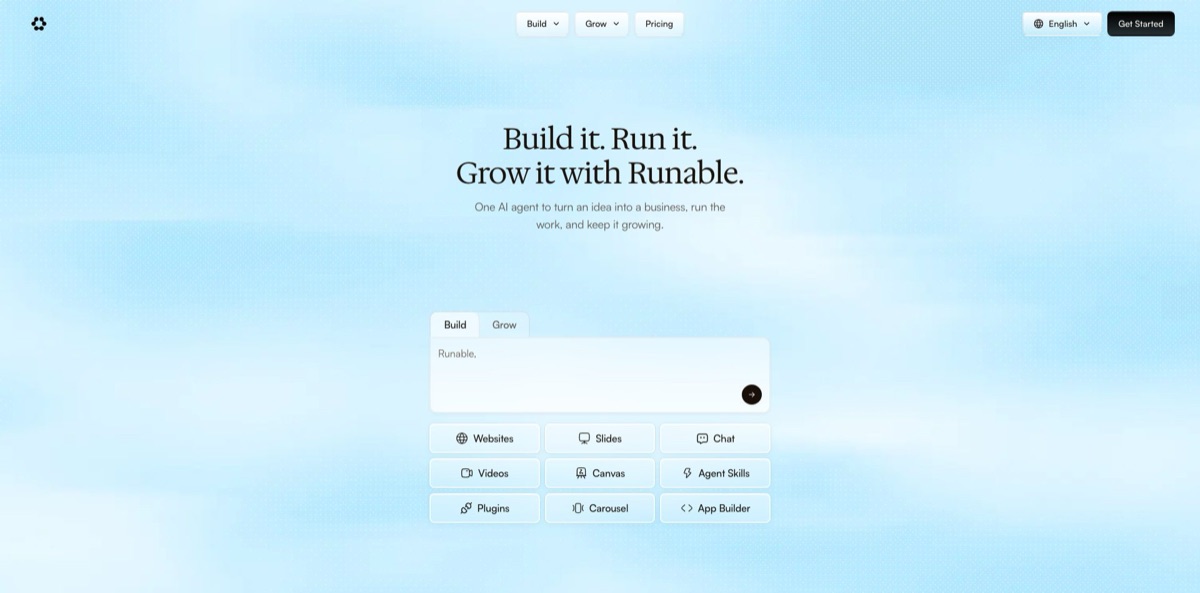
Click Get Started Free on runable.com and create an account. The same login works in the iPhone and iPad app, the Android app and the macOS desktop app, while a Windows version is still listed as coming soon. The home screen is one prompt box with Build and Grow modes and shortcut chips for Websites, Slides, Chat, Videos, Canvas, Agent Skills, Plugins, Carousel and App Builder. Picking a chip tells the agent which kind of result you expect, so the first draft opens in the right editor.
A good first job for a creator is repurposing. Paste a transcript or point the agent at a long video and ask for a script outline, a few thumbnail options and vertical cutdowns with captions, which is the example Runable itself shows on its page for content creators. The same page suggests feeding it three older videos so that new scripts follow your hooks and voice. For a smaller test, type a topic and ask for an Instagram or LinkedIn carousel built around a hook, value slides and a call to action.
The screen you will spend the most time in is Canvas. There you generate and upscale images, remove backgrounds, draw boxes over the exact part of an image you want changed, rewrite text detected inside a banner and line up video clips on a timeline. Before bigger projects, open Plugins and connect the apps you already use, such as Slack, Gmail, Google Drive, Notion or Shopify, so the agent can pull context from them and send finished files back without manual copying.
Check every output before it leaves the workspace. Decks export as PPTX or PDF, go to Google Drive or play from a live link, while websites publish to a free subdomain or your own domain with SSL and keep a version history with one-click rollback. Recurring work, like a weekly content plan or a morning news digest, can move to Scheduled tasks, which run at a time you choose and deliver results by email, mobile notification or a connected chat app. Watch the credit balance after each run, because video and app builds draw far more than chat.
Run one small carousel or deck first and note how many credits it used before you ask for video.
Who is it for?
YouTubers and podcasters
One long episode should become shorts, a newsletter section and a week of captions, but cutting it by hand eats your weekend. Runable pulls the best moments, captions vertical clips and drafts titles and thumbnails in one thread. Review every cut before posting, since the agent chooses the moments, not you.
Social media managers
You need carousels, short videos and post copy for Instagram, LinkedIn and TikTok every week, often for several accounts. The Carousel and Videos tools plus Scheduled tasks turn a weekly brief into drafts queued for approval. You still own the final edit and the brand voice.
Solo founders and small business owners
Your website, pitch deck and launch posts live in different tools, and none of them know about each other. Runable keeps one project context, so the deck, the landing page and the campaign copy share the same facts. The Grow layer can also take over ads and social posting once you trust it with a budget.
Marketers and agencies
Clients want decks, landing pages and campaign visuals faster than a design queue allows. Slides come from a brief, a URL or a PDF and export to PowerPoint or Google Slides, and the same context feeds a landing page with Stripe and analytics. Budget extra time for brand polish, because template layouts tend to show through.
Teams that live in chat apps
If your day happens in Slack, Microsoft Teams, Telegram, Discord or iMessage, Claw lets you tag Runable there and get a deck, poster or report back in the thread. Notetaker joins Google Meet, Zoom and Teams calls and returns summaries and action items. Fewer tabs means less context switching.
Non-technical app builders
You have an idea for a booking or fitness app but no developer. App Builder produces a React Native project with logins, a database, Stripe payments and push notifications, then prepares App Store and Play Store submissions under your own developer accounts. Store review times and edge-case bugs still need a human eye.
Runable pricing
Runable sells subscriptions measured in credits. Each paid plan includes a monthly pool plus 1,500 daily credits, and the plan data on the pricing page caps those daily credits at 15,000 a month. The company does not publish how many credits a deck, a video or an app build consumes, so your real cost depends on the mix of tasks you run. Prices are listed in USD. One inconsistency is worth knowing: the pricing page lists annual Pro billing at $240 a year, the same as paying monthly, while the separate comparison page quotes $15/month billed yearly, so confirm the figure at checkout.
Sign-up is free, but the pricing page does not state a free credit allowance. The privacy policy says the free plan may show an ad from partner Gravity next to replies, and user reviews describe free credits running out within the first request or two.
You get 25,000 credits monthly plus 1,500 daily, Notetaker, Flow dictation, access from your DMs, slides, carousels, image and video creation, documents and research, 3,000+ plugins, 100+ curated workflows, Discord support, multi-model chat and website and app building with a free database, analytics, Stripe integration, a free subdomain and Android and iOS app building. A limited-time bonus adds $50 in ad credits.
You get 150,000 credits monthly plus 1,500 daily, unlimited chats in Ask mode and the same tools as Pro. A limited-time bonus adds $300 in ad credits.
Custom. SSO, data localization, premium support and onboarding assistance are offered through the sales team at team@runable.com.
Read the fine print before you commit. The terms state that fees are non-refundable unless the law requires otherwise, and credit expiry rules are shown at checkout or in your account dashboard rather than on the public pricing page.
Runable key features
One agent covers Websites, Slides, Carousel, Videos, Canvas, Chat and App Builder, and all of them share the same project memory. A video idea can become a landing page, a carousel, a brief or a publishing plan in the same workspace. You stop pasting the same product facts into five different tools.
Creator repurposing turns one long upload into shorts, a carousel, a newsletter section and a week of captions
The agent watches the source, picks moments, cuts vertical clips with captions and drafts thumbnails sized for each platform. It can also plan a month of content, draft each slot and queue everything for your approval. That replaces hours of manual editing per episode.
Canvas is an infinite visual workspace for image and video work
You can generate images, upscale them up to 4x, remove or replace backgrounds, run virtual try-on for clothing, rewrite text detected inside an image while keeping its font and layout, and mark regions for targeted edits. A built-in timeline combines multiple clips into one video. Most quick fixes no longer require Photoshop or a separate video editor.
The video engine gives you several models, including Kling, Seedance and Veo 3.1, behind one subscription. Clips run from 5 to 120 seconds at up to 4K, and you can start from text or animate a photo with motion control. Voiceovers, soundtracks and audio effects are added in the same flow. You compare models without paying each vendor separately, though video is the fastest way to burn credits.
Slides and carousels start from a topic, a pasted URL, a PDF or a rough outline, with more than 500 slide templates to choose from. The visual slide editor lets AI restyle a single slide or swap its layout without rebuilding the deck. Decks export to PPTX, PDF or Google Drive, and carousels are structured as hook, value slides and call to action for Instagram and LinkedIn. You get presentable drafts in minutes instead of a blank template.
Websites and apps run on built-in infrastructure: a database, Stripe payments, custom domains with free SSL and CDN hosting, a visual SEO editor, real-time analytics and one-click rollback. App Builder outputs a standard React Native project for iOS and Android that you can export at any time. A creator can launch a paid newsletter page or a members app without hiring a developer.
Plugins, schedules and channels keep the agent working outside the browser
More than 3,000 app connections cover tools such as Slack, Gmail, Notion and Shopify, Scheduled tasks run jobs on a timetable, and Claw answers in Slack, Microsoft Teams, Telegram, iMessage and Discord. There is also an MCP server, so assistants like Claude or ChatGPT can start Runable tasks and fetch finished files.
Runable Pros & Cons
Pros
Breadth is the main reason to pay. Websites, slides, carousels, video, images, documents, research and native apps share one prompt box and one project memory, so a single brief produces a deck, a landing page and a set of posts that agree with each other. The video tool offers Kling, Seedance and Veo 3.1 under the same subscription, and Canvas covers the image fixes most creators open a separate editor for. Exports are standard formats: PPTX, PDF, Google Slides and React Native source code. The privacy policy states that your content is not used to train AI models. Positive reviewers describe sites and decks that ship in minutes. Use it as a first-draft engine for multi-format campaigns, then polish the winners by hand.
Cons
Credits are the recurring complaint. Runable does not publish what each task costs, and App Store and Google Play reviews describe credits vanishing on failed video renders, new accounts hitting the limit on their first message and upgrade prompts in the middle of a project. Several reviewers say refund requests were refused, which matches terms stating that fees are non-refundable. The pricing and comparison pages disagree on the annual Pro price, and support replies get mixed marks. The company is barely a year old and the product changes quickly, while the Windows app is still on the way. Pay monthly, test one short video before any large project and check your credit balance after every long run.
Use Runable if you want…
- Turn one long video into shorts and thumbnails.
- Build Instagram and LinkedIn carousels from a single topic.
- Generate pitch decks from a brief, PDF or URL.
- Publish a landing page with Stripe payments built in.
- Compare Kling, Seedance and Veo clips in one workspace.
- Schedule recurring content plans that land in your inbox.
- Get decks and posters back inside Slack or iMessage.
- Replace several creative subscriptions with one AI agent.
Runable alternatives
 GensparkRead review →
 Manus AIRead review →
 Skywork.aiRead review →
 MiniMaxRead review →
 CanvaRead review →
 SimplifiedRead review →
 Jasper AIRead review →
Runable Reviews
A user who builds client projects praises running market research, outreach lists and the website at the same time, with research that cites real sources and sites that go live looking polished.
One reviewer cancelled a Lovable subscription after two days, saying Runable carried out a detailed prompt in minutes without mistakes, although the prompt itself was first drafted in ChatGPT.
Users call it one of the most complete all-in-one tools for business insight and decks, but say credits burn so quickly that they cannot use it as often as they would like.
Several paying users report credits being used up on video jobs that never produced a clip, followed by prompts to pay more and refund requests that were turned down.
Fans on Google Play like how it connects to their other apps and handles graphics, research and writing from one simple interface, while critics point to unclear credit deductions and slow replies from support.
FAQ
Is Runable free to use?
You can sign up for free, but the pricing page does not publish a free credit allowance, and the free plan may show ads next to replies. Paid plans start with Pro at $20/month.
Does Runable train AI models on my content?
No. The privacy policy says Runable does not train AI models on your messages, files, voice or the apps you build, and the AI providers it uses are contractually barred from training on that content.
Which AI models does Runable use?
Chat on paid plans lists GPT 6 Astra, Claude Opus 5, Claude Sonnet 5.0, Gemini 3.5 Flash, GLM 5.3, Grok 4.6, DeepSeek V4.1 Flash, Kimi K3 and Runable’s own Runner. Video generation draws on models such as Kling, Seedance and Veo 3.1.
What file formats can I export?
Slide decks export as PPTX or PDF, go to Google Drive or play from a live link, and canvases export as images or PDF. Apps can be exported as standard React Native source code, and websites publish to a free subdomain or your own domain.
Which apps does Runable integrate with?
It connects to more than 3,000 apps, including Slack, Gmail, Google Drive, Notion and Shopify. You can also use it from Slack, Microsoft Teams, Telegram, iMessage and Discord, or connect it to an MCP-compatible assistant.
Can I use Runable outputs commercially?
Yes. The terms of service allow commercial use of exported outputs, but you may not resell or redistribute Runable templates as standalone products.
Can I get a refund if credits run out?
The terms state that fees are non-refundable unless required by law, and credit expiry rules appear at checkout or in your account dashboard. Test with a monthly plan before choosing annual billing.
Is there a mobile or desktop app?
Yes. Runable has apps for iPhone and iPad, Android and macOS, while a Windows app is listed as coming soon. The website interface is available in 11 languages, and Flow dictation understands more than 100.
Similar tools
 AISEOAI writing suite with a text humanizer, article and Outrank generators, AI detector and plagiarism checker, plus AI search visibility tools.
 Octopus.doVisual sitemap builder that drafts page structure, block copy and SEO tags with AI, crawls existing sites and connects to ChatGPT, Claude
 GravityWriteAll-in-one AI content platform with 250+ writing tools, a long-form blog writer, image and video generation and a social media scheduler on