

RunPod
Developer ToolsUpdated October 5, 2026
RunPod is a scalable cloud platform that provides on-demand GPU resources and serverless endpoints for training and running AI models.
We may earn a commission when you sign up through our links. It does not affect our reviews.
What is RunPod?
RunPod acts as a globally distributed GPU marketplace where you rent high-end compute by the hour to spin up Stable Diffusion instances or train LLMs, without the overhead of enterprise cloud contracts. It sidesteps local hardware scarcity by connecting you to a network of private providers and data center operators, so you can deploy Docker containers on RTX 3090s or A100s within seconds. I noticed the interface is built for speed, though the spot instance market means your pod might vanish if a higher bidder shows up. This matters because it slashes the cost of AI experimentation compared to fixed-price hyperscalers. Community-maintained templates give you a fast start; switch to dedicated instances when your training run can’t survive an interruption.
How to start using RunPod?
Start by signing up for the RunPod console and verifying your email. You need to top up credit right away, since the platform runs on a prepaid model. The minimum deposit is low, which is ideal for testing a single RTX 4090 without a big commitment. Renting high-end compute by the hour instead of buying a five-figure workstation lowers the barrier to training niche models or running compute-heavy inference.
Tip: Enable two-factor authentication immediately to protect your balance.Next, browse the GPU Cloud or Serverless sections to pick your hardware. You can choose specific cards like the A100 or cheaper community-provided instances. Every pod requires a template; the official PyTorch template usually works best for AI workloads. That saves you from the nightmare of manual CUDA driver installs. Pre-configured environments let you start coding within minutes instead of debugging kernel incompatibilities, although community pods can be less reliable than ones in secure data centers.
Takeaway: Check the VRAM requirements before deploying to avoid out-of-memory errors on smaller cards.Launch your pod and wait roughly sixty seconds for the container to initialize. You can connect through a browser-based Jupyter Lab or use SSH for local IDE integration. I prefer the SSH route because it lets me run VS Code extensions directly against the remote GPU. That turns an ordinary laptop into a specialized AI machine, combining the responsiveness of local editing with the raw power of a remote H100 and a professional terminal for complex scripts.
Takeaway: Save your public SSH key in the RunPod settings to skip the password prompt on every connection.Finally, manage your data with network volumes if you want your datasets to survive across sessions. Regular pod storage is ephemeral, so anything outside a volume disappears when you terminate the instance. This setup protects your weights and logs even when you move from a cheap GPU for debugging to a powerful one for training. You pay a small ongoing cost for the storage itself, but persistent volumes decouple your expensive compute from your valuable data, so a routine shutdown can’t wipe out days of training progress.
Takeaway: Always “Stop” a pod to save money while keeping data, but only “Terminate” it once you are completely done.
Who is it for?
The independent researcher.
You need high-end NVIDIA VRAM to train a custom LoRA or fine-tune an LLM without paying the five-figure price of a personal workstation. Renting an A100 by the hour lets you test hypotheses on hardware that would otherwise be out of reach. For solo experimenters competing with venture-funded labs, that levels the playing field.
The inference engineer
You want to host an API for a generative AI app that only costs money when someone actually hits the endpoint. Serverless GPUs spin up containers during traffic spikes and scale back to zero during quiet periods. Your cloud bill stops eating your margins while your app sits idle. I noticed the FlashBoot technology cuts cold starts down to a few seconds, which makes it viable for real-time apps.
The Docker power user
If your environment is already containerized, you can deploy your specific stack to a remote GPU in about sixty seconds. That bypasses the dependency hell of manual CUDA driver installs on local Linux distributions. You spend your time writing Python instead of debugging kernel incompatibilities. The catch: you need discipline with network volumes to store data permanently.
The VS Code developer
You prefer your local IDE but need the raw power of a remote H100 cluster. Connecting over SSH turns your standard laptop into a specialized AI machine with full terminal access and extension support. Local responsiveness meets data center power. I found that setting up public SSH keys early removes the annoyance of repeated password prompts.
The Stable Diffusion hobbyist
You want to generate entire batches of high-resolution images with ComfyUI or Automatic1111 without hammering your home GPU. With pre-configured templates you can launch a web UI on an RTX 4090 within minutes. Complex workflows like ControlNet or IP-Adapter iterate much faster. It works well for demanding creative sessions but is less ideal for casual single-image prompts.
RunPod pricing
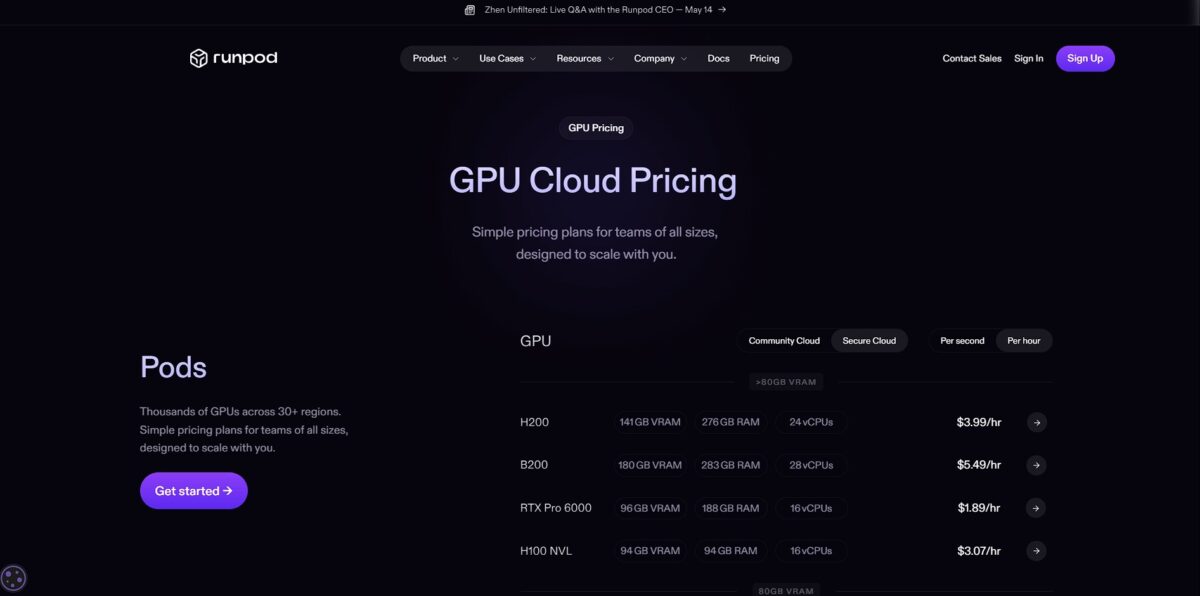
RunPod skips the flat monthly subscription in favor of a marketplace model where you rent GPU time by the second or by the hour. This setup gives you access to high-end hardware like the H100 or A100 without the heavy markups of traditional cloud providers. You pay exactly what you consume, so idle instances don’t drain money during long training breaks. The downside is price volatility: costs fluctuate with current network demand and the pricing tier you pick.
These pods stay yours until you delete them, which gives you a stable environment for complex development work without the risk of sudden termination.
You only pay while your code actually runs, which suits inference APIs that scale to zero as soon as traffic drops off.
Compute costs fall, but storage remains a separate fixed cost. Even so, predictable billing helps teams budget for long-term model hosting.
Expect $0.10/GB/month for active volume disks.
One important catch is that stopped pods are billed for storage at double the rate ($0.20/GB/month) to discourage hoarding unused resources. The policy forces disciplined data management.
RunPod key features
Rent high-end NVIDIA H100 or A100 GPUs with per-second billing
You avoid massive capital costs because you only pay for the compute cycles your model training actually consumes. Solo researchers who can’t afford a $40,000 hardware rack get access to the same class of hardware.
Launch serverless endpoints that scale to zero when idle
Your API stays responsive during traffic spikes but stops generating costs the moment requests dry up. No more bill shock from idle data center compute.
Deploy custom Docker containers or use pre-configured templates for PyTorch and Jupyter
You bypass the dependency hell of installing CUDA drivers and start straight from your notebook. That cuts hours off the gap between an idea and running a benchmark.
Attach persistent network storage across multiple pods
Your training checkpoints and large datasets stay available even when you switch GPU types or restart a pod. This matters because it ensures you don’t lose days of progress when a spot instance is released.
Access a Community Cloud for cheaper rates or a Secure Cloud for compliance requirements
You choose between maximum savings on idle capacity or dedicated hardware for sensitive data. You decide how to balance price against privacy.
Use the Flash CLI to push Python functions straight to the cloud
You skip the need to build and manage images by leaving orchestration to the platform. You can focus on application logic instead of infrastructure.
RunPod Pros & Cons
Pros
RunPod supplies GPUs when hyperscalers show “out of stock” errors. You skip the sales calls and the wait for quota approval. Launch an H100 or an RTX 4090 in under a minute. Per-second billing ensures you stop paying the moment your script finishes. The serverless endpoints scale to zero, which removes idle costs: you only pay for active compute. Pick the Secure Cloud for stability and the Community Cloud for maximum savings.
Cons
The marketplace model brings stability trade-offs. Community instances offer massive discounts but are prone to sudden preemption. Your training job might be cut off if someone outbids you, so persistent storage volumes are necessary for frequent checkpoints. It lacks the broad service ecosystem you find on AWS or Google Cloud. You won’t find managed SQL databases or enterprise networking here. Always mount a network volume to protect your data from unexpected pod shutdowns.
Use RunPod if you want…
- Rent high-end GPUs for AI training with per-second billing.
- Deploy serverless inference endpoints without managing infrastructure.
- Access H100 or A100 clusters instantly for large models.
- Run persistent pods with full root and SSH access.
- Scale production AI workloads effortlessly across the globe.
- Fine-tune LLMs using cheap community-provided compute.
- Monitor GPU temperature and memory usage in real time.
- Avoid complex cloud contracts with transparent per-second billing.
RunPod alternatives

RunPod Reviews
Excellent for AI development. Working in a CUDA- and GPU-supported environment matters a lot, and RunPod delivers it with an easy setup.
Great interface and instantly available GPUs. For a mid-range cloud hosting service, this is the best choice.
Easy to use and the best quality for this price. Support is also relatively straightforward compared to the big providers.
Excellent for startups. It is really flexible and easy to use. You can deploy ready-to-use templates without trouble and start right away.
FAQ
What is the difference between Secure Cloud and Community Cloud?
Secure Cloud runs in high-end data centers with enterprise-grade reliability and security, while Community Cloud uses a peer-to-peer network of individual GPU providers. Secure Cloud suits production workloads and sensitive data better, while Community Cloud offers significantly cheaper pricing for non-critical development and testing.
How does persistent storage work?
RunPod lets you create network volumes that can be attached to your pods. These volumes ensure your data, models and code stay available even after a pod is terminated or restarted, and you only pay for the space you actually use.
What are spot instances?
Spot instances are available at a significant discount compared to on-demand pricing. The trade-off is that they can be terminated early when an on-demand user needs the capacity, which makes them ideal for fault-tolerant training jobs but less suitable for persistent web services.
Can I use custom Docker images?
Yes, you can deploy pods with any public or private Docker image from registries like Docker Hub or the GitHub Container Registry. This lets you pre-configure your environment with specific drivers, libraries or application code.
Does RunPod support serverless deployments?
Yes, RunPod Serverless lets you deploy AI models as endpoints that scale to zero when unused. You only pay for the exact duration of GPU compute needed to process each request, which is highly cost-effective for inference tasks with variable traffic.
How do I manage multi-GPU clusters?
RunPod offers Instant Clusters that let you deploy multiple nodes with high-speed interconnects. This is designed for distributed training of large-scale models where a single GPU’s memory is not enough.
Similar tools
 Novita AIDeveloper cloud with one API for 200+ open-weight AI models, plus GPU instances, dedicated endpoints and isolated sandboxes for AI agents.
 You.comDeveloper platform of web search, content extraction, cited research and model inference APIs that feed AI agents and RAG apps real-time web
 QodoAI code review platform that runs specialized agents on every pull request, enforces team rules and checks changes against tickets and linked