
Secoda
Data AnalysisUpdated October 27, 2026
AI data catalog and governance platform that maps lineage, monitors data quality and answers questions about company data in plain English.
We may earn a commission when you sign up through our links. It does not affect our reviews.
What is Secoda?
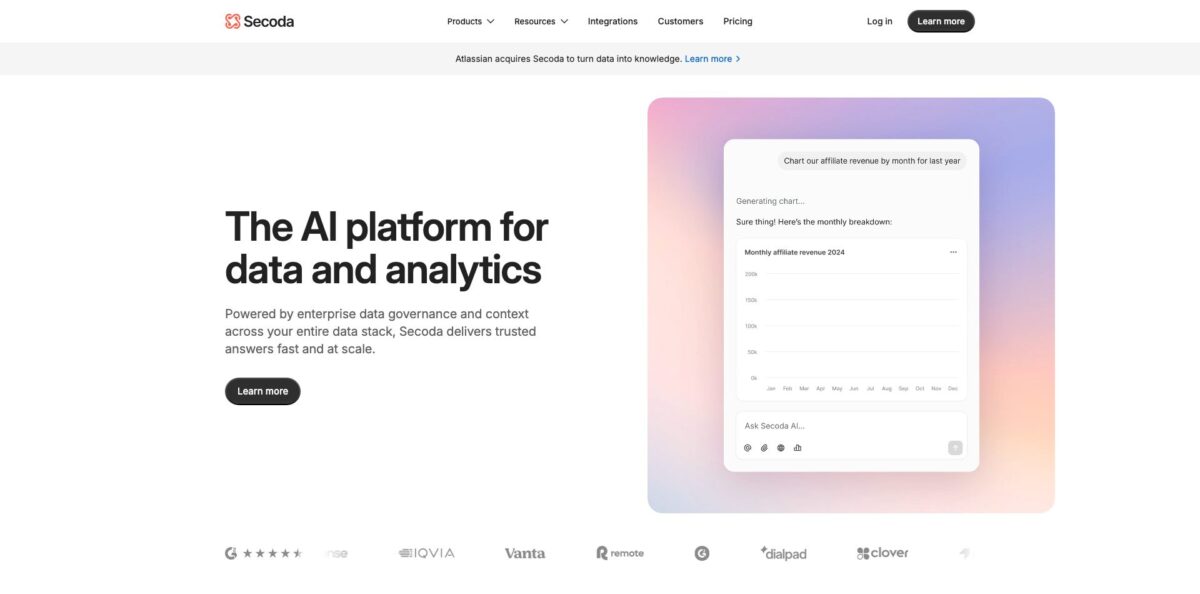
Secoda, short for Searchable Company Data, is a data catalog, lineage, observability and governance platform with an AI analyst built on top. It connects to your warehouses, BI tools and dbt projects, pulls in metadata and query history rather than the data itself, and builds column-level lineage and documentation from that. Secoda AI then answers questions in plain English, writes SQL, drafts descriptions and turns prompts into charts and dashboards, all within each user’s team permissions. The problem it removes is the endless “which table is the right one?” thread in Slack. The weak spots are sales-led pricing with no public numbers and an open roadmap: Atlassian bought Secoda in December 2025 and plans to move it onto Atlassian’s cloud platform. It fits mid-size and enterprise data teams that want catalog, monitoring and AI answers in one tool instead of three.
How to start using Secoda?
You can begin from the Start free trial button on the Secoda AI page, which opens a sign-up at app.secoda.co, or book a demo through the sales form that most other trial buttons on the site lead to. The workspace admin handles the setup: integrations, single sign-on and invitations. Before inviting anyone, open the sign-in options and connect SAML or your identity provider, since Secoda can map permissions from Okta or Active Directory. Getting this right first saves you from re-assigning roles once hundreds of viewers are inside.
Next, open the Integrations tab in the side panel and click New Integration; only Workspace Admins see this tab. Pick your warehouse, for example Snowflake, BigQuery, Redshift, Databricks or Postgres, and follow the setup notes shown in the right panel. If the database sits in a private network, Secoda supports SSH tunnels, a reverse SSH tunnel agent, VPC peering and AWS PrivateLink. Under Associated Teams, choose which teams can see that integration’s metadata. Secoda then ingests metadata and query history, parses the queries and draws table- and column-level lineage, so add dbt and your BI tool next to see the full path from source to dashboard.
The key screen is Settings > AI. Secoda AI is disabled by default, so toggle it on, then set governance filters that decide which resources the assistant may read. Add custom instructions such as answering only from Verified resources or never touching the RAW database, and create Personas with their own instructions, resource filters and team access, for example one for finance and one for product. The run SQL tool only executes queries when an admin switches it on and the user has query access to that integration, so decide early who gets live SQL and who gets metadata-only answers.
Before the company-wide rollout, decide whether new resources publish automatically or stay as drafts, because by default both published and draft resources feed Secoda AI answers. Seed the Questions section with your team’s most common data FAQs, review the Data Quality Score if your plan includes it, and connect Slack or Microsoft Teams so business users can ask questions where they already work. Then invite colleagues as Viewers, a smaller group as Editors, and ask a handful of real business questions to check that the answers cite the tables you expect.
Who is it for?
Heads of Data
Your team answers the same “where is the revenue table?” question every week, and documentation lags behind the warehouse. Secoda drafts table and column descriptions with AI, tracks which assets are popular and turns answered requests into a searchable Questions archive. Fewer interruptions leave your analysts time for actual modeling.
Analytics Engineers on dbt
You change a model and have no idea which Looker or Tableau dashboard breaks. Secoda reads dbt Cloud or Core, including tests, tags and column-level lineage, and its GitHub integration shows downstream impact on pull requests. You see the damage before merging, not after a stakeholder complains.
Governance and Compliance Managers
Spreadsheets of PII columns and manual access tickets stop scaling past a few dozen tables. Secoda adds PII scanning and policies on Premium, access request management and SIEM logging on Enterprise, and audit logs with role-based access along the way. Audit preparation becomes an export rather than a week-long hunt.
Business Analysts and Data Consumers
You want a number, not a ticket in someone’s queue. Secoda AI answers in Slack, Teams, the web app or the Chrome extension inside Looker, Tableau or Snowflake, and can turn a prompt into a live dashboard. You get governed answers without memorizing the warehouse schema.
Platform Teams in Regulated Industries
Multi-tenant SaaS fails your security review. Secoda offers single-tenant deployment on Premium and self-hosting with Terraform and Docker on Enterprise, alongside SOC 2, SAML, MFA and built-in GDPR and HIPAA frameworks. The catalog can stay inside your own network.
Atlassian-Heavy Organizations
Your data requests already live in Jira and your docs in Confluence. Secoda syncs both and now belongs to Atlassian, which plans to bring its cataloging into the Atlassian cloud platform and Rovo AI. Buying now lines you up for that path, provided your contract covers the migration.
Secoda pricing
No dollar figures appear anywhere on the official site. The pricing page, checked on October 25, 2026, lists three tiers with feature lists, and every Learn more button leads to the sales contact form, so pricing is quote-based. The model is seat-oriented: Viewers and Teams are unlimited on every tier, while the number of Editors and admins and the number of workspaces are marked Custom and set in your contract. That structure is friendly to a wide read-only rollout, but the quote grows with the people who document and govern data.
Custom quote. Includes the full data catalog, column- and table-level lineage, automations, API access, the home page and inbox, workspace analytics, SAML, SSH or reverse SSH connections and RBAC. Slack and Microsoft Teams plus the Confluence, Git, Jira, GitHub, Linear and PagerDuty extensions are listed on every tier.
Custom quote. Adds the Data Quality Score, guest accounts, policies, PII scanning, single-tenant deployment, VPC peering and premium support. This is the tier for teams that need quality scoring and sensitive-data tagging.
Custom quote. Adds custom roles, self-hosted deployment, access request management, SIEM logging, unlimited integrations, disaster recovery support, priority support with a dedicated account manager and professional services.
One inconsistency to watch: the FAQ on the same pricing page still says the API is available on Business and Enterprise plans, names that no longer appear in the plan table, so get API access written into the order form. A Start free trial sign-up exists, but no trial length or free tier is published.
Secoda key features
Secoda AI answers questions in plain English using your catalog metadata, lineage, monitors, query history and policies as context. It runs on a mix of models, including OpenAI GPT-4o, Google Gemini 2.5 Flash and Lite, and Anthropic Claude Sonnet 4 and Opus 4, can write and run SQL when admins allow it, and turns results into charts or live dashboards from a single prompt. Because it follows Team permissions, a marketer cannot pull answers about finance tables they cannot see.
Automated lineage parses query history from your warehouse and BI tools into table- and column-level maps, and pulls in dbt tests, ETL events and tags. With the GitHub integration, a pull request on a dbt model shows its downstream impact before the merge. Systems Secoda cannot parse can still be added through manual lineage via the API.
Monitoring and quality scoring cover no-code monitors, schema change alerts, data profiling, query performance and warehouse cost monitoring, and bulk monitor creation. The Data Quality Score on Premium and above grades assets and suggests fixes, and Secoda AI can propose monitors, for example for null spikes in a column. You get observability inside the catalog instead of paying for a separate product.
Governance controls include customizable RBAC, groups, audit logs, PII scanning, policies with automated rules, guest accounts and access request management, depending on tier. AI governance filters and PII masking keep sensitive resources out of AI processing. Expect it to replace the shared spreadsheet of who owns which table.
Questions, Slack and the Chrome extension bring the catalog to where people already work
Data requests arriving through Slack or Jira get answered once and stay searchable, while the Chrome extension shows metadata, lineage and Secoda AI inside Looker, Tableau, Snowflake, BigQuery and other tools. Business users stop pinging analysts for definitions they can look up themselves.
Agents and automations take over recurring busywork
You can convert a useful Secoda AI prompt into a scheduled agent with its own persona and a minimum one-hour interval, or use the AI Automation block to generate descriptions and tags with a preview-and-approve step.
The MCP server and REST API open the catalog to other AI tools and scripts
The MCP server exposes tools such as search_data_assets, run_sql, entity_lineage and glossary, so Claude, Cursor and similar agents get trusted context with workspace permissions applied. The API covers tables, columns, lineage, monitors, documents, audit logs and more for custom integrations.
Secoda Pros & Cons
Pros
Secoda puts catalog, lineage, monitoring, governance and an AI assistant in one product, which can replace two or three separate tools for a mid-size data team. Reviewers on G2 keep returning to the intuitive interface, quick adoption by non-technical colleagues and responsive support during onboarding. The AI is grounded in your own metadata and respects team permissions, and by default only metadata, not row-level data, goes to the model provider. Unlimited viewers on every tier make company-wide rollout realistic, and deployment options from SSH tunnels to full self-hosting satisfy strict security teams. Run a pilot with one warehouse, dbt and one BI tool, and track how many Slack data questions Secoda AI answers correctly in the first month.
Cons
With no public prices, you cannot budget without a sales call, and reviewers from smaller companies often call it pricey. Some G2 users report bugs that break features like automations, and lineage detection can miss edges in complex environments. The bigger question is the roadmap: Atlassian acquired Secoda in December 2025, infrastructure is set to migrate to Atlassian’s cloud, and the public changelog has had no new entry since October 2025. Metadata sent to OpenAI or Anthropic is processed in the US, and enabling run SQL adds a data sample. Negotiate an exit clause tied to the Atlassian migration and keep run SQL off until your legal team signs off.
Use Secoda if you want…
- Answer data questions in plain English from Slack.
- Map column-level lineage across warehouse, dbt and BI.
- Document thousands of tables with AI-generated descriptions.
- Catch schema changes and data quality issues early.
- Scan for PII and enforce governance policies automatically.
- Give AI agents trusted context through an MCP server.
- Turn recurring data requests into a searchable knowledge base.
- Run your data catalog self-hosted inside your network.
Secoda alternatives
Secoda Reviews
Lineage is the standout for several G2 reviewers: connecting Snowflake, dbt and Tableau drew dependencies automatically and made impact analysis on planned changes easy, although advanced setup takes more effort than the clean interface suggests.
A recurring G2 complaint is bugs, with one user saying they too often hit the most useful features, such as automations, which makes the product frustrating despite its promise.
G2 users broadly praise how easy Secoda is to use and how responsive the support team is, which helps non-technical colleagues adopt it; reviewers at smaller companies add that it gets expensive.
Early Product Hunt reviewers liked the long list of integrations, granular role-based sharing with vendors and automatic PII tagging, while another found the young product felt like a beta, with lost documentation and a flaky BigQuery connection.
FAQ
Does Secoda have a free plan?
No free tier is listed on the pricing page; all three plans, Core, Premium and Enterprise, are sold through sales. The site does offer a Start free trial sign-up, but the trial length is not published.
How much does Secoda cost?
Pricing is quote-based. Viewers are unlimited on every plan, while Editor and admin seats and the number of workspaces are set per contract, so the number of people who maintain metadata drives the price.
Is Secoda still available after the Atlassian acquisition?
Yes. Atlassian acquired Secoda in December 2025, and the product is still sold under its own brand at secoda.co. Secoda says the customer experience continues while infrastructure gradually moves to Atlassian’s cloud platform, with technical plans shared in advance.
What data does Secoda AI send to the model provider?
By default only workspace metadata such as resource names, descriptions, tags, owners and popularity. If an admin enables the run SQL tool, a sample of the data is also sent to resolve query errors, and OpenAI, Google and Anthropic state that API data is not used to train their models.
Which tools does Secoda integrate with?
Secoda lists more than 50 integrations, including Snowflake, BigQuery, Redshift, Databricks, Postgres, Oracle, SQL Server and MySQL, BI tools such as Tableau, Looker, Power BI, Sigma, Metabase and Mode, plus dbt Cloud and Core, Jira, Confluence, GitHub, Slack and Microsoft Teams.
Can I self-host Secoda?
Yes, on the Enterprise plan, using Terraform and Docker. Premium offers single-tenant deployment and VPC peering instead, and self-hosted images are updated less often than the SaaS version.
Does Secoda have an API and an MCP server?
Yes. The REST API covers tables, columns, lineage, monitors, documents, audit logs and more, and the MCP server lets tools like Claude and Cursor search assets, read lineage and run SQL under your workspace permissions.
Is Secoda secure enough for enterprise use?
Secoda states SOC 2 compliance, SAML SSO, MFA, SCIM, data encryption and SSH tunneling, with built-in frameworks for GDPR and HIPAA. Keep in mind that metadata sent to OpenAI or Anthropic is processed on US servers.
Similar tools
 HexCollaborative analytics workspace that mixes SQL, Python and AI agents in notebooks, then publishes results as data apps and plain-language answers.
 WindwardMaritime AI platform that fuses AIS, satellite and ownership data into vessel risk scores, sanctions screening, alerts and container ETAs.
 Delve AIAI market research platform that builds personas from analytics, CRM and social data, then lets you chat with them or run synthetic