

Semantic Scholar
Data AnalysisUpdated October 5, 2026
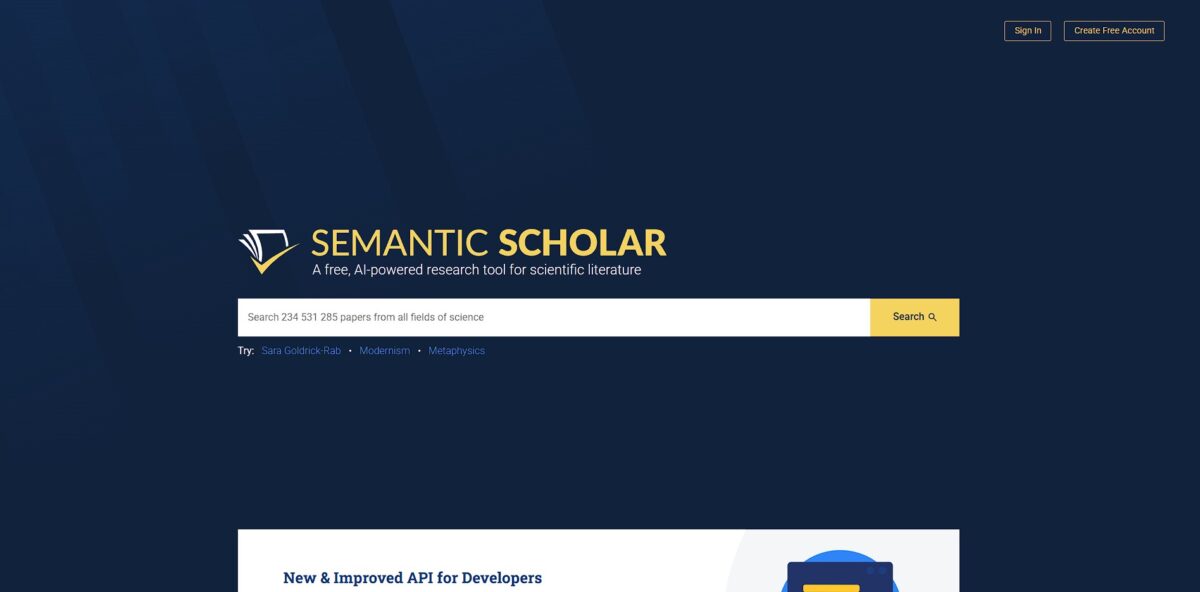
Semantic Scholar is a free, AI-powered search engine that uses machine learning to discover and summarize scientific research.
We may earn a commission when you sign up through our links. It does not affect our reviews.
What is Semantic Scholar?
Semantic Scholar is a non-profit search engine from the Allen Institute for AI that crawls over 200 million papers to help you skip the manual slog of reading lengthy abstracts. Instead of just matching keywords, it uses machine learning to extract the actual intent behind citations, flagging which papers truly influenced a study rather than just appearing in a list. I noticed it excels at surfacing “TLDR” summaries for computer science and biomedicine, though coverage for niche humanities can feel thinner. This semantic approach helps you map out a research field’s evolution without getting buried in the three million papers published annually. It transforms a wall of text into a navigable graph of connections so you can find the “must-reads” faster.
How to start using Semantic Scholar?
Start by heading to semanticscholar.org to test the search bar. You don’t need an account to browse their corpus of over 200 million papers, which is great for quick fact-checking. Type a specific topic and look for the TLDR tags in the results. These one-sentence summaries help you skip irrelevant PDFs without opening them.
To get more out of the engine, click Create Free Account in the top right. You can use Google or your institutional email. That gives you the Library feature, where you can save papers to specific folders, so your research doesn’t turn into a giant, unorganized pile of browser tabs.
Once you have a few papers saved, toggle the Research Feed to On for those folders. The AI analyzes your saves to recommend new, relevant preprints and articles daily. It feels like a personalized discovery queue that learns your niche interests. This saves you from manually repeating the same keyword searches every week.
If you’re an author, find your name in the search results and select Claim Author Page. This lets you clean up your publication record by removing papers you didn’t write or adding missing ones. You also get notifications when someone cites your work. It’s a low-effort way to track your academic footprint without paying for a citation manager.
The site is excellent for finding open-access PDFs, but sometimes the “Highly Influential Citations” count differs from Google Scholar. This happens because they focus on specific data sources rather than the entire web. Use it as a discovery tool first, then verify citation counts elsewhere if you need total precision.
Who is it for?
Graduate students facing a mountain of PDFs
The TLDR feature extracts one-sentence summaries from complex computer science or biology papers, saving you from reading entire abstracts just to see if a study is relevant. You spend far less time filtering out noise during a literature review.
PhD candidates tracking specific idea threads
Influence scores highlight which citations actually shaped a paper’s direction rather than just being a passing mention in the intro. Knowing a paper’s “influence” helps you map the actual evolution of a concept over decades. You don’t get lost in a sea of generic citations.
Academic developers building scholarly apps
The open API provides stable access to a massive graph of paper metadata and citation connections without the gatekeeping of legacy databases. You can build custom research tools or data visualizations using their indexed datasets. That is the raw data needed to innovate in the open science space.
Early-career researchers managing information overload
Personalized research feeds suggest new papers based on what you’ve saved in your library folders, acting like a discovery engine that learns your niche. It automates the “morning search” so you don’t miss a breakthrough in a fast-moving field like AI. Staying current becomes a background process instead of a manual chore.
Collaborative research labs
Shared folders allow teams to pool relevant sources and export citations in bulk, keeping everyone on the same page during a group project. It bridges the gap between individual discovery and team knowledge management. Goodbye to the “did you see that one paper?” email chains.
Independent scholars on a budget
The platform offers free access to 200+ million papers across STM and social sciences, providing a professional-grade alternative to expensive proprietary indexes. You get high-end NLP features without a university-subsidized subscription. High-level scientific discovery tools stop being a privilege of well-funded institutions.
Semantic Scholar pricing
Most academic search engines eventually hide the best features behind a paywall, but Semantic Scholar stays open. Since it is funded by the Allen Institute for AI, you get access to deep citation mapping and paper summaries without a subscription.
The core platform is free for everyone.
No cost for standard research. Public endpoints share a rate limit of 1000 requests per second across all unauthenticated users.
Available via agreement. While the site doesn’t list tiered pricing, developers requiring dedicated throughput (starting at 1 request per second) must apply for an API key.
Open. You can download the bulk dataset for local analysis without paying licensing fees. You can build custom research tools or scripts without worrying about a monthly bill. While the API is free, the unauthenticated tier can get throttled during peak hours, so grab a free API key if you plan to scrape data for a project.
Semantic Scholar key features
AI-generated TL;DRs pinpoint a paper’s main contribution in a single sentence
You can skim dozens of search results without opening multiple tabs to find the core thesis. This prevents the mental fatigue of reading dense abstracts just to see if a study is relevant. Pick the paper with the most relevant one-liner to start your deep dive.
The engine prioritizes influential citations over raw counts by identifying when a paper builds on previous work rather than just mentioning it. You see which studies actually moved the needle in your field. This helps you skip the “background noise” and focus on the foundational literature that shaped current methods. Use the Highly Influential Citations filter to find the real heavy hitters.
Automated Research Feeds suggest new pre-prints based on your library’s specific technical focus
It catches niche papers that broad keyword alerts often miss. This saves you from manual weekly searches across disparate journals. Check your library weekly to see how the recommendations evolve as you add more sources.
Semantic Reader highlights key terms and citations in-situ as you read the PDF
It pulls up definitions and cross-references without forcing you to scroll to the bibliography. This maintains your flow when encountering unfamiliar acronyms or complex math. Hover over a citation to see the abstract immediately instead of navigating away.
The platform links directly to open-access versions and GitHub repositories associated with the research
You can jump from a theoretical claim to the actual implementation or raw data in two clicks. This bridges the gap between reading a method and trying to replicate it. Look for the Code button to see if the authors published their stack.
Author pages aggregate career-long impact and collaboration networks across millions of profiles
It’s easier to vet a researcher’s consistency and find their frequent co-authors for a broader view of a lab’s output. This provides context on whether a breakthrough is a one-off or part of a sustained research program. Follow a lead author to track their upcoming work across different publication venues.
Semantic Scholar Pros & Cons
Pros
Semantic Scholar slashes the time you spend decoding academic jargon by surfacing one-sentence TLDRs for millions of papers. Instead of opening twenty tabs to read dense abstracts, you can skim a search results page to identify which studies actually support your thesis. I noticed the “Highly Influential Citations” filter effectively weeds out passing mentions, highlighting only the research that truly shifted a field’s direction. This matters because it prevents you from building a bibliography on top of superficial references. It works well for rapid literature mapping in computer science and biology, though coverage varies in niche humanities. Check the citation context snippets to see if a paper was supported or contested before citing it.
Cons
The library system feels utilitarian and lacks the deep PDF annotation features found in dedicated reference managers. While the AI recommendations in Research Feeds stay relevant, the engine sometimes misses the latest preprints that haven’t yet been indexed in its primary corpus. The trade-off for its speed is a search interface that can feel cluttered when multiple AI-generated elements compete for space, and a busy UI can distract you from finding a specific, known title when you aren’t in discovery mode. It is less ideal for researchers needing a primary storage hub for thousands of local files. Use it as a discovery layer rather than your only tool for document organization.
Use Semantic Scholar if you want…
- AI to surface hidden connections across millions of papers
- To bypass keyword matching for true semantic search results
- One-sentence abstracts to rapidly filter your reading list
- Automated citation tracking to monitor your research impact
- To discover influential papers via smart, data-driven ranking
- A personalized feed of the latest scholarly breakthroughs
- To identify trending research topics before they go mainstream
Semantic Scholar alternatives


Semantic Scholar Reviews
Best literature search tool available; the AI summaries save me hours of reading.
FAQ
How does Semantic Scholar calculate citation counts?
Semantic Scholar identifies citing papers based on the data available in its corpus, which primarily focuses on published academic articles and preprints. Citation counts may differ from other sites because book coverage is limited and patents are not included.
What is a TLDR summary?
TLDRs are super-short summaries generated using artificial intelligence that highlight the main objective and results of a paper. They are designed to help researchers scan papers quickly to decide if they are relevant to their work.
How is the H-index determined on the platform?
The h-index is calculated using the citation data discoverable within the Semantic Scholar database. It represents the highest number of papers that have each been cited at least that same number of times.
What are Highly Influential Citations?
This feature uses a machine-learning model to identify citations where the cited publication has had a significant impact on the citing paper. It helps researchers filter through large volumes of citations to find the most meaningful connections.
Can I save and organize research papers?
Yes, by creating a free account, you can save papers to a personal library, organize them into customized folders, and share those folders with collaborators.
What are Research Feeds?
Research Feeds are personalized, AI-powered recommendations that suggest new papers based on the items you have saved to your library folders. The system learns your interests as you rate the relevance of the suggested papers.
How can I find my Semantic Scholar ID?
You can find your ID by searching for your author page on the site. The ID is the numerical string located at the end of the URL for that specific author page.
Are there tools available for developers?
Semantic Scholar provides a RESTful API and the Semantic Scholar Academic Graph (S2AG) dataset, allowing developers to integrate academic content and citation data into their own applications.
Similar tools
 HexCollaborative analytics workspace that mixes SQL, Python and AI agents in notebooks, then publishes results as data apps and plain-language answers.
 WindwardMaritime AI platform that fuses AIS, satellite and ownership data into vessel risk scores, sanctions screening, alerts and container ETAs.
 Delve AIAI market research platform that builds personas from analytics, CRM and social data, then lets you chat with them or run synthetic