

SheetAI
Data AnalysisUpdated November 10, 2026
Google Sheets add-on that runs AI formulas down whole columns to write, classify and extract text, and to generate images, video or music per row.
We may earn a commission when you sign up through our links. It does not affect our reviews.
What is SheetAI?
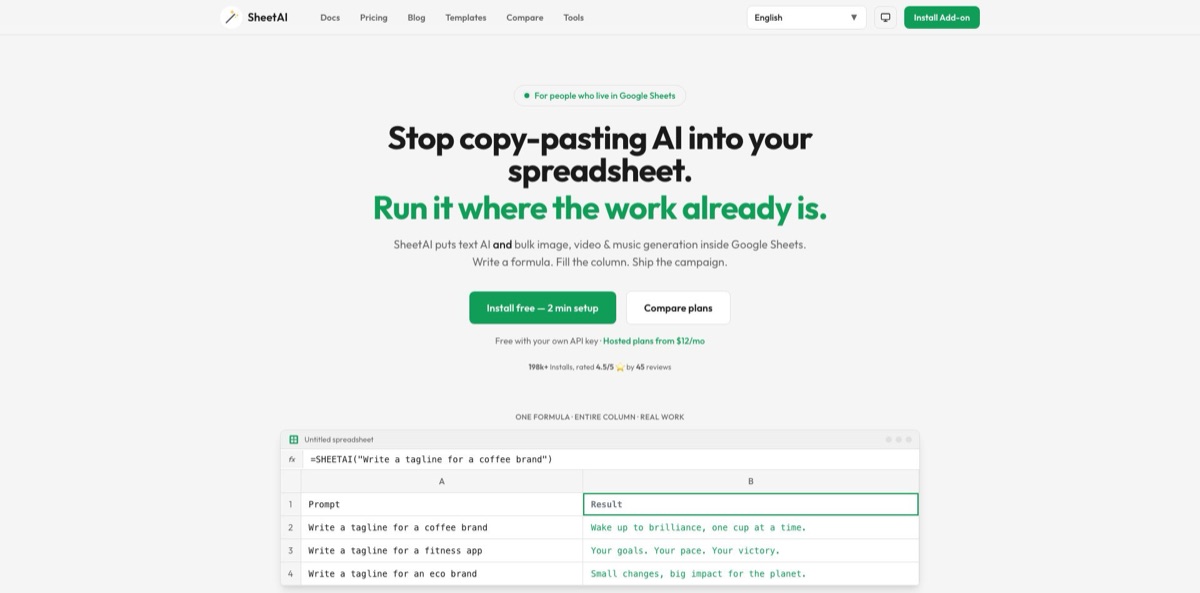
A Google Sheets add-on from IndianAppGuy Tech that turns AI prompts into spreadsheet formulas. You write =SHEETAI() with a prompt or a cell reference, drag it down a column, and every row returns its own tagline, summary, label or extracted value. Companion functions cover lists, tables, classification, extraction, gap filling and translation, and a Replicate connection adds bulk image, video and music generation. The point is to end the copy-paste loop between a chatbot and a sheet with hundreds of rows. You can run it free on your own OpenAI, Claude, Gemini, Grok or DeepSeek key, or pay for hosted usage. The weak spots are Google’s 30-second limit on custom functions, formulas that rerun and re-bill when the sheet recalculates, and a mixed support record in Marketplace reviews. It suits marketers, ops staff and analysts who already work in Google Sheets.
How to start using SheetAI?
Install the add-on from its Google Workspace Marketplace listing: click Install, choose your Google account, then Continue and Allow. The listing asks for permission to show sidebars inside Google apps, connect to an external service, and see your primary email address and basic profile info, so use the account that will own the files. Open any spreadsheet, go to Extensions, and you should see SheetAI App in the menu. Choose Extensions → SheetAI App → Launch sidebar once; if a cell later shows “#NAME? Unknown function: SHEETAI”, launching the sidebar is the documented fix.
Next, decide who pays for the AI calls. In the sidebar, open the Settings tab, pick a provider (OpenAI, Google Gemini, Anthropic Claude, xAI Grok or DeepSeek), paste the API key from that provider’s dashboard and click Save. The setup guide says the key is stored in your Google account and is not sent to SheetAI’s servers. Note that a ChatGPT Plus subscription does not include OpenAI API access, so you need a paid API account. If you would rather not manage keys, the Starter and Pro plans use hosted AI instead. Type =SHEETAI(“hello”) in an empty cell to confirm everything works.
Now run a real job. Put product names or customer comments in column A, write =SHEETAI(“Write a 20-word description for: “ & A2) in B2 and fill it down a short range. For feedback, =SHEETAI_CLASSIFY(A2, “Positive,Neutral,Negative”) returns a sentiment label, and =SHEETAI_EXTRACT(A2, “Extract email and phone number”) pulls contact details out of free text. The fourth argument of SHEETAI picks a model by shortcode, and raising max_tokens (up to 4,000) fixes answers that get cut off. For long columns, the AI Formulas tab in the v3 sidebar has a Batch Process button that works through rows one by one, retries failed rows and lets you pause and resume.
Finally, lock in what you got. Google Sheets reruns custom functions when you reopen a file, edit cells or sort data, and every rerun is a new paid API call that may return a different answer. Once the outputs look right, choose Extensions → SheetAI App → Replace with Values to turn the formulas into plain text. Spot-check a sample of rows before the data goes anywhere public. If you share the file, remember that every editor can run SheetAI functions, but usage is billed to the key of the spreadsheet’s owner.
Run 10 to 20 rows first, review them, replace them with values, and only then scale up with Batch Process.
Who is it for?
E-commerce and catalog managers
You have hundreds of SKUs that need descriptions, titles and feature bullets, and writing them one by one eats days. One SHEETAI formula filled down a column drafts them all, and Replicate models can generate a product image per row. Expect to edit for brand voice and to fact-check specs.
Performance marketers
Campaigns need many variations of the same headline, tagline or social post, often in several languages. SHEETAI_LIST writes multiple variants into consecutive cells and SHEETAI_TRANSLATE handles localization, so a whole campaign pack can sit in one sheet next to its targeting data.
Data and operations analysts
Free-text columns such as survey answers, support tickets or bank transaction descriptions resist pivot tables. SHEETAI_CLASSIFY and SHEETAI_TAG assign categories or sentiment, SHEETAI_EXTRACT pulls emails and figures, and SHEETAI_FILL completes gaps from patterns in nearby rows. The vendor’s own docs tell you to verify predictions, and you should.
Sales and recruiting teams
Lead lists and candidate lists already live in Sheets. SheetAI can draft a personalized follow-up or outreach note per row from the columns you have, or turn a role title into a job description. Review messages before they go out, because the model only knows what is in the row.
Researchers and students
You collect abstracts or notes in a sheet and need short summaries and key findings in separate columns. SHEETAI_SUMMARIZE and SHEETAI_EXTRACT do this row by row, and the docs point to Gemini’s free API tier as the budget option. Always check summaries against the original paper.
No-code builders
SHEETAI_API sends GET, POST, PUT, PATCH or DELETE requests from a cell and SHEETAI_PJSON parses the JSON that comes back. A sheet can pull data from a REST service, enrich it with AI and pass it on without Apps Script.
SheetAI pricing
There are two ways to pay. On the free BYOK route you bring your own API key and pay the AI provider directly; on a hosted plan SheetAI supplies the model access and you skip key management. For one-off bulk jobs there are also one-time credit packs. Licenses are per user, meaning one Google account email. The prices below were shown in US dollars on the official pricing page on 6 November 2026; the same page offers an INR toggle with UPI payment.
Use your own OpenAI, Claude, Gemini or Grok keys with unlimited SHEETAI calls and formula generation, plus Replicate for bulk images, video and music. You pay only your AI provider and Replicate bills.
Hosted AI with no API key required and up to about 500 AI runs a month, AI formulas and =SHEETAI functions, the sidebar formula generator, BYOK and Replicate media models, and email support.
Hosted AI with higher, “soft unlimited” usage, bulk image, video and music via Replicate, bulk fills, classification and summaries, multi-model BYOK (OpenAI, Claude, Gemini, Grok) and priority support.
$29 buys up to 97M tokens, $79 up to 260M, $139 up to 460M and $299 up to 1B tokens, with no subscription.
Custom. Pricing is arranged by email with SheetAI support.
SheetAI key features
SHEETAI formula with fill-down
The core function takes a prompt or a cell reference, plus optional max tokens, temperature and model arguments, and writes the answer into the cell. Because prompts can concatenate other cells, one formula dragged down a column produces a different, row-specific answer for each line. A cache parameter is on by default, so identical prompts do not trigger duplicate API calls.
Purpose-built data functions
SHEETAI_CLASSIFY sorts text into your categories or picks its own, SHEETAI_TAG adds labels, SHEETAI_EXTRACT pulls out emails, phone numbers or metrics, and SHEETAI_FILL completes missing values from patterns in a range. SHEETAI_LIST and SHEETAI_TABLE generate several items or a full table with the number of rows you set, and SHEETAI_SUMMARIZE shortens long text.
Five model providers
The docs list models from OpenAI, Anthropic, Google, xAI and DeepSeek, selected with shortcodes such as “4o-m” for GPT-4o Mini, and the v3 sidebar adds a search box across 14+ models. The model table in the docs still shows GPT-4o, Claude 3 and Gemini 2.0 Flash era names, so run =SHEETAI_MODELS() to see what your install actually offers. Pick a cheap, fast model for bulk tagging and a stronger one for writing.
Bulk images, video and music through Replicate
Connect a Replicate key and generate assets row by row, for example =SHEETAI_IMAGE(A2) on a column of product shot prompts, with video clips and audio tracks handled through Replicate models as well. The homepage pitches it as an alternative to juggling separate image, video and audio tools. On the free plan, Replicate bills you directly for every generation.
v3 sidebar with an AI agent and Batch Process. Since the February 2026 release the sidebar has three tabs: Agent, AI Formulas and Settings. The Agent tab is a chat that writes formulas such as VLOOKUP or SUMIFS from plain English and reads images you drag in, like receipts or screenshots of tables. Batch Process runs a formula over a range sequentially with smart delays and automatic retries, which keeps you under Google’s daily URL fetch quota of 20,000 calls on Gmail accounts and 100,000 on Workspace.
API calls and JSON parsing from cells
SHEETAI_API makes HTTP requests with custom headers and a JSON body, and its key path argument extracts a single value with dot notation or array indexes, such as data.email or items[0].name. SHEETAI_PJSON parses JSON strings already in the sheet. Together they let a spreadsheet act as a lightweight data pipeline without code.
Replace with Values and SHEETAI_BRAIN
A menu command converts every SHEETAI formula on the sheet into static text, which stops recalculation and repeat billing. SHEETAI_BRAIN stores, retrieves and deletes keyed pieces of context, such as a project brief, that later prompts can reference.
SheetAI Pros & Cons
Pros
The work stays in the sheet. There is no export, no chat window and no pasting results back row by row; one formula filled down a column handles hundreds of lines, and specialized functions cover the common jobs of classifying, extracting, filling and summarizing. The BYOK route costs nothing beyond your provider bill, and choosing among OpenAI, Claude, Gemini, Grok and DeepSeek lets you match cost to task. Batch Process with automatic retries addresses the timeouts that made older versions painful, Replace with Values protects finished data, and Replicate puts image, video and music generation next to the SKU data that drives it. Start on a cheap model with your own key and move to a hosted plan only if key management becomes a chore.
Cons
Google Sheets custom functions are fragile. Calls longer than 30 seconds fail, daily fetch quotas cap volume, and recalculation silently reruns prompts and spends money. The Marketplace listing averages 3.9 stars from 63 ratings, and recent one-star reviews describe paid upgrades that did not activate, buggy outputs and slow support, though the developer has replied with refunds. The documentation is uneven: the FAQ still says an OpenAI key is required and there are no subscription fees, the model table lists older models, and the features page contains placeholder text. It is Google Sheets only, with no Excel version. Pay monthly at first, confirm your plan activates right away, and keep the receipt.
Use SheetAI if you want…
- Write product descriptions for hundreds of SKUs at once.
- Classify customer feedback by sentiment inside Google Sheets.
- Extract emails, phone numbers and figures from messy text.
- Generate ad copy variations and translate them in bulk.
- Create product images and short clips row by row.
- Run AI in Sheets on your own OpenAI or Claude key.
- Turn plain-English requests into working spreadsheet formulas.
- Pull REST API data into cells without Apps Script.
SheetAI alternatives
 Numerous.aiRead review →
 Google GeminiRead review →
 RowsRead review →
 JuliusRead review →
 PowerdrillRead review →
SheetAI Reviews
Early Google Workspace Marketplace reviewers called it easy to use and surprisingly powerful, while admitting it felt rough around the edges and took some patience to get right.
One seller used it to write Amazon listing copy and praised the simple interface along with the hands-on help from the support team.
A user whose word credits showed a negative balance on an unlimited plan said the team fixed the problem within 24 to 48 hours.
Several later Marketplace reviews are one-star: paying users say their plan upgrade did not activate automatically, outputs sometimes drifted off topic, and bugs made the add-on hard to rely on.
Another reviewer could never get the API key screen to load, heard nothing back from chat support and wanted clearer notice that an OpenAI account is needed; the developer has since answered some complaints with refunds.
FAQ
Is SheetAI free?
Yes, if you bring your own API key: the add-on is free to install and the BYOK plan allows unlimited SHEETAI calls while you pay the AI provider directly. The docs also mention a shared built-in key for getting started, with stricter rate limits. Hosted plans without a key start at $12 a month.
Do I need ChatGPT Plus to use SheetAI with OpenAI models?
No. ChatGPT Plus does not include OpenAI API access, and SheetAI’s troubleshooting page says paying for it will not enable GPT-4 in the add-on. You need a paid account on the OpenAI API platform, another provider’s key, or a hosted SheetAI plan.
Which AI models does SheetAI support?
It works with models from OpenAI, Anthropic Claude, Google Gemini, xAI Grok and DeepSeek, chosen by a shortcode in the formula or from the sidebar. Run =SHEETAI_MODELS() to list what is available, and connect Replicate for image, video and music models.
Is my spreadsheet data safe with SheetAI?
The setup guide says your API key is stored in your Google account and never sent to SheetAI’s servers. The privacy policy says SheetAI collects your email, the sheet data you choose to process and usage data, encrypts data in transit and at rest, and does not permanently store processed spreadsheet data. Prompts still go to the AI provider you pick, so check that provider’s terms before sending sensitive data.
Why do my SheetAI formulas keep recalculating and costing credits?
Google Sheets reruns custom functions when you reopen a file, edit cells, sort or filter, and each rerun is a new API call. Use Extensions → SheetAI App → Replace with Values, or paste as values, once the results are final.
What does “Exceeded maximum execution time” mean?
Google Sheets stops custom functions after 30 seconds, and slow AI responses can exceed that. SheetAI suggests a faster model such as GPT-4o Mini, a paid API tier, running the job from the sidebar, or trying again outside peak hours.
Does SheetAI work in Excel or other languages?
The Marketplace listing shows it works with Google Sheets only; there is no Excel add-in for this product. Prompts and answers work in 90+ languages, and SHEETAI_TRANSLATE converts text between them.
How do I cancel SheetAI or get a refund?
Subscriptions are managed through the Stripe billing portal linked as Manage Subscription in the site footer. The refund policy offers a 30-day money-back guarantee on first-time purchases if you email support with the subject “Refund Request”; renewals after 30 days and API usage fees are not refundable.
Similar tools
 HexCollaborative analytics workspace that mixes SQL, Python and AI agents in notebooks, then publishes results as data apps and plain-language answers.
 WindwardMaritime AI platform that fuses AIS, satellite and ownership data into vessel risk scores, sanctions screening, alerts and container ETAs.
 Delve AIAI market research platform that builds personas from analytics, CRM and social data, then lets you chat with them or run synthetic