

Shuffle
Developer ToolsUpdated November 10, 2026
AI visual website editor that drafts pages with several AI models at once, then lets you refine them with 13,400+ components and export clean code.
We may earn a commission when you sign up through our links. It does not affect our reviews.
What is Shuffle?
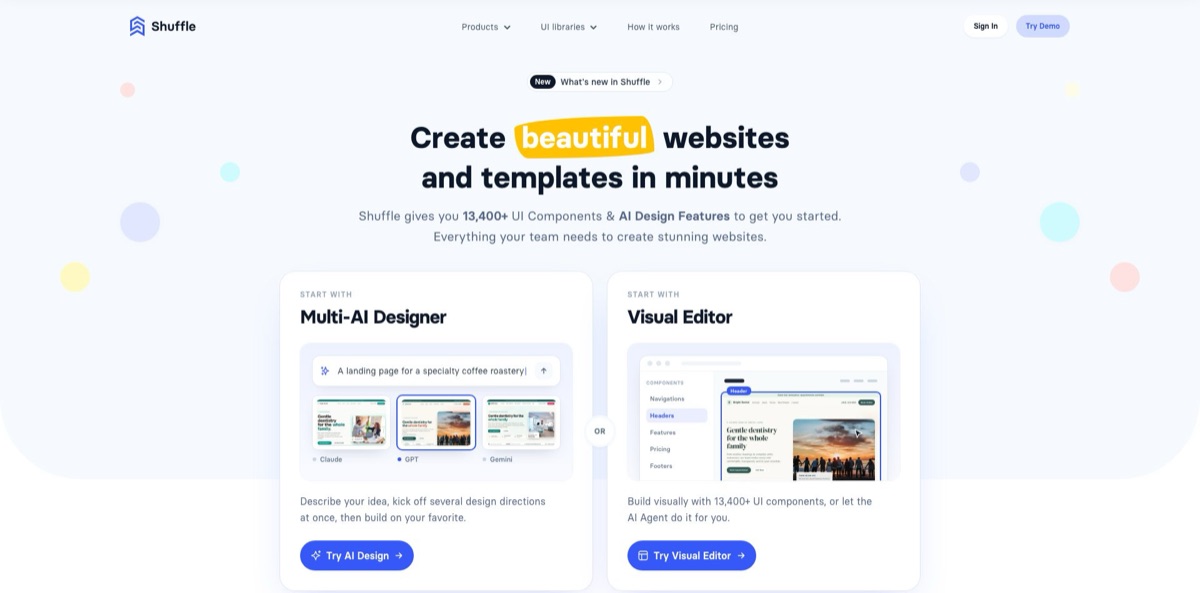
Shuffle is a browser-based website editor that began in 2019 as a drag-and-drop builder for Tailwind CSS, Bootstrap and other CSS frameworks and has since become an AI-first design tool for developers. You describe a page, the Multi-AI Designer generates up to four versions in parallel with models from OpenAI, Anthropic and Google, and you finish the strongest one in a visual editor stocked with 13,400+ components from 80+ UI libraries. An AI Agent inside the editor adds sections, rewrites copy and restyles blocks on request, and export covers static HTML, Next.js, Laravel, WordPress and Git repositories. That removes the blank-canvas stage of front-end work without tying your code to a hosting platform. The weak spot is reliability and support, where public reviews report crashes and unanswered emails. Pick it if you build marketing sites and want code you own.
How to start using Shuffle?
Open shuffle.dev and click Try Demo to look around the editor before paying anything, or create an account with Google, GitHub or a work email; the email route sends a six-digit sign-in code instead of asking for a password. Trial accounts can generate only a small number of AI designs, and the public Multi-AI Designer demo gives you one run before it points you to the plans.
For a first real project, go to the Multi-AI Designer and write a brief. Shuffle’s own guidance is to cover who you are, the look and feel (colors, fonts, logo), the sections in order with real headlines, any media, and rules for the whole page. If you only have one line, click Improve my prompt to expand it into a fuller design brief. Under Compare models pick up to four models, then click Generate designs. Each model builds its own layout at the same time, and you compare them in a grid, a mobile preview or a full-screen carousel. To refresh an existing site instead, paste its URL into AI Website Redesign, which captures your current content and structure first.
Once you have a favorite, click Customize in Shuffle to open it in the Shuffle Editor. Double-click any text to edit it inline, replace images from your computer or Unsplash, or generate new ones with the built-in Nano Banana image models. Drag extra sections in from the component library, and use the Change styles panel for global colors, typography and custom CSS. For bigger edits, click the AI Agent icon and describe the change in plain words; the Agent can add sections, edit copy and styles, and move or remove blocks across the whole page. Grid view puts every page of the project side by side on one canvas.
Before anything goes live, use Preview to check the layout at different screen sizes and Project history to roll back an edit you regret. Then choose an export format: Next.js (JSX or TSX), Laravel, Symfony, static HTML, Pug or a WordPress theme. You can download a ZIP, push the project to GitHub, GitLab or Bitbucket and let Vercel or Netlify deploy it automatically, or send the files to your own server over sFTP. Projects made in the AI tools can also be exported as a DESIGN.md file or handed to Claude Code or Codex so a coding agent continues from the same design.
Spend your free demo on a real brief for a real page, then buy the 7-Day Pass and export one project before you commit to a subscription or lifetime license.
Who is it for?
Freelance web developers
Clients rarely approve the first direction, and mocking up three options by hand eats unpaid hours. The Multi-AI Designer produces several directions from one brief in minutes, and you hand over Tailwind or Next.js code instead of a page-builder export. The license allows unlimited end products, including client work.
Back-end and full-stack developers
You can build the API, but the landing page and dashboard screens drag on for days of CSS tweaking. Pick sections from 80+ UI libraries or ask the AI Agent for one, then export to Laravel, Symfony or Next.js and wire it to your own back end.
Agencies pitching redesigns
Showing a prospect a fresh version of their own site is a strong opener, but producing it on spec is expensive. AI Website Redesign starts from a live URL, and the Design CLI can run the same job from scripts, with an example workflow that sends personalized redesign offers. The team option adds five accounts that share one AI allowance.
Developers working with coding agents
Claude Code, Codex and Cursor tend to produce generic-looking interfaces when left alone. Connect the Shuffle MCP server or drop an exported DESIGN.md into your repo, and the agent gets a concrete design spec to follow. Generated designs still land as Shuffle projects you can edit visually.
Founders and small business owners
You need a polished landing page or store theme but not a design agency. Describe the business, compare the results, and export a WordPress or Shopify theme for a platform you already run. Expect to touch code or theme settings for anything beyond static pages.
Shuffle pricing
Shuffle sells one product, access to the editor and its AI tools, in four billing shapes: a one-week pass, a monthly or annual subscription, and a one-time lifetime license. AI work is metered by a daily token allowance that resets automatically, and the pricing page describes the 7-day pass as having the same daily AI limit as the other plans; the size of that allowance is not published. Prices below come from the official pricing page on November 6, 2026, are shown in US dollars, include VAT where applicable, and can be paid by card through Stripe or by PayPal.
Try Demo opens the editor, the Multi-AI Designer demo allows one generation, and trial accounts get a small number of AI designs. Treat it as a look around rather than a working plan, since code export sits behind paid access.
Full access for seven days with the standard daily AI limit and code export included. It is not a subscription and nothing renews automatically, which makes it the low-risk way to finish one quick project.
Best if you are not sure you will still need the editor in a few months.
That is roughly four months of the monthly plan, so it wins for anyone building more than one project a year.
The page labels it most popular and best value, and it includes lifetime access to the Shuffle Editor under a license that allows unlimited end products, client work and products you sell.
Custom. The team option gives five accounts and double the daily AI tokens, shared so the allowance goes to whoever is designing that day, with Admin and Editor roles and extra seats bought from the dashboard. A team price was not displayed on the public pricing page when checked, so confirm it at checkout or with support.
Shuffle key features
Multi-AI Designer sends one prompt to up to four models at once and shows the results side by side
The pricing page names GPT-6 Astra, Claude Opus 5.5 and Gemini 4 Argon, and the heaviest models are reserved for full accounts. You can improve the prompt with AI, add generated video for hero sections, and regenerate a single design with tweaks such as your logo or missing assets. Comparing distinct directions early saves you from polishing a layout you would have rejected.
AI Website Redesign starts from a live URL rather than a blank page
Shuffle captures the current page, four models redesign it in parallel, and Design more pages extends the chosen style to further pages with the same navigation, colors and typography. A Chrome extension published by Shuffle sp. z o.o. starts the same process from any site you visit. Redesigns work only on public websites, not on local or internal addresses.
The AI Agent works inside the visual editor through chat
It adds sections, edits copy and styles, and moves or removes blocks across the whole page without switching modes. It also accepts an uploaded Figma mock-up or rough sketch, or a drawing made with the built-in tool, and converts it into an editable component. Image generation and editing run on Google’s Nano Banana models.
A component library of 13,400+ pieces across 80+ UI libraries backs the AI output
Libraries cover Tailwind CSS, Bootstrap, Bulma, Material-UI and shadcn/ui, and you can upload libraries you already bought, such as Tailwind UI or Flowbite, or assemble your own with the UI Library Creator.
Export keeps you independent of Shuffle
Projects go out as Next.js, Laravel, Symfony, static HTML, Pug or WordPress themes, and the homepage adds Astro and Shopify. Delivery options are a ZIP download, GitHub, GitLab or Bitbucket for automatic deploys on Vercel or Netlify, or sFTP to your own server.
Agent and terminal integrations bring the designer into developer workflows
The MCP server at shuffle.dev/mcp connects Claude Code, Codex, Cursor, VS Code and Claude with an OAuth sign-in and no API key, supports up to four models per session and eight designs in progress, and returns ZIP links that expire after 15 minutes. The Design CLI (npm package @shuffle-dev/cli) runs designs and redesigns from scripts or CI jobs, and DESIGN.md export gives coding agents a written design spec.
Shuffle Pros & Cons
Pros
Shuffle pairs AI generation with a real component editor and real code export, so you are never stuck with whatever a model produced on its first try. Seeing four models interpret the same brief side by side is a faster way to find a direction than re-prompting a single chatbot. The output is yours: framework exports, Git delivery and a license that allows unlimited end products, with AI-generated projects free of the generator restriction. Pricing is modest next to AI app builders, with $99 a year, $249 once or a $10 week. MCP, CLI and DESIGN.md support make it useful even if you live in a coding agent. Use the Multi-AI Designer for direction, then finish the last details by hand in the visual editor.
Cons
Independent feedback is thin and skews negative: Trustpilot shows 2.7 from five reviews and Product Hunt 3.3 from four. Reviewers report editor crashes, an unstable code editor, many near-identical components, and support or refund emails that went unanswered. Most of those reviews predate the 2026 AI tools, so there is no independent verdict on the Multi-AI Designer yet. The daily AI allowance is not quantified and the team price is not published. Shuffle builds front ends only, with no database or user accounts, and your prompts, URLs and screenshots go to third-party model providers. Buy the 7-Day Pass first, export early, and keep support requests in writing.
Use Shuffle if you want…
- Compare website designs from several AI models at once.
- Redesign an existing site starting from its live URL.
- Turn a Figma mock-up or sketch into editable sections.
- Build Tailwind or Bootstrap pages with drag-and-drop components.
- Export clean Next.js, Laravel or WordPress code you own.
- Push finished projects straight to GitHub, GitLab or Bitbucket.
- Give Claude Code or Cursor a design spec to follow.
- Generate redesign concepts for client pitches from the terminal.
- Pay once for a lifetime license instead of subscribing.
Shuffle alternatives


Shuffle Reviews
A Product Hunt reviewer rates the UI blocks highly for quick Tailwind edits inside Next.js projects, but reports crashes, stutter and an unstable code editor that make the monthly price hard to justify for beginners.
A five-star Trustpilot reviewer likes the multi-framework templates, custom libraries, AI assistant and clean exported code, and calls the $249 lifetime license good value, but wants a proper code editor for custom CSS.
One-star Trustpilot reviews from late 2024 to mid-2025 describe editor crashes, AI output that felt random, many near-identical components and refund or support emails that never got a reply.
Older Product Hunt reviews call Shuffle handy for fast builds and for borrowing well-designed sections, but say customization gets tricky on complex projects and that support can be slow to answer.
An early user of the chat-based Shuffle Assistant found it promising, but wanted the first generated preview to be much closer to a finished website.
FAQ
Is there a free version of Shuffle?
There is no permanent free plan. You can try the editor demo, run one free Multi-AI Designer generation, and trial accounts get a small number of AI designs; the cheapest paid access is the $10 7-Day Pass, which includes code export.
Do I need to know how to code to use Shuffle?
Not to create designs, because prompts, drag-and-drop and the AI Agent cover most of the work. The output is front-end code such as HTML, Tailwind and React, so coding skills help once you connect forms, data and deployment.
Which AI models does Shuffle use?
The pricing page lists GPT-6 Astra, Claude Opus 5.5 and Gemini 4 Argon, and the designer also offers models such as GPT-6, Gemini 3.8 Flash and Claude Fable 5.1, with the heaviest ones limited to full accounts. Image generation uses Google’s Nano Banana models, and the lineup changes as providers release new versions.
Can I use Shuffle projects in commercial work?
Yes. The license allows unlimited end products for yourself or clients, including products you sell. The only restriction is that you cannot repackage Shuffle’s own component libraries as a new library or generator, and projects created with the AI tools are free of even that limit.
Does Shuffle work with Claude Code, Codex or Cursor?
Yes. Add the MCP server at https://shuffle.dev/mcp, sign in with your Shuffle account (no API key needed), and ask the assistant to design or redesign a site with Shuffle; you can also use the Design CLI or export a DESIGN.md file.
What happens to my prompts and website data?
Your prompt, and for redesigns the site URL and a screenshot, are sent to the AI providers you choose, such as Anthropic, OpenAI and Google. Designs created through the MCP server are kept out of public galleries, but anyone with a share link can open them.
Is there a plan for teams?
Yes. The team option includes five accounts and double the daily AI tokens shared across the team, with Admin and Editor roles and extra seats available from the dashboard. Its price was not shown on the public pricing page when checked.
Does the 7-Day Pass renew automatically?
No. It is a one-time $10 payment for seven days of full access, and nothing renews afterwards; the monthly and annual plans are recurring subscriptions.
Similar tools
 Novita AIDeveloper cloud with one API for 200+ open-weight AI models, plus GPU instances, dedicated endpoints and isolated sandboxes for AI agents.
 You.comDeveloper platform of web search, content extraction, cited research and model inference APIs that feed AI agents and RAG apps real-time web
 QodoAI code review platform that runs specialized agents on every pull request, enforces team rules and checks changes against tickets and linked