

Shutterstock Image Generator
Image GenerationUpdated October 5, 2026
Shutterstock's AI Image Generator creates high-quality, ethically sourced, and legally-cleared visuals for professional commercial use instantly.
We may earn a commission when you sign up through our links. It does not affect our reviews.
What is Shutterstock Image Generator?
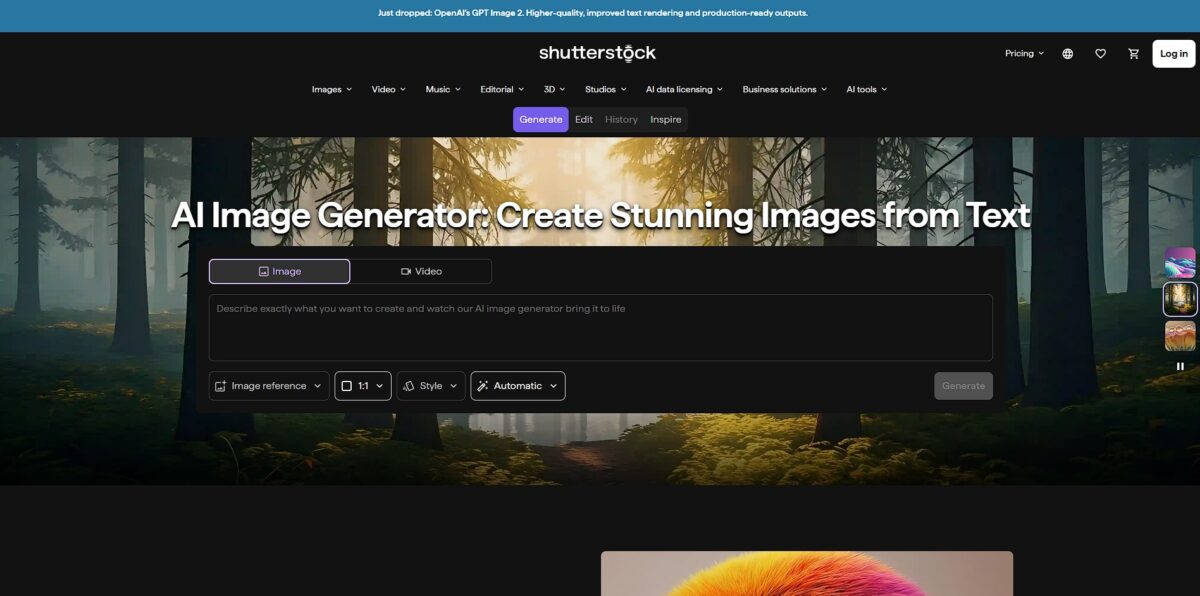
Shutterstock Image Generator functions as a legally-cleared bridge between prompt-based ideation and commercial production. Built on a partnership with OpenAI, it uses DALL-E technology trained specifically on Shutterstock’s own library, which means every output comes with standard licensing and contributor compensation. It avoids the “weird hands” issues of older models, but its real value lies in the integrated Creative Flow suite where you can immediately edit a generated asset without jumping to Photoshop. This removes the legal anxiety for businesses that need unique marketing visuals but cannot risk using scraped data from gray-market generators. The trade-off is a tighter safety filter that can be more restrictive than open-source alternatives. Choose this if your priority is commercial indemnification over raw, uncensored creative freedom.
How to start using Shutterstock Image Generator?
Navigate to the Shutterstock AI image generator page to access the text-to-image interface. You don’t need a complex setup or a Discord server to get started. Just type a specific prompt into the generation bar. The tool works best when you describe textures and lighting, like “brushed aluminum” or “golden hour.” The result is a usable base layer for commercial projects without the typical legal gray areas of other generators.
Once you enter a prompt, the system generates four variations. You can select one and use the “Creative Flow” editor to tweak it immediately. This skips the annoying cycle of downloading an image just to upload it into Photoshop for a simple crop or color adjustment. It helps designers who need a specific background for a social post in minutes. Your creative momentum stays alive instead of stalling on file management.
If you are using the Website Builder, drag an image component into your workspace and select the Shutterstock option. You can search by keyword or filter by category and orientation right in the UI. I noticed the orientation filter is particularly helpful for finding hero images that actually fit a horizontal banner. This saves you from buying an image only to realize the subject gets cut off by your site’s text.
Takeaway: Use the orientation filter early to ensure your generated image fits your intended layout.To use the image for actual business marketing, you must license it. Click the “Buy image” or “License” button to confirm your purchase using your plan credits or a one-off payment. Unlike free generators that leave you guessing about copyright, this provides a clear paper trail for commercial use. This matters because it protects your brand from potential legal disputes over AI training data.
Takeaway: Always check your “All your downloads” catalog to redownload licensed assets for free if you lose the original file.
Who is it for?
Commercial Designers
Legal safety is the main draw here. You can generate assets for client projects without worrying about the copyright “gray area” of scraped datasets. Every image comes with standard licensing and contributor compensation, which is rare in this space and shields your agency from expensive legal disputes over AI training data.
Marketing Teams
This tool shortens the path from prompt to ad. Instead of hunting through stock libraries, you generate the exact scene needed, like “a diverse team in a futuristic office,” and it’s already formatted for Shutterstock’s editing tools. On the downside, it feels more “stock-photo-esque” than artistic competitors. Still, it saves hours of filtering through generic photos that don’t quite fit your brand.
Small Business Owners
If you lack a professional photographer, this fills the gap for website headers and blog posts. You get DALL-E tech trained on a library that prioritizes commercially viable compositions. The “weird hands” issue is less frequent here than in older open-source models, which lets you create high-end visuals on a bootstrap budget without a steep learning curve.
Content Creators
Skip the subscription fatigue if you only need a few images occasionally. The credit-based system lets you buy exactly what you need for a specific project. While the output is technically sharp, it may lack the “dreamy” vibe found in Midjourney. Since you only pay for what you use, your creative overhead is easier to manage.
Indie Authors
Create your own book covers or promotional teasers using prompt-based illustrations. You can describe specific characters or settings and immediately have a licensed file ready for print or digital distribution. The platform handles realistic textures well, though complex typography still requires a separate editor. For self-published projects, that makes it a legal, affordable alternative to custom commissions.
Shutterstock Image Generator pricing
Shutterstock separates its generative AI pricing from its standard stock library, though the lines blur if you already have a subscription. Most users will look at the Generative AI Plus plan, which costs roughly $7 per month. This allows you to generate 100 sets of four images. If you need a legal safety net for commercial work, this is the most direct path. You can generate for free to test the tech, but you cannot download those specific results without paying or using a credit. This prevents “window shopping” for usable assets without committing.
Standard image subscriptions also cover AI downloads. These start at $29 per month for 10 downloads when billed annually. This works well for designers who mix AI-generated concepts with traditional stock photos. Each download includes a standard license and $10,000 in indemnification. This matters because it shifts the legal risk of AI training data from your company to Shutterstock. For occasional needs, on-demand packs start at $29 for two images. The catch: a much higher per-asset cost in exchange for skipping a monthly bill.
Shutterstock Image Generator key features
Commercial Safety and Licensing
Every download comes with a standard or enhanced license, meaning you can use assets for client work or marketing without a legal headache. That clears up the uncertainty around copyright and ownership common in other AI tools.
Integrated Creative Flow Suite
You can jump directly into post-generation editing to remove backgrounds or adjust colors without downloading files or switching to heavy design software. It cuts out the usual shuffling of assets between browser tabs and Photoshop, which saves time during rapid content production cycles.
Multi-Model Choice
The interface allows you to toggle between models like DALL-E 3 and Google’s Gemini-powered tech to find the aesthetic that fits your specific project. Different engines handle lighting and human anatomy differently, so switching gives you a better chance at a usable result.
Ethical Contributor Fund
Shutterstock pays the original photographers and artists whose work trained the AI models. It is a more sustainable model for the creative industry than simply scraping the open web.
Smart Prompt Enrichment
A single click expands your basic ideas into detailed descriptions, helping the AI understand complex scene logic or specific camera angles. It helps beginners avoid “floating head” syndrome on their first try and bridges the gap between a vague idea and a professional-looking render.
Magic Brush Inpainting
You can paint over specific errors, like a weirdly rendered hand or a distracting background object, and describe exactly what should replace it. You don’t have to restart the entire generation process just to fix one small detail.
Shutterstock Image Generator Pros & Cons
Pros
Shutterstock provides a legally shielded environment for commercial projects. The model uses ethically sourced data, ensuring contributors receive compensation through a dedicated fund. This removes the shadow of copyright lawsuits that haunts other generators. I noticed the integrated Creative Flow suite lets you jump from a prompt to a localized edit without downloading the file first. You can generate a scene and immediately swap the background or adjust colors in the sidebar. For marketing teams who need assets ready for client approval, that adds up to a predictable production line.
Cons
The interface feels more corporate and rigid compared to the playground atmosphere of Midjourney. You will encounter stricter safety filters that might block specific creative concepts if they lean too close to protected categories. While the DALL-E integration is reliable, the stylistic range often defaults to a polished “stock photo” aesthetic that lacks the raw, artistic grit found in open-source models. The pricing structure can be confusing, as commercial rights often require specific credit packs or higher-tier subscriptions. In other words, a “free” generation doesn’t necessarily mean you own the rights to use it on a billboard.
Use Shutterstock Image Generator if you want…
- Commercially safe visuals backed by full licensing protection
- Legally cleared assets for professional marketing campaigns
- Quickly refined stock images using intuitive AI brushes
- Unique brand visuals using ethically trained generative models
- Instant mood boards to spark fresh creative directions
- High-resolution exports ready for immediate commercial production
- Easy collaboration through integrated cloud design tools
- Diverse image variations to test different advertising concepts
Shutterstock Image Generator alternatives


Shutterstock Image Generator Reviews
The commercial licensing gives me peace of mind for client projects, though the credit costs can add up quickly compared to other tools.
I love having the stock library and AI generator in one place; it makes creating social media variations incredibly fast.
The interface is clean and beginner-friendly, but the natural landscape results often feel a bit too dim and lack depth.
FAQ
Are Shutterstock AI-generated images safe for commercial use?
Yes, images generated through the platform are commercially usable and include indemnity protections as long as they meet content standards and are properly licensed.
Do I own the copyright to the images I generate?
No, because the models draw on the intellectual property of many artists, ownership cannot be assigned to an individual; instead, you receive a license to use the image while artists are compensated via a contributor fund.
What file formats and resolutions are supported for downloads?
The tool primarily supports JPG downloads at 1024 x 1024 pixels, though it also offers options for 16:9 and 9:16 aspect ratios and upscaling capabilities up to 4K resolution.
Can I generate images in languages other than English?
Yes, the generator supports over 20 languages and will attempt to interpret prompts even in languages that are not officially supported.
Will my generated images be available for other customers to see?
It depends on your plan; some plans keep generations private by default, while others may add the generated content to the public Shutterstock library for others to view or license.
Does Shutterstock accept AI-generated content submissions from contributors?
No, Shutterstock does not allow contributors to upload AI-generated content to ensure proper handling of IP rights and to guarantee that original artists are fairly compensated.
What happens if I run out of generation credits in my plan?
If you deplete your monthly allotment, you typically have the option to purchase one-time packs to continue generating additional image variations.
Similar tools
 BannerbearTemplate-based API for generating on-brand images, PDFs, animations and videos at scale from your data via REST, Zapier, Airtable or AI agents.
 Generated PhotosLibrary of 2.6M+ AI-generated faces plus face and full-body human generators for model-release-free people images in design, ads and research.
 VheerBrowser-based AI studio for text-to-image, photo editing and image-to-video, with a free no-signup model plus credit access to Nano Banana, Sora 2