

Simple Analytics
Data AnalysisUpdated November 24, 2026
Cookieless, EU-hosted web analytics with an AI chat and an MCP server, so you can ask about your traffic in plain English without tracking visitors.
We may earn a commission when you sign up through our links. It does not affect our reviews.
What is Simple Analytics?
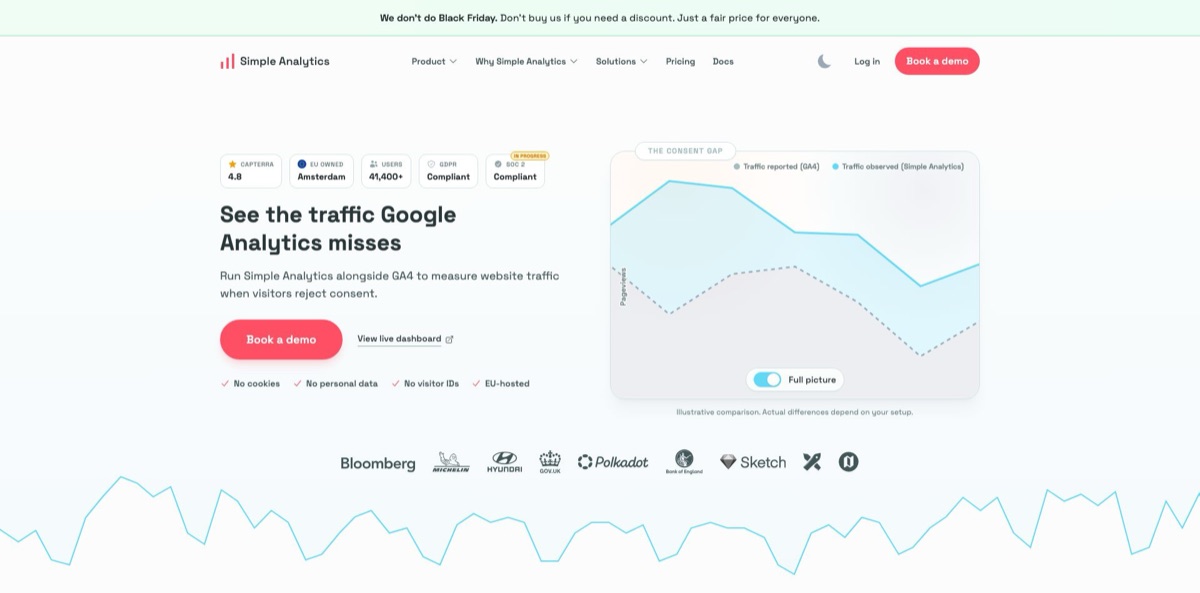
Simple Analytics is a cookieless web analytics service from an Amsterdam company that has been running since 2018. A lightweight script records pageviews, events, referrers and UTM campaigns without cookies, IP storage or visitor IDs, so the tool is built to work without an analytics consent banner. The AI side comes in two forms: a built-in chat that answers questions about your stats and draws charts, and an MCP server that lets Claude, ChatGPT, Claude Code or Codex read your numbers and even set up events and goals for you. The trade-off is depth. There are no user profiles, session replays or cross-device journeys, and the AI chat sends your aggregated data to OpenAI once you agree. Choose it when you want honest traffic numbers that GA4 loses to rejected consent, with as little configuration as possible.
How to start using Simple Analytics?
Click Start for free on the website to open an account. Every signup begins with a 14-day trial that needs no credit card. Afterwards you pick a paid plan or drop to the Free plan, which keeps running indefinitely. Add your website in the dashboard, then install the script: paste one script tag into your pages, or use the official WordPress plugin, the Netlify extension, a Google Tag Manager container, or the code injection fields in Webflow, Squarespace, Wix and Ghost.
Next, give it something real to measure. Open Goals in the dashboard menu and create a goal from a filter, for example pageviews of your home page, then add a second step for the pricing page to turn it into a funnel. Event tracking covers button clicks, form submissions, downloads and custom interactions, and an automated events script is included. Moving off Google Analytics? Import your GA4 history now: only page_view events come across, user data is discarded, and the import stops at your first Simple Analytics pageview, so nothing you collect natively gets overwritten.
The AI tools live on the Integrate AI tab of each website. Legacy chat is the original assistant: ask it to compare your visitors this week with last week, or request a doughnut chart of device types, and it answers with one chart per reply. If you do not name a period, it uses the last 30 complete days and compares them with the 30 days before. Before your first question it asks whether you agree to send analytics data to OpenAI. For Claude, ChatGPT, Claude Code or Codex, click Connect MCP and add
https://mcp.simpleanalytics.com/mcp/v1as a custom connector; you log in, pick a team and approve what the app may do. Cursor and other agents that cannot log in over MCP get copied instructions and a temporary token you approve for anywhere from 1 hour to 1 year.Before you trust the numbers, check the install. Add the browser extension for Chrome or Firefox so your own visits stop counting, then compare a week of data with GA4 for the same pages and dates. On the Free plan, place the Simple Analytics badge in a footer that shows on every page: if the regular check cannot find it, you get 14 days to fix it before dashboard data, API access and exports for that site are locked, although collection continues. If ad blockers hide much of your audience, plans with the ad-blocker bypass can serve the script from your own subdomain or a proxy.
Who is it for?
EU Website Owners
You want analytics without a cookie banner and without explaining international data transfers to your legal team. Simple Analytics stores website data in the EU, with primary infrastructure in the Netherlands, and collects no personal data. You get readable numbers and a cleaner page for visitors.
Marketing Analysts on GA4
Your GA4 reports shrink every time visitors reject consent, and modeled data is hard to defend in a meeting. Running Simple Analytics alongside gives you an independently observed baseline for pageviews, events and campaigns. You can finally tell whether traffic actually fell or GA4 simply measured less.
Indie Makers and Bloggers
You need to know which posts and referrers work, not build custom reports. The one-page dashboard needs no configuration, and the Free plan covers 5 websites with unlimited pageviews under fair use. The cost is a visible badge and only 30 days of history.
Developers Using AI Agents
You already work in Claude Code, Codex or ChatGPT and would rather not click through another dashboard. The MCP server lets the agent install the script, open your live site to verify it, add events and goals, and answer traffic questions in the same chat. It asks before changing anything and cannot delete data.
Agencies and White-Label Partners
Clients want privacy-safe reporting they can read without training. Public stats, email reports, embedded charts and the Looker Studio and Power BI connectors let you hand over numbers without sharing a GA property. Dedicated agency and white-label offers run through the Enterprise track.
Public Sector and Regulated Teams
GOV.UK, the Scottish Government and the Bank of England appear on the customer list, and that is the bar you need to clear. The company states compliance with GDPR, the ePrivacy Directive, UK GDPR and PECR by design, with SOC 2 compliance still in progress.
Simple Analytics pricing
Self-serve billing is usage-based. You pay by monthly pageviews (data points) rather than by feature tier, and the amount adjusts automatically: it looks back one month, then at the average of the previous three months. The pricing page shows amounts in your local currency, and you can pay in US dollars, euros or British pounds. All figures below are the USD prices on the official pricing page. Every account starts with the 14-day trial, no card required.
1 user, 5 websites, unlimited pageviews under a fair use policy and 1 month of history, after which older data is deleted. A Simple Analytics badge on your site is mandatory, and support is community only.
You get 10 websites, 3 email reports, 3 years of data retention, goals, events, automated events, metadata, the Stats API, trendlines, annotations, missing-script alerts, advanced robot blocking, email support and no badge.
$30/month at 250k and $40/month at 500k, with the same feature set.
Simple, 1M to 2.5M pageviews: $60/month at 1M and $120/month at 2.5M, which is where the slider on the pricing page ends.
$20/month for each additional user on the Simple plan, since only one user is included.
Custom pricing. It is pitched at running Simple Analytics alongside GA4, starts with a free 30-day proof of concept, and adds API and BI access plus hands-on help with proxies and custom domains.
The raw-data Export API, Admin API, custom views, ad-blocker bypass, IP range blocking and role-based access do not appear among the Simple plan’s features. The plan table does not mention the legacy AI chat at all, while the MCP server is stated to work on every plan, Free included. Bills from $500 can be paid by bank transfer at an extra 10% fee, and you can cancel at any moment.
Simple Analytics key features
Cookieless tracking by design
The script records pageviews, events, referrers and campaign parameters without cookies, localStorage, IP addresses or visitor IDs, and it derives country-level location without storing the IP. You get numbers for the visitors who reject consent, which is exactly the traffic GA4 loses.
AI chat on your stats
Ask plain-English questions such as a summary of last month’s traffic or spikes in referral sources, and get an answer with a chart. It compares periods and websites in your account and answers how-to questions about the product. Data goes to OpenAI only after you agree, OpenAI does not use it for training, and your questions are stored anonymously.
MCP server for AI agents. Connecting Claude, ChatGPT, Claude Code or Codex lets the agent filter by pages like /blog/*, referrers, countries, UTM codes, browsers, devices, URL parameters and metadata, compare periods and save filters as custom views. Coding agents can add the script, check it on your live site, add events to buttons and forms, and set up goals, annotations and email reports. It cannot delete anything, touch billing or manage users, and each connection reaches one team only.
Goals, funnels and events
Goals turn filters into cards you can read at a glance, and extra steps build a funnel that shows where visitors drop off. Events track clicks, form submissions, downloads and custom interactions, and metadata attaches extra context to them.
GA4 history import
You can bring in Google Analytics 4 properties so your reporting does not start from zero. Only page_view events are imported, all user data Google collected is dropped. The import stops at your first Simple Analytics pageview, so it never overwrites native data.
APIs, exports and BI connectors
The Stats API returns aggregated numbers, the Export API delivers raw data as CSV or JSON, and connectors cover Google Looker Studio, Power BI, Chartbrew, Dailytics and CloudQuery for warehouse exports. Server-side tracking lets your backend send events directly.
Noise and blocker controls
Robot blocking, one-click referral spam removal, a browser extension that excludes your own visits and alerts when the script stops sending pageviews keep the numbers clean. A custom subdomain or proxy helps the script survive ad blockers on plans that include the bypass.
Simple Analytics Pros & Cons
Pros
You get traffic numbers that hold up even when visitors refuse cookies, because nothing about them is stored in the first place. The dashboard fits on one page, needs no configuration and stays readable for people who never learned GA4. Reviewers on Software Advice rate it 4.8 out of 5 across 46 reviews and keep mentioning fast, personal answers from a small founder-led team. The AI layer is practical rather than decorative: the MCP server works on every plan, Free included, and lets an agent install the script and set up goals for you. Pricing is public, usage-based and the same for everyone. Connect your AI assistant on the first day of the trial to see how much setup it handles.
Cons
Depth is the price of privacy. There are no user profiles, session recordings, heatmaps or cross-device journeys, and reviewers say following user journeys in the interface is hard. The self-serve Simple plan includes a single user, so each teammate adds $20/month, and the Export API, custom views and ad-blocker bypass are missing from its feature list. The Free plan keeps just 30 days of history and requires a badge. The legacy AI chat relies on OpenAI, so your aggregated data leaves the EU when you opt in, and one reviewer found Ahrefs crawler visits slipping past bot filtering. Pair it with GA4 or a product analytics tool if you need behavior-level insight.
Use Simple Analytics if you want…
- Measure traffic without cookies or consent banners.
- See the visitors GA4 misses after rejected consent.
- Ask your analytics questions in plain English.
- Let Claude or ChatGPT set up events and goals.
- Keep website data hosted inside the European Union.
- Track goals and funnels on a one-page dashboard.
- Import your GA4 history before switching tools.
- Pull aggregated stats into Looker Studio or Power BI.
Simple Analytics alternatives


Simple Analytics Reviews
A small research team calls it easy and stress-free, with just enough data to understand traffic and a separate UTM section that helps track campaigns, and says it has found nothing to complain about.
One reviewer moved to the annual plan after the first day and began migrating all their sites, citing fast setup and flexible events and goals; a number display bug did hit the account, but the founder shipped a fix within hours.
Several users accept that cookieless analytics are less powerful than Google Analytics and lack the advanced GA4 options, yet say dropping the cookie banner and gaining privacy makes the trade worthwhile.
A self-employed user rates it a good GA alternative with open stats and helpful support, but complains that Ahrefs crawler visits were not filtered out, which made the numbers less accurate.
A reviewer who values it for real visitor numbers and fair pricing still finds parts of the UI buggy and user journeys hard to follow, while another wishes the interface felt closer to Google Analytics.
FAQ
Is there a free plan?
Yes. The Free plan covers 1 user and 5 websites with unlimited pageviews under fair use, but keeps only the last 30 days of data and requires a Simple Analytics badge on your site.
Does Simple Analytics need a cookie banner?
It uses no cookies, browser storage, IP addresses or visitor IDs, and the company states it complies with GDPR, the ePrivacy Directive, UK GDPR and PECR from installation. It is designed so that analytics consent is not required, though your other scripts may still need a banner.
Where is my data stored?
Website data is stored in the EU, with primary infrastructure in the Netherlands. It goes to a provider outside the EU only when you opt in to a feature that needs it, such as the AI assistant, which uses OpenAI.
How does the AI chat work?
Open the Integrate AI tab, choose Legacy chat and ask questions in plain English. It replies with one chart per answer, defaults to the last 30 complete days, and asks for consent before sending data to OpenAI.
Can I connect Claude or ChatGPT?
Yes. Add the official MCP server URL as a custom connector in Claude, ChatGPT, Claude Code or Codex. It works on every plan, asks before making changes and cannot delete data or touch billing.
Can I import my Google Analytics data?
You can import GA4 properties. Only pageview events are kept, user data is discarded, and the import stops at your first Simple Analytics pageview.
Does Simple Analytics have an API?
Yes. There are Stats, Export and Admin APIs plus a Tools API for AI agents. The self-serve Simple plan includes the Stats API, while the Export and Admin APIs are not listed among its features.
Can I cancel anytime?
Yes. You can cancel your subscription at any moment and keep access to your account and data until the end of the period you paid for.
Similar tools
 InnovatianaFrench managed data labeling service with in-house annotators for computer vision, NLP, RLHF and evaluation datasets, plus a self-serve Dataset Finder.
 Y2DocWeb tool that turns public YouTube videos into structured notes, timestamped transcripts and PDF, Markdown or Docx files, plus MP3 downloads.
 InfinityCall tracking and AI call analytics platform that ties phone calls to campaigns and keywords and sends call outcomes into Google, Meta