

Simplified
Content CreationUpdated October 5, 2026
Simplified is an all-in-one AI platform for graphic design, video editing, copywriting, and social media management in one workspace.
We may earn a commission when you sign up through our links. It does not affect our reviews.
What is Simplified?
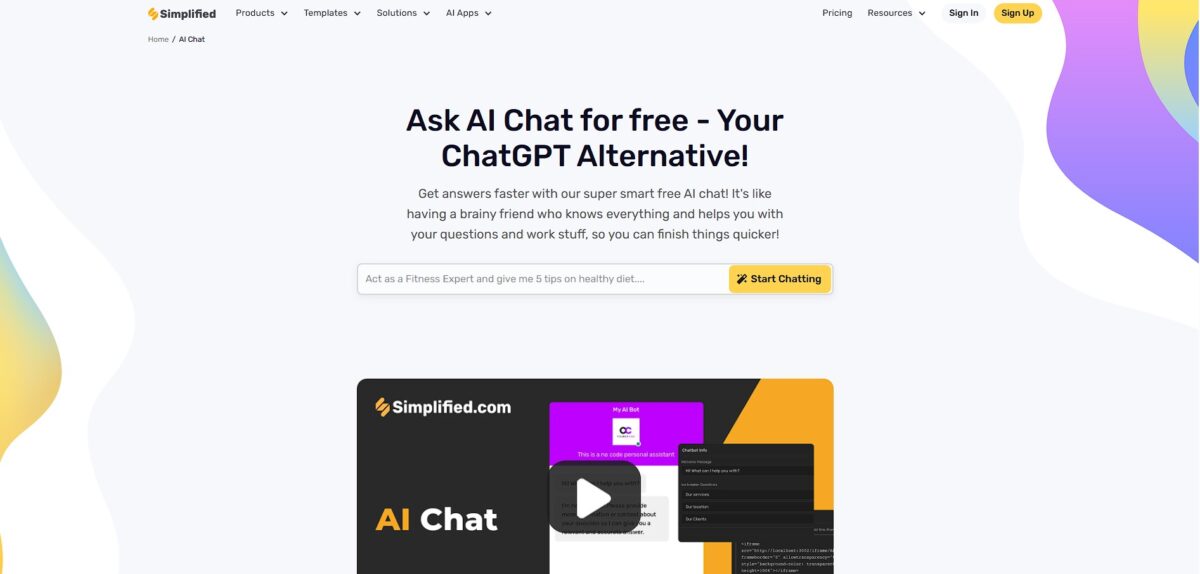
Simplified serves as a Swiss Army knife for digital marketing, merging a design suite, video editor, and AI writer into a single tab. It solves the friction of moving a brand asset from Canva to a separate social scheduler by keeping the assets and the calendar in the same workspace. I noticed the AI designer builds full presentation decks from a single prompt, which saves an hour of manual slide formatting for last-minute meetings. While it excels at high-speed content production for multi-channel teams, its specific editing tools may feel less deep than dedicated standalone software. Consolidating your stack here reduces subscription bloat and keeps your brand voice consistent across every caption and thumbnail. Use Simplified if you need to go from an idea to a published post in ten minutes rather than two hours.
How to start using Simplified?
Start by signing up at simplified.com to land on a dashboard that groups tools by discipline: design, video, writing, and social media. The interface uses a clean, tile-based layout that keeps these distinct workflows from clashing. I noticed that clicking into the “AI Designer” immediately prompts you for a project type, which helps if you usually get stuck choosing between a post or a story format. This skips the decision fatigue of staring at a blank canvas and hundreds of templates. Why this matters: you can jump from a social post to a video edit without opening new browser tabs.
Rule of thumb: start with the AI Designer to set your visual direction before moving to copy.Once inside, use the AI assistant to generate your first draft of assets. You type a prompt describing your brand or campaign, and the engine builds multiple variations of images and text. It handles the tedious layering and font pairing that usually takes up twenty minutes of manual clicking. While the generator is fast, the results often need a quick manual tweak to fix minor alignment issues. This automated first pass gives you a structured foundation to refine instead of building from scratch. Why this matters: it converts a thirty-minute design task into a three-minute editing job.
Takeaway: hit “Generate” for bulk ideas, then manually refine only the best one.Connect your social media accounts in the settings tab to enable direct publishing. The platform includes a visual calendar where you can drag and drop your created images and videos onto specific dates. It allows you to schedule posts across Instagram, LinkedIn, and TikTok from the same window where you designed them. I found that the preview mode accurately shows how your grid will look, though the video upload can occasionally lag if the file is massive. This integration removes the friction of downloading files just to re-upload them to a different scheduling tool. Why this matters: it eliminates the “file download” step of the content lifecycle.
Rule of thumb: schedule your posts immediately after designing to keep your momentum.For teams, invite collaborators using the workspace settings to set up approval loops. You can leave comments directly on specific design elements or video timestamps, much like a code review or a shared document. This replaces the messy chain of Slack messages and screenshots usually required to get a sign-off. The trade-off is that the permission levels can feel a bit restrictive on the lower-tier plans. Why this matters: it centralizes feedback so you don’t lose track of requested changes.
Takeaway: use the “Share for Review” link to get client feedback without giving them full editor access.
Who is it for?
Solo Marketers
Manage design, copywriting, and social scheduling in one tab. Housing assets and calendars together spares you the 1,200-times-per-day “toggle tax”, which adds up to hours of reorientation time saved every week.
Social Media Managers
Automate posts across multiple platforms from a centralized dashboard. The app replaces the manual churn of resizing images for Instagram, LinkedIn, and TikTok individually. You keep the brand consistent without expanding your creative team.
Small Agency Owners
Scale production for different clients using reusable templates and brand kits. It works well for high-volume asset creation, though it might feel restrictive for designers needing deep Photoshop-level control. Even non-designers can ship professional-grade visuals safely.
Content Creators
Generate YouTube thumbnails, video scripts, and captions using built-in AI generators. You stop wrestling with complex prompt engineering because the tool provides specific modules for each content type. Your creative momentum stays high instead of stalling on technical details.
E-commerce Sellers
Build product pages and social ads that adapt to different devices and marketplaces. The system reads product feeds to generate conversion-ready banners in real-time, which helps your store compete in milliseconds during seasonal sales.
Startup Teams
Collaborate on pitch decks and marketing one-pagers without leaving the workspace. Real-time editing keeps everyone on the same page, preventing the mess of “v2_final” file versions scattered across Slack. Less time goes into hunting for fragmented information across data silos.
Simplified pricing
Simplified structures its pricing around specific content disciplines, allowing you to pay only for the creative silos you actually use. It offers a fragmented but flexible menu where design, video, social media, and writing each have their own independent subscription tracks. This approach stops you from subsidizing a video editor if you only need an AI copywriter, though costs can compound quickly if your team needs the full suite.
Free Forever: $0/month. This tier serves as a sandbox for solo creators with tight usage limits on AI credits and exports. The storage cap is low, which makes it a temporary home for quick social posts rather than a long-term asset library. That matters because it lets you test the workflow and export a few assets without a credit card.
Pro: $19/month (billed annually) or $29/month. This level targets individual professionals who need to remove watermarks and get advanced brand kits. It expands your AI credit pool and adds premium templates for higher-volume production. The result is a consistent, professional look across your social channels without manual formatting.
Business: $49/month (billed annually) or $79/month. Designed for small teams, this plan introduces collaborative workspaces and higher export resolutions. It solves the “who has the password” headache by allowing multiple seats to share assets. Approvals move faster, and all brand assets live in one shared folder.
Growth: $149/month (billed annually) or $199/month. This is the heavy-lifting tier for agencies managing multiple client brands simultaneously. It offers massive credit limits and priority support to keep high-frequency campaigns moving. When you’re managing dozens of social accounts at once, that headroom prevents production bottlenecks.
Enterprise: Custom pricing. Large organizations get tailored security and dedicated account management. Expect a longer sales cycle for the bespoke setup, but you get the data governance and API access required for corporate-scale deployments.
Audit your monthly output across design and video; if you hit the export wall twice, the Pro plan pays for itself in time saved on workarounds.
Simplified key features
Unified Design and Copywriting
Generate social media graphics and the accompanying captions in one dashboard without toggling between tabs. It cuts the friction of matching your visual style to your text, so your branding doesn’t feel disjointed across different channels.
AI Video Trimming and Subtitling
Upload long videos to extract shorter, vertical clips for TikTok or Reels with automated captions. It handles the tedious frame-by-frame clicking that usually eats up an afternoon. One webinar can become a week of social content in minutes.
Centralized Social Media Scheduling
Plan and publish posts to Instagram, LinkedIn, and X directly from the design canvas. It skips the manual export-and-upload cycle that often leads to file version errors. Your content calendar ends up with a single source of truth.
Collaborative Workspace Folders
Organize assets into specific client or project folders where teammates can leave comments and approvals. Real-time cursor tracking avoids the “who is editing this right now?” confusion, and you no longer need messy Slack threads to get creative sign-offs.
Long-Form AI Writing
Move from a brief headline to a full-length blog post or article using specialized long-form templates. The editor keeps your tone consistent even as the word count climbs. For busy marketing managers, that solves the “blank page” problem.
Instant Background Removal
Strip backgrounds from product photos with one click to create clean assets for e-commerce. It works well for crisp studio shots, though it may struggle with flyaway hair or busy outdoor scenes. Your DIY product photography ends up looking professional without Photoshop skills.
Simplified Pros & Cons
Pros
Simplified packs design, video editing, and AI copywriting into one workspace. This setup stops the constant tab-hopping between Canva and separate AI writers. The AI designer builds full presentation decks from a single prompt and does the heavy lifting of slide formatting. Keeping your brand assets and social calendar in the same dashboard prevents file version confusion during last-minute posts. You spend far less time exporting and re-uploading files across different creative tools.
Cons
The interface feels overwhelming because so many distinct tools compete for your attention. While it handles basic social graphics well, the video editor lacks the frame-by-frame control found in dedicated professional software. The credit system for AI generation can be tricky to track if you’re running multiple campaigns at once. This matters because you might run out of monthly “runs” right in the middle of a tight project deadline. The price of having everything in one hub is a steeper learning curve than a single-purpose tool.
Use Simplified if you want…
- Manage design, copywriting, and social scheduling in one tab.
- Eliminate the “toggle tax” by housing brand assets and calendars together.
- Generate social media graphics and accompanying captions simultaneously.
- Build full presentations from a single prompt using the AI designer.
- Speed up workflows for solo marketers and small creative teams.
- Scale content production across video, design, and writing disciplines.
Simplified alternatives


Simplified Reviews
Simplified is a powerful and versatile utility that handles all my social media publishing and content creation in one place.
I’ve been using Simplified for a while now, and honestly, it’s one of the best all-in-one tools for content creation and marketing.
Its ease of use and carefully crafted responses were exactly what I was looking for when it comes to these types of apps.
FAQ
Does Simplified offer a free trial?
Yes, Simplified offers a Free Forever plan with limited features and credits, allowing you to test the AI designer, video editor, and copywriting tools without a paid subscription.
What is included in the Simplified workspace?
The workspace is an all-in-one platform that combines AI graphic design, video editing, social media management, and copywriting tools into a single dashboard to eliminate the need for multiple apps.
Can I manage multiple social media accounts?
Yes, Simplified allows you to generate content and schedule posts across multiple social media platforms directly from its integrated social media management calendar.
Does Simplified have a mobile app?
Yes, Simplified offers a mobile app for on-the-go content creation, though some advanced features may have limited functionality compared to the desktop version.
Can I customize my brand voice in Simplified?
Yes, the platform allows for brand voice customization and brand kit integration, ensuring that AI-generated copy and designs stay consistent with your specific colors, fonts, and tone.
How does Simplified pricing work?
Simplified uses a discipline-based pricing structure where you can subscribe to specific silos—like design, video, or writing—independently or choose a comprehensive plan based on your team’s needs.
Does Simplified support team collaboration?
Yes, higher-tier plans include team collaboration features, allowing multiple users to work within the same workspace, share assets, and manage approval workflows.
Similar tools
 RunableGeneral AI agent that turns one prompt into websites, slide decks, social carousels, videos and apps, with plugins and scheduled tasks.
 AISEOAI writing suite with a text humanizer, article and Outrank generators, AI detector and plagiarism checker, plus AI search visibility tools.
 Octopus.doVisual sitemap builder that drafts page structure, block copy and SEO tags with AI, crawls existing sites and connects to ChatGPT, Claude