
SiteGPT
AI ChatUpdated November 10, 2026
AI customer support chatbot that learns from your website, files and help docs, answers visitors 24/7 and hands tricky chats to your team.
We may earn a commission when you sign up through our links. It does not affect our reviews.
What is SiteGPT?
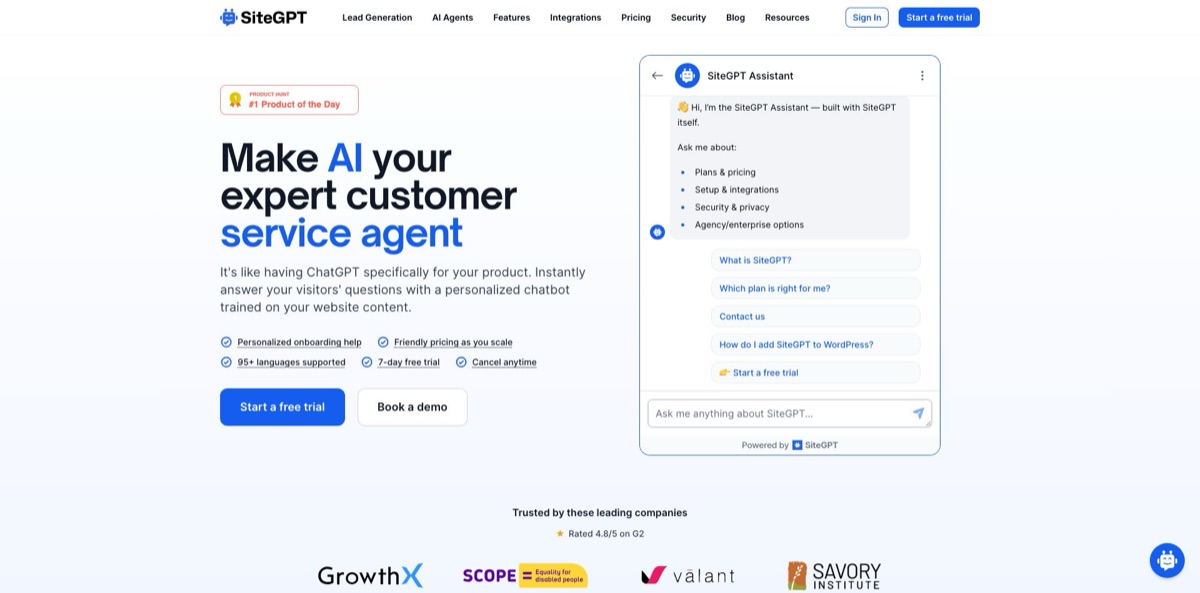
SiteGPT is a no-code platform that turns your website, help center and documents into a customer support chatbot running on OpenAI’s GPT-4.1 models. You give it a URL or sitemap, upload files or connect Notion, Google Drive or GitHub, and it indexes that content so the bot answers visitors from your own pages instead of general model knowledge. The problem it removes is the stream of repeat questions about pricing, setup and policies that eats a small support team’s day. Human handoff, lead capture, an unanswered-questions report and an API sit on top. The weak spots are a model choice limited to GPT-4.1 and GPT-4.1 mini, a message allowance that counts both the question and the reply, and no free plan, only a 7-day trial that asks for a card. It fits SaaS companies, online shops and agencies that want a grounded FAQ bot without building one.
How to start using SiteGPT?
Go to the login page and enter your email address. SiteGPT sends a 6-digit code and a sign-in link, and there is no password to set. You need an active plan before a chatbot can be trained, so pick Starter, Growth or Scale on the pricing page and start the 7-day trial; a credit card is required at checkout and you can cancel before the trial ends. On the Chatbots page, select Create New Chatbot, type a name your team will recognize and select Create Chatbot.
Next, feed it content. In the left menu, open Website Links and choose Scrape Website. Enter your home page address, set Recursion Depth to 2 and Max Pages to Scrape to 50, as the official quickstart suggests, then select Add Links. If your site has a sitemap, Add from Sitemap gives you a cleaner list. You can also upload PDF, DOCX, PPTX, CSV, TXT or Markdown files, add YouTube videos, or connect Notion, Google Drive, Dropbox, OneDrive, Box and GitHub. The Links List shows how many items are Trained, Pending and Failed, and it updates on its own while you work elsewhere.
Then shape how the bot behaves. Under Chatbot Instructions, select Add New Instructions and write rules such as “If you cannot answer, tell the visitor to email support@yourdomain.com”. Choose whether answers come from GPT-4.1 mini, which favors speed, or GPT-4.1, which favors depth, and set the split on the Usage or Billing page. Open Leads, then Human Support, and switch on Enable Human Support so visitors can ask for a person; this works on every plan. Adjust the widget’s logo, colors and welcome message so it matches your brand.
Finally, test and publish. On the Dashboard, select Chat with your chatbot and ask the three or four questions your visitors ask most. Answers can show links to the pages they came from, which makes wrong sources easy to spot. When you are happy, go to Installation, copy the JavaScript Embed snippet and paste it into the head section of every page; the docs have separate steps for WordPress, Shopify, Wix, Squarespace and Webflow. A few days after launch, open Chat History, filter User Reactions by Negative and fix weak replies with Incorrect? Modify bot’s answer!, which saves your text as a custom response.
Start with a 50-page crawl and one week of Chat History review before indexing your whole site, because every 2,500 characters you add count as one page against your plan quota.
Who is it for?
SaaS founders and small support teams
You already have docs and a help center, yet the same setup and billing questions arrive every day. SiteGPT reads those pages and answers around the clock, and anything it cannot handle escalates to a human inbox. On Growth and above, the iOS app pushes a notification the moment a visitor asks for a person.
Online store owners
Shoppers ask about shipping, returns and sizing at hours when nobody is online. The bot pulls those answers from your store pages and policies, and the lead capture feature collects contact details from visitors who are not ready to buy yet. Install guides cover Shopify and WordPress, so setup does not need a developer.
Support teams on Zendesk or Crisp
You want AI to take the first reply without replacing the help desk you already pay for. On Scale, SiteGPT can run as the AI agent inside Zendesk Messaging and pass conversations to human agents with the full history. On Crisp, a human takes over as soon as an agent replies from the Crisp inbox.
Agencies building bots for clients
One chatbot can be embedded on any number of sites, and SiteGPT offers agency and white-label arrangements by email. Watch the chatbot counts, though: Starter allows one bot, Growth two and Scale three, so serving many clients means talking to sales about Enterprise.
Healthcare and other regulated businesses
You need an answer bot, but legal asks about data handling first. SiteGPT reports a SOC 2 Type II examination, GDPR compliance and HIPAA safeguards, and says customer data is never used to train AI models. The signed DPA and the Business Associate Agreement are available only on Enterprise.
Developers and teams that work through AI agents
You would rather script chatbot setup than click through a dashboard. Growth and higher plans include API v2, a command-line tool, a remote MCP server and SDKs, so you can create, train and inspect bots from scripts or from an assistant such as Claude Code.
SiteGPT pricing
There is no free plan. Every self-serve tier starts with a 7-day free trial that requires a credit card, and you can try a public demo bot trained on SiteGPT’s own website before signing up. Plans are flat subscriptions billed monthly or yearly, with yearly billing saving up to 40%. Each tier sets a number of chatbots, team seats, a training quota in pages (one page equals 2,500 characters) and a shared monthly message allowance. One GPT-4.1 message uses as much allowance as ten GPT-4.1 mini messages, and both the visitor’s question and the bot’s reply count, so one exchange uses two messages. Usage resets on the 1st of each month (UTC) and unused messages do not roll over. Prices exclude taxes.
1 chatbot, 1 member, 1,000 pages, up to 4,000 GPT-4.1 mini or 400 GPT-4.1 messages, manual content refresh and basic usage analytics. Chat integrations and API access are not included.
2 chatbots, 4 members, 10,000 pages and up to 10,000 GPT-4.1 mini or 1,000 GPT-4.1 messages. Adds Slack, Google Chat, Messenger, Crisp, Freshdesk Messaging and Zoho SalesIQ, API and MCP access, the iOS app, the unanswered-questions list, the weekly email digest, a per-conversation message limit and monthly auto refresh.
3 chatbots, 10 members, 50,000 pages and up to 40,000 GPT-4.1 mini or 4,000 GPT-4.1 messages. Adds the Zendesk AI Agent, webhooks, weekly auto refresh, a daily sitemap scan and AI conversation insights with topics, sentiment and outcomes.
Custom. Quote after a demo. Up to 500,000 pages, message volume priced to your traffic, daily auto refresh, custom integrations, priority support, a signed DPA and a HIPAA Business Associate Agreement.
Add-ons work on any plan. Extra messages come in packs of 5,000 per month for $59/month, or $39/month on yearly billing. WhatsApp costs the same per connected number, and AI Email Support the same per inbox, each from 1 to 25. Removing the “Powered by SiteGPT” line is a separate add-on at $39/month on yearly billing. If both model shares run out, current plans keep answering visitors, but the dashboard is blurred until you buy extra messages.
SiteGPT key features
Training from many sources
The crawler follows links from a URL or reads a sitemap, and you can add files, YouTube videos and playlists, a text snippet, or content from Notion, Google Drive, Dropbox, OneDrive, Box and GitHub. Content stays fresh through manual resync on every plan, monthly auto refresh on Growth, weekly on Scale and daily on Enterprise.
An answer correction loop
Chat History lets you filter conversations by negative reactions or escalations, and Incorrect? Modify bot’s answer! saves your wording as a custom response the bot prefers next time. The Analytics page lists questions the bot could not answer (Growth and up), each with an Add to Q&A button, so knowledge gaps turn into fixes in a few clicks.
Human handoff on every plan
When a visitor asks for a person, the AI stops answering and your team replies from the dashboard. You can show escalation buttons after each answer, write your own confirmation text and route chats by working hours. On Growth and above, the iOS app adds push notifications and one-tap takeover from the AI.
Channels beyond the website widget
One bot can sit on your marketing site, inside your app and in your help center at once. Growth connects Slack, Google Chat, Messenger, Crisp, Freshdesk Messaging and Zoho SalesIQ, Scale adds Zendesk Messaging, and WhatsApp and AI email replies are paid add-ons. Intercom and HubSpot are still listed as coming soon.
Lead capture and analytics
The widget can collect visitor details during a chat, so support conversations also build a follow-up list. Every Monday, managers on Growth and up get a digest with last week’s numbers, top topics and unanswered questions, while Scale adds AI-classified topics, sentiment and resolution outcomes for every conversation.
Developer and agent access
Growth and higher plans include API v2, a command-line interface, a remote MCP server and SDKs for TypeScript, Python and Go. You can create chatbots, train content and read conversations or leads from scripts, CI jobs or AI assistants, and Scale adds webhooks for new messages, escalations and leads.
Security and compliance
SiteGPT reports a SOC 2 Type II examination, GDPR compliance and HIPAA safeguards, with TLS 1.2+ in transit, encryption at rest and role-based access for team members. It states that customer data is never used to train AI models.
SiteGPT Pros & Cons
Pros
Getting a working bot takes minutes: paste a URL, wait for training and test it on the Dashboard, which is the part reviewers on Capterra and G2 praise most. Answers come from your indexed pages and can link to their sources, so checking a wrong reply is quick. The correction loop is practical, with negative-reaction filters, custom responses and an unanswered-questions list that point to the exact gaps in your content. Page quotas are generous, with 10,000 pages on Growth, and the newer CLI, MCP server and SDKs make scripted setup possible. Compliance paperwork is available for regulated buyers. Start with your help center only, since a clean, focused source set gives the most accurate answers.
Cons
Model choice stops at OpenAI’s GPT-4.1 and GPT-4.1 mini, so you cannot switch to Claude, Gemini or an open model. There is no free plan, and the trial needs a card. Message allowances count both sides of a conversation, which halves the headline number. Key features sit behind higher tiers: chat integrations and the API start on Growth at $129/month, while Zendesk, webhooks and conversation insights need Scale at $429/month. Chatbot limits are tight, with three bots on Scale. Some Product Hunt users reported billing and cancellation problems, and reviewers ask for more integrations. Price your plan on monthly billing first, then decide whether a yearly commitment is worth it.
Use SiteGPT if you want…
- Answer visitor questions from your own website content.
- Deflect repeat support tickets around the clock.
- Hand complex chats to a human with full history.
- Run one support bot on several websites at once.
- Capture leads during support conversations.
- Find content gaps from unanswered visitor questions.
- Add an AI first responder inside Zendesk Messaging.
- Manage chatbots from scripts through an API or MCP.
SiteGPT alternatives
 ChatbaseRead review →
 DocsBotRead review →
 eesel AIRead review →
 FinRead review →
 QuickchatRead review →
 DropchatRead review →
SiteGPT Reviews
A Capterra reviewer found setup extremely easy, since training meant entering the company’s Zendesk help portal link and starting the crawl, but noted that the integration options are limited depending on which other platforms you use.
G2 reviewers mostly praise quick setup and solid handling of customer questions; one points out that answers turn generic when the source website lacks detail, and another says learning the system takes time with large data sets.
A product manager on SourceForge liked how easy the bot is to train, that it avoids made-up answers and that sensitive questions can be handled with fixed Q&A, while asking for more integrations, voice support and a Chrome extension.
Product Hunt feedback is mixed: some users say the bot reads intent well and hallucinates less than Chatbase or Botsonic, while others reported billing trouble, including a cancel button that did not work and a second charge that the founder later refunded.
FAQ
Does SiteGPT have a free plan?
No. Every self-serve plan starts with a 7-day free trial that requires a credit card, and you can try the public demo bot on the SiteGPT website without signing up.
How are messages counted on SiteGPT?
Both the visitor’s message and the chatbot’s reply count as one message each, so one exchange uses two. One GPT-4.1 message uses as much allowance as ten GPT-4.1 mini messages, and usage resets on the 1st of each month (UTC).
What content can I train the chatbot on?
You can crawl a website or sitemap, upload PDF, DOCX, PPTX, CSV, TXT or Markdown files, add YouTube videos and plain text, or connect Notion, Google Drive, Dropbox, OneDrive, Box and GitHub. Every 2,500 characters count as one page against your plan quota.
Which languages does SiteGPT support?
SiteGPT says its chatbot handles 95+ languages. Your website can be in any language, and visitors can ask in a different language from your content and still get answers.
Is my data used to train AI models?
SiteGPT states that customer data is encrypted, access-controlled and never used to train AI models. It reports SOC 2 Type II, GDPR and HIPAA compliance, with a signed DPA and BAA available on Enterprise.
Which integrations does SiteGPT offer?
Growth and higher plans connect to Slack, Google Chat, Messenger, Crisp, Freshdesk Messaging and Zoho SalesIQ, and Scale adds Zendesk Messaging. WhatsApp and AI email support are paid add-ons on any plan.
Does SiteGPT have an API?
Yes. API v2, the command-line tool, the MCP server and the SDKs are included from the Growth plan up, and webhooks start on Scale.
How do I cancel my subscription?
Open Billing, select Cancel Subscription in the Danger Zone and confirm. Paid plans keep working until the end of the billing period, while a cancelled trial ends immediately, and chatbot data is scheduled for deletion no earlier than 30 days later.
Similar tools
 Chat 4O AIAll-in-one AI workspace with GPT, Claude, Gemini and Grok chat plus image and video models like Veo, Kling and Nano Banana, paid
 LiveChatAIAI customer support agent trained on your website, docs and Q&As, with human live chat handoff, AI Actions, and WhatsApp, Slack and
 Kore.aiEnterprise agentic AI platform for building, governing and improving voice and chat AI agents for customer service, HR, IT and business processes.