
Skywork.ai
AI AutomationUpdated October 5, 2026
Skywork.ai is an integrated AI workspace using specialized agents to automate deep research and generate professional documents.
We may earn a commission when you sign up through our links. It does not affect our reviews.
What is Skywork.ai?
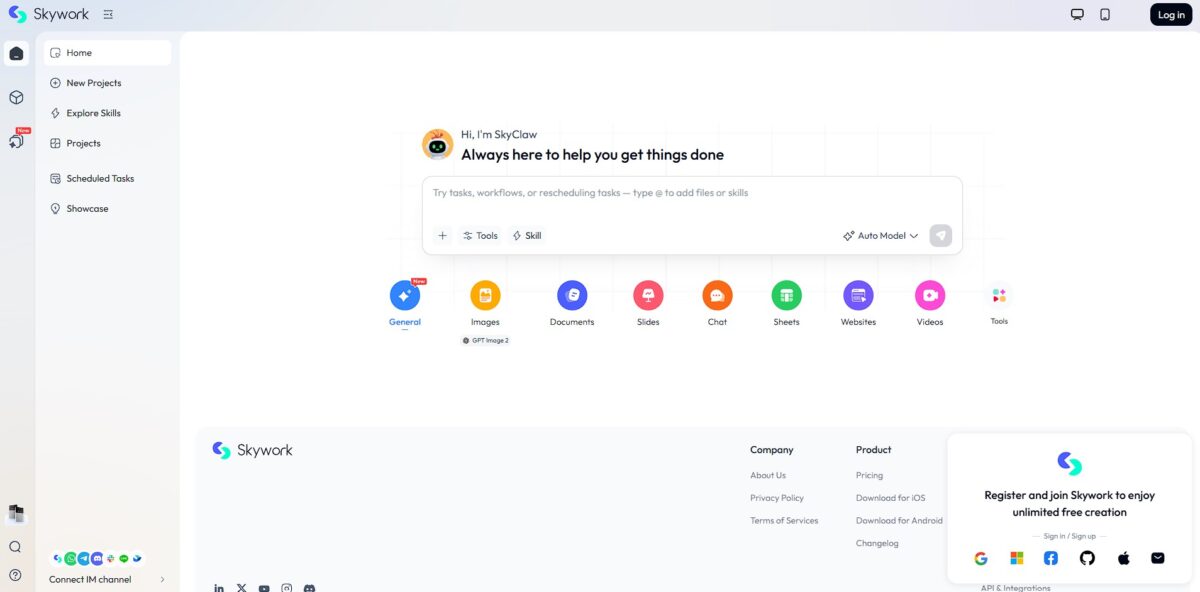
Skywork AI is an integrated workspace that replaces the endless tab-switching between search engines and editors by deploying specialized “Super Agents” to build finished documents. Instead of just chatting, you prompt these agents to scrape dozens of live sources, verify claims via the DeepResearch engine, and assemble everything into formatted slide decks, spreadsheets, or even podcasts. While it excels at turning raw data into consultancy-grade reports with traceable citations, its highly structured approach might feel restrictive if you just want a quick, creative brainstorm. This matters because it shifts AI from a conversational novelty to a production tool that creates verifiable assets you can actually present to a client. Expect a learning curve with the “Clarification Cards” that refine your intent before the agent starts its work.
How to start using Skywork.ai?
Jump into the Skywork dashboard and pick your first agent. If you need a technical report, head straight for the Documents agent. If you’re staring at a messy CSV file, the Sheets agent is your best bet. Avoid the General agent for specialized work; it’s an orchestrator, but the specialized tools have tighter focus. This prevents you from getting generic “chat” results when you actually need a formatted PDF or a slide deck. Pick the agent that matches your output type to save time on re-formatting later.
Next, feed your context into the Knowledge Base. You can upload PDFs or link live URLs to anchor the AI in your specific data. I noticed the research is much more reliable when you give it actual files to chew on rather than letting it loose on the general web. This stops the AI from hallucinating fake stats about your specific project. Grounding your project in your own data means the final draft actually sounds like your company, not a generic Wikipedia entry.
Now, write your prompt like a director, not a searcher. Define a role, like a senior financial analyst, and specify exactly what the report needs to cover. Use a “Mega-Prompt” that lists your required word count and specific sections. Vague asks like “write about AI” usually return fluff you’ll just delete. Detailed instructions ensure the DeepResearch engine scans dozens of sources for the exact data points you need. A clear prompt is the difference between a rough outline and a client-ready document.
Watch the agent’s thinking process. Skywork doesn’t just spit out text; it scans, parses, and summarizes in steps. You might see a clarification card asking for more details on your goals. Don’t ignore these. Answering a quick question during the “thinking” phase prevents the AI from heading down a useless rabbit hole. This human-in-the-loop check ensures the final 2,000-word draft hits every one of your marks.
Once the draft appears, use the built-in workspace to tweak it. You can ask for follow-up edits, like adding a chart or making a specific section more technical. The real magic happens when you tell it to “convert this report into a 10-slide presentation.” It pulls the context from your doc and builds the deck without you copy-pasting a single line. This interoperability cuts the busywork of moving data between different apps. Always check the source citations in the final doc to ensure the external data is solid.
Who is it for?
Market Researchers
These specialists dig through endless PDFs and web data. It sifts through specific data points so they don’t spend hours on manual extraction. I noticed it handles complex research loops much faster than standard chatbots, which spares you the inevitable cognitive burnout of deep-web digging.
Content Strategists
Managers who feed a content pipeline use this to aggregate factual sources. Its DeepResearch agent automates the gathering phase of writing and returns drafts with citations. While it is less ideal for creative brainstorming, it excels at building a pre-vetted foundation for articles. Your team ends up working from verified data rather than guessing.
Data Analysts
Analysts who evaluate unstructured content without writing custom Python scripts find a home here. It runs analysis over existing documents to spot patterns in seconds. Don’t expect it to replace a dedicated SQL engine for structured tables, though. It bridges the gap between messy text and actual insights.
Knowledge Managers
People tasked with maintaining internal wikis or documentation across scattered apps use it to keep information accessible. It indexes uploaded PDFs, recordings and local folders in a Personal Knowledge Base to solve the “where is that file?” headache. It works well for centralized search, though organizing the knowledge base takes initial effort. Critical company knowledge stops rotting in forgotten folders.
Productivity Hackers
Users who want one workspace for research, documents, slides and sheets without being locked into rigid logic. It lets you turn a single prompt into several finished files from one interface. It is perfect for those who find no-code tools too limited but do not want to maintain a custom codebase. The result: less time jumping between tabs and more time finishing projects.
Skywork.ai pricing
Skywork runs on a credit-based subscription model: every agent task draws from your credit balance, and heavy jobs like deep research or video burn through it faster. The company has switched between unlimited and credit-based pricing more than once, so check the pricing page before you commit. A bigger monthly allowance is a relief for power users who iterate on documents ten times an hour, but it might feel steep if you only need a quick summary once a week.
Free Plan: $0
The entry point gives you 500 daily credits to test the waters. It works for occasional deep dives or checking out the “Super Agent” architecture. Note that these credits don’t roll over. If you don’t use them, they’re gone.
That’s enough to verify whether the DeepResearch engine actually finds the niche data you need before committing.
Monthly Pro: $19.99/month
This tier provides 7,000 monthly credits. It’s designed for consistent builders who need to generate slide decks and technical reports throughout the week. Recent updates suggest Skywork is moving toward “unlimited” usage for certain models on this plan.
Your monthly software spend stays predictable even during heavy project cycles.
Quarterly & Annual Pro: $39.99/3 months or $149.99/year
The annual option brings the cost down to about $12.50 per month. You get the same feature set as the monthly pro plan but at a significant discount. It’s the obvious choice if Skywork becomes your primary workspace for documentation and coding architecture.
Committing early locks in a lower rate before potential price hikes as the tool matures.
Skywork.ai key features
DeepResearch Engine scans up to 600 webpages per task to synthesize data
This replaces hours of manual tab-hopping and source-checking for research reports. Finding actual data points becomes faster than just reading summaries. Use this for deep dives, but verify the final links.
Specialized Agents generate structured PPTX slides, DOCX reports, and XLSX spreadsheets
Instead of a chat bubble, you get files ready for a presentation or data audit. This skips the reformatting phase entirely. Pro-tip: check the slide layouts as they can sometimes be rigid.
Personal Knowledge Base allows uploading PDFs, recordings, and CSVs to ground AI responses
Your outputs stay relevant to your specific internal data rather than generic web knowledge. It stops the AI from guessing when it should be looking at your project files.
Clarification Cards prompt you with follow-up questions to fix vague requirements before generating
You spend less time iterating on bad first drafts because the system forces you to be specific upfront. This reduces the “garbage in, garbage out” cycle common in standard chatbots.
Website Agent builds full-stack sites and landing pages via conversational instructions
It handles the code, database, and publishing, allowing a non-dev to ship a live MVP in minutes. While great for speed, complex custom logic still requires manual code tweaks.
YouVibe Utility converts YouTube videos into lecture notes, summaries, and mind maps
It turns passive watching into a searchable asset for students or researchers. You don’t have to sit through a 40-minute video just to find one specific insight.
Skywork.ai Pros & Cons
Pros
Skywork.ai kills the constant tab-hopping between research and design tools. You get a direct pipeline from 600-source web scans to cited slide decks and spreadsheets in one chat window. This helps researchers and consultants skip the manual data entry phase. I noticed it even builds the underlying formulas when generating Sheets, which saves you from writing complex Excel logic yourself. This matters because it preserves your creative momentum by keeping all project assets in a single, context-aware environment. Use it for data-heavy projects where you need proof for every claim.
Cons
The credit-based system is a massive bottleneck for power users. Generating a single detailed 3D video or deep-dive report can wipe out your monthly allowance in minutes. While the data is solid, the visual style of charts and images often looks like a generic academic default. As a result, you might spend extra time manually tweaking colors to avoid a “produced by AI” aesthetic, since a lack of brand polish can make your final deliverable look unprofessional to high-end clients. Stick to simple text and data tasks if you are on the free tier to avoid running out of juice.
Use Skywork.ai if you want…
- Deep data analysis of uploaded files and live web sources.
- Autonomous research agents to handle complex evaluations.
- Centralized knowledge bases from fragmented content.
- Scalable content analysis for high-volume productivity.
- Smooth workflow execution within a unified AI workspace.
Skywork.ai alternatives



Skywork.ai Reviews
DeepResearch is a game changer for my reports. Scanned hundreds of pages in minutes. High factual accuracy.
The all-in-one workflow is great, but those premium credits disappear way too fast. Too expensive for casual use.
Turned my 30-page PDF into a polished pitch deck instantly. Visuals are a bit basic, but it saves me hours.
Impressive multimodal capability. One prompt gave me a spreadsheet, a landing page, and a presentation.
FAQ
How does Skywork AI prevent hallucinations?
Skywork utilizes a proprietary DeepResearch engine that scans up to 600 external sources per task, cross-validating data points and providing inline, clickable citations to ensure factual accuracy.
Is my corporate data secure on Skywork AI?
Yes, Skywork operates on a zero-retention privacy model and zero-trust setup, ensuring that user data, including prompts and uploaded files, is encrypted and never used to train public foundational models.
Does Skywork AI support multimodal outputs?
Skywork can generate various professional deliverables from a single prompt, including formatted documents, PowerPoint slide decks, Excel spreadsheets with formulas, and even short video summaries.
Can I use my own documents with Skywork AI?
Users can integrate a Personal Knowledge Base by uploading PDFs, CSVs, or local folders, allowing the AI agents to ground their research and responses in specific organizational context.
Does Skywork AI require coding knowledge?
No, the platform provides a completely no-code interface where users build and direct specialized Super Agents using natural language instructions and simple file uploads.
What is the difference between Skywork and standard chatbots?
Unlike general conversational bots, Skywork is an integrated AI Office Suite designed for research-to-deliverable workflows, utilizing specialized agents to execute multi-step professional tasks.
Can Skywork AI automate research tasks?
The platform features a DeepResearch capability that autonomously queries web sources, parses data, and synthesizes findings into structured reports with citations.
Does Skywork AI offer a desktop application?
Skywork provides a desktop assistant for Windows that allows for persistent local context, enabling the AI to index and work with local project folders without manual file uploads.
What are Clarification Cards?
Clarification Cards are a human-in-the-loop feature where the AI pauses to ask follow-up questions to refine user intent before generating complex or ambiguous assets.
Can I export files created in Skywork AI?
All generated assets, such as PPTX presentations, DOCX reports, and XLSX spreadsheets, are fully editable within the workspace and can be exported for professional use.
Similar tools
 GPT WorkspaceAI agent for Google Docs, Sheets, Slides, Gmail and Drive that edits your files, runs GPT formulas in bulk and automates routine
 FPT.AIVietnamese enterprise AI platform from FPT Smart Cloud for chatbots, call-center voicebots, document reading and eKYC that automate customer operations.
 Frigate NVROpen-source NVR that runs real-time AI object detection on your own hardware and sends camera events to Home Assistant and other MQTT