

Speak AI
Data AnalysisUpdated November 10, 2026
Conversation intelligence platform that transcribes interviews, calls and meetings in 100+ languages and turns them into themes, scores and structured data.
We may earn a commission when you sign up through our links. It does not affect our reviews.
What is Speak AI?
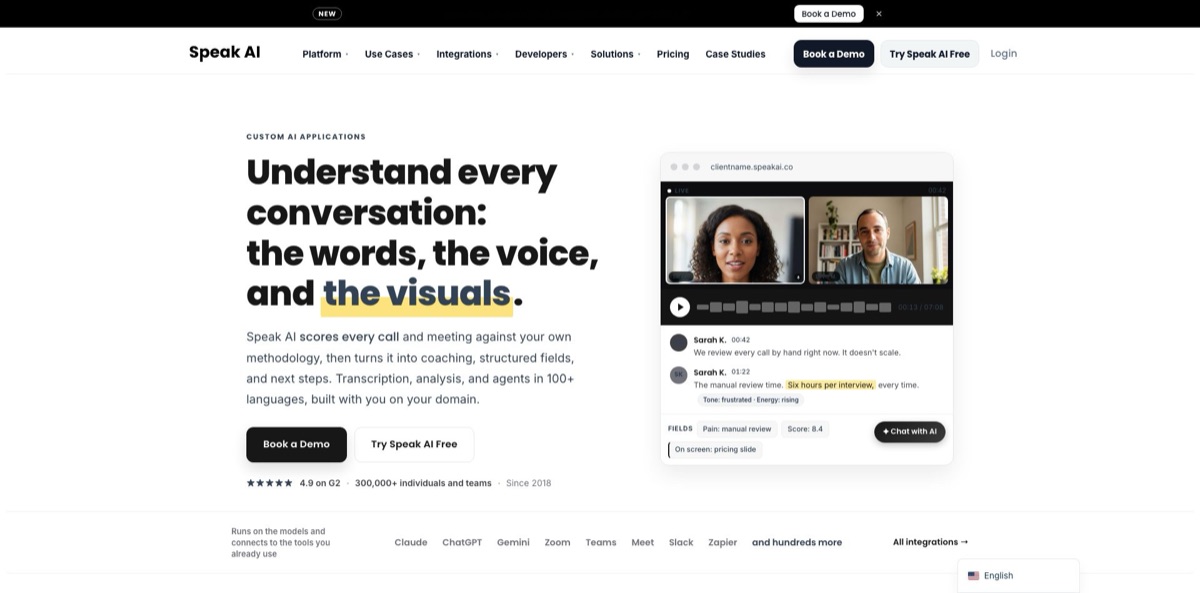
Think of it as an analytics layer for anything people say out loud. Speak AI records or imports calls, interviews, focus groups and meetings, transcribes them in 135 languages and regional variants, then runs automatic keyword, sentiment, entity and topic analysis on every file. On top of that sit AI Chat across one file or a whole folder, AI fields that write themes or scores into sortable columns, rule-based automations, and an open-source MCP server that lets Claude, ChatGPT or Cursor query your library. The company now pitches itself hardest at call scoring and white-label builds, which are scoped through a demo rather than sold self-serve. The weak spots: dashboards, tone and video analysis sit on Enterprise, and the handful of Trustpilot complaints center on cancellations. Pick it if you analyze dozens of recorded conversations, not if you only need notes from your own meetings.
How to start using Speak AI?
Create an account at app.speakai.co with Google, Microsoft or an email address; email sign-ups are confirmed with a six-digit code rather than a link. Use a work email, since that is what enables the team features later. The account starts a 7-day trial with every premium feature switched on, no card required, and a small balance of free credits. Uploaded audio transcribes at 1 credit an hour during the trial, so a 45-minute interview costs about 0.75 credits, and one very long file can drain the whole balance before you try AI Chat.
For a first real scenario, pick a small dataset you actually care about, such as five customer interviews on one question, and keep them in one folder. Open Upload from the + New menu and drag in MP3, WAV, M4A, MP4 or MOV files, or text in TXT, DOCX and PDF, or paste a media link, YouTube included. Set the source language explicitly for anything that is not English: auto-detect usually gets it right, but one reviewer lost two German interviews to the wrong setting. Speak quotes roughly a minute or two of processing per hour of audio, and about nine in ten files finish within five minutes.
The screen that matters most is the folder view with AI fields. Create a field under Settings, Fields, for example a text field called Exploratory Themes. Then open the folder, select Prompt, choose Map Response to Field, pick your field and run one instruction across every file. Each answer lands in a column you can sort, filter and export as a Media Details CSV. For open questions, open AI Chat on a file or a folder; on the trial it runs on Gemini 3.7 Flash, while Claude, GPT and Grok models open up once you upgrade.
Before you trust the output, turn on the Transcription confidence highlighter in the transcript toolbar, which tints sentences the engine scored below 75 or 55 percent. Fix names and jargon by hand, or add them to custom vocabulary so future files get them right. Then open a few transcripts at random and check that the themes in your AI field match what participants actually said. Only after that connect the Meeting Assistant to Google or Outlook Calendar so new calls flow in without manual uploads.
Who is it for?
Qualitative researchers
You have thirty interviews and a deadline, and manual first-pass coding eats days. Speak transcribes the set, then one AI field prompt classifies every file against your theme list and gives you a column to count. You still do the interpretation, but the mechanical tagging no longer means rereading every transcript.
Market research and insight agencies
Clients want branded deliverables, not a link to someone else’s tool. Embeddable recorders, shareable libraries and, on Enterprise, white-label domains let you collect video answers and hand back findings under your own name. One workspace can serve every client account.
Sales and customer success leaders
Reviewing calls by hand covers a sliver of the pipeline. Speak scores calls against your own rubric and pushes structured fields into HubSpot or Salesforce, although full scorecard setup runs through a demo. Managers get coaching data on every call instead of the few they had time to hear.
Consultants and solo analysts
You record client sessions, sometimes in several languages, and need structured notes fast. Pay-as-you-go credits keep costs tied to the hours you actually process, and AI Chat summarizes or compares sessions across a folder. A quiet month costs you nothing.
Developers and AI-heavy teams
Your assistant cannot transcribe audio on its own. The free MCP server and CLI give Claude, ChatGPT, Cursor or a shell script the ability to upload, transcribe, search and export, with JSON output for pipelines. Your recordings become a queryable data source rather than a folder of MP4 files.
Healthcare, legal and HR teams
Recorded consultations and interviews carry sensitive data. Enterprise adds Business Associate Agreements for HIPAA workflows, SSO and data residency, and exports can redact names, emails and locations. Check the missing SOC 2 report against your procurement rules before you commit.
Speak AI pricing
Everything runs on credits, where 1 credit equals US$1, and a single balance covers transcription, meeting recording, translation and AI Chat. You can pay per use with no subscription, buy Pro seats that include a monthly credit pool, or scope an Enterprise build with the sales team. Pro effectively halves the per-hour rate, because pay-as-you-go is billed at twice the standard credit rate. If you go past what your plan includes, nothing stops: extra usage is drawn from a prepaid Speak Credit balance that never expires, then from your card.
All premium features, a small credit balance and AI Chat on Gemini 3.7 Flash only. You are not charged when it ends; the account drops to a free tier where you keep your files and transcripts, but new work is limited until you add credits or pick a plan.
Top up from 10 credits. Standard transcription costs 2 credits an hour, premium languages 3, Meeting Assistant recording 4, translation 12 credits per 100,000 characters, and AI Chat starts at about 0.08 credits per question. API, MCP, CLI, webhooks, Zapier and embeds are included.
Up to 5 users, each with 25 credits a month (about 25 hours of standard transcription) and 10 GB of storage. Adds unlimited data retention, multi-model AI Chat, a shared team library, automations, branded recorders and surveys, a usage dashboard and priority email support.
Custom. Unlimited seats, volume transcription rates, white-label and custom domains, custom fields, scoring and AI agents, voice agents and AI interviewers, tone-of-voice and video analysis, BAA and NDA, data residency, a dedicated account manager and SLA-backed support.
$1.50 per minute, or $2.50 per minute with rush delivery in about 48 hours instead of the standard 4 to 5 days.
Speak AI key features
Multi-source capture
A Meeting Assistant joins Zoom, Google Meet, Microsoft Teams and Webex from your Google or Outlook calendar, with auto-join rules per platform and exclusions by meeting title or attendee. Add the Mac app for bot-free call recording, iOS and Android apps that record offline, a Chrome extension, YouTube import and plain uploads. Every source lands in one searchable library, so interviews and sales calls are analyzed the same way.
Transcription with quality signals
Speak transcribes 135 languages and regional variants with speaker identification, translates finished transcripts into 111 languages, and quotes accuracy above 95 percent on clear audio. A confidence highlighter tints shaky sentences, custom vocabulary teaches product names in 31 languages, and human transcription is one menu away. You know which passages to recheck before you quote them in a report.
Automatic NLP insights
Every file gets keywords, topics, document- and sentence-level sentiment with a compound score from -1 to +1, and named entities such as people, companies, products and money, plus speaker talk time and words per minute. Explore compares all of this across your library.
AI fields and batch prompts
Define a field, write one prompt, and Speak fills that column for every file in a folder, whether it holds a theme, a score or a yes/no flag. Export the folder to CSV and count the results in any spreadsheet. This is the feature that turns a pile of transcripts into a dataset you can chart.
Multi-model AI Chat
Ask questions of one file, a folder or the whole library using models from Anthropic, OpenAI, Google, xAI and z.ai, with preset assistants such as Researcher and Sales. Chat can also cut clips, rename speakers and export, while irreversible actions like bulk deletion wait for your approval. A folder question returns one combined answer, and batch analysis gives you one answer per file.
Automations and integrations
Build trigger, filter and action flows, add yes/no branches, or start from ready-made templates for Google Drive, Zoom, Slack, HubSpot and Salesforce. Zapier reaches 5,000+ other apps, including Twilio, Aircall and Dialpad for phone recordings. Scoring and field extraction can run the moment a new file lands, without anyone opening the app.
MCP server, CLI and API
The MIT-licensed MCP server exposes more than 100 tools to Claude, ChatGPT, Cursor, VS Code and Windsurf, and the same npm package ships a CLI with JSON output. Developers can script uploads, searches and exports or wire webhooks into their own stack.
Speak AI Pros & Cons
Pros
Speak AI covers the whole path from capture to counted themes in one product, which is rare among transcription tools. Recordings arrive from meetings, phones, uploads or an embedded recorder, get transcribed in well over 100 languages, and pick up sentiment, entities and keywords without a single prompt. AI fields then turn qualitative answers into sortable columns, and the MCP server puts the whole library inside Claude or ChatGPT. Pay-as-you-go credits at one US dollar each keep light use cheap, and G2 reviewers repeatedly praise transcription accuracy and helpful human support. Start with one folder of interviews and one AI field to see whether the theme output holds up on your own data.
Cons
Several headline features sit behind Enterprise: dashboards, tone-of-voice and video analysis, white-label and full call scoring all start with a demo. The credit model is flexible but takes some arithmetic, since meeting recording costs twice as much as uploads and premium chat models burn far more per question than the default. The help center also lists Word, PDF, CSV and JSON exports under a Premium Export add-on. Speak does not hold SOC 2 or ISO 27001 certification itself and relies on AWS and MongoDB Atlas for that. Trustpilot reviews, though few, repeat one theme: cancellations that were slow to process. Keep written confirmation of any cancellation, and check what your plan exports before a large project.
Use Speak AI if you want…
- Transcribe interviews and focus groups in 135 languages.
- Turn open-ended responses into countable theme columns.
- Score sales calls against your own rubric.
- Query your recording library from Claude or ChatGPT.
- Collect video answers through a branded embeddable recorder.
- Pay per transcribed hour without a subscription.
- Push call insights into HubSpot or Salesforce automatically.
- Launch a white-label voice AI product for clients.
Speak AI alternatives

Speak AI Reviews
Reviewers on G2 single out transcription accuracy and how quickly they get from upload to usable notes, though one felt the interface could use some polish.
Several G2 users value that a real person answers their support questions; one wished it could translate the audio itself, not only the transcript text.
A researcher who transcribed and translated 14 interviews found the software worked reasonably well, but two German files came out wrong because the language was not set, and re-uploading cost extra.
Some Trustpilot reviewers describe trouble cancelling, including charges after a cancellation request and replies that took weeks; the CEO has since answered each complaint publicly.
An early user who brainstorms out loud for hours says it turns long recordings into useful insights, while another reported that jumping from a search hit to the right moment in the audio failed too often.
FAQ
Is there a free plan for Speak AI?
There is a 7-day free trial with every premium feature and a small credit balance, no card required. After it ends you keep your files and transcripts on a free tier, but new transcription needs pay-as-you-go credits or a Pro plan.
How many languages does Speak AI support?
The help center lists 135 transcription languages and regional variants, including 13 Arabic dialects, with automatic language detection. Finished transcripts can be translated into 111 languages, and 49 languages support live transcription.
Does Speak AI use my recordings to train AI models?
No. The help center states that your data is not used for training unless you explicitly ask for it, data is encrypted in transit and at rest, and deleted files are removed permanently after a 7-day recovery window. Data is hosted in Canada and the United States.
Is Speak AI HIPAA compliant or SOC 2 certified?
Enterprise builds support Business Associate Agreements for HIPAA workflows, SSO and data residency options. Speak AI does not currently hold SOC 2 or ISO 27001 certification itself; its infrastructure providers do.
Which tools does Speak AI integrate with?
Native connections cover Zoom, Google Drive, Google and Outlook calendars, Slack, Vimeo, HubSpot, Salesforce and a Chrome extension, and Zapier links 5,000+ more apps. The Meeting Assistant joins Zoom, Google Meet, Microsoft Teams and Webex calls.
Does Speak AI have an API?
Yes. There is a developer API with webhooks, plus a free MIT-licensed MCP server and CLI, available on pay-as-you-go, Pro and during the trial. The same credit rates apply whether you work in the web app, the API, the CLI or MCP.
What is the maximum file size?
On the free tier each file can be up to 2 GB, and paid plans accept larger files. Recordings longer than 4 hours are split into segments and transcribed in order, which takes longer than usual.
Can I cancel or switch plans at any time?
The pricing page says you can move between pay-as-you-go and Pro whenever you like, with no long-term contracts, and your recordings and balance carry over. Some users report slow cancellation handling, so keep written confirmation when you cancel.
Similar tools
 HexCollaborative analytics workspace that mixes SQL, Python and AI agents in notebooks, then publishes results as data apps and plain-language answers.
 WindwardMaritime AI platform that fuses AIS, satellite and ownership data into vessel risk scores, sanctions screening, alerts and container ETAs.
 Delve AIAI market research platform that builds personas from analytics, CRM and social data, then lets you chat with them or run synthetic