

Stablecog
Image GenerationUpdated November 12, 2026
Open-source web app for generating images with FLUX.1, Stable Diffusion 3 and Kandinsky, with a free daily allowance, upscaling and a REST API.
We may earn a commission when you sign up through our links. It does not affect our reviews.
What is Stablecog?
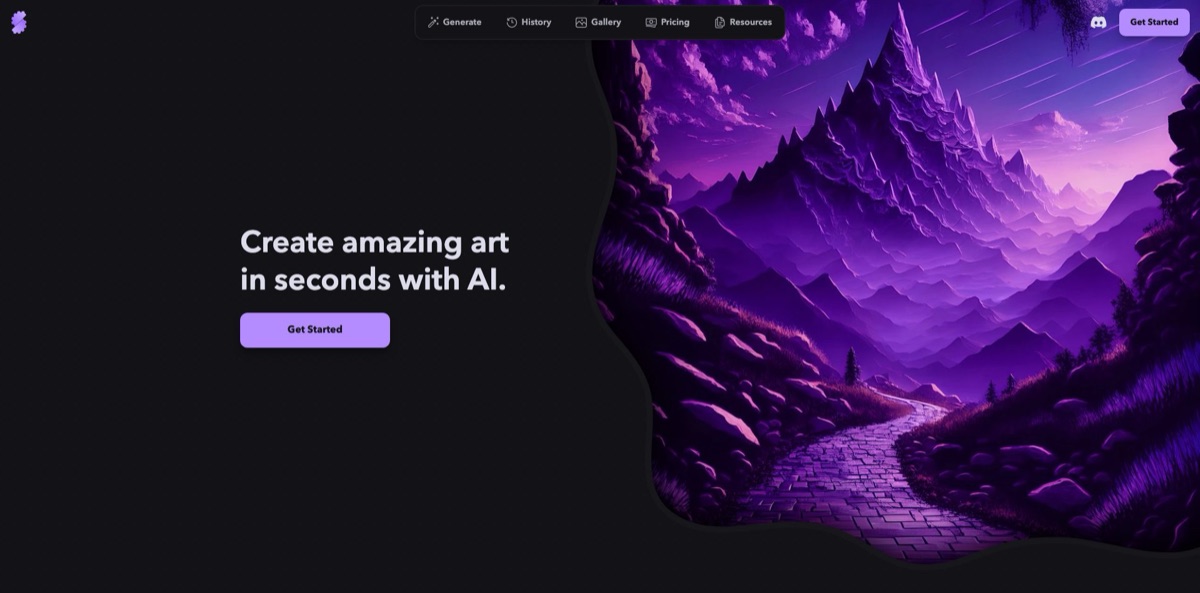
Built by Stablecog, Inc., a small company registered in Oregon, Stablecog is a browser app for text-to-image and image-to-image generation that runs open models such as FLUX.1, Stable Diffusion 3, Kandinsky 2.2 and SSD-1B on hosted GPUs. You type a prompt, pick an aspect ratio and get up to four images back, with no local install or GPU. The web app and its Go API server are open source under the MIT license, and a plain REST API draws on the same credits. Pricing is among the simplest in the category: 20 free images a day, then $10 for 2,000 images a month. The weak side is momentum: the newest models date from 2024, the blog has been quiet since August 2024 and the voiceover tool was retired. Pick it for cheap, no-frills open-model generation rather than the latest image quality.
How to start using Stablecog?
Open stablecog.com and click Get Started. The sign-in page offers Continue with Google, Continue with Discord or a plain email address, and it promises that no credit card is needed. The terms of service limit the app to users aged 18 and over. A new account starts on the Free plan: 20 images per day, slow generation, one image per generation, no parallel jobs, public images and personal use only. That is enough to learn how each model reacts to your prompts before you decide whether to pay.
For your first image, stay on the Generate screen and type a description into the prompt bar. Before you press Generate, open the Aspect Ratio menu and choose between Square (1:1), Portrait (2:3), Landscape (3:2), Mobile (9:16), Desktop (16:9), Squarish (4:5) and Anamorphic (2.4:1). Then pick a model. FLUX.1 is the default, and Stablecog’s own guide describes it as a 12-billion-parameter model from Black Forest Labs with strong prompt adherence and the ability to put readable text into images. On a paid plan, Number of Images lets you ask for up to four results per run. Finished images land in History.
The screen worth learning next is Advanced Settings. It exposes inference steps, guidance scale, scheduler and seed, while a separate field takes a negative prompt, the list of things the model should avoid. The guide explains each control with side-by-side examples: around 30 steps is a sensible starting point, the default guidance scale is 7, and Euler, Euler Ancestral, DPM Multistep and LMS each trade speed against detail differently. To start from a picture, use Upload Image. It works with the other models but shows “Not supported by the model” when FLUX.1 is selected, so switch models first.
When a result looks right, open it full screen. From there you can Download it, Copy Prompt, Generate Similar, Explore Similar or Upscale it with the AuraSR model, and a Show on Profile toggle decides whether it appears on your public profile. Free-plan images are always public and cannot be used commercially, so subscribe before you create anything for a client: images made during a paid subscription stay licensed for commercial use even after you cancel. Developers can create an API key on the account page and call the same models from code.
Who is it for?
Curious beginners
You want to see what open image models can do without installing Python, downloading checkpoints or buying a graphics card. Stablecog hides the setup behind a prompt bar and a model menu, and the free plan gives you 20 images a day to experiment. Expect slower generation on the free tier.
Bloggers and social media managers on a budget
You need a steady supply of header images, thumbnails and illustrations with clear commercial rights. The Starter plan gives 2,000 private, commercially usable images for $10 a month, which works out to half a cent per image according to the billing docs. Volume is cheap, but you trade away the polish of premium closed models.
Developers prototyping an image feature
You want a simple HTTP endpoint rather than a GPU cluster. One POST request with a prompt to the generation endpoint returns images, and the response reports your remaining credits. Per-image costs are published, so you can estimate the bill for a prototype before writing much code.
Stable Diffusion tinkerers
You care about seeds, schedulers and guidance values and want to compare models on the same prompt. Stablecog keeps those controls one click away and documents them in a free guide. Fix the seed, change one setting at a time and you see exactly what each knob does.
Open-source learners
You want to read how a real image generation service is built, from the web app to the GPU worker and the Go API. The repositories are public, and the web app and Go server are MIT-licensed, with brand assets and blog posts excluded. The README admits that the full self-hosting setup is not documented, so treat it as a reference rather than a one-command install.
Prompt learners
You learn best by copying what already works. The public gallery has New, Trending, Top and Search views, and every image offers Copy Prompt and Explore Similar. Borrowing a proven prompt and adjusting it is faster than starting from a blank bar.
Stablecog pricing
Pricing is image-based. Every plan comes with an allowance of images, and the billing documentation charges an upscale at the same rate as a generated image, so one credit buys one output either way. Credits reset on your billing date and do not roll over. The pricing page lists monthly plans only, all prices are in US dollars, and payments go through Stripe with Visa, Mastercard, American Express and Discover cards.
20 images per day with slow generation, one image per generation and no parallel jobs. Images are public, licensed for personal use only, and you cannot buy extra credits on this tier.
2,000 images per month with fast generation, up to 4 images per generation and 2 parallel generations. Commercial use, private images and optional credit top-ups are included. The billing docs put the effective cost at $0.005 per image or upscale.
6,000 images per month, fast generation, up to 4 images per generation and 3 parallel generations, with commercial use, private images and top-ups. The effective rate drops to $0.00416 per image, and the pricing page marks this plan as Recommended.
12,000 images per month, fast generation, up to 4 images per generation and 4 parallel generations, with the same commercial and privacy terms. The per-image rate is the same $0.00416 as Pro, so you pay for volume and one extra parallel slot rather than a better unit price.
Medium, Large and Mega packs are available only while you hold an active subscription. The public pricing page does not list pack prices; the docs give effective rates of $0.00571 per image for Medium and $0.00476 for Large and Mega, which is more than the per-image rate inside Pro or Ultimate.
You can cancel at any time and billing stops at the end of the current cycle, with your credits kept until then. Upgrades are charged immediately and in full, and leftover credits from the old plan stay usable until they expire.
Stablecog key features
Several open models in one picker
The Generate screen offers FLUX.1 (the default), Stable Diffusion 3, Kandinsky 2.2 and SSD-1B, and the public models endpoint of the API also lists SDXL, Luna Diffusion, 22h Diffusion and Waifu Diffusion. Each model has a guide page describing its strengths, such as FLUX.1 for text inside images.
Image-to-image generation
Upload a picture and the model builds new art on top of it, and the API exposes a prompt strength value from 0 to 1 that decides whether the result follows your image or your text more closely. This turns a rough sketch or a photo into a styled variation without starting from noise. FLUX.1 does not accept an input image, so pick another model for this workflow.
Full manual controls with a free guide
Inference steps, guidance scale, negative prompt, scheduler and seed are all adjustable, and the API allows 10 to 50 steps and a guidance scale from 1 to 20. Stablecog’s guide shows each setting with side-by-side examples, which makes it a decent free primer on how diffusion models behave.
Batches and parallel jobs
Paid plans return up to four images per generation and run two to four generations at once, depending on the tier, across seven aspect-ratio presets from 1:1 to 2.4:1. That shortens the loop when you explore variations of one idea.
AuraSR upscaling
The Upscale button sends a finished image to the AuraSR model, and the API accepts either one of your own outputs or any image URL up to 1024×1024 in JPG, PNG or WebP. An upscale costs the same as a generation. Use it on the keepers only, so your monthly allowance goes to new ideas.
Public gallery with similarity search
The gallery sorts community images by New, Trending and Top and has a search box, while each image offers Copy Prompt, Generate Similar, Explore Similar and Explore Style. You can find a look you like and reuse its prompt and settings in seconds.
A simple REST API
The API lives at api.stablecog.com/v1 and covers generation, upscaling, model lists, default settings and your credit balance, with examples in cURL, TypeScript and Python. Width and height run from 256 to 1024 pixels, and every response reports the credits you have left. It suits prototypes and internal tools that need cheap images without managing GPUs.
Stablecog Pros & Cons
Pros
The pricing is easy to understand and cheap at volume: $10 buys 2,000 commercial images, and the docs publish the exact per-image cost of every plan and credit pack. The free plan is real rather than a three-image trial, with 20 images a day. Power users get every setting that matters in open models, from schedulers to seeds, plus a guide that explains them with examples. The web app and API server are open source under the MIT license, which is rare among hosted generators, and the same credits work in the API. Start on the free plan, settle on one model for your style, then pick the smallest plan that covers your monthly volume.
Cons
Development has slowed. The newest models on offer, FLUX.1 and Stable Diffusion 3, date from 2024, the blog has not posted since August 2024, low-use models were removed in early 2026, and the voiceover feature now shows that it is no longer available. There is no built-in editor, inpainting tool or video generation, and free images are always public. Feedback from users is thin, so you have little independent evidence about support quality or uptime. Reviewers also describe results as hit-and-miss on complex prompts. Keep a second generator in your toolkit and avoid annual commitments to any single niche tool.
Use Stablecog if you want…
- Generate FLUX.1 images without installing anything locally.
- Get 2,000 commercial images a month for $10.
- Compare open models side by side using fixed seeds.
- Turn a sketch or photo into new art.
- Add a cheap image generation API to prototypes.
- Upscale your best generations with the AuraSR model.
- Learn prompting by remixing public gallery images.
- Study open-source code behind a working image service.
- Test prompts daily on a free 20-image allowance.
Stablecog alternatives
 Leonardo.aiRead review →
 MidjourneyRead review →
 IdeogramRead review →
 getimg.aiRead review →
 Stable Diffusion OnlineRead review →
 OpenArtRead review →
 SeaArt.aiRead review →
Stablecog Reviews
A Hive blogger comparing several generators found Stablecog plainer than starryai but liked its unlimited attempts and wide range of settings; that unlimited free era has since given way to a cap of 20 images a day.
A Japanese reviewer who scored it 86 out of 100 in 2025 praised the atmospheric scenes and lifelike lighting and textures, but likened it to a gacha machine because complex instructions drift and some results ignore the prompt.
On Reddit, a Stable Diffusion user recommended it to newcomers as a free online option whose gallery shows the prompts and settings behind each image, and another was impressed by what it produced from a short prompt.
Forum users who tried it in 2023 found sign-up easy, with a login link sent by email, and one expected to keep using it, while others noted that it does not produce adult content.
Independent reviews remain scarce: AlternativeTo carries a single short five-star note praising the interface and features, and the only Product Hunt review comes from one of the app’s volunteer translators.
FAQ
Is Stablecog free?
Yes. The Free plan gives you 20 images per day at no cost and without a credit card, but generation is slower, you get one image per run, the images are public and they are for personal use only.
Can I use Stablecog images commercially?
Yes, if you create them while subscribed to Starter, Pro or Ultimate. Those images remain licensed for commercial use even after you cancel, while images from the Free plan stay personal-use only.
Are my Stablecog images private?
On paid plans your images are private, and a Show on Profile toggle controls whether any of them appear publicly; on the Free plan they are always public. The privacy policy says Stablecog has not sold personal information, payment data is held by Stripe, and you can ask for your account and data to be deleted.
Which AI models does Stablecog use?
The generator offers FLUX.1 as the default, plus Stable Diffusion 3, Kandinsky 2.2 and SSD-1B, and the API also lists SDXL, Luna Diffusion, 22h Diffusion and Waifu Diffusion. Upscaling runs on the AuraSR model.
Does Stablecog have an API?
Yes. Create an API key on your account page and send requests to api.stablecog.com/v1 for generation, upscaling and credit checks. The billing docs list per-image costs from $0.00416 to $0.005 depending on your plan.
Can I self-host Stablecog?
The code for the web app, Go server and GPU worker is public on GitHub, and the web app and Go server carry the MIT license, excluding the logo and blog content. The README notes that the full setup is not documented, so expect real infrastructure work.
Do unused credits roll over, and how do I cancel?
Credits do not roll over; they reset on your billing date. You can cancel from your account at any time, and billing stops at the end of the current cycle while your remaining credits stay usable until then.
Does Stablecog still offer AI voiceovers?
No. The Bark-based voiceover tool launched in 2023, but its page now states that the feature is no longer available, so Stablecog is an image-only service today.
Similar tools
 BannerbearTemplate-based API for generating on-brand images, PDFs, animations and videos at scale from your data via REST, Zapier, Airtable or AI agents.
 Generated PhotosLibrary of 2.6M+ AI-generated faces plus face and full-body human generators for model-release-free people images in design, ads and research.
 VheerBrowser-based AI studio for text-to-image, photo editing and image-to-video, with a free no-signup model plus credit access to Nano Banana, Sora 2