

Stable Diffusion Online
Image GenerationUpdated October 28, 2026
Independent browser-based AI image and video generator with GPT Image, Seedream, Nano Banana and Kling models on one shared credit balance.
We may earn a commission when you sign up through our links. It does not affect our reviews.
What is Stable Diffusion Online?
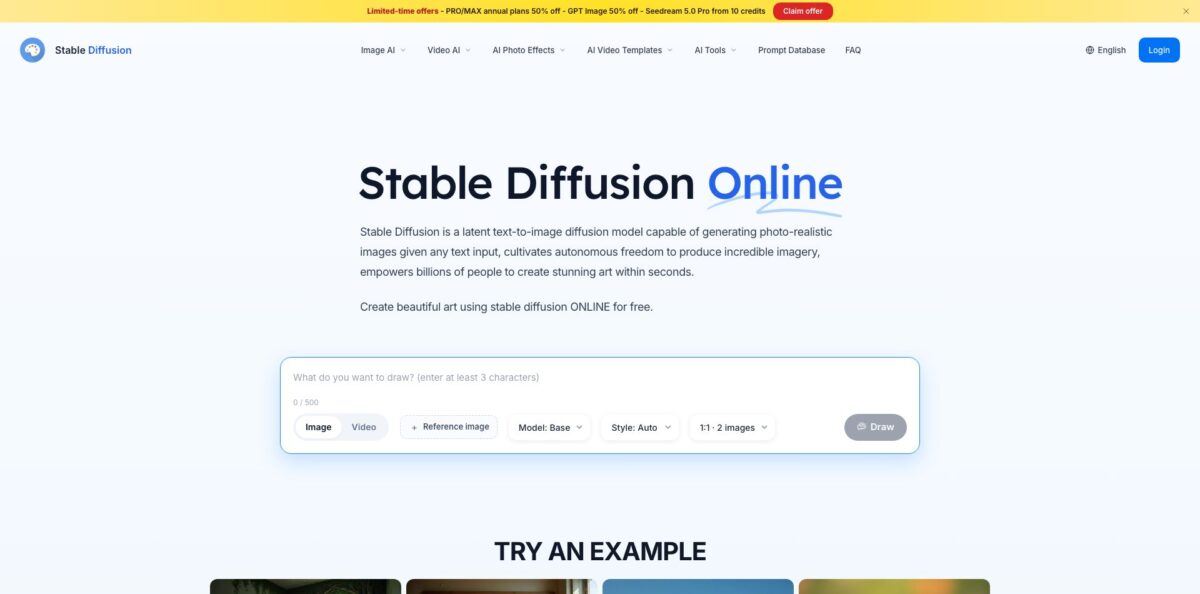
Stable Diffusion Online is a browser-based image and video generator at stablediffusionweb.com, operated by Black Technology LTD under UK law. Despite the name, it is an independent web service, not an official Stability AI product. The homepage still describes Stable Diffusion XL, but the main AI Image Generator now sends prompts to hosted models such as GPT Image, Seedream and Nano Banana, while the video tool offers Seedance, Kling and MiniMax. Everything draws on one credit balance, so you can try ideas without a GPU or a local install. The weak spots are transparency and support: there is no public price list, and recent Trustpilot reviews complain about billing and unanswered emails. It suits casual creators who want many models in one tab; skip it if you need open Stable Diffusion checkpoints or dependable vendor support.
How to start using Stable Diffusion Online?
Open stablediffusionweb.com and you land on a simple prompt box with its own controls: “Model: Base” (with Enhanced, plus premium Pro and Ultra options), “Style: Auto”, an aspect ratio setting with a two-image default, a “+ Reference image” button and a “Draw” button. To create an account and keep a history of your work, use the “Login” button in the top-right corner; the privacy policy lists Google sign-in and Google One Tap among the login methods. Free accounts receive 10 credits a day that reset daily, and the free tier asks for a verification step before each generation.
For real projects, open “AI Image Generator” from the left sidebar of the app. Write a concrete brief with the subject, setting, lighting and any exact text you need; the prompt field accepts up to 5,000 characters. Click “Edit Image” to upload a reference when you want to restyle an existing photo or keep a product recognizable across scenes. The page itself recommends changing one instruction at a time between attempts, which is also the cheapest way to learn what each model responds to.
The key controls sit in one row under the prompt. The model menu groups GPT Image, Seedream and Nano Banana, and every version shows a typical generation time and a starting credit cost, from 1 credit for Seedream 4.0 lite up to 84 credits for Nano Banana Pro. Next to it you set the style, ratio, speed, resolution and number of images, with toggles for a transparent background and the watermark. A credit estimate appears before you press “Generate”, so check it each time you switch models or raise the resolution.
When an image works, download it or carry it into the “AI Video Generator” as a starting frame for image-to-video. Past tasks are kept in the creations history inside the app. Before you publish anything, open the plan dialog behind the “Claim offer” banner and read the benefits table: free output keeps a watermark, the commercial license belongs to paid plans on yearly billing, and only MAX keeps images and videos private.
Spend your first free credits on Seedream 4.0 lite to learn the controls, then test pricier models on one finished brief.
Who is it for?
Curious beginners
You want to see what AI image generation can do without installing software or buying a graphics card. The 10 free daily credits cover a handful of experiments every day. Expect a watermark and a verification step until you pay.
Social media creators
You need quick visuals and short vertical clips for posts and reels. Having image models and video models such as Kling and Seedance in one workspace saves you from juggling several subscriptions. Budget carefully, because premium video models burn credits fast.
Small online sellers
Product stills, clean backgrounds and sharper photos are your daily routine. The background remover costs 2 credits per image and the batch upscaler handles 2× or 4× enlargements, while reference uploads keep the product itself recognizable. Check logos, proportions and edges before you list anything.
Bloggers and newsletter writers
You need article artwork that fits a wide banner or a square thumbnail. The image generator handles aspect ratios and readable headline text through models like GPT Image and Seedream. For generic topics it is faster than hunting through stock photo libraries.
Model shoppers
You want to compare GPT Image, Seedream and Nano Banana on the same prompt before committing to any single vendor. The shared credit wallet makes side-by-side tests simple. Keep in mind that you are using a third-party interface rather than the model makers’ own apps.
Stable Diffusion Online pricing
The service runs on credits: every image, video or edit deducts a model-dependent amount from one balance shared by images and videos. There is no standalone pricing page anymore, as the old /pricing address now lands on a 404, and paid plan prices appear only inside the membership dialog at checkout. When this review was checked, that dialog listed plan benefits but showed no prices for the region it was opened from, so current USD figures could not be confirmed and may vary by region. A site banner was advertising 50% off PRO and MAX annual plans at the same time.
You get 10 credits per day that reset daily, roughly 10 fast images or 2 MiniMax H3 Turbo videos a day, and up to 2 images per generation. Output keeps the Stable Diffusion Online watermark, each generation needs verification, there is no commercial license and you cannot buy credit packs. Access covers the basic image models plus trials of GPT Image 2.5 and Seedream 5.0 Pro.
Price shown at checkout, monthly or yearly. You get 2,000 credits per month shared by images and videos, which the plan table equates to about 2,000 fast images or 400 MiniMax H3 Turbo clips. It adds the complete advanced image and video model library, no watermark, no verification, up to 4 video results per generation and optional credit packs. Generations are not private on this tier.
Price shown at checkout, monthly or yearly. You get 5,000 credits per month, 2.5 times the PRO allowance, or about 5,000 fast images or 1,000 H3 Turbo clips. Everything in PRO is included, plus private images and videos.
Price shown at checkout. Extra credits are available to paid members, stay valid for 30 days after purchase, can be bought multiple times and do not change your subscription reset date.
Two fine-print points matter before you pay. The plan dialog says yearly billing includes a commercial license and monthly billing excludes it, even though older plan text lists the license for both paid tiers, so choose yearly if you plan to sell the output. The terms also state that purchases are non-refundable unless the law requires otherwise.
Stable Diffusion Online key features
Multi-model image generation
The model menu groups GPT Image (2.5, 2 and 1.5), Seedream (5.0 Flash, 4.0 lite, 5.0 Pro, 5.0, 4.5 and 4) and Nano Banana (2 Lite, 2, Pro and the original). Each entry shows a typical generation time and a starting credit cost, so you can weigh speed, quality and spend before you click. You compare several vendors’ models on one brief without opening separate accounts.
AI Video Generator for text-to-video and image-to-video
The current menu includes Seedance, Kling 3.0 and O3, MiniMax H3 and other models, and supported durations depend on the model you pick. You can frame clips in 16:9 or 9:16 at 720P or 1080P, and audio-capable models accept instructions for dialogue or effects. A still from the image tool can become a short clip in the same workspace.
Reference-based editing
Upload a photo through “Edit Image” or the image-to-image mode and describe the change, such as a new background or a different setting. Separate editor modes handle local edits, object erasing and text changes, and an Expand Image tool extends the canvas. This keeps an existing subject recognizable while the scene around it changes.
Batch photo utilities
The sidebar’s Batch AI Image Editor bundles Enhance Image, Watermark Remover, Background Remover, Expand Image, AI Clothes Changer and AI Hairstyle Changer. The upscaler offers 2× output up to about 4 megapixels or 4× up to about 16 megapixels with batch upload, and background removal costs 2 credits per image for signed-in users. Routine cleanup stays in the same credit wallet as generation.
Photo effects and video templates
Effect templates restyle a photo in one step, and video templates apply a ready-made video effect to your image. They suit quick social posts where speed matters more than precise control. Expect less flexibility than a written prompt gives you.
Prompt database
The Prompts section is a searchable library the site sizes at 12 million prompts, each paired with example images. Browsing it shows how other people phrase lighting, style and composition. Copy a structure, then adapt it to the model you picked, since wording that works on one model does not always transfer.
Stable Diffusion Online Pros & Cons
Pros
The biggest strength is breadth for very little setup. One account gives you GPT Image, Seedream and Nano Banana for stills, Seedance, Kling and MiniMax for video, and a set of cleanup tools, all paid from a single credit balance. The model menu shows a typical generation time and a starting credit cost for every version, which makes budgeting easier than guessing. The free tier refreshes 10 credits each day, so light users can keep experimenting without paying anything. Plan differences such as watermark, verification and private generations are laid out in one table, and paid members can top up with 30-day credit packs. Use the free tier to shortlist two models, then subscribe only if they fit your work.
Cons
Trust is the weak point. The name suggests an official Stable Diffusion product, yet this is an independent service, and the homepage still talks about SDXL and CC0 images while the app runs other vendors’ models and ties commercial use to yearly paid plans. No public price list exists, and the plan dialog may show no prices at all depending on where you open it. Trustpilot rates the site 2.0 from 12 reviews, with complaints about unanswered cancellation emails, a paid plan that was not activated and prompts followed inconsistently. Purchases are non-refundable under the terms. Stay on the free tier until you have confirmed the checkout price and the license terms for your use case.
Use Stable Diffusion Online if you want…
- Generate images from text without installing anything.
- Compare GPT Image, Seedream and Nano Banana side by side.
- Turn still images into short vertical video clips.
- Remove backgrounds and upscale product photos in batches.
- Restyle existing photos with a reference image upload.
- Test AI art daily on a free credit allowance.
- Browse millions of prompts to improve your own wording.
- Keep image and video spending in one credit balance.
Stable Diffusion Online alternatives










Stable Diffusion Online Reviews
A yearly subscriber says they paid believing the site was the official Stable Diffusion provider, only later realised it was a different company, and found that generations followed prompts poorly.
Several Trustpilot reviewers describe unanswered emails about cancellations and billing, including one who says a paid annual Pro plan stayed inactive on the free tier for two weeks.
A one-month subscriber reported that only about one generation in five matched the request and that far fewer images were produced than the plan suggested.
A longer-term user praised realistic images and convincing faces in the early days, but disliked the tightening content filter and having to email support to cancel.
Early Reddit users liked running Stable Diffusion free in the browser with no setup, while asking which model version it used and what the catch was.
FAQ
Is Stable Diffusion Online made by Stability AI?
No. It is an independent web service operated by Black Technology LTD under UK law. The site uses the Stable Diffusion name, but its main generator now offers models from other vendors such as GPT Image, Seedream and Nano Banana.
Is there a free plan?
Yes. Free accounts get 10 credits per day that reset daily, enough for about 10 fast images or 2 MiniMax H3 Turbo videos, with a watermark and a verification step before each generation.
Can I use the images commercially?
Only on paid plans, and the plan dialog says the commercial license comes with yearly billing, not monthly. Older FAQ text on the homepage still mentions CC0 public domain images, so rely on the current plan table and terms instead.
Are my generations private?
Private images and videos are a MAX-only benefit in the plan table. The privacy policy adds that your inputs are sent to third-party generation providers and that content you publish or share may become accessible to others.
How much do PRO and MAX cost?
Prices are not published on a public page; they appear in the membership dialog at checkout and may vary by region. PRO includes 2,000 credits a month and MAX includes 5,000.
Can I cancel or get a refund?
The terms state that purchases are non-refundable unless the law requires otherwise. Several users report slow replies to cancellation emails, so keep your receipts and contact support@stablediffusionweb.com well before renewal.
How do I delete my account?
Go to Settings → Account → General → Delete account once any active subscription is resolved. The privacy policy notes that deletion does not automatically erase all generation history or stored files, so ask support to remove the remaining content.
Does Stable Diffusion Online have an API or mobile app?
The site does not document a public API or link to a current mobile app. You use it through the web app in a desktop or mobile browser.
Similar tools
 BannerbearTemplate-based API for generating on-brand images, PDFs, animations and videos at scale from your data via REST, Zapier, Airtable or AI agents.
 Generated PhotosLibrary of 2.6M+ AI-generated faces plus face and full-body human generators for model-release-free people images in design, ads and research.
 VheerBrowser-based AI studio for text-to-image, photo editing and image-to-video, with a free no-signup model plus credit access to Nano Banana, Sora 2