
Storyboarder.ai
Content CreationUpdated November 20, 2026
AI pre-production platform that turns scripts or ideas into shot lists, consistent storyboard frames, animatics and pitch decks for film and ad teams.
We may earn a commission when you sign up through our links. It does not affect our reviews.
What is Storyboarder.ai?
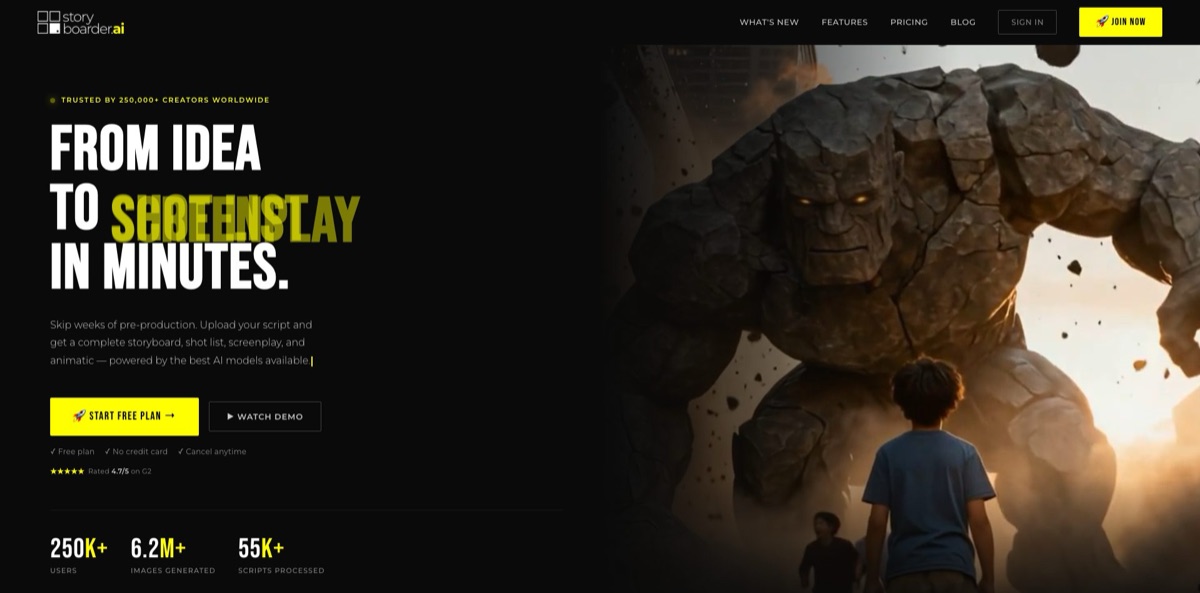
Storyboarder.ai is a browser-based pre-production suite from The FilmAI GmbH, a Dortmund company started by two working filmmakers. You upload a screenplay or type a two-sentence idea, and the app builds a scene breakdown, a shot list with shot sizes and perspectives, AI-generated frames for every shot, and finally an animatic and a pitch deck. It replaces the days and the budget that a hand-drawn board usually costs before a client or crew can react to an idea. Character, location and object editors keep faces and sets steady from shot to shot, but busy multi-character scenes can still drift, and video clips sit behind add-ons. Paid plans start well above general image tools. It suits commercial directors, agencies, indie filmmakers and film schools. Do not confuse it with Storyboarder, the free open-source drawing app from Wonder Unit.
How to start using Storyboarder.ai?
Create an account at app.storyboarder.ai. The free trial needs no credit card and gives you 2 projects, 6 shots per project, 30 image generations and 3 video generations, with watermarked exports and no commercial rights. The help center notes that it is one or the other: if you pick a paid plan at signup, billing starts right away. From the Dashboard, click Add Storyboard and choose between Create a Storyboard, which follows the script-to-animatic workflow, and the Content Editor, which generates standalone images, videos, characters, objects and locations.
For a first real project, choose Create a Storyboard and either type your idea or upload a file in Final Draft (.fdx), Fountain, PDF, Word or TXT. If your shots are already planned, Import Shotlist takes an Excel file built on the provided template; keep scene and shot numbers numeric and restart shot numbering for each scene. A Blank Storyboard option lets you pick genre, art style and aspect ratio and build frames one by one. Once a shot list or storyboard exists, the screenplay and scene breakdown lock, so make story edits in the Shot List from then on.
The Shot List is where most of the planning happens. You can change a scene’s time of day, duplicate, delete or drag shots between scenes, and set shot size and perspective. The Character Editor lists characters found in the script; describe each one or upload a reference image, flip the Based On Image Reference toggle and add scene-specific Clothing & Accessories. The Location Editor does the same for sets. Then pick an art style and generate the board, using Retry, Iterate and Edit under each frame to refine it.
To check the result in motion, click the camera icon on any frame and choose Shot, Shot Enhanced 2.0 or Sequence Multi-Cut 2.0. You can add dialogue, a camera movement template, an end frame, and in 2.0 mode an MP3 or WAV file of up to 15 seconds. Animatic View lays every still and clip on a timeline where you adjust estimated running time and order. Export as PDF, MP4 or a pitch deck from the top-right Export button, and on paid plans exports come without watermarks.
Lock in your main characters and locations in the editors before you generate the whole board, because fixing drift shot by shot costs far more time.
Who is it for?
Commercial directors and ad agencies
Clients want to see a spot before they approve a budget, and outsourcing boards for every pitch takes a week. Here a script or concept becomes a shot list and frames the same day, and the pitch deck export packages it for the meeting. Revisions happen in the app rather than in another round with a freelance artist.
Indie and short-film makers
Most shorts never get a proper storyboard because nobody on the team draws. Storyboarder.ai gives you a complete visual blueprint from your script, and the Starter plan’s roughly 10-page limit matches a typical short. Your DP and AD arrive on set knowing what each setup is meant to look like.
Film schools and students
Teachers need every student on the same tool without per-head commercial pricing. The enterprise page offers class-wide licenses, class dashboards and an extra 20% academic discount, and it names USC, NYU, UCLA, AFI and Emerson among its users. Students can also export festival-ready pitch decks from their projects.
Feature and series developers
Long scripts break most AI board tools because of page and shot caps. Production Unlimited removes both limits, and the pitch deck generator drafts a logline, synopsis, character descriptions and a director’s note from your material. It gives investors and broadcasters something visual to react to long before a budget exists.
Corporate and documentary producers
Training videos and documentaries rarely justify a storyboard artist, yet stakeholders still need to sign off. You can sketch interview setups and B-roll ideas quickly and share a PDF, so approvals rest on concrete frames.
Assistant directors and producers who live in shot lists
Even if you never use the images, the script-to-shot-list stage turns a screenplay into an editable breakdown with shot size and perspective per shot. Export a clean PDF for the crew and skip a day of spreadsheet prep.
Storyboarder.ai pricing
Paid plans are subscriptions limited by projects per month, script length and shots per project, not by image credits. Image generation is unlimited under a fair-use cap of 2,000, 6,000 or 10,000 generations per month for Starter, Pro and Production. Video is metered separately: each plan includes a handful of free clips, after which you buy a video add-on and optional credits. The figures below are the USD prices on the official pricing page on November 20, 2026. That page labels the current rates as a limited-time offer until November 30, shows higher crossed-out list prices, excludes VAT and notes that prices may vary by region.
Free. 2 projects, 6 shots per project, 30 image generations and 3 video generations. Exports carry a watermark, commercial use is not allowed and the video add-on is unavailable.
5 projects per month, stories of about 10 pages, 80 shots per project, unlimited image generations, commercial use and 10 free video generations. Every project you create counts toward the five, even if you delete it the same day.
Unlimited projects, stories of about 30 pages, 250 shots per project and 15 free video generations. Pitched at professionals and agencies working on campaigns and longer shorts.
Unlimited projects, unlimited story length and shots, and 20 free video generations. Built for feature films and series development.
Custom. Adds SAML single sign-on, user management and analytics, a dedicated account manager, priority support with a 99.9% uptime SLA, and volume discounts by seat count. Annual invoicing with NET30 terms is standard.
Core is +$59/month for 50 standard clips and 10 Video 2.0 clips, Full Suite is +$139/month (100 and 40), Full Suite Max is +$449/month (unlimited standard under fair use, 80 Video 2.0), and Studio is +$849/month (100 standard, unlimited Video 2.0). Credit packs run from $10 to $500; $50 buys 128 credits, and a clip costs 3 to 8 credits on the standard model, 5 to 16 on Video 2.0 and 7 to 48 on Video 2.5. Credits never expire.
Storyboarder.ai key features
Script-to-shot-list pipeline
The app reads screenplays in FDX, Fountain, PDF, Word or TXT, concept documents of up to 75,000 words, or an Excel shot list, in any script language. It produces a formatted screenplay, a scene breakdown and a shot list with shot size and perspective for every shot. You start editing a structured plan instead of an empty board.
Character, location and object editors
Each character gets a description or a reference image, plus per-scene wardrobe rules such as a different outfit in scene 7. The Location Editor anchors a set to a reference photo, and Iterate can merge up to 8 images, for example a location, a character and a product.
Unmetered image iteration and editing
Retry gives a fresh take on a shot, Iterate applies a written change while keeping the composition, and Edit adds Erase, InPaint, Mirror, Zoom-In, Extend Image and Design Background. Sketch-to-image turns rough drawings into finished panels, and any reference image can become a custom art style. On paid plans none of this burns credits.
3D Camera Angle tool
Inside Edit you get a 3D viewport where you orbit, tilt, push in and pull out, and the AI regenerates the frame from that position with characters and lighting kept. An Additional prompt field changes the background at the same time. Covering one moment from several angles takes seconds instead of a string of prompt rewrites.
Image-to-video and Animatic View
The camera icon on a frame creates a standard clip of up to 12 seconds or a Video 2.0 clip of up to 15 seconds, including multi-cut sequences, while Video 2.5 reaches 30 seconds on credits. Typed dialogue or an uploaded audio file is lip-synced, and clips render in parallel. The timeline lets you set running time per shot and export an MP4 animatic.
Pitch deck and exports
Export builds a pitch deck with a logline, synopsis, character descriptions, director’s note and target audience drawn from your project. You edit the text, pick a template and accent colors, and add your logo and contact details. PDF boards and shot lists, MP4 animatics and XML exports cover the rest of the handoff.
Content Editor with Brand Kit
Outside the story workflow you can generate standalone images, videos, visual designs and reusable assets. A Brand Kit stores your logo, colors and brand description for any generation, and selected results can later be dropped into a storyboard.
Storyboarder.ai Pros & Cons
Pros
The biggest strength is that the whole chain from script to shot list, frames, animatic and pitch deck lives in one tool designed by filmmakers, so you are not copying prompts between a chatbot and an image generator. Standard screenplay formats are parsed directly, and paid plans do not meter image generations, which encourages proper iteration. The character and location editors, the 3D camera and Iterate give you more control over continuity than prompting a general model. The company states it has contractual no-training clauses with its model providers, and the enterprise page lists SOC 2, ISO 27001 and a GDPR DPA. Start by importing a short real script to see how well its breakdown matches your own coverage plan.
Cons
Pricing is steep next to general image tools, and the current figures are flagged as a limited-time offer, so check the page again before you commit. Starter’s five projects per month count even deleted projects, and page and shot caps blur anything beyond 10 or 30 pages until you upgrade. Video clips run out quickly, and reviewers call the add-ons expensive. Several G2 users report style drift and distorted faces in crowded scenes, and the screenplay locks once boards are generated. The safety filter blocks famous names and graphic wording, and the help center documents no public API or plug-ins for editing software. Plan a few rounds of retries into every board and keep important shots simple.
Use Storyboarder.ai if you want…
- Turn a finished screenplay into a shot list automatically.
- Generate a full storyboard without hiring an illustrator.
- Keep characters and locations consistent across every frame.
- Reframe shots with a virtual 3D camera instead of prompts.
- Convert storyboard frames into a timed animatic with audio.
- Export a pitch deck for clients, investors or broadcasters.
- Turn rough napkin sketches into clean storyboard panels.
- Give a whole film class one shared storyboarding tool.
Storyboarder.ai alternatives
Storyboarder.ai Reviews
Freelance creators and small-business users on G2 say it turns a rough idea into a readable storyboard quickly and without drawing skills, though frames often need a few retries to match the scene they pictured.
A small agency reviewer credits sketch-to-image with turning rough tablet sketches into client-ready frames and likes that a character keeps the same look across panels. The same review calls the included video generations stingy and says faces distort in busy multi-character scenes.
A team using it for a feature film praises how quickly a script upload produced starting frames and how fast the founders act on suggestions. Their main wish is a way to pull selected shots into a separate project for printing.
A recent G2 review is far less positive: easy to use, but style and composition drift, characters lose consistency and the 3D camera is awkward, so that team went back to general image generators that were cheaper for them.
An independent hands-on writeup on Substack found the screenplay and shot list stages useful in their own right, while describing the generated images as serviceable but with a cartoony AI look.
FAQ
Is Storyboarder.ai free?
There is a free trial plan with 2 projects, 6 shots per project, 30 image generations and 3 video generations. Exports carry a watermark and commercial use is not allowed until you move to a paid plan.
Is Storyboarder.ai the same as the Storyboarder app from Wonder Unit?
No. Wonder Unit’s Storyboarder is a free, open-source desktop drawing app for Mac, Windows and Linux, while Storyboarder.ai is a paid AI web platform from The FilmAI GmbH in Germany. They share a name but nothing else.
Which script formats can I upload?
Final Draft (.fdx), Fountain, PDF, Word and TXT files work, as does an Excel shot list built on the in-app template. You can also just type a short idea.
Is my script used to train AI models?
The company says it never uses your scripts, storyboards or outputs for training and has contractual no-train agreements with all model providers. Enterprise data is hosted in the US on AWS by default, and a GDPR DPA is available.
Is image generation really unlimited?
On paid plans there are no image credits, but a fair-use cap applies: 2,000 generations a month on Starter, 6,000 on Pro and 10,000 on Production. If you exceed it, image generation can be paused until the quota resets.
How do video animatics work and what do they cost?
Each paid plan includes 10 to 20 free video generations. Beyond that you need a video add-on from $59/month on top of your plan, and Video 2.5 clips always draw on one-time credits.
Do I own the storyboards I create?
On paid plans you keep full commercial rights to the images, storyboards and animatics you generate. You remain responsible for having rights to anything you upload, such as logos, brands or faces.
Can I cancel at any time?
Yes. Plans can be cancelled from account settings, and access continues until the end of the paid monthly or yearly period. Upgrades and downgrades take effect on the next billing cycle.
Similar tools
 WritefullAcademic writing AI for Word, Overleaf and the browser, with journal-trained language edits, an Academizer, a paraphraser and title and abstract generators.
 TypefaceEnterprise marketing AI platform that turns brand guidelines into AI agents for on-brand emails, ads, web pages and campaign variants at scale.
 Repurpose.ioAutomation service that takes videos, images, Stories and podcasts from one channel and republishes them to TikTok, Reels, Shorts and other platforms.