

Subscribr
Content CreationUpdated November 17, 2026
All-in-one YouTube workspace that finds outlier video ideas, writes scripts in your channel's voice, designs thumbnails and renders finished videos.
We may earn a commission when you sign up through our links. It does not affect our reviews.
What is Subscribr?
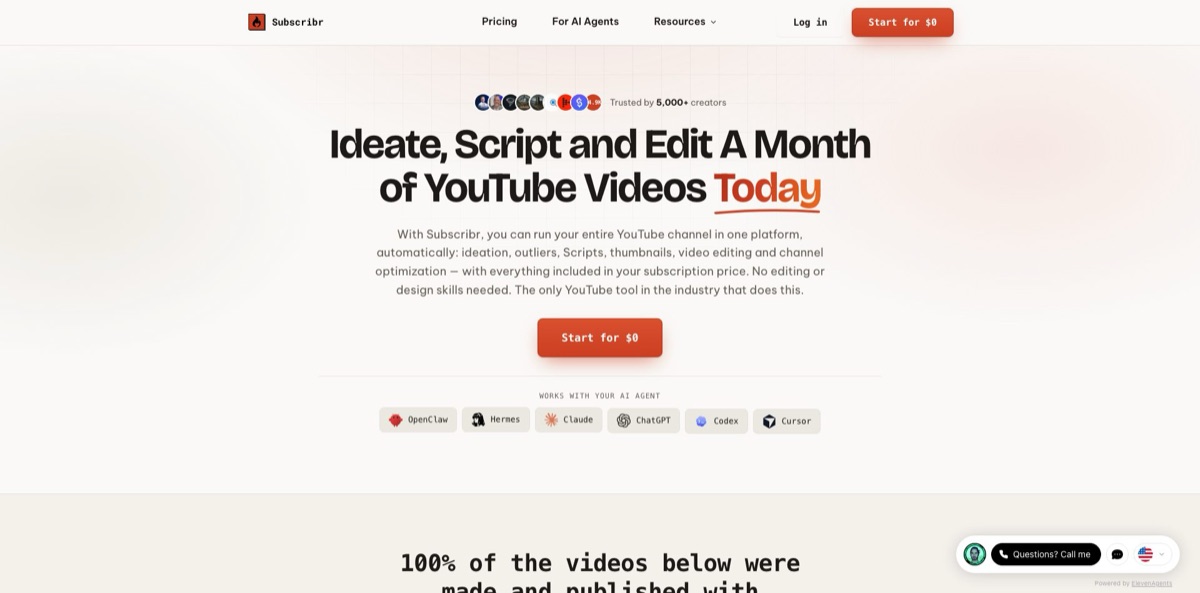
Subscribr is a browser-based production workspace built only for YouTube. It pairs Intel, a searchable database of more than 35 million videos used to spot outliers (videos pulling far more views than their channel normally gets), with a script writer that learns your channel’s voice from public transcripts, an AI Thumbnail Studio and a renderer that turns a finished script into a faceless, avatar-led or self-recorded edit. It removes the tool sprawl of running ideas, scripts, thumbnails and editing through separate subscriptions and a freelance editor. Planning and research are free, but anything it generates needs a paid plan starting at $99 a month, purchases are non-refundable, and users say voice matching takes several rounds before scripts sound like them. Pick it if you publish scripted long-form or faceless videos on a schedule and want one pipeline that you, your team or your AI agent can run.
How to start using Subscribr?
Create a free workspace from the Start for $0 button on the homepage. No card is required, and the free plan gives you one channel, one user, the Projects board and a monthly allowance of 3 idea batches, 10 Intel searches, 10 chat messages and 25 video transcripts. Then set up your channel. Paste your YouTube URL or @handle and Subscribr reads your public videos; it never asks for a YouTube login or Studio access. No channel yet? Choose Remix an existing channel to build on a format you admire, or Start from scratch and say whether you will appear on camera (Personality) or stay Faceless. The optional second step lets you add one to three competitor channels.
While the voice profile and audience avatar generate in the background, usually within a few minutes and up to an hour under load, open Ideas. New ideas arrive like an inbox, each with a title, angle, thumbnail concept and recommended length. Keep one, then click Write Script to open the Canvas with that idea pre-loaded. If you would rather hand the work off, drag the card into the Script column on the Projects board to launch Agent Mode, which researches, outlines, writes and quality-checks the draft on its own in roughly 15 to 30 minutes and emails you when done.
The Canvas is the screen you will spend the most time in. Chat sits on the left and the script editor on the right. You answer planning questions, generate an outline in Plan mode, then flip the toggle to Script mode for the full draft. Pick a template such as Educational, Documentary or Review, choose a writing model, and use Add Context to attach YouTube URLs, articles, PDFs or pasted notes. Highlight a passage to improve it, or press Humanize for a rewrite pass that strips AI phrasing. Each script includes three free full regenerations, shared between Start Over and Humanize.
Before you publish, review the voice and audience profiles under the channel Settings menu, because they shape every later script. Export the finished script to the clipboard, a Word document, PDF or the built-in teleprompter. On a paid plan with Subscribr Video linked to your channel, open the Video tab to render a faceless or avatar version, or upload your own recording to have it cut with B-roll, graphics and captions. Subscribr quotes the exact credit cost before rendering, and that quote is the final charge.
Who is it for?
Faceless channel operators
You run documentary, history or explainer channels and have no wish to film or edit. Outlier-based ideas, scripts, AI voiceover and 14 visual styles take a topic to a finished file without a timeline. You review and publish instead of coordinating a writer, a voice artist and an editor.
Solo YouTubers publishing weekly
The blank page and the long edit are what stall most channels after a handful of uploads. The Growth plan is sized for roughly one finished video a week, with scripts written against your own voice profile. Your schedule stops depending on spare weekend energy.
Business owners using YouTube for leads
You know your field, not hook timing or retention structure. Point Subscribr at a channel serving your audience, add your own PDFs and notes as research, and let the Script Agent handle the structure. You get on-topic videos without hiring a content agency.
Agencies and multi-channel teams
Every channel keeps its own voice, audience, competitors and research library, so one client’s scripts never bleed into another’s. Admin, Editor and Viewer roles plus per-channel access let a voice-over artist see only the channel they work on. Pro and Max add enough seats and channels to run a portfolio from one board.
Creators who already work in Claude or ChatGPT: You brainstorm in an AI assistant, then copy results between tabs. Subscribr’s MCP server and REST API, available on every plan, let your agent search Intel, generate ideas, create projects and run Agent Mode. Your assistant works from real channel data instead of guesses.
Creators testing a new niche
You have not launched yet and want to see what performs before committing. The free plan’s Intel searches and idea batches show which videos beat their channel’s usual numbers. You can validate a niche for $0 before paying for production.
Subscribr pricing
Subscribr sells a permanent free tier and three paid plans, all priced in US dollars, with annual billing worth two months free. Paid plans meter three separate balances: script credits (a one-minute script costs 1, a ten-minute script costs 5), thumbnail credits (one per Brainstorm, Clone or Edit action) and video credits, where one credit equals 60 seconds of standard video. Chat, outlines, research and any edits after a script exists cost nothing. Included credits refresh each billing cycle and do not roll over, while video top-ups start at $20 and stay available as long as your subscription is active.
One channel, one user, the Projects board, channel setup, agent and API access, plus 3 idea batches of up to 10 ideas, 10 Intel searches, 10 chat messages and 25 video transcripts each month. Scripts, thumbnails and video are not included.
You get 60 script credits, 150 thumbnails and 66 minutes of video a month, 3 channels, 3 users, competitor tracking and email support. Finished video works out at $1.50 per minute on monthly billing or $1.25 on annual, which Subscribr pitches as up to 8 videos a month.
It raises the allowance to 180 script credits, 500 thumbnails and 185 minutes of video, and adds 1080p export, 5 channels, 10 users and priority support. Video costs $1.35 per minute monthly or $1.12 annually.
It includes 300 script credits, 1,000 thumbnails and 415 minutes of video, unlimited channels and users, and a private Slack channel with the team. Video drops to $1.20 per minute, or $1.00 on annual billing.
Custom. Subscribr prices bigger teams on request through its contact page.
All sales are final, including subscriptions, credits and packs. You can cancel at any time and keep access until the paid period ends; upgrades apply immediately and downgrades take effect at the next cycle.
Subscribr key features
Intel and outlier ideas
Intel is a searchable database of more than 35 million YouTube videos where you can look up channels, track competitors and filter for outliers that beat their own channel’s usual views. Subscribr turns those outliers into idea batches with a title, angle, thumbnail concept and recommended length. You base your next video on what is working in your niche this week rather than on a hunch.
Channel voice and audience profiles
When you link a channel with videos over three minutes, Subscribr analyzes transcripts of your top performers to build a voice profile and generates a detailed audience avatar. Both stay editable, and the voice can be tuned in Simple or Advanced mode. Scripts start closer to how you actually talk, so you rewrite less.
Canvas and Agent Mode scripting
The Canvas walks you from planning questions to an outline and then a full script, with templates, version history and a choice of models such as Claude Sonnet 5.5, GPT 6.1 Sol, Gemini 3.1 Pro, Grok 4.7 and DeepSeek V4. Agent Mode automates the same path with research, hook options, retention and humanization passes, repetition cleanup and voiceover preparation. Script credits depend on length, not model, and scripts run from about one minute to three hours in 44 languages.
AI Thumbnail Studio
You describe the video and Subscribr designs a thumbnail from 157 proven formats. Brainstorm returns four concepts, Clone rebuilds a reference thumbnail for your topic, and Edit refines one you already have, with saved faces, area selection and editable headline text. Each action costs one thumbnail credit, so you can test several directions without briefing a designer.
Finished video generation. A script becomes a video with voiceover, B-roll, motion graphics and captions. You choose fully faceless visuals in 14 styles, an AI avatar presenter, or your own recording edited automatically, and you can clone your voice once and reuse it. Multilingual voiceovers let you publish the same video in more markets, and the exact price is shown before anything renders.
MCP server and REST API
Subscribr runs a Streamable HTTP MCP server with 25 tools, is listed in the Claude and ChatGPT directories, and exposes a REST API described by an OpenAPI file. Connecting is free on every plan; your agent spends the same credits you do and previews costly actions before running them. You can run research, ideas and Agent Mode from the assistant you already use.
Projects board and team controls
Every video is a card that moves from idea to script, thumbnail, render and upload on a kanban board shared by you, your team and your agent. Several people can edit the same script live with autosave and version history, and per-channel access keeps contractors in their lane.
Subscribr Pros & Cons
Pros
Subscribr covers the whole chain from idea to rendered file in one workspace, and every stage draws on the same channel data. Ideas come from outliers in a 35-million-video database, scripts are written against a voice profile built from your own transcripts, and the result can be rendered without a camera or an editor. Script credits depend on length rather than model, so picking a stronger model costs no extra. The free plan is permanent, needs no card and still includes Intel searches, idea batches and agent access. Reviewers on Trustpilot and AppSumo most often praise time saved on research and drafting and fast replies from the founders. Use the free tier to confirm the ideas suit your niche before buying production credits.
Cons
The jump from $0 to $99 a month is steep if you only want scripts, and nothing is refundable once purchased. Three separate credit balances take some bookkeeping, and included credits expire at the end of every cycle. The one-chat-one-script workflow is deliberately linear, which some users find slower than a free-form board, and voice matching often needs several rounds of feedback. AI-generated thumbnail text and logos can need finishing in another editor, and 1080p export is listed only from Pro upward. One critical reviewer argued much of the writing can be reproduced in ChatGPT or Claude. Run a month on monthly Growth to judge output quality before committing to an annual plan.
Use Subscribr if you want…
- Find outlier video ideas in your niche every week.
- Turn video ideas into scripts written in your voice.
- Publish faceless YouTube videos without filming or editing.
- Clone a proven thumbnail style for your next upload.
- Edit your own recordings with automatic B-roll and captions.
- Run several client channels from one production board.
- Let Claude or ChatGPT manage your YouTube pipeline directly.
- Replace separate research, script and thumbnail subscriptions with one tool.
Subscribr alternatives


Subscribr Reviews
Creators on Trustpilot credit it with cutting research and drafting time and say its drafts read closer to human writing than plain ChatGPT output, though a few mention occasional bugs that support fixed quickly.
An AppSumo buyer reported strong research and scripts that matched their voice once prompts were well built, but found the linear chat workflow clunky and said voice matching took trial and error.
Another AppSumo reviewer uses it mostly for titles, hooks and outlier research and values that chat knows the channel’s past performance, but warns that generated titles vanish when the title tool closes and thumbnail text often needs fixing in Canva.
A creator-blogger liked the iterative outline step and the built-in revision pass, but wanted line-by-line edit control instead of accepting or rejecting whole sections.
A one-star Trustpilot reviewer felt the app adds little over ChatGPT or Claude and disliked that top-tier models need a separate paid account.
FAQ
Is Subscribr free?
Yes. The free plan needs no card and has no time limit, and it includes one channel, one user, the Projects board, 3 idea batches, 10 Intel searches, 10 chat messages and 25 transcripts a month. Scripts, thumbnails and videos require a paid plan from $99 a month.
Does Subscribr need access to my YouTube account?
No. It works from public YouTube data only and never reads YouTube Studio or your private analytics. You connect a channel by pasting its URL or @handle.
Can Subscribr make videos without me on camera?
Yes. Faceless videos use voiceover over AI visuals in 14 styles, an AI avatar can present on screen, or you can upload your own recording for automatic editing with B-roll, graphics and captions.
Which AI models does Subscribr use for scripts?
The current list includes Claude Sonnet 5.5, GPT 6.1 Sol, Gemini 3.1 Pro, Grok 4.7, DeepSeek V4, GLM 5.2 and MiniMax M3. Credits are charged on script length, so no model costs more than another, and Agent Mode can also run on your own Anthropic or OpenAI API key.
What languages does Subscribr support?
Subscribr writes scripts in 44 languages, including English, Spanish, Brazilian Portuguese, French, German, Hindi, Japanese and Arabic. Voiceovers are multilingual too.
Does Subscribr have an API or MCP integration?
Yes, on every plan including free. You can add it from the Claude or ChatGPT directory, point any MCP client at its endpoint, or call the REST API with a token from the Integrations page; generations still spend credits.
Do unused credits roll over?
No. Plan credits refresh each billing cycle and do not accumulate, while purchased video top-ups and thumbnail packs stay available for as long as your subscription is active.
Can I cancel Subscribr or get a refund?
You can cancel at any time from the billing page and keep access until the paid period ends. Subscribr does not refund subscriptions, credits or packs, but it corrects billing errors such as a duplicate charge.
Similar tools
 Contents.comEnterprise AI content platform that writes, translates and illustrates on-brand content, with batch generation, approval workflows and audit trails.
 CopyterSpanish-first AI writing platform that researches keywords, drafts SEO articles and publishes them to WordPress, with image, voice and chat tools.
 DocswritePublishing hub that sends Google Docs, Drive folders and Sheets to WordPress, Webflow, Shopify and 8 more destinations, with an AI writer