

Superhuman Docs
AI AssistantsUpdated October 27, 2026
Collaborative doc platform, formerly Coda, that combines pages, connected tables and built-in Docs AI to run team hubs, trackers and workflows.
We may earn a commission when you sign up through our links. It does not affect our reviews.
What is Superhuman Docs?
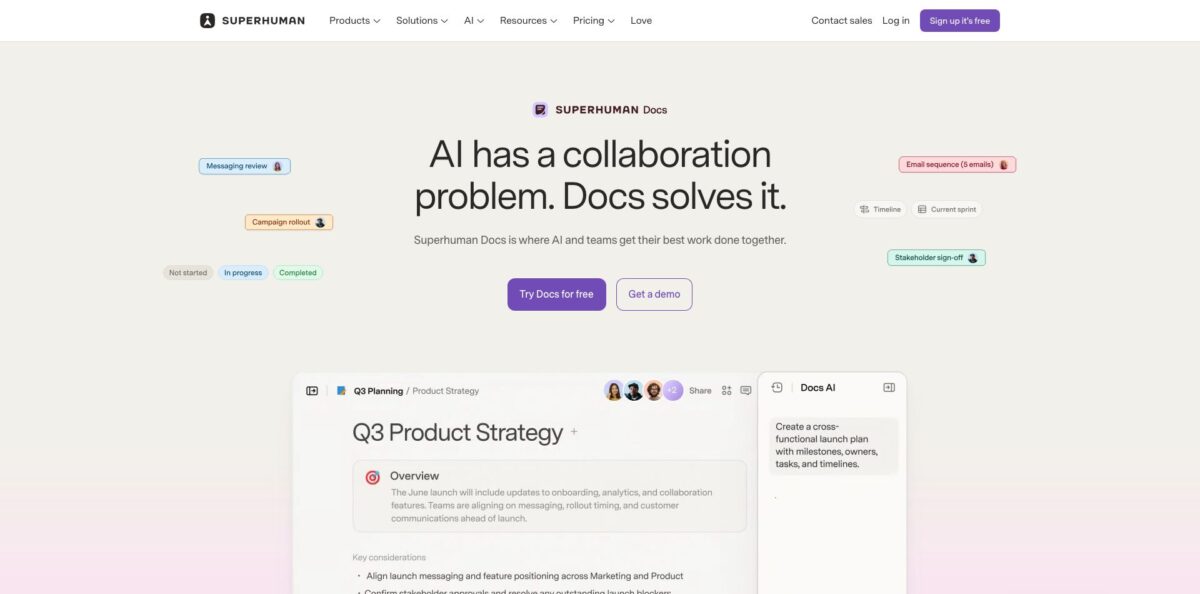
Superhuman Docs is a collaborative workspace where pages, connected tables, formulas, buttons and automations live in one doc, so a document can behave like a lightweight app. It is the product formerly called Coda: Grammarly announced a deal to acquire Coda in December 2024, renamed the company Superhuman in October 2025, and on July 8, 2026 Coda itself was renamed Superhuman Docs. Docs AI, the former Coda AI, sits in a side panel inside every doc and can answer questions, draft content and build trackers from your own pages and tables. The problem it solves is tool sprawl, with specs, roadmaps, trackers and meeting notes scattered across separate apps. Weak spots are a real learning curve for formulas, a mobile app with many complaints and new plans that bundle Grammarly and Go. Pick it if your team wants docs and data in one place.
How to start using Superhuman Docs?
Go to superhuman.com/docs and click Try Docs for free, which opens the app at docs.superhuman.com. New sign-ups land on the Free plan and use a shared Superhuman login; if you already had a Coda account, your existing credentials still work and old coda.io links redirect to the new address. You can start from a blank doc or from one of the hub templates on the Docs page, such as the Product team hub, Marketing team hub, Sales team hub or Operations team hub.
For a first real scenario, open any doc and click the Docs AI icon in the bottom right corner to open the chat panel. The official guide suggests starting with “What can you do?” and then describing a full system, for example a hiring tracker with candidates, interview stages, feedback and reporting views. Docs AI creates the pages, tables and views, then summarizes the changes it made so you can review them. Answers it gives stay in the side panel, visible only to you, until you choose to add them to the doc.
The screen you will spend most time on is the table. When you create a new table, the setup menu opens in the right-hand panel, with an AI prompt for describing what you need and an option to set up cross-doc tables. To automate a column, add a blank column, pick AI column as the type, choose the Input column, add instructions, toggle Refresh when column changes and click Fill column. Packs are where you connect outside tools such as Jira, Salesforce or Google Calendar, and refresh frequency depends on your plan.
Before you share, check the work. The guide itself advises double-checking important information and trying prompts on a small data set before applying them broadly. Version history covers 7 days on Free and 30 days on Pro, which gives you a safety net for bulk AI edits. Invite teammates as Editors (free) or Doc Makers (paid), publish a doc to the web if needed, and connect Claude or ChatGPT through the Docs MCP once the structure is stable.
Who is it for?
Product managers
Your PRDs, roadmaps, sprint trackers and customer feedback usually sit in different tools. In Docs they share one doc, and Docs AI can draft a PRD from a Customer Feedback table and a strategy page, which is one of the examples in the official guide.
Operations and program leads
You maintain the spreadsheets and intake forms everyone else depends on. Connected tables, forms with conditional logic and automations replace many one-off apps, though reviewers note that someone on the team needs to own administration and training.
Budget-conscious team leads
Per-seat pricing punishes you for inviting more people. Docs charges only for Doc Makers, while Editors and Viewers stay free, so a whole department can read and update a hub without each person needing a paid license.
Sales and RevOps teams
Account plans, mutual action plans and pipeline notes need live CRM data. The Sales team hub template, two-way sync with tools like Salesforce and AI columns that write per-row summaries keep account context in one place.
AI-heavy knowledge workers
You already work in Claude, ChatGPT or Cursor and lose output in chat threads. The Docs MCP lets those assistants read and write your docs directly, so drafts, tables and meeting notes land in a shared workspace your team can edit.
Existing Coda customers
Your docs, Packs, automations and formulas carried over unchanged on July 8, 2026. You stay on your current plan and price unless you choose to move to the Superhuman bundle.
Superhuman Docs pricing
Billing follows the Maker model inherited from Coda: you pay per Doc Maker, the people who create docs and pages and use Docs AI, while Editors and Viewers are free. New subscribers no longer buy a Docs-only plan; each paid tier is a Superhuman bundle that also includes Grammarly and Go, and Business adds Superhuman Mail. Existing Coda customers keep their current plan and price unless they switch. Docs AI is in beta and included on paid plans with high limits under a fair-use policy, and the old AI credit system was paused on July 8, 2026. Prices below are USD from the official plans page.
Collaborative docs, tables, views, forms, formulas and a low automation quota. Shared docs are capped at 50 objects and 1,000 rows, with a 14-day grace period before an over-limit doc turns read-only; personal docs have no object or row limits. Attachments are limited to 1 GB per doc, version history to 7 days, connectors refresh manually, and Docs AI and MCP come as limited trials.
Unlimited doc size, Docs AI for writing, editing and questions, AI trackers, pages and views, full MCP access, 30-day version history, hidden pages, custom branding and domains, 5 GB of attachments per doc and daily connector refresh. The comparison table lists Grammarly as included on annual billing and $15 per Maker per month on monthly billing.
Adds Databases (beta), unlimited automations and version history, private folders, subfolders, doc and page locking, cross-doc actions, hourly connector refresh, group trainings and Superhuman Mail. This tier replaces the former Coda Team plan.
Custom. Adds SAML SSO, SCIM provisioning, AI admin controls, doc and folder governance, audit events, advanced user management, a SOC 2 Type 2 report and HIPAA compliance. You still pay only for Doc Makers.
Superhuman Docs key features
Docs AI chat panel: a built-in assistant with access to the pages, tables and data in your doc
You can ask which sprint tasks are blocked, have it draft an executive update from your roadmap, or tell it to mark every task owned by one person as done. It can also search the web and leave comments as feedback.
AI columns and AI blocks: an AI column runs one prompt row by row across a table, generating tags, summaries or email drafts, and fills new rows automatically when Refresh is on. AI blocks, inserted with the slash menu, turn a whole page or table into a single summary or action item list. Both keep updating as the underlying data changes.
Docs MCP: an MCP server that lets Claude, ChatGPT, Cursor, OpenAI Codex, Copilot Studio and Google Antigravity read and write your docs. You connect via OAuth or personal access tokens and can limit the connection to chosen workspaces or folders. Existing doc permissions are enforced, and Free users get 30 requests per week, capped at 60 per month.
Connected tables, formulas and buttons: tables talk to each other, views stay in sync, and buttons or automations act inside or outside the doc. Cross-doc tables share data between docs, and the new table pages give a large table its own full page for bulk editing. This is what lets a doc replace a tracker app instead of linking to one.
Packs and integrations: the vendor lists 800+ integrations with two-way sync, so changes in Jira, Salesforce or Asana appear in your doc and you can act on records without switching apps. Pack Studio and the API let developers build their own connections. Refresh frequency rises from manual on Free to hourly on Business.
AI Views and Databases: AI Views, in open beta, build a custom view on live table data from a description, such as a seating chart, heatmap or leaderboard. Superhuman Databases, in closed beta, hold up to a million rows, connect to many docs and manage permissions separately.
Publishing and apps: docs can be published to the web, with custom domains and branding on paid plans, and forms are unlimited on every plan, with branding and conditional logic from Pro up. A Mac desktop app launched on July 8, 2026 with a Windows version announced for later in the year, alongside iOS and Android apps.
Superhuman Docs Pros & Cons
Pros
Few tools combine a readable document with relational tables, formulas and automations as tightly as this one, and reviewers on Capterra and Product Hunt keep praising that flexibility for knowledge bases, project management and lightweight internal apps. Maker billing keeps costs down for large teams because Editors are free. Docs AI now works across the whole doc rather than in single blocks, AI columns automate repetitive row-level work, and the Docs MCP makes the workspace a shared home for output from Claude, ChatGPT or Cursor. Migration from Coda was automatic, with links, Packs and API endpoints still working. Use it when one hub for specs, trackers and decisions would replace several subscriptions.
Cons
The learning curve is the most common complaint in user reviews: formulas, cross-doc setup and automations feel admin-heavy for non-technical staff, and some reviewers could not get automations working at all. Mobile is weak, with App Store reviews after the rebrand reporting an app that fails to load or log in. Some long-time users dislike the new name and the paid Doc Maker license, which can discourage people from creating pages. New customers must buy the Superhuman bundle even if they only want Docs, and Docs AI pricing after beta is not yet set. Plan desktop-first use and train one admin before rolling it out.
Use Superhuman Docs if you want…
- Build project trackers from a single plain-language prompt.
- Combine team docs, tables and workflows in one workspace.
- Pay only for people who create docs and pages.
- Let Claude or ChatGPT write directly into shared docs.
- Summarize meeting notes and extract action items automatically.
- Sync Jira, Salesforce or Asana data into team hubs.
- Replace scattered spreadsheets with connected tables and forms.
- Publish internal docs to the web with custom branding.
Superhuman Docs alternatives


Superhuman Docs Reviews
A RevOps manager on Capterra uses Coda as a company-wide notebook with page-level permissions and highly customized project management, but says getting the most out of it requires Coda-specific training and a dedicated administrator.
Another Capterra reviewer likes how much the company can run in Coda, yet finds formulas hard for non-IT staff, building tables and cross-doc links admin-heavy, and could not get automations to work.
One Capterra user credits Coda with getting real team buy-in for a shared knowledge base thanks to live collaboration, while calling the paid Doc Maker license frustrating because it discourages people from sharing knowledge.
Product Hunt reviewers praise AI columns that fill themselves as rows are added and the ability to reference pages and tables in prompts, though several mention a learning curve and recent pricing and permission changes.
Recent App Store reviews of the renamed app are split: one user calls the Claude connector excellent for keeping AI projects in sync, while many others report that since the rebrand the mobile app will not load or log in.
FAQ
Is Superhuman Docs the same as Coda?
Yes. Coda was renamed Superhuman Docs on July 8, 2026, and all docs, tables, Packs, automations and formulas carried over automatically. Old coda.io links redirect to docs.superhuman.com, and Docs AI is the new name for Coda AI.
Is there a free plan?
Yes. The Free plan costs $0 and includes collaborative docs, tables, forms and formulas. Shared docs are limited to 50 objects and 1,000 rows, while personal docs that are not shared have no object or row limits.
How much does Docs AI cost?
During the beta, Docs AI is included on paid plans with high limits under a fair-use policy, and Free users and Editors get a limited allowance. The vendor says it is still deciding how to charge for it after beta.
Do I have to pay for every team member?
No. You pay only for Doc Makers, who can create docs and pages and use Docs AI. Editors, Viewers and Guest Editors are free.
Does Superhuman Docs use my data to train AI models?
The official AI FAQ says doc content is sent to third-party AI providers when you use AI features, but those providers are not allowed to train on it. Enterprise admins can also restrict AI and MCP access for their organization.
Can I connect Claude or ChatGPT to my docs?
Yes, through the Docs MCP, which supports Claude, ChatGPT, Cursor, OpenAI Codex, Copilot Studio and Google Antigravity. Paid plans get full access, and Free users get 30 requests per week.
Does Superhuman Docs have an API?
Yes. The existing Coda API endpoints keep working after the rename, and Pack Studio lets developers build custom integrations.
What happens if I cancel or remove members?
According to the pricing FAQ, removing members or canceling a plan gives you a prorated credit on your account for future charges rather than a cash refund.
Similar tools
 FreedomGPTMulti-model AI app that puts hundreds of chat, image and video models, including its own censor-free Liberty models, behind one credit balance.
 ElephasPrivate desktop AI for Mac and Windows that answers questions from your own documents with page-level citations and hides personal details first.
 MagaiPaid AI workspace that puts ChatGPT, Claude, Gemini, Grok and dozens of image and video models in one chat, with memory and