

Supermeme.ai
Content CreationUpdated October 21, 2026
AI meme generator that turns a written situation into captioned template and GIF memes, with brand kits, a REST API and an MCP server.
We may earn a commission when you sign up through our links. It does not affect our reviews.
What is Supermeme.ai?
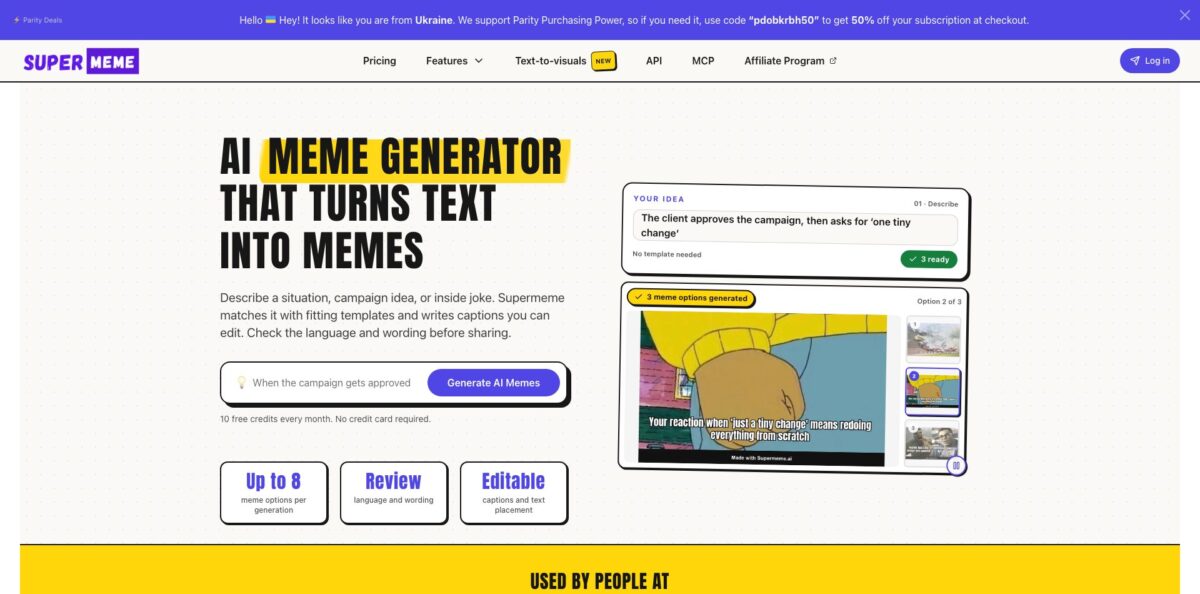
Supermeme.ai is a template-based AI meme generator: you type a situation in plain language, and it matches that text to a curated library of known meme formats, then writes editable captions for each one. Under the hood, a multilingual embedding model turns your whole prompt into a vector and retrieves the closest template meanings, so you never need to know a meme’s name. A single generation can return up to 8 options, and GIF mode works the same way with animated reactions. The site advertises 110+ languages, and branded output, a REST API and an MCP server sit on top. The weak spot is humour itself: users say captions sometimes miss the context and need rewriting. Pick it if you publish memes regularly for a brand or community and want drafts fast, not if you need a polished punchline every time.
How to start using Supermeme.ai?
Create a free account on supermeme.ai. No credit card is needed, and the free tier gives you 10 creation credits per UTC calendar month. If you only want to caption your own picture, the Meme Maker page lets you upload a JPG, PNG or WebP and export a PNG without signing in at all, though free exports carry a small Supermeme.ai watermark.
For your first real meme, open Text to Meme and describe a specific situation rather than a topic. “I blocked the afternoon to finish one task, then spent it in meetings about that task” gives the matcher far more to work with than “meetings”. Leave the composer on Images, press Generate memes, and compare the options it returns. Each result pairs a template with a drafted caption.
Next, open the result you like in the editor. You can rewrite the caption, move the text, change font, colour and size, and add a header or footer bar outside the picture. If you want a GIF, switch the composer from Images to GIFs before generating; note that switching formats clears any previous results. On a paid plan, turn on a brand kit here to add your logo badge and brand-coloured header styling.
Finally, check the meme at the size people will actually see it. Pick square, portrait or landscape output for the platform, read the caption on a phone-sized preview, then download. On mobile, the editor uses a Share action, and your browser may offer a download instead. Review the wording carefully if you prompted in a language other than English.
Who is it for?
Social media managers
You need a steady stream of relatable posts, and searching template galleries for the right format eats your afternoon. Supermeme turns a one-line situation into several captioned options at once. You spend your time choosing and editing rather than hunting.
B2B marketers and SaaS teams
Your audience lives on LinkedIn and X, and a meme about a customer pain point can outperform another polished graphic. Brand kits keep the logo, colours and fonts consistent across campaign memes. The memes look like your company made them, not a random account.
Community and Slack or Discord admins
You want a bit of humour in channels without someone drawing memes by hand. The REST API and bot workflows let you generate contextual memes from a message inside the tools your members already use. Engagement becomes something you can automate.
Developers building social or chat products
You want a “make it a meme” button without building a template database and caption logic yourself. One POST request returns captioned image URLs, or you can request captions and templates separately for your own editor. That saves weeks of work on a side feature.
Teachers and trainers
A meme can open a lesson or break up a slide deck, but you are not a meme expert. Describing the classroom moment gets you usable drafts quickly. Your slides feel more human with very little prep.
AI assistant power users: If you already work in Claude, ChatGPT or Cursor, the MCP server lets your assistant search templates and render memes in the same conversation. You stay in one window instead of switching tools.
Supermeme.ai pricing
Supermeme.ai prices on creation credits for the web app and a separate monthly allowance of API requests. Credits cover AI generations and saved hand-made memes, and one generation can return several options. Every paid plan removes the Supermeme watermark and includes API and MCP access. Yearly billing is shown as a monthly equivalent and charged annually.
10 creation credits per month, no credit card required. Downloads include a small Supermeme.ai watermark.
100 creation credits per month, logo branding with 1 brand kit, watermark removal, 100 API requests per month, MCP server access, text-to-meme generation, template search and starred memes.
Everything in Solo plus unlimited creation credits, 10 brand kits, custom watermark text, 2,000 API requests per month, creation history and priority support.
Everything in Startup plus unlimited brand kits, 5,000 API requests per month and priority support. Larger API allowances are available on request (Custom).
You can manage or cancel from your account, and the cancellation flow may offer a pause of one to three months. For a full refund, the pricing page says to email support within 14 days of your first payment.
Supermeme.ai key features
Text-to-meme generation takes a described situation, matches it to fitting templates and drafts captions for each format
You do not need to pick a template first or know what a format is called. The result is a set of editable options instead of a blank canvas.
Semantic template search lets you describe an emotion, reaction or scene, such as “pretending to be happy”, and returns matching blank templates from a curated, high-resolution library. Searching works across the language list, which currently names 109 languages. It replaces endless scrolling through galleries when you can picture the reaction but not the meme’s name.
GIF meme mode uses the same kind of prompt to suggest captions on existing animated GIFs
You can edit the header or footer line and change its font, size and colour before downloading. It is a quick way to produce reaction content for chats and social replies.
Brand kits store your logo, colours and font for a logo badge in a chosen corner and styled header or footer bars
Colours can be suggested from your website or logo, or entered as exact hex values, and mascot stickers can be dragged, resized and rotated. Campaign memes stay recognisable without manual design work each time.
The Meme API is a REST interface with Bearer authentication at app.supermeme.ai
POST /api/v2/meme/image accepts 1 to 2,500 characters of text, returns up to 12 captioned memes, and supports 1:1, 3:4, 4:3, 9:16 and 16:9 ratios; other endpoints return captions and templates separately or search templates. Signed image URLs expire after one hour, so save anything you want to keep.
The remote MCP server at mcp.supermeme.ai connects through OAuth to Claude, ChatGPT workspaces with developer mode, and Cursor. It exposes three tools: search_meme_templates, get_meme_template and render_meme. Your assistant writes the captions, and Supermeme handles template lookup and rendering.
Text-to-visuals is a newer side tool that generates simple, minimalist illustrations from a brief of up to 2,500 characters in five aspect ratios. It suits ideas that are better explained than joked about, such as a slide on priorities or progress. Expect clean line drawings rather than photorealistic images.
Supermeme.ai Pros & Cons
Pros
Supermeme removes the hardest part of meme making for non-specialists: finding a format that fits the joke. Because it matches meaning rather than keywords, a plain-language description is enough, and one generation gives you several directions to compare. The free tier and the no-login Meme Maker make it easy to judge before paying. Paid plans are cheap by marketing-tool standards, and brand kits, custom watermarks and API access are unusual extras for a meme generator. The MCP server and clear API documentation make it one of the few meme tools developers can wire into bots and assistants without scraping. Start with ten free credits on real campaign situations and keep notes on which prompt styles produce usable drafts.
Cons
The jokes are only as good as the caption model, and user feedback repeatedly mentions captions that miss the context or read flat, so expect to rewrite many of them. Templates are existing meme images, which means rights depend on the template and how you use it; Supermeme itself warns you to check permissions for paid media and merchandise. API allowances are tight on the entry plan, at 100 requests a month, and one Product Hunt reviewer called the API pricing poor value for testing. Older reviews also complain about slow support responses on billing problems. Plan a manual review step for every meme you publish, and check image rights before using one in ads.
Use Supermeme.ai if you want…
- Turn a workplace situation into several meme drafts.
- Find a meme template by describing the reaction.
- Create captioned GIF reactions for chats and replies.
- Add your logo and brand colours to memes.
- Generate memes inside a Slack or Discord bot.
- Let Claude or Cursor render memes through MCP.
- Build a meme feature into your app via API.
- Make captions in languages other than English.
- Remove watermarks from social memes for a few dollars.
Supermeme.ai alternatives

Supermeme.ai Reviews
Simple to use, and it covers everything from social media posts to actual business presentations; memes have become a normal way to communicate, and this makes them quick to produce.
Getting a whole batch of memes from a single input is the real help here, since it breaks writer’s block and gives you angles you would not have thought of.
A useful tool overall, though the output quality is only average, and the caption text is the weakest part.
The memes often felt low quality and did not match the context of the prompt, and the initial setup was frustrating.
The API plans feel expensive for the number of requests you get, since testing alone can eat a few hundred calls before you find the right meme.
FAQ
Is Supermeme.ai free?
Yes, every free account gets 10 creation credits per month with no credit card required. Free downloads include a small Supermeme.ai watermark, which paid plans remove.
How much does Supermeme.ai cost?
Solo costs $9.99/month billed monthly or $6.49/month billed annually, Startup costs $34.99/month or $19.99/month annually, and Enterprise costs $99.99/month or $83.99/month annually.
Does Supermeme.ai create new AI images or use real meme templates?
The standard workflow uses a curated library of recognisable meme templates and writes captions for them. It does not invent a new image for every prompt, although the separate Text-to-visuals tool does generate simple illustrations.
Which languages does Supermeme.ai support?
Supermeme advertises 110+ languages, and its meme-search language page currently lists 109, including Spanish, German, Japanese, Hindi and Ukrainian. Check names and local expressions in generated captions before sharing.
Can I use my own image?
Yes. Upload a photo or custom template to get AI caption suggestions, or use the free Meme Maker to add your own text to a JPG, PNG or WebP image and export a PNG.
Does Supermeme.ai have an API?
Yes, all paid plans include API requests: 100 per month on Solo, 2,000 on Startup and 5,000 on Enterprise. It is a REST API with Bearer authentication, and creation credits and API requests are counted separately.
Can I use Supermeme memes commercially?
Rights depend on the template and how you use it, because many templates contain third-party images or characters. Supermeme recommends checking permissions before using a meme in paid media or merchandise.
How do I cancel or get a refund?
You can cancel from your account, where the flow may offer a one-to-three-month pause instead. For a full refund, email support within 14 days of your first payment.
Similar tools
 RunableGeneral AI agent that turns one prompt into websites, slide decks, social carousels, videos and apps, with plugins and scheduled tasks.
 AISEOAI writing suite with a text humanizer, article and Outrank generators, AI detector and plagiarism checker, plus AI search visibility tools.
 Octopus.doVisual sitemap builder that drafts page structure, block copy and SEO tags with AI, crawls existing sites and connects to ChatGPT, Claude