
Tavus
AI AutomationUpdated November 13, 2026
Real-time conversational video platform for building AI humans that see, hear and talk face to face, via API or the no-code PAL Maker.
We may earn a commission when you sign up through our links. It does not affect our reviews.
What is Tavus?
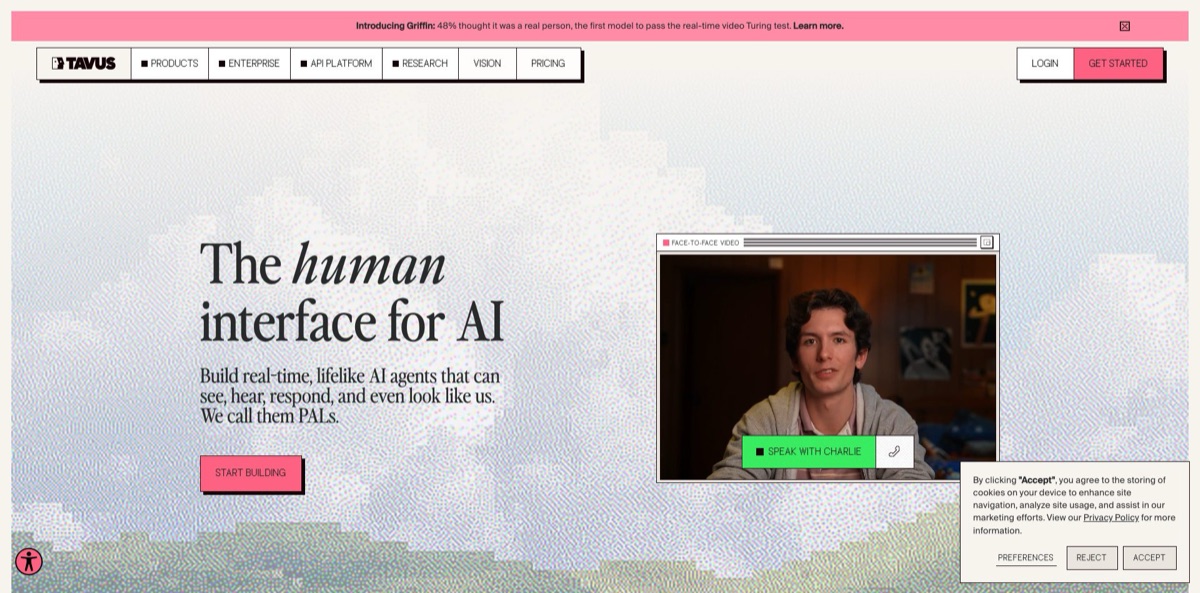
Tavus builds real-time AI humans, which it calls PALs: video agents that watch through the camera, pick up tone and pauses, and answer with a rendered face and a cloned or stock voice during a live call. Developers reach it through the Conversational Video Interface (CVI) API, while non-coders use PAL Maker, a no-code builder guided by an AI character named Charlie. One CVI minute covers the whole stack: perception (Raven-1), turn-taking (Sparrow-2), speech recognition, the language model, text-to-speech and the Phoenix-4.5 face, streamed over WebRTC. The problem it removes is wiring five vendors together to get a talking avatar that replies fast enough to feel like a person. The weak spots are cost at volume, short session caps on cheaper plans and a real learning curve. Pick it if you need face-to-face agents for sales, training, interviews or patient intake inside your own product.
How to start using Tavus?
Go to tavus.io and click Get Started. The site asks you to pick an account type: a Developer account for building with the APIs, or a PALs account for chatting with personal AI companions. For anything you plan to ship, choose Developer. The Free plan needs no credit card and includes 20 minutes of conversational video a month, a set of stock faces and full API access. Your API key is generated inside PAL Maker and sent in the x-api-key header on every request.
Next, build a first PAL around one narrow job. In PAL Maker you can describe the idea to Charlie in plain words, such as “a math tutor”, and watch it assemble the persona, or clone a stock template like Sales Development Representative, AI Interviewer or Casting Director. Developers can do the same with two calls from the quickstart: POST /v2/pals with a system prompt, context, a stock face and the raven-1 and sparrow-2 models, then POST /v2/conversations and open the conversation_url it returns.
The screen that shapes quality is the PAL configuration. Here you set the system prompt, objectives with completion criteria, guardrails, and a knowledge base built from CSV, PDF, TXT, PPTX, PNG or JPG files or a website URL. Pick a stock voice or bring one from ElevenLabs or Cartesia, then choose a face. Custom faces come from Face Studio, which accepts a training video, a single photo or a text prompt, but only paid plans include face slots. A fresh Phoenix-4.5 face shows a watermarked preview until background tuning finishes.
Before going live, test cheaply. Conversations are billed from the moment the API creates them, even if nobody joins, so set idle and call-duration timeouts and use test_mode to check your creation flow without charges. Read the transcripts of each trial call and watch for interruptions, long pauses and answers that drift outside the knowledge base. When it behaves, embed it with one script tag, share a hosted page, or invite the PAL to a Google Meet.
Who is it for?
SaaS product teams
You want a guide that walks users through onboarding or a feature tour face to face, but you do not have a team to build a video pipeline. CVI gives you rendering, speech and turn-taking behind one API, and PALs can open your product in a browser, share the screen and click through it with the user.
Sales and go-to-market teams
Website visitors leave before a rep can reply, and chat widgets feel cold. A PAL can greet each visitor on video, answer product questions from your documents and book the meeting. Tavus’s own case study on an AI SDR called Piper reports six times more meetings scheduled.
Learning and development and sales enablement leads
Role-play practice needs a partner, and managers rarely have the hours. A PAL plays the difficult customer or the hiring manager on demand, remembers where each learner stopped last time and keeps the scenario on track with objectives.
Healthcare and patient intake teams
Clinicians lose time collecting history the patient could have shared beforehand. Tavus ships a medical intake template, its docs list SOC 2, GDPR, HIPAA and BAA compliance, and the Enterprise plan adds compliance reports and zero data retention.
Recruiting and interview platforms
First-round screens follow the same questions every time. The AI Interviewer template runs structured interviews, and Sparrow-2 can be tuned to high patience so candidates get time to think before the PAL speaks again.
Voice-agent developers on LiveKit, Pipecat or Agora
You already have a working voice pipeline and want a face on it. Tavus integration modes render a synchronized Tavus face inside your existing room or transport instead of forcing a rebuild.
Tavus pricing
Developer plans combine a monthly fee with included conversation minutes, custom face slots and a cap on concurrent sessions. From Builder upward, extra minutes are billed pay-as-you-go with no overage cap. A conversation minute counts live session time from API connect to disconnect, rounded to 6-second increments, with a 30-second minimum per conversation. The fee covers the whole pipeline (LLM, speech, rendering and WebRTC), so there are no separate model bills. Prices below are in USD from the official pricing page; only monthly prices are listed. The consumer PALs account is priced separately.
20 minutes of conversational video per month, 10 stock faces, 1 concurrent session, a 5-minute maximum conversation, 1 team seat, APIs and the no-code platform. No custom faces.
60 minutes per month, 1 custom face slot, 1 Google Meet, Microsoft Teams or Zoom configuration, transcripts, no watermark, 1 concurrent session, a 10-minute maximum conversation and 5 minutes of async video generation. There is no pay-as-you-go overage on this tier.
175 minutes, 3 custom face slots, up to 3 concurrent sessions, 3 meeting configurations, 25 stock faces and a 15-minute conversation cap. Extra conversation minutes cost $0.35 each; 15 minutes of video generation are included, then $1 per minute.
1,300 minutes, 7 custom face slots, up to 10 concurrent sessions, 7 meeting configurations, the full stock face library, conversation recordings at $0.03/min, a 60-minute conversation cap and 5 team seats. Overage is $0.31 per minute; video generation includes 50 minutes, then $0.90 per minute.
4,000 minutes, 15 custom face slots, up to 15 concurrent sessions, 15 meeting configurations, priority support with a 1:1 onboarding call and 10 team seats. Overage is $0.26 per minute; video generation includes 250 minutes, then $0.80 per minute.
Custom. Fully white-labeled experience including face consent and meeting configurations, dedicated stock faces, unlimited face slots, custom concurrency, zero data retention, SOC 2 and HIPAA compliance reports, performance SLAs, forward-deployed engineers, a dedicated Slack channel and unlimited seats.
Unused minutes and face slots do not roll over to the next billing cycle, according to the billing FAQ in the docs.
Tavus key features
Conversational Video Interface: One API call starts a live session that runs perception, turn-taking, speech recognition, the LLM, text-to-speech and face rendering in order, delivered over WebRTC powered by Daily at 1080p with 24 kHz audio. The same pipeline also runs audio-only at the same price. You get a full video agent without integrating and paying four or five separate vendors.
Phoenix-4.5 faces: Train a custom face from a short video, which also clones the voice, or from a single photo with a separate voice, or design one from a text prompt in Face Studio. The model shows emotion while speaking and listening, and the library holds 100+ stock faces for prototypes. Faces must be human (cartoon and anime styles work, animals and mascots do not), and green-screen background replacement is not supported on Phoenix-4.5 faces.
Raven-1 perception and Sparrow-2 turn-taking: Raven-1 reads expressions, gaze, background and shared screens, while Sparrow-2 decides when to listen, wait or speak, handling pauses, interruptions and backchannels. You can set turn-taking patience and interruptibility per PAL.
Knowledge Base, Memories, Objectives and Guardrails: Upload documents or a website URL so answers come from your facts, give each participant a memory store so the PAL picks up where it left off, and use objectives with completion criteria for defined workflows. The docs note that open-ended conversations usually do not benefit from objectives. Guardrails set lines the PAL never crosses.
Tool calling and bring-your-own LLM: Define tools, attach them to a PAL and handle conversation.tool_call events in your app, or let Tavus call your HTTPS endpoints directly. You can swap in any LLM that exposes a compatible chat-completion endpoint by supplying model name, base URL and API key, at the cost of some added latency. The docs recommend keeping prompts under 5,000 tokens, with noticeable slowdown above 25,000.
Deployment options: A PAL can join Google Meet, Zoom or Teams as an on-camera participant, sit on your site through a single script tag, run as a hosted page, or live inside a React app built with the @tavus/cvi-ui component library. Mobile apps use Daily’s iOS, Android and React Native SDKs, and LiveKit, Pipecat and Agora users can bring only the face. An MCP server and CLI let coding agents build and test PALs from the editor.
Magic Canvas and Presentation Mode: During a call the PAL can put charts, multiple-choice questions or a scheduling page in a panel beside its face, and whatever the user taps flows back into the conversation. Presentation Mode lets it share a slide deck from its knowledge base and talk through it while taking questions. A demo or training session becomes interactive instead of a talking head.
Tavus Pros & Cons
Pros
Tavus owns the hard parts of a live video agent: rendering, perception and turn-taking run on its own models, and one per-minute price covers the LLM, speech and WebRTC as well. Developers get a clean REST API, a React component library, an MCP server, a CLI and ready templates for sales, interviews, intake and customer service, while non-coders can start in PAL Maker. Integrations with Google Meet, Zoom, Teams, LiveKit, Pipecat and Agora mean the agent can go where users already are. The free tier needs no card. Start with a stock template and your own documents to judge realism before training a face.
Cons
Costs climb fast: real production use starts around the $397 Growth tier, because cheaper plans cap concurrent sessions at one to three and conversations at 5 to 15 minutes. Billing runs from connect to disconnect, so idle or abandoned sessions still burn minutes unless you set timeouts. Recordings, zero data retention, compliance reports and white-labeling sit in higher tiers, and team members do not share assets by default. Public reviews are few and mention a steep learning curve and onboarding glitches. Budget engineering time and model a month of real session lengths before you sign.
Use Tavus if you want…
- Add a face-to-face AI agent to your app.
- Greet website visitors with a live video SDR.
- Run role-play practice for sales or support reps.
- Conduct structured first-round interviews with an AI interviewer.
- Collect patient intake before the clinician joins.
- Clone your own face and voice for live conversations.
- Send an AI participant into Google Meet or Zoom calls.
- Put a realistic face on an existing LiveKit agent.
Tavus alternatives

Tavus Reviews
A small-business founder on G2 says Tavus makes personalized video at scale feel authentic, with output natural enough to keep a human touch in outreach.
Another G2 reviewer finds branded, personalized videos much easier to produce with Tavus, but warns that the learning curve at the start is steep.
A critical G2 review calls real-time tailored video innovative, yet says the cost is high and the product did not deliver what was promised on the sales call; G2’s summary also flags technical problems during onboarding.
Hacker News commenters trying the CVI demo praised the fast replies and the avatar noticing things in their room, like a cat or a record player, but reported lag spikes on launch day and quirks such as constant nodding.
Product Hunt reviewers, mostly from 2024, rate the avatar realism, quick product updates and responsive team highly, though the number of reviews there is small.
FAQ
Does Tavus have a free plan?
Yes. The Free developer plan costs $0, needs no credit card and includes 20 minutes of conversational video per month, stock faces and API access, with conversations capped at 5 minutes and no custom faces.
How are Tavus conversation minutes billed?
You pay for live session time from API connect to disconnect, rounded to 6 seconds, with a 30-second minimum per conversation. A conversation is billed once it is created even if nobody joins, so set timeouts and use test_mode while testing.
Can I use my own LLM with Tavus?
Yes. Add your model name, base URL and API key to the LLM layer of the PAL; any endpoint that returns a compatible chat-completion format works, though external processing adds some latency.
Which languages does Tavus support?
The default tavus-auto voice engine speaks 42 languages, including English, Spanish, German, French, Japanese, Hindi, Arabic and Ukrainian, with Azure as a fallback for others. Accents follow the training audio, but regional dialects are only partly supported.
Is Tavus HIPAA and SOC 2 compliant?
The docs state SOC 2, GDPR, HIPAA and BAA compliance. Compliance reports, zero data retention and performance SLAs are listed on the Enterprise plan.
Can a Tavus PAL join Zoom, Google Meet or Teams calls?
Yes. Paid plans include meeting configurations (1 on Starter, 3 on Builder, 7 on Growth, 15 on Business), and in Google Meet you can invite the PAL’s email to the calendar event or pass a meeting link through the API.
How do I create a custom face of myself?
Use Face Studio in PAL Maker or the Video to Face and Image to Face APIs. A short training video also clones your voice, while a photo is faster but needs a voice attached separately; a paid plan with a free face slot is required.
How do I cancel a Tavus subscription?
You can change or cancel your plan from the billing settings in PAL Maker. Unused minutes and face slots do not roll over to the next cycle.
Similar tools
 GPT WorkspaceAI agent for Google Docs, Sheets, Slides, Gmail and Drive that edits your files, runs GPT formulas in bulk and automates routine
 FPT.AIVietnamese enterprise AI platform from FPT Smart Cloud for chatbots, call-center voicebots, document reading and eKYC that automate customer operations.
 Frigate NVROpen-source NVR that runs real-time AI object detection on your own hardware and sends camera events to Home Assistant and other MQTT