

testRigor
AI AutomationUpdated October 21, 2026
Generative AI test automation platform that turns plain-English steps into end-to-end tests for web, mobile, desktop, API, email and SMS flows.
We may earn a commission when you sign up through our links. It does not affect our reviews.
What is testRigor?
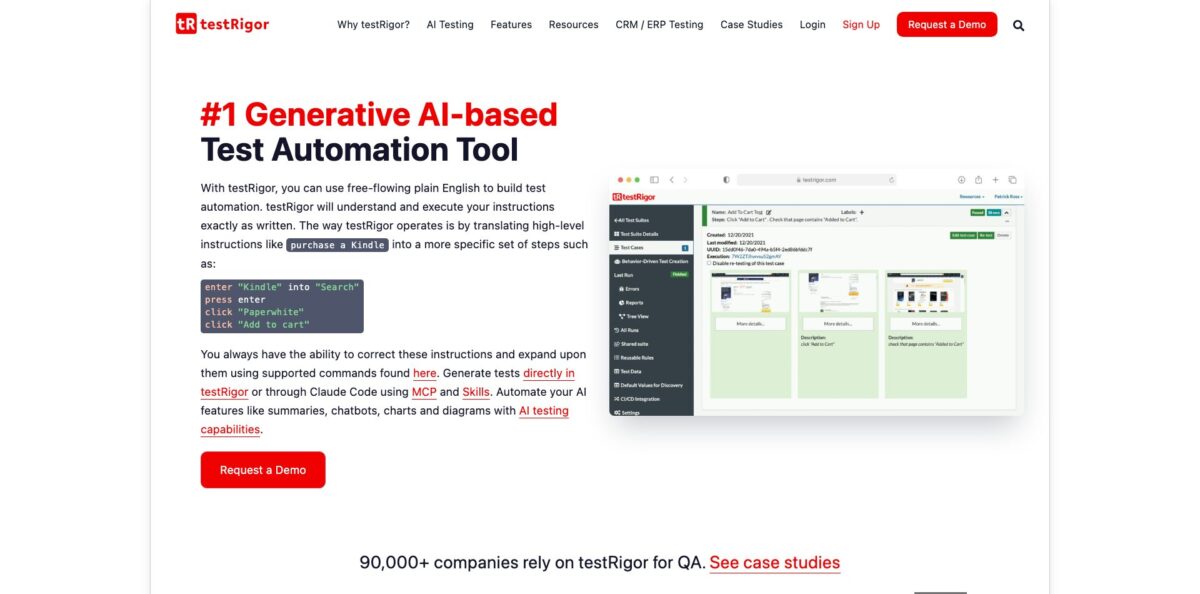
testRigor is a cloud test automation platform where end-to-end tests are written as plain-English steps and executed by an AI engine that reads the screen the way a person does. You type an instruction such as “purchase a Kindle”, and it expands that into concrete actions like entering text into Search, clicking a product and pressing Add to cart, which you can then review and edit. Because elements are found by their visible labels rather than XPath or CSS locators, tests tend to survive UI refactors that break Selenium or Appium scripts. One suite can cover web, native mobile, Windows desktop, APIs, email, SMS and 2FA logins. The weak spot is cost transparency: beyond a free public tier, pricing depends on how many parallel runs you buy. It suits QA teams that want manual testers writing automation without learning to code.
How to start using testRigor?
Begin on the sign-up page. You can create a free Public Open Source account, where every test and result is publicly visible, or register for the 14-day Private Complete trial with your name, work email and company. After confirming your email, you land in the app and create your first test suite. The official guide recommends one suite per environment, for example production web, staging web and your iOS app as three separate suites.
The suite form asks for a Test Suite Name, the Type of testing (Desktop Web, Mobile Web, Native and Hybrid Mobile, or Native Desktop) and the OS to run on: Ubuntu, Windows or Mac OS, with Mac OS reserved for paid plans. You can store a test username and password at suite level, which lets you write a single “login” step in any test instead of repeating credentials. For native mobile, upload an Android APK or AAB, or an iOS .app.zip built for simulators; for real iOS devices the guide points you to LambdaTest.
Next, click + Add Custom Test Case. You get three paths: write the steps yourself in testRigor’s plain-English command language, describe the scenario and press Generate sample test using AI to get an editable draft, or press Generate actual test using AI to let the engine explore your app and build the full test. Click Add and Run, then open Quick Edit or the full Edit view to tighten steps such as which button to click or which text to check for. Teams already working in Claude Code or Cursor can connect the official MCP server with a Personal Access Token from the API Tokens menu and create, update and run tests from the editor.
Before relying on the suite, run it several times and read every failure. Each run is recorded as video, and failures are grouped so one fix in place can repair every test affected by the same issue. Once results are stable, hook the suite into your CI through the testRigor CLI or a native integration such as GitHub Actions, GitLab, Jenkins, CircleCI or Azure DevOps, and set up scheduled runs if you want production monitoring.
Write your first five tests by hand in plain English before turning on AI generation, so you learn the command language and can judge what the generator produces.
Who is it for?
Manual QA testers
You know the product inside out but never had time to learn Selenium or Appium. testRigor lets you turn existing manual test cases into automated ones using the same language you already write them in. Your regression checklist stops being a weekly click-through marathon.
QA managers with flaky suites
Your engineers spend more time repairing locators than adding coverage. Tests that reference visible labels instead of XPath are less likely to break after a front-end redesign. Coverage can finally grow instead of being eaten by maintenance.
Teams testing multi-channel flows
Sign-up journeys often cross a web form, a confirmation email, an SMS code and a mobile app. testRigor handles email checks, Twilio-based SMS and phone calls, and 2FA via authenticator apps inside one test. You stop stitching together separate tools for each channel.
Enterprise IT and ERP teams
Companies running SAP, Salesforce, Microsoft Dynamics or mainframe applications need regression tests that business analysts can read. Plain-English steps double as living documentation, and on-premise deployment is available on Enterprise. Audits and sign-offs get easier when anyone can read the test.
Product teams shipping AI features
Chatbots, generated summaries and AI-produced images are hard to assert with fixed strings. testRigor has dedicated capabilities for testing AI-native apps and LLM-based features, so chatbot replies, summaries and generated pictures can be covered by automated checks. Release confidence improves for features that change output on every run.
Developers using coding agents
If you build with Claude Code, you can write a plain-English test for a new feature and let the agent iterate on code until the test passes. The MCP server and Claude Code Skills keep tests and code in one loop. Specs become executable from day one.
testRigor pricing
testRigor does not publish dollar prices on its plans page. According to the official FAQ, you pay for infrastructure: the cost scales with the number of parallel test runs you buy, and there are no per-user or per-execution charges, with access licensed per company. That model rewards large teams with many testers, but it makes budgeting hard until you talk to sales.
All test cases, results, screenshots and recordings are public and can be shared via a unique public URL. Limited to 1 user with unlimited test cases, support only through StackOverflow, and CI/CD integration through the testRigor CLI only. Fine for open-source projects or learning the syntax, not for anything proprietary.
Tests and data stay private, users and test cases are unlimited, and you get runs on Ubuntu, Windows and Mac browsers, Android emulators, iOS simulators, Windows native apps and mainframe applications. Includes all AI generation and execution features, API, email, 2FA and SMS tests, Jira, TestRail, Zephyr, XRay and Azure DevOps integrations, scheduled monitoring and standard support.
Custom. Adds Slack or MS Teams based support, a dedicated customer-success manager, access management, SSO, SLA, white-labeling and custom reporting, on-premise deployment, and SOC 2 Type 2 and HIPAA-compliant infrastructure.
testRigor key features
Plain-English test language lets you write steps like enter “Kindle” into “Search” or click “Add to cart”, referring to elements as they appear on screen. The engine parses these with natural language processing and runs them directly, so there is no underlying Selenium code to maintain. Product managers and analysts can read and review tests without a developer translating them.
Generative AI test creation turns a scenario description into test steps, either as an editable sample or as a full test built against your running app. You can also paste or import manual test cases from TestRail and have them executed.
Cross-platform coverage spans web on more than 3,000 browser and device combinations, native and hybrid iOS and Android apps, Windows desktop applications on paid plans, mainframe apps and APIs. Device farms such as LambdaTest, BrowserStack and Sauce Labs can be plugged in for broader hardware. One tool and one language replace separate web, mobile and API frameworks.
Email, SMS, phone and 2FA testing is built into the command set
You can send and check emails with attachments, verify SMS and calls through a direct Twilio integration, and complete 2FA logins with authenticator apps, SMS or email codes. Real user journeys that leave the browser can be tested end to end.
Visual, accessibility and file checks go beyond clicks
testRigor compares screen regions against previous runs, reads text inside images with OCR, runs accessibility tests, and validates downloaded PDF, CSV, Word and Excel files. Load testing can reuse the same end-to-end tests, which saves writing a separate performance suite.
Reusable rules and stored values work like functions and variables
You group steps into named rules, add loops and conditional execution, and override stored values through the API when a suite runs from CI. Large suites stay manageable because a change to a login rule updates every test that calls it.
MCP server and Claude Code integration let you list suites, create or update test cases, start runs and read step-level failure details from Claude Code or Cursor. The setup is one command with a Personal Access Token. Testing becomes part of an agentic coding workflow instead of a separate tab.
testRigor Pros & Cons
Pros
The biggest win is who can write automation. Manual testers describe flows in the same English they already use in test plans, and reviewers on G2 and Gartner Peer Insights single out how quickly a QA organisation can adopt it. Tests based on visible labels hold up better after UI changes than locator-based scripts, and the failure grouping lets you fix a shared issue once. Coverage is unusually broad for a single tool, from web and mobile to Windows apps, mainframes, email, SMS and 2FA. Support also gets consistent praise, with users describing an engaged team during rollout. Security documentation covers ISO/IEC 27001:2022, SOC 2 Type 2, HIPAA, GDPR and CCPA. Start with your most painful regression flow to see the maintenance difference quickly.
Cons
Pricing is the most common complaint. There are no public prices beyond the free public tier, and the license is tied to parallel runs, which some reviewers dislike and smaller teams find expensive, especially outside the US. Large suites can take a long time to finish, and mobile sessions are slower to spin up in Live Mode. Users report occasional false positives when the app or environment is slow, and error messages do not always point to the root cause. The interface packs many options onto a single screen, which some find overwhelming at first. The free plan makes every test public, so it is not an option for client work. Ask sales for a written parallel-run estimate and run a pilot on a slow staging environment before committing.
Use testRigor if you want…
- Turn manual test cases into automated tests.
- Let non-coding testers own end-to-end automation.
- Cut time spent repairing broken locators.
- Test web, mobile and desktop in one tool.
- Verify email, SMS and 2FA flows automatically.
- Generate tests from plain-language scenario descriptions.
- Check chatbots and other AI features reliably.
- Run regression suites inside your CI pipeline.
testRigor alternatives

testRigor Reviews
QA leads on Gartner Peer Insights say it was easy to roll out across the QA organisation and praise hands-on support, while noting concerns about the license being based on parallelization.
G2 reviewers like replacing dozens of lines of Selenium code with a single plain-English step, but some say full test suites take a long time to run.
Some users report occasional false positives or flaky failures when the application or test environment is slow, and wish error messages showed the root cause more clearly.
Reviewers outside the US call pricing a real concern and want plans that reflect local currencies, even though they are happy with the product itself.
FAQ
Is there a free version of testRigor?
Yes. The Public Open Source plan is free forever for one user with unlimited test cases, but all tests and results are public. Private use requires the 14-day Private Complete trial and then a paid plan.
How much does testRigor cost?
Paid pricing is quote-based and not listed on the official site. The FAQ says you pay for infrastructure, which scales with the number of parallel test runs, with no per-user or per-execution charges.
Do I need coding skills to use testRigor?
No. Tests are written in plain English using commands like click, enter and check, and AI can generate the steps from a description. Developers can still add JavaScript execution, API calls and database checks when needed.
Which platforms can testRigor test?
It covers web browsers on Ubuntu, Windows and Mac, native and hybrid Android and iOS apps, Windows desktop apps, mainframe applications and APIs. Email, SMS, phone calls and 2FA logins can be tested in the same scenarios.
What integrations does testRigor support?
Official integrations include Jira, TestRail, Zephyr, XRay, Azure DevOps, GitHub Actions, GitLab, Jenkins, CircleCI, Spinnaker, PagerDuty, Slack and MS Teams. LambdaTest, BrowserStack and Sauce Labs can supply extra devices.
Is testRigor secure for private data?
testRigor states compliance with ISO/IEC 27001:2022, SOC 2 Type 2, HIPAA, GDPR and CCPA, with details in its Trust Center. On-premise deployment is available on the Enterprise plan.
Does testRigor have an API or MCP server?
Yes. You can trigger runs and pass variables from CI through its API and CLI, and an official MCP server lets Claude Code or Cursor manage suites, test cases and runs using a Personal Access Token.
What does testRigor not test well?
The official FAQ says it does not test games. It is strongest on form-based UI, multi-user flows across email or SMS, and apps whose HTML IDs change often.
Similar tools
 GPT WorkspaceAI agent for Google Docs, Sheets, Slides, Gmail and Drive that edits your files, runs GPT formulas in bulk and automates routine
 FPT.AIVietnamese enterprise AI platform from FPT Smart Cloud for chatbots, call-center voicebots, document reading and eKYC that automate customer operations.
 Frigate NVROpen-source NVR that runs real-time AI object detection on your own hardware and sends camera events to Home Assistant and other MQTT