

Textideo
Video GenerationUpdated October 5, 2026
Textideo is an AI-powered tool transforming text and images into cinematic 1080p videos using advanced models like Google Veo.
We may earn a commission when you sign up through our links. It does not affect our reviews.
What is Textideo?
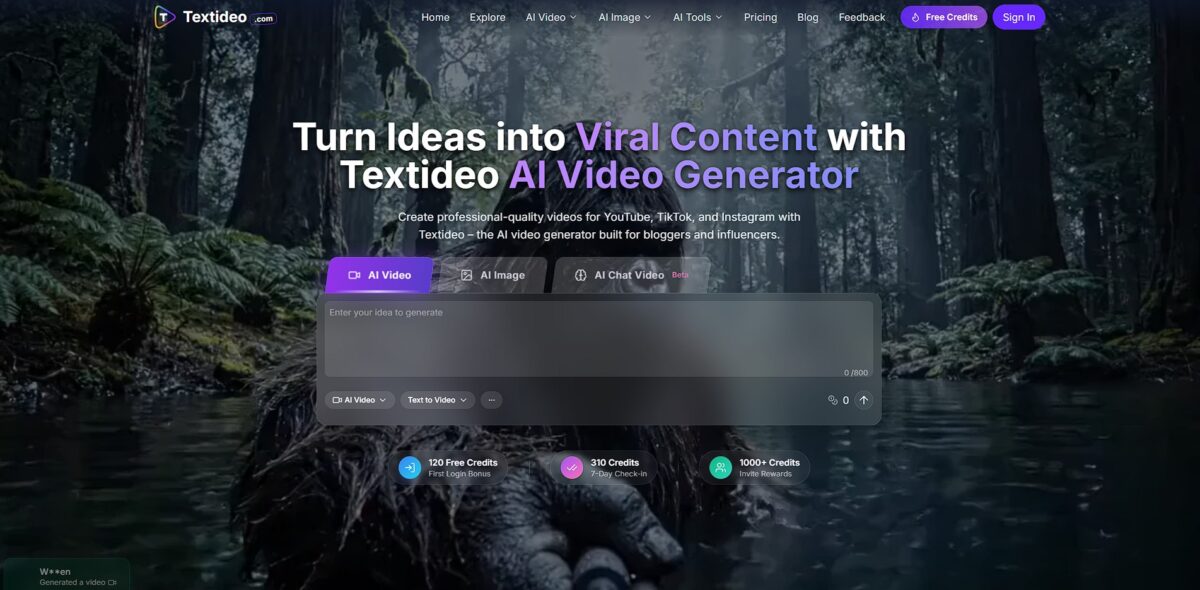
Textideo functions as a centralized browser-based hub that converts text and static photos into 1080p video clips by tapping into Google’s Veo 3 model. It bypasses the need for manual keyframing or masking, allowing creators to generate cinematic camera pans or lip-synced avatars through descriptive prompts. I noticed it handles complex physical interactions well, though it occasionally struggles to maintain depth if your starting image is low-resolution. This automation helps social media managers ship short-form content daily without touching a timeline editor. It scales your output speed, but the trade-off is a lack of frame-by-frame precision for professional editors. Use it to quickly turn a product photo into a 3D-feeling social post, but stick to traditional software if you need exact control over every pixel movement.
How to start using Textideo?
Getting started on Textideo is refreshingly fast because the site skips the usual mandatory account creation. You can land on the homepage and jump straight into the video generation tools without a multi-step sign-up process. This helps if you just want to test a single prompt without handing over an email address immediately.
The interface centers on a large text area where you type your script or scene description. Simple prompts like “a cat in a space suit” work, but adding camera cues like “slow pan” or “cinematic lighting” results in much steadier motion. For a more grounded start, you can upload a static photo of a product or a person to animate it instead of relying entirely on text.
Once your prompt is ready, you pick between different AI backends like Veo 3 or WAN. The choice matters because each model handles physics differently; Veo 3 generally produces more realistic 1080p human movement, while other models might be better for abstract effects. You then use your initial free credits to hit generate, which usually puts you in a short queue.
After the generation finishes, the video appears in a gallery where you can download it or refine the prompt. I noticed the preview player is fairly basic, so don’t expect a full timeline editor here. It works well for quick social clips but feels less ideal for syncing complex multi-scene stories.
Who is it for?
Social Media Managers
Textideo speeds up the grind of creating daily 1080p clips for TikTok or Reels without touching a complex timeline. It works well for volume, though the AI motion can sometimes feel hit-or-miss for high-end brand aesthetics. Your feed stays active even when you lack fresh footage.
E-commerce Store Owners
You can turn static product shots into short, moving ads that catch eyes better than a still JPEG. It’s especially handy for showing off clothing textures or product angles. Movement helps potential buyers visualize the item in real life.
Solo Bloggers
Use it to extract the core message of a post and turn it into a visual summary for Pinterest or X threads. The catch: long, technical scripts might get oversimplified by the AI. Still, it gives readers a quick “hook” to click your link.
Real Estate Agents
Instead of just posting a gallery, you can animate property photos into a flowing virtual tour. It’s faster than hiring a videographer for every mid-tier listing. A video Story usually earns more attention than a stack of static photos.
Educational Creators
Turn quick tips or definitions into 1080p visual explainers to break up text-heavy lessons. It helps students who learn better through visual cues. Complex ideas get boiled down into digestible six-second loops.
Event Promoters
Create fast-paced hype clips for upcoming webinars or local meetups using just a flyer image and a prompt. It’s a great way to build FOMO on a zero-dollar production budget. It also saves you from the “blank canvas” syndrome when you need to post an announcement quickly.
Textideo pricing
Textideo lets you dodge the typical subscription trap by blending free starter credits with one-time credit packs that stay valid for at least three years. You aren’t forced into a heavy monthly commitment if you only need a few 1080p clips for a one-off project. It’s built for creators who want to pay for actual rendering time rather than a recurring seat.
Grab 120 credits on your first login to test the Veo 3 engine.
Claim 310 extra credits just by checking in daily for a week.
Basic starts at $9.92 per month billed yearly ($29.99 month-to-month), with Pro and Unlimited tiers above it.
The hybrid model lets you scale costs based on your actual output instead of wasting money on unused features during quiet weeks.
Textideo key features
Switch between models like Google Veo 3, WAN, and SeeDance from one dashboard
This allows you to pick a specific engine based on whether you need realistic human movement or stylistic environmental backgrounds. That matters because one model might nail a landscape while another fails at human hands.
Animate static photos with controlled zoom and cinematic pans
The motion stays anchored to the subject, preventing the “melting face” effect common in cheaper generators. That saves you from re-generating the same clip five times to get a usable 1080p output.
Generate 1080p lip-sync videos directly from text scripts
The AI aligns mouth movements to the audio markers, which is ideal for creating quick talking-head snippets for social ads. No manual keyframing in a dedicated editor required.
Maintain character consistency across multi-shot sequences
By using reference assets, you can keep a protagonist’s features stable even when the camera angle shifts. That makes room for actual storytelling instead of just a collection of random, unrelated clips.
Extend existing 5-second clips into longer narrative arcs
The tool analyzes the final frame to predict the next logical movement, though backgrounds can occasionally drift if the motion is too aggressive.
Access generation tools immediately without creating an account or signing a subscription
You purchase credits as needed, which is a relief if you only produce a few videos a month for a specific campaign. No “subscription fatigue” from paying for unused features.
Transform written concepts into structured cinematic scripts automatically
The built-in writer formats your ideas into scenes that the video engine can easily digest. This matters because it bridges the gap between a vague thought and a prompt that actually produces a coherent visual.
Textideo Pros & Cons
Pros
Textideo hits the sweet spot for creators who need quick 1080p clips without the friction of a login. It pulls from the Google Veo 3 model to keep physics consistent, so a glass of water ripples instead of morphing into a blob. The interface skips the usual onboarding bloat, letting you dump a prompt and see results in seconds. For social media managers who need to visualize a script before committing to a full production, that removes the technical barrier. The 7-day check-in bonus is a free way to stack credits for experiments.
Cons
The output tops out at 1080p, which looks soft on large displays or professional portfolios. While the movement is generally stable, complex human limbs still occasionally cross or ghost during fast-paced actions. The lack of a granular timeline means you can’t pin specific objects or control exact camera paths, leaving you at the mercy of the initial seed. You might waste three or four generations just to get a character to look in the right direction. Stick to simple environmental scenes for the most reliable results.
Use Textideo if you want…
- Transform simple text prompts into cinematic 1080p videos.
- Animate static images with realistic depth and fluid motion.
- Generate viral social media clips without complex editing skills.
- Create consistent multi-shot sequences for professional digital storytelling.
- Access premium Veo 3 technology for high-fidelity visual results.
- Produce instant AI voiceovers and subtitles for global reach.
- Scale content production with one-time credit packs instead of a mandatory subscription.
- Experiment with diverse cinematic styles and precise camera controls.
Textideo alternatives
 Kling AIRead review →
 Runway Gen-4Read review →
 Veo 3.1Read review →
 InVideo AIRead review →
 HeyGenRead review →
Textideo Reviews
Textideo is great for turning product photos into social content without a timeline editor, but the lack of pixel-level control is tough for pros.
I love how it handles complex physics for cinematic pans, though low-res images definitely lose depth during the conversion.
Perfect for shipping daily short-form clips, but I still have to switch to traditional software when I need frame-by-frame precision.
FAQ
What types of text can I use to generate videos?
You can use any kind of text, including detailed scripts, brief product descriptions, or simple lists of ideas, as the AI understands context to generate aligned visuals.
Can I edit the videos after they are generated?
Only in a limited way. Textideo does not offer fine-tuning or a timeline editor for finished clips, so you refine the prompt and regenerate, or extend the clip with Video Extend; music, text and voiceover tweaks need a separate editor.
How long does it take to create a video?
The AI typically generates a video within minutes, though the exact time depends on the complexity and length of your prompt.
Can I use the AI-generated videos for commercial purposes?
Absolutely, you have full rights to use the generated videos for marketing campaigns, social media, educational materials, or product demos.
Is Textideo suitable for large-scale video production?
Yes, the tool is designed to be fast and scalable, making it efficient for producing hundreds of videos for high-volume content needs.
What resolution does Textideo support?
Textideo transforms prompts and images into high-quality 1080p videos to ensure professional cinematic clarity.
Does Textideo support image-to-video generation?
Yes, you can upload static images and use motion prompts to animate them into dynamic video sequences.
Are there rewards for consistent use?
Textideo offers bonuses such as 310 credits for a 7-day check-in and additional credits for inviting others to the platform.
Similar tools
 AIAIAll-in-one AI studio that puts Veo, Sora, Kling, Seedance and other models behind one credit balance for video, images, music and voice.
 ToMoviee AIWondershare's AI creative studio that turns text prompts and images into short videos, pictures, music, sound effects and voiceovers.
 Morph StudioBrowser AI video studio that runs Seedance, Kling, Veo and its own style transfer model, with a storyboard canvas for multi-shot clips.