

TutorGPT
Education AIUpdated November 10, 2026
Multi-model AI study workspace with step-by-step homework solvers, chat with GPT, Claude and Gemini, plus slide, image and voice generators.
We may earn a commission when you sign up through our links. It does not affect our reviews.
What is TutorGPT?
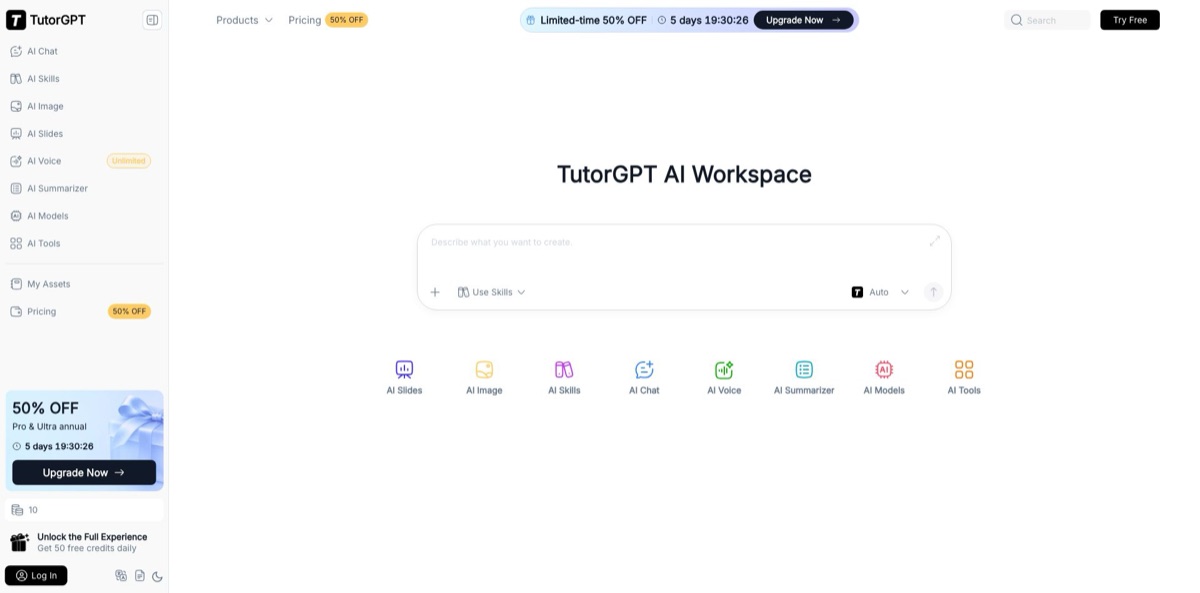
TutorGPT is a browser-based AI workspace that puts several commercial language models behind one account and wraps them in study tools: a photo-based math solver, chemistry and physics solvers, quiz and flashcard generators, and separate generators for slides, images and spoken audio. Instead of paying for ChatGPT, Claude and Gemini one by one, you switch between models such as GPT-5.6, Claude Opus 4.7, Gemini 3.1 Pro and DeepSeek V4 Pro inside one chat and pay from a shared credit balance. The homework solvers open without an account, and a companion Chrome extension brings the same help into any web page. The weak spots are trust signals: support runs through a Gmail address, some tool pages call everything free while the pricing page shows limits, and independent reviews are short and few. Pick it for cheap multi-model access while studying; skip it if a school needs admin controls or contracts.
How to start using TutorGPT?
Open tutorgpt.io in any browser. Several tools, including the AI Math Solver, the YouTube Video Summarizer and the AI Answer Generator, work without logging in, so you can try the core idea before handing over an email. For the full workspace, click Log In at the bottom of the left sidebar and create an account. The pricing FAQ says every new account receives 50 free credits, and some tool pages add a few free uses that do not touch your credits. The sidebar doubles as the product map: AI Chat, AI Skills, AI Image, AI Slides, AI Voice, AI Summarizer, AI Models, AI Tools and My Assets, where generated files are stored.
Start with a real homework problem. Open the AI Math Solver, upload a photo or a file, or type the question, then click “Get Answer”. The result is a step-by-step solution rather than a bare number. The example prompts on that page also cover physics, chemistry, biology, history and literature, so the same box handles fill-in-the-blank questions. If you would rather stay on the page you are studying from, install the TutorGPT extension from the Chrome Web Store; it accepts typed questions or screenshots in a side panel and needs no login.
The screen you will use most is AI Chat. Pick a model from the selector at the top (it defaulted to DeepSeek V4 Flash when this page was checked) or start from the shortcut buttons: “Help me write”, “Analyze image”, “Summarize text”, “Analyze data”, “Translate”. The homepage says you can query several models at once and compare their answers while the conversation context stays in place. Basic models are what the free tier runs on; premium models draw down credits, so glance at the AI Models page to see the current lineup, which changes often.
When the output has to leave the browser, switch to the generator that fits. AI Slides asks for text, a PDF or a link, shows an editable outline before it builds anything, and exports the finished deck as PPT or PDF. AI Voice reads a script, a file or an article link aloud and lets you download the audio. Whatever you produce, check solver steps against your textbook or lecture notes, because no TutorGPT page publishes accuracy figures. Plans are upgraded or cancelled later from the “Subscriptions” menu in your workspace.
Who is it for?
High school students
Algebra worksheets and chemistry problems pile up at night when nobody at home remembers the method. Snap the problem, get numbered steps and ask a follow-up in chat on the line you did not follow. You finish the sheet with the method understood, not just the answer copied.
College students on a budget
Separate subscriptions to ChatGPT, Claude and Gemini add up fast on a student income. TutorGPT puts those model families behind one login, and the Basic plan starts at $5 a month. You can compare explanations from two models on the same question instead of trusting one.
Teachers
Lesson plans, practice questions and review slides eat evenings. The quiz generator, flashcard maker and AI Slides turn a topic or an uploaded outline into draft material you then correct. You keep control of the content but skip most of the formatting.
Graduate students and researchers
Starting a literature review or narrowing a thesis question is slow and messy. The Literature Review AI, Research Gap Finder and Research Questions Generator give you a first structure to argue with. Treat every reference they mention as a lead to verify, not a citation.
Presenters and professionals
A brief or a set of meeting notes needs to become a deck by tomorrow. Agent Slides builds an editable deck from text, files, article links or YouTube URLs, and you can regenerate one slide without touching the rest. You spend the evening on the message instead of on layouts.
Language learners and audio learners
Long readings are easier to absorb when you can listen. AI Voice converts text, documents or article links into speech in multiple languages and voice styles, with downloadable audio. Your commute turns into review time.
TutorGPT pricing
Everything runs on monthly credits that are shared across chat, images, slides and voice, so one balance covers every tool. A free tier gives basic models, and three paid plans add premium models, more credits and higher limits. Annual billing looked cheaper on the date checked only because of a time-limited promotion with a countdown timer: the list annual prices equal twelve monthly payments for Pro and Ultra. The subscription policy page separately says annual plans save 30%, which does not match the pricing cards, so trust what checkout shows. There is no team, school or enterprise plan on the page. Refunds are accepted only within 24 hours of the first payment, not on renewals, and promotional purchases are marked non-refundable.
Basic chat and voice models, 50 credits for new accounts according to the pricing FAQ, and a limited number of free uses on individual tool pages. The site banner advertises 50 free credits daily, so check your balance after sign-up to see which applies.
1,000 credits a month, access to premium models such as GPT-6, Claude Opus 4.7 and Gemini 3.1 Pro, up to 100 image generations at up to 4K resolution, MiniMax Speech 2.8 voices with up to 10,000 characters per request, limited basic chat and voice, and standard processing speed.
4,500 credits a month, up to 450 image generations, up to 100,000 characters per voice request, unlimited basic chat and basic voice, and fast processing speed.
12,500 credits a month, up to 1,250 image generations, the same 100,000-character voice limit, top processing speed, and what the pricing FAQ calls enhanced private context storage for sensitive papers and teaching materials.
TutorGPT key features
Multi-model AI Chat: One chat window switches between OpenAI, Anthropic, Google, DeepSeek and Kimi models, with a model list that included Claude Opus 4.7, GPT-5.6 and Gemini 3.1 Pro on the date checked. The homepage says you can query several models at once and compare answers without losing context.
Homework solvers and the Chrome extension: The AI Math, Chemistry and Physics Solvers accept a photo, a file or typed text and return step-by-step solutions after you click “Get Answer”. The Chrome extension, listed at 4.8 stars from 161 ratings with about 4,000 users, brings the same panel onto any page without a login. You get help in the place you are already working instead of switching tabs.
AI Skills: A Skills Library holds preset task templates for writing, summarizing, planning and marketing copy, and you can save your own under My Skills or add new ones. You pick a skill, type a short idea, and get a structured result without writing a long prompt. Repeated jobs, such as weekly study summaries, stop starting from a blank box.
AI Slides with Agent and Creative modes: Agent Slides turns text, uploaded files, article links or a YouTube URL into an editable deck you can open in PowerPoint or Google Slides. Creative Slides uses image models such as GPT Image 2 and Nano Banana to render each slide as a designed visual, and you can regenerate one slide by changing its prompt. Decks export as PPT or PDF after you approve the outline.
AI Image: Text-to-image generation with GPT Image 2.5, Google’s Nano Banana models and Seedream 5.0 Pro, with aspect-ratio and resolution settings and post-generation editing. Paid plans allow up to 4K output, from 100 images a month on Basic to 1,250 on Ultra. Students and creators get diagrams, thumbnails and slide visuals without a second subscription.
AI Voice: Paste a script, upload a PDF, PPT, DOCX, book or image file up to 50 MB, or drop an article link, and the tool reads it aloud with a choice of voices. The free voice box takes 5,000 characters, while premium MiniMax Speech 2.8 voices allow up to 10,000 or 100,000 characters per request depending on the plan. Audio downloads as a file you can replay offline.
Study and research generators: The AI Tools menu adds a quiz generator, flashcard maker, mind map generator, YouTube Video Summarizer, Literature Review AI and Research Gap Finder, plus office tools such as an Excel data analyzer. The summarizer takes YouTube links, accepts extra links in one run, and claims to work on videos without subtitles. Use these outputs as first drafts, not final work.
TutorGPT Pros & Cons
Pros
The price-to-access ratio is the main draw. For $5 a month you reach premium models from several labs that would otherwise need separate subscriptions, and the homework solvers, the YouTube summarizer and the Chrome extension work without an account at all. Explanations come as numbered steps, which early users in third-party reviews single out as the reason they learn rather than just copy. The toolset is wide: chat, slides with an editable outline, images up to 4K and text-to-speech share one credit balance, so you do not juggle five apps during exam week. Start on the free tools and only register when you need premium models or saved history.
Cons
The marketing and the pricing page disagree. Tool pages promise free, unlimited use with no login, while the pricing cards limit basic chat on the cheapest plan, and the subscription policy quotes an annual discount that matches neither card. The homepage claims 10M+ active users, yet the Chrome extension shows about 4,000, and the testimonials on tool pages repeat word for word under different names. Support is a Gmail address plus Crisp live chat, refunds close 24 hours after the first payment, and uploaded homework may be retained for a limited time and shared with AI processing providers. Keep sensitive documents out of it and screenshot your plan terms at checkout.
Use TutorGPT if you want…
- Solve math problems from a photo with steps.
- Compare GPT, Claude and Gemini answers in one chat.
- Get homework help inside Chrome without signing up.
- Turn lecture notes or PDFs into editable slide decks.
- Convert readings and articles into downloadable audio files.
- Generate quizzes and flashcards from a topic outline.
- Summarize long YouTube lectures into key takeaways.
- Draft a literature review structure for a thesis.
- Pay one small subscription instead of several AI plans.
TutorGPT alternatives
 AnswersAiRead review →
 EdubrainRead review →
 AI HayRead review →
 PhotomathRead review →
 MonicaRead review →
 ChatGOTRead review →
TutorGPT Reviews
A Chrome Web Store reviewer says the extension answers correctly every time and costs nothing, but held back the fifth star over privacy because it read most of a question before they had even cropped it.
A student who describes failing several classes writes on the Chrome Web Store that it helped more than other AI tools because it explains the method while giving the answer, and it is free.
On TopAI.tools, a user who tried it on a few school questions liked that there was no sign-up or enforced limit, but felt it needs personalization features beyond plain question answering.
Users on Indexator credit it with getting them through math assignments because it walks through the logic step by step instead of printing only the final answer.
Four of five TopAI.tools raters recommend it for result quality and value, while the one dissenting rater found it hard to use, short on features and lacking integrations.
FAQ
Is TutorGPT free?
Partly. Several tools, including the AI Math Solver and the YouTube Video Summarizer, work without an account, and new accounts get 50 free credits according to the pricing FAQ. Premium models, higher limits and unlimited basic chat require a paid plan.
How much does TutorGPT cost?
Basic costs $5 a month, Pro $20 a month and Ultra $50 a month. On the date checked, annual billing was $54, $120 and $300 a year, with the Pro and Ultra prices tied to a time-limited 50% promotion.
Which AI models can I use in TutorGPT?
The lineup on the date checked included GPT-5.6, GPT-6 Astra, Claude Opus 4.7, Gemini 3.1 Pro, DeepSeek V4 Pro and Kimi K3 for chat, plus GPT Image 2.5, Nano Banana and Seedream 5.0 Pro for images. The list changes often, so check the AI Models page.
Can I get a refund or cancel my subscription?
You can cancel anytime from the “Subscriptions” menu in your workspace, and the plan stays active until the end of the billing cycle before reverting to free. Refunds are only accepted within 24 hours of the first payment or for system errors, and promotional purchases are non-refundable.
Do I need an account to use TutorGPT?
Not for the basic homework tools or the Chrome extension, which work without a login. You need an account to use credits, premium models, saved history and the My Assets library.
Is my data private on TutorGPT?
The privacy policy says uploaded questions and homework images are stored temporarily, may be retained for a limited time, and are processed by third-party AI and cloud providers, but are not shared for marketing. The site also uses analytics and advertising cookies, so avoid uploading sensitive documents.
Is there a TutorGPT browser extension or app?
There is a Chrome extension called TutorGPT, Free AI Homework Helper and Personal Tutor, rated 4.8 from 161 ratings in the Chrome Web Store. The main workspace runs in desktop and mobile browsers; no dedicated mobile app is listed on the site.
What languages does TutorGPT support?
The website interface is available in English, Japanese, Simplified Chinese, Korean and German. AI Voice converts text to speech in multiple languages and voice styles, and the Chrome extension listing names language practice and grammar help among its uses.
Similar tools
 EducatoAI exam prep platform that builds a study plan around your test date, with practice questions, mock exams and a tutor that
 UplupAI quiz and form builder that turns a prompt, PDF or URL into scored quizzes, personality tests and lead-capture funnels with CRM
 AbhyasJEE, NEET and AP EAPCET prep platform from Aditya Educational Institutions with video lessons, a large question bank, custom tests and mistake