

Twee
Education AIUpdated October 19, 2026
AI lesson generator for language teachers that turns a topic, text, word list or video into CEFR-levelled exercises you can export or assign.
We may earn a commission when you sign up through our links. It does not affect our reviews.
What is Twee?
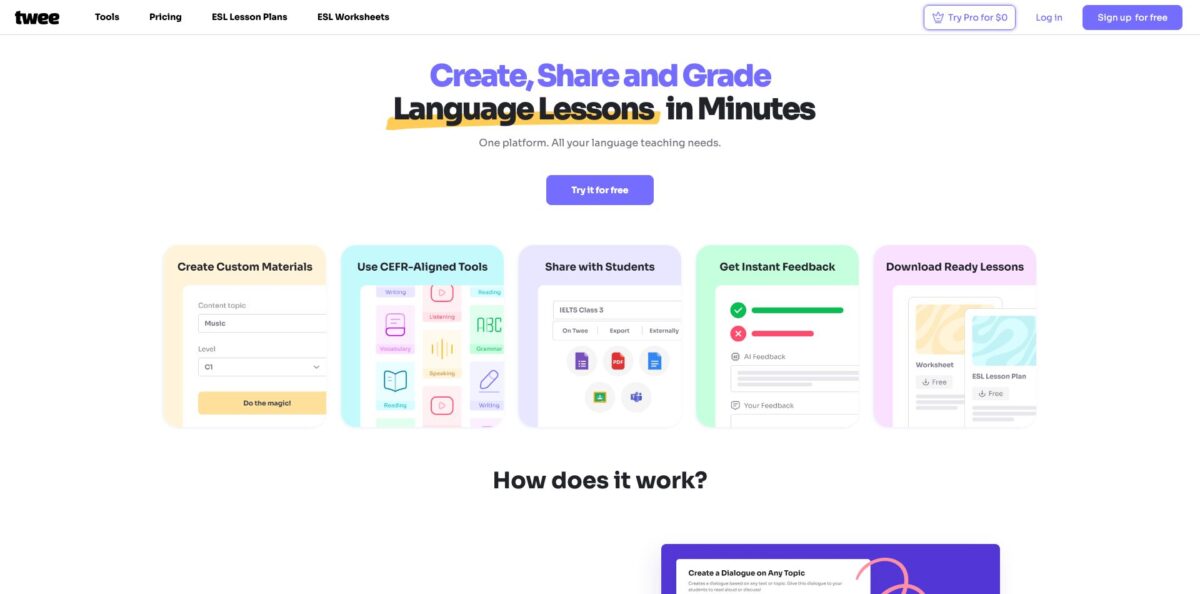
Twee is a web platform that generates language teaching material from whatever you already have: a topic, a pasted article, a vocabulary list, a YouTube link or an uploaded audio file. You pick a CEFR level from A1 to C2, choose one of more than 40 tools (dialogues, gap fills, ABCD questions, true/false statements, word matching, grammar drills, listening summaries), and the output lands in a lesson you can print, export or assign to students as an interactive link. It solves the slowest part of an ESL teacher’s week, which is turning one good source into a full set of levelled activities. The weak spots are a free trial of only five runs, a no refunds policy, and the fact that the AI cannot know your actual learners, so every result still needs a read before class. Pick it if you teach general English to mixed-level groups and plan several lessons a week.
How to start using Twee?
Sign up for free at twee.com with an email account. The free Twee Trial gives you five runs on any tool outside the Pro set, plus 500 audio credits, which is enough to judge the output quality on one real lesson. If you want to test the Pro tools as well, the Pro plan comes with a three-day free trial, but it asks for a card and renews automatically, so note the date.
Your first real lesson starts in My Library. Click New Lesson in the top-right corner and you land on the full tool catalog, filtered by skill (Reading, Vocabulary, Writing, Speaking, Grammar, Listening, Utility) or searchable by keyword such as “dialogue”. Open a tool, choose the output language from the dropdown at the top, then fill in the fields: topic, text, target vocabulary, level, or a link and upload button for the media tools. Press Do the Magic to generate, and run it again if the first version is not quite right.
The screen that turns single exercises into a lesson is Don’t Stop. Right under each result it suggests the next tools, split into ones that reuse your original input (the topic or word list) and ones that build on what was just generated (the text or dialogue). Your content carries over automatically, so a reading text can become open questions, a gap fill and a discussion task without retyping anything. Reorder tasks by hovering over the task number and using the up and down arrows.
When the lesson looks right, switch to Interactive mode and click Assign. You can copy a link or show a QR code, and students complete the work without an account by entering their name. You can also push the whole assignment to Google Classroom or Microsoft Teams. On open-ended tasks, turn on Check with AI and Check grammar and spelling if you want automatic feedback; otherwise grading stays manual.
Who is it for?
ESL and EFL school teachers
You plan for several groups at different levels and keep rebuilding the same exercise types by hand. Twee generates a levelled text plus matching tasks in minutes, and the A1 to C2 setting does the adapting for you. Your evening prep shrinks to reviewing and editing.
Private and online tutors
You need fresh material for each student, often around their hobbies or job, and you want it to look professional. Twee builds a lesson on any topic, and the Pro plan lets you add your logo to PDFs. Clients see branded, tailored worksheets instead of photocopies.
Teachers of mixed-ability groups
One class often holds learners two levels apart, which makes a single worksheet useless for half the room. The Simplify or Upgrade Your Text tool rewrites the same source for different levels. Everyone works on the same topic at a pace that fits.
Listening-focused instructors
Building a lesson around an authentic video clip usually means transcribing it yourself and writing questions from scratch. The media tools take a YouTube link or an mp3 or mp4 file and return a transcript, summaries and question sets. Authentic listening becomes a short prep task instead of an evening of transcribing.
Teachers of other languages
The tools are not English only. The language dropdown in the help center lists options such as Spanish, French, German, Italian, Polish, Ukrainian and the Scandinavian languages. You get the same exercise catalog for the language you actually teach.
Language schools and departments
Coordinators want one platform, shared billing and invoices rather than reimbursing individual subscriptions. Twee Schools adds multiple teacher seats, personal support and payment by invoice or bank transfer. Staff get Pro features without each teacher buying a plan.
Twee pricing
Twee sells per-teacher subscriptions with monthly limits on tool runs and audio credits. Text-based Basic Tools are counted in runs, Media Tools (video and audio) have their own monthly cap, and text-to-speech draws from a credit balance that renews every month. Annual billing is about 30% cheaper than monthly, and the company states that it does not offer refunds, so start with the trial and the monthly plan if you are unsure.
Five trial runs for any tool except Pro tools, 500 audio credits, free-tier access to the ESL lesson and worksheet library, unlimited interactive sharing and classroom management. It is an evaluation, not a working plan.
100 runs per month across all non-Pro tools and 2,500 audio credits per month, with free-tier library access, interactive sharing and classroom management. There is no AI checking of student answers on this tier.
All Pro tools, unlimited runs on Basic Tools under the fair use policy, 100 Media Tool runs per month, 5,000 audio credits, 100 AI response checks per month, full library access, the CEFR Level Checker, audio and video transcription, text capture from screenshots and web pages, export to PDF, Google Forms and Google Docs, and your logo on PDFs.
Custom. Priced per teacher depending on team size, with Pro features for every seat, 7,000 audio credits per month and personal support. Teams above 50 teachers contact sales; payment works by card, bank transfer and several other methods, but not by check or purchase order.
The asterisk on “unlimited” points to a fair use policy: one account per person, and the company may throttle or suspend accounts with abnormal usage. If you run out of runs or credits, support can sell you a top-up.
Twee key features
CEFR-levelled generation
Every text-producing tool asks for a target level from A1 to C2, and Twee says a team of teachers trains its AI to match the Common European Framework. You stop writing level instructions into prompts the way you would with a general chatbot. Output lands closer to what a B1 or C1 group can actually handle.
A catalog of 40+ exercise tools
Tools are grouped by skill: Fill in the Gap, Word-Definition Matching, Matching Halves, Scramble the Words, Odd One Out, Gaps with Brackets, Error Correction, Essay Topics, Four Opinions and many more. Pro adds the assessment-style formats such as ABCD questions and true/false statements. You can cover reading, vocabulary, grammar, writing and speaking from one source.
Video and audio to lesson
Paste a YouTube link or upload an mp3 or mp4 file, and the Listening tools create a transcript, an audio summary gap fill, a choose-the-right-summary task and warm-up questions. Media Tools are capped at 100 runs a month on Pro and Schools.
Don’t Stop lesson chaining
After each result, Twee suggests follow-up tools and passes your input or output straight into them. One article can become a vocabulary list, a gap fill, comprehension questions and a discussion task in a single flow. This is where most of the time saving comes from.
Interactive assignments with AI checking
Lessons can be shared by link, QR code, Google Classroom or Microsoft Teams, and students can complete them anonymously or through their own accounts. On open answers, Check with AI scores the response and gives students suggestions and language tips, with optional grammar and spelling checks. Results collect in your account so you can add feedback and send it back.
Text-to-speech and utilities
Any generated or pasted text can be turned into audio with a choice of voices and accents, and dialogues get multiple voices automatically. The CEFR Level Checker grades any text you paste, and the OCR tool makes text from a screenshot editable. You can hide the text and use the audio as a listening task.
Ready-made library and export
Beyond the generators, Twee offers a library of ESL lesson plans and grammar worksheets tagged by CEFR level and duration, with full access on Pro. Lessons export to PDF, Google Forms and Google Docs on Pro, so material works offline or inside your school’s existing tools.
Twee Pros & Cons
Pros
Twee is built for language teaching rather than adapted to it, so CEFR level, exercise type and skill focus are settings instead of prompt engineering. The Don’t Stop flow is the standout: one source text or video can become a complete lesson with reading, vocabulary, grammar and speaking tasks without copying anything between tools. Interactive sharing through a link or QR code works without student accounts, and Google Classroom and Microsoft Teams sharing fits schools already on those platforms. Pricing is modest for what Pro includes, especially on annual billing, and the tool catalog keeps growing with new grammar formats. Start with a lesson you know well so you can judge the output against your own standard.
Cons
The free trial stops after five runs, which is too little to test a full week of teaching, and the pricing page states plainly that there are no refunds. Several useful pieces, including AI checking, transcription, PDF export and the full library, sit behind Pro, so Basic feels thin for anyone who assigns work online. The AI does not know your students, cannot spot a culturally awkward example, and is not built around IELTS or Cambridge task formats. “Unlimited” is governed by a fair use policy that allows throttling. Read every generated text before it reaches a class and keep exam material in a dedicated resource.
Use Twee if you want…
- Turn any article into a levelled reading lesson.
- Build gap fills and matching tasks from your vocabulary list.
- Create listening exercises from YouTube videos and audio files.
- Adapt one text for mixed-ability groups in seconds.
- Assign interactive homework through a link or QR code.
- Grade open student answers with AI feedback.
- Check the CEFR level of texts you already use.
- Export branded worksheets to PDF or Google Forms.
Twee alternatives

Twee Reviews
Reviewers on Trustpilot describe Twee as handy for ESL vocabulary practice and for keeping lesson plans varied, and one says it now covers most of their ESL lessons. The sample there is still very small, so it says little about long-term reliability.
Teachers quoted on the official site say it saves hours of prep and works especially well for groups with students of different abilities, though these testimonials are selected by the company.
In a Reddit thread on whether AI tools are worth paying for, an online ESL teacher called Twee one of the more promising options but said they would rather not pay when a general AI assistant can handle similar tasks.
Teacher-facing directories such as TeachersFirst and TESL Ontario recommend it for quick differentiation and AI-assisted feedback, while reminding teachers to check generated content for accuracy and suitability before using it.
FAQ
Is Twee free?
There is a free Twee Trial with five runs on any non-Pro tool and 500 audio credits. Paid plans start at $9 per month, or $6.50 per month billed annually.
Can I get a refund if Twee does not work for me?
No. The pricing page states that Twee does not offer refunds, so use the free trial and the three-day Pro trial before committing. You can cancel at any time, and access continues until the end of the paid period.
Which languages does Twee support?
Besides American and British English, the lesson language dropdown includes options such as Spanish, French, German, Italian, Portuguese, Dutch, Polish, Czech, Greek, Ukrainian and the Scandinavian languages. All tools in a lesson generate content in the language you choose.
Do students need an account to complete assignments?
No. Students can open a lesson through a link or QR code, enter their name and submit answers. They can also join through their own accounts, and lessons can be shared to Google Classroom or Microsoft Teams.
Can Twee grade student answers?
Yes, on Pro and Schools plans. Check with AI scores open-ended answers and gives students feedback, with an optional grammar and spelling check, up to 100 checks per month.
Can I share one account with a colleague?
No. Accounts are for individual use under the fair use policy. For teams, Twee Schools provides multiple teacher seats under one subscription.
What happens if I run out of runs or audio credits?
Limits reset on the same date each month that your subscription started. If you need more before then, support can add extra runs or credits for a fee.
How is Twee different from ChatGPT?
Twee is designed only for teaching material, with CEFR levels, ready exercise formats, interactive assignments and export built in. A general assistant is more flexible, but you have to describe the level and format in every prompt and format the result yourself.
Similar tools
 EducatoAI exam prep platform that builds a study plan around your test date, with practice questions, mock exams and a tutor that
 TutorGPTMulti-model AI study workspace with step-by-step homework solvers, chat with GPT, Claude and Gemini, plus slide, image and voice generators.
 UplupAI quiz and form builder that turns a prompt, PDF or URL into scored quizzes, personality tests and lead-capture funnels with CRM