

Ultralytics
Data AnalysisUpdated October 5, 2026
Ultralytics is a computer vision hub for real-time object detection, tracking, and training using the YOLO architecture.
We may earn a commission when you sign up through our links. It does not affect our reviews.
What is Ultralytics?
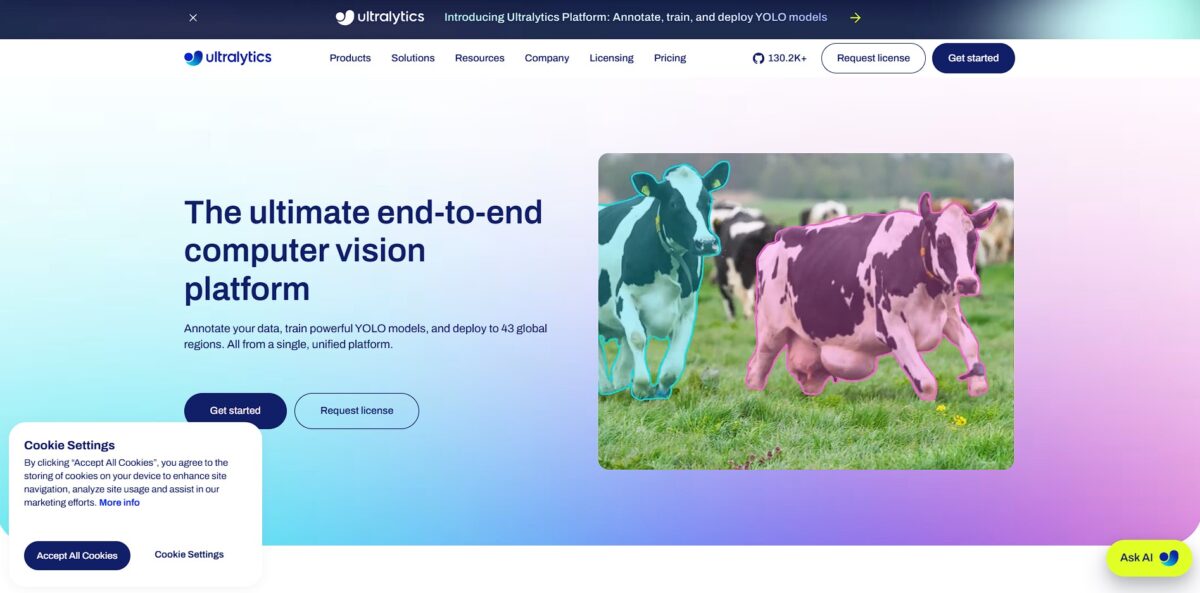
Ultralytics is a computer vision hub centered on the YOLO (You Only Look Once) architecture for detecting and tracking objects in real-time. It moves beyond simple bounding boxes to handle pose estimation and image segmentation without the usual post-processing lag from Non-Maximum Suppression. While the command-line tools and Python API make it accessible for automated scripts, the web-based Ultralytics Platform provides a no-code space to label data with AI-assisted brushes and train models on cloud GPUs. This setup removes the friction of managing local dependencies and infrastructure, though the shift toward specialized, NMS-free models means you might need to rethink your deployment pipeline for older hardware. That matters because it allows you to go from a folder of raw images to a production-ready API in hours rather than weeks.
How to start using Ultralytics?
Start by running pip install ultralytics in a virtual environment. This keeps your system dependencies clean and avoids version conflicts that often break computer vision projects. If you use Linux or macOS, verify your installation by checking the CLI with the yolo command. It’s the fastest way to confirm your GPU is actually being utilized for acceleration. With the environment isolated, your local setup won’t crash when you experiment with different model versions.
The library works best when you feed it a data.yaml file. This small configuration file tells the model exactly where your training and validation images live and maps your class names to specific ID numbers. Skip the validation path or get the folder structure slightly wrong, and the training loop will fail before the first epoch ends. Getting your paths right early prevents hours of debugging ghost errors, since the model needs a clear map of your dataset to calculate accuracy metrics during training.
Pick a pre-trained model like YOLO11n to initialize your weights. Starting from a checkpoint rather than random noise saves you days of compute time and requires significantly fewer custom images to reach decent accuracy. You can trigger training with a single command like model.train(data=’data.yaml’, epochs=100, imgsz=640). Using a standard 640px resolution balances detection speed with the ability to find smaller objects in a frame. You can have a working prototype running on consumer-grade hardware in minutes.
Once the training completes, the weights are stored in a runs directory. You can immediately run inference on a new video file or a live camera stream to see how the model handles real-world motion. I found that testing on a raw phone video often reveals lighting or angle biases that weren’t obvious in the static training set. Seeing the bounding boxes appear in real-time gives you immediate feedback on whether your dataset was diverse enough, and live testing is the only way to prove your model works outside of a sterile dataset.
Who is it for?
Computer Vision Engineers who need to move from raw images to a trained YOLO model without managing fragmented toolchains. This saves hours of environment setup by integrating annotation and deployment into one browser tab.
Small AI Startup Teams lacking a dedicated MLOps hire
The platform handles the heavy lifting of GPU orchestration, which means you can train a YOLOv8 model on an RTX 4090 without owning the hardware.
Retail Tech Developers building self-checkout or inventory tracking systems
You can deploy models directly to edge devices to keep processing local and latency low.
Academic Researchers running iterative experiments on object detection
The platform allows for quick comparisons between YOLO versions like v5 and v11, helping you find the right accuracy-to-speed ratio for your paper.
No-code Enthusiasts wanting to build custom vision apps
The drag-and-drop interface lets you label datasets and trigger training runs without writing a single line of Python.
Manufacturing Quality Leads looking to automate defect detection on the assembly line
It works well for identifying visible cracks or misalignments but is less ideal if your data requires hyper-specialized medical domain expertise.
Ultralytics pricing
Ultralytics lives in a weird space between open-source altruism and strict commercial licensing. You can download the code and mess around for free, but the moment you want to hide your source code in a commercial product, the AGPL-3.0 license becomes a major roadblock. Most developers start for free and then hit a wall when their legal team sees the “copyleft” requirements.
Free Plan - $0 per month
100 GB storage and 3 concurrent cloud trainings
20 cloud GPU types including RTX 5090 and H100
Includes $5 to $25 in starting credits for compute
This lets you prototype without entering a credit card, but it forces you to keep your project public or open-source your entire stack.
The upside: you can test if YOLOv8 actually detects your specific objects before spending a dime.
Pro Plan - $29 per seat/month (or $290/year)
500 GB storage and 10 concurrent trainings
$30 monthly credit allowance per seat
Access to H200 and B200 GPUs
Scaling to 500 models means you won’t have to delete old experiments every Friday afternoon.
Teams that have moved past basic experimentation get more compute overhead and faster chips.
Enterprise Plan - Custom pricing (Quote required)
Unlimited models, storage, and deployments
SSO/SAML and dedicated onboarding
Commercial license for closed-source applications
Reports suggest these licenses can start around $5,000 to $20,000 annually depending on company size.
It is the only way to use the tech in a proprietary app without revealing your proprietary code.
Ultralytics key features
Real-time YOLO processing
You can detect and track objects in live video streams without the usual lag that kills edge deployment. Systems can respond instantly to changes in dynamic environments like traffic or factory floors.
Unified Computer Vision Hub
Stop jumping between separate tools for annotation, training, and deployment. Managing everything in one browser tab prevents the version conflicts and environment headaches common when stitching fragmented Python scripts together. Far less of your time goes to infrastructure management.
Multi-Task Versatility
The platform handles object detection, pose estimation, and image segmentation using the same core architecture. You can map human body keypoints for fitness apps or outline specific pixels for medical imaging without relearning a new framework. Your team only needs to master one toolchain for varied AI projects.
Cloud-Based Training
Offload heavy GPU tasks to the cloud and save your local machine from thermal throttling. This lets you iterate on models while traveling or using a low-power laptop, though you will need to manage your compute credits. High-end AI development becomes realistic for teams without expensive server racks.
Flexible Deployment Options
Export your trained models to formats like ONNX, CoreML, or TensorFlow Lite for mobile and web apps. The conversion process handles the math translation automatically, which keeps the model snappy on smartphones and shortens the path from a research notebook to a production-ready application.
Ultralytics Pros & Cons
Pros
Ultralytics simplifies the move from raw images to a functional YOLO model by consolidating annotation and deployment into a single browser tab. This lets you deploy object detection scripts to edge devices without managing your own server infrastructure or fighting CUDA drivers. I noticed the removal of Non-Maximum Suppression (NMS) in newer versions significantly drops CPU latency, making it faster for real-time tracking on low-power hardware. This matters because it slashes the time spent on environment setup so you can focus on model accuracy.
Cons
Simplicity comes with a heavy licensing trade-off that forces you to choose between open-sourcing your entire application or paying for an undisclosed enterprise fee. The documentation often feels thin for advanced scenarios, specifically when dealing with custom codec supports or deep fine-tuning of backbone layers. While the API is accessible, the underlying codebase can be difficult to navigate and customize for niche research needs. The software might feel like a “black box” that limits your control over internal layers, which can lead to overfitting if you aren’t careful with hyperparameter tuning. For small teams who can’t afford custom quotes, restrictive licensing can block commercial releases outright.
Use Ultralytics if you want…
- Deploy high-speed YOLO models on resource-constrained edge devices.
- Automate real-time object detection for autonomous navigation systems.
- Track athletic performance with precise human pose estimation.
- Build custom visual datasets for industrial assembly line inspection.
- Detect safety hazards like fire or smoke instantly.
- Identify and classify multiple object instances in complex scenes.
- Integrate NMS-free inference for simpler machine learning pipelines.
- Monitor urban environments for maintenance and security anomalies.
Ultralytics alternatives
Ultralytics Reviews
Training custom models is incredibly fast, and the export options for edge devices like the Jetson Orin are a lifesaver for our production pipeline.
It is the easiest way to go from raw images to a functional proof of concept, though the code can feel a bit like a black box when you need deep customization.
The YOLO performance on mobile is impressive, but I found the documentation for advanced deployment scenarios can be a bit thin and hard to navigate.
Great for rapid prototyping with the CLI, but be prepared for the restrictive AGPL licensing if you plan to keep your project closed-source.
FAQ
What is the minimum system requirement to run Ultralytics YOLO?
To run Ultralytics YOLO, you need at least Python 3.8 and PyTorch 1.8, although using a CUDA-compatible GPU is highly recommended for faster processing and training.
Does Ultralytics YOLO support real-time object tracking?
Yes, Ultralytics YOLO includes built-in support for multi-object tracking, allowing users to track detected objects across video frames using a single command or specialized Python functions.
Can I export YOLO models to other formats for mobile use?
Ultralytics models can be exported to various formats including TFLite and CoreML for integration into Android and iOS applications, as well as ONNX and TensorRT for edge devices.
What are the core components of the YOLO architecture?
The YOLO architecture consists of a Backbone for feature extraction, a Neck for fusing multi-scale features, and a Head for making final predictions like bounding boxes and class probabilities.
Does Ultralytics offer support for enterprise organizations?
Yes, Ultralytics provides Enterprise support which includes a dedicated Slack channel, guaranteed response times via SLA, and custom engineering services for large-scale deployments.
Is data privacy maintained when using the Ultralytics platform?
Ultralytics adheres to strict data protection regulations and primarily collects anonymized data to improve its tools, ensuring that sensitive user information remains secure.
Similar tools
 HexCollaborative analytics workspace that mixes SQL, Python and AI agents in notebooks, then publishes results as data apps and plain-language answers.
 WindwardMaritime AI platform that fuses AIS, satellite and ownership data into vessel risk scores, sanctions screening, alerts and container ETAs.
 Delve AIAI market research platform that builds personas from analytics, CRM and social data, then lets you chat with them or run synthetic