

Unlucid AI
Art GenerationUpdated October 5, 2026
Unlucid AI is an uncensored creative sandbox for generating and editing high-quality AI images and motion video effects.
We may earn a commission when you sign up through our links. It does not affect our reviews.
What is Unlucid AI?
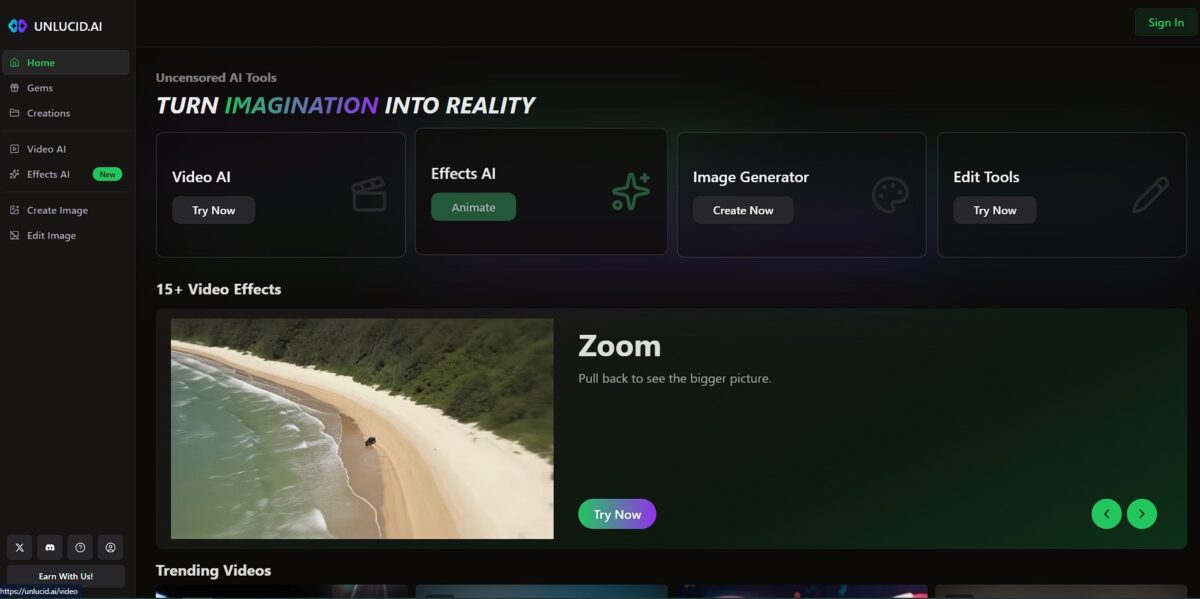
Unlucid AI functions as a sandbox for creators who need to generate or modify assets without the restrictive filters found on mainstream platforms. It stacks fifteen video effects alongside a core image engine, letting you push pixels into motion without jumping between three different apps. I noticed the interface skips the usual clutter, focusing instead on a direct editor that handles both static and moving visuals in one space. This centralized approach cuts down the time spent exporting files just to apply a simple glitch or transition. That takes the technical friction out of iterative design, though the quality of complex motion can occasionally vary. Use the daily gem login to test specific effects before committing to a larger bundle.
How to start using Unlucid AI?
Start by visiting the Unlucid.ai homepage to access the browser-based editor. You won’t need to install Python or manage local environment variables, which saves you from the usual troubleshooting headaches associated with open-source setups. Registration is immediate, and you can jump straight into the workspace without waiting for a verification queue. This matters because it removes the technical barrier between having an idea and seeing the first render.
Once inside, focus on the Gem system. You receive a small daily allowance of free Gems, which is enough to test a few 2D frames or a short video effect. The interface skips the overwhelming technical sliders found in Stable Diffusion, favoring a more direct “input and edit” flow. This trade-off works well for rapid visual brainstorming but might feel light for those used to local control over every tensor. Skipping deep-level configuration keeps your creative momentum high.
To generate your first asset, type a prompt into the generator or upload an existing image to modify. You can apply one of the fifteen video effects, like glitches or motion transitions, directly on top of your static image within the same tab. Instead of bouncing between three different apps to add a simple movement layer, you handle the entire sequence in one place. You also avoid the quality loss and time waste typical of multiple file exports.
When you’re ready for more intensive work, consider one of the bundle options. The credit-based tiers provide more Gems for high-resolution tasks or complex video rendering that the daily free allotment can’t cover. While the “freemium” model allows for casual testing, serious creators will likely hit the daily limit quickly during iterative sessions. Bundles let you scale your spending based on project volume rather than committing to a massive monthly overhead.
Choice rule: Use the daily free Gems to test style consistency, but switch to a bundle once you need to export final, high-motion video assets.
Who is it for?
Indie Creators
Perfect for those needing to push pixels into motion without jumping between three different apps. It handles glitch transitions and static image manipulation in one space, which cuts down the time spent exporting files between platforms.
Unfiltered Artists
Ideal for designers who want to bypass the restrictive content filters found on mainstream generators. The editor grants freedom to explore raw concepts that corporate tools often block, allowing for a more authentic creative sandbox.
Social Media Experimenters
Works well for building quick character concepts or motion banners. The fifteen integrated video effects let you apply stylized overlays to frames instantly, which helps maintain a consistent vibe across a series of posts.
Rapid Iterators
This is for people who prioritize speed over deep layer control. You can modify an asset and see the video result in one interface, which takes the technical friction out of repetitive design cycles.
Mobile-First Designers
A solid choice if you want to generate on the go without wrestling with local Python environments or heavy GPU setups. The browser-based editor is light enough for quick edits, though complex motion quality can occasionally vary.
Unlucid AI pricing
Unlucid AI bypasses standard subscription fatigue by leaning into a gem-based economy. Instead of a monthly bill that runs while you sleep, you pay for the specific transformations you actually use. This setup favors the occasional creator who needs a burst of uncensored video effects without the overhead of a pro studio license.
Good for testing a single image-to-video loop but stalls quickly if you need multiple retries for a clean render.
This covers about 10-12 short video clips, making it a fair entry point for a one-off TikTok campaign.
I noticed this is the sweet spot for creators who need priority rendering to skip the wait during peak hours.
Best for heavy workloads where you’re churning out dozens of variations to find the perfect uncensored aesthetic. This credit system means your money goes toward pixels rather than a calendar date. You only spend when you have a specific project ready to animate.
Unlucid AI key features
Remove safety filters on creativity
You generate images and videos that mainstream tools block for being too edgy or experimental. You can explore mature themes or niche aesthetics without a digital chaperone monitoring every prompt.
Apply fifteen distinct video effects
You transform static frames into motion using a built-in library of glitch, VHS, and cinematic overlays. It saves time by handling the “look” of the video inside the generator rather than requiring a second pass in Premiere, and one click gives your social clips a cohesive style.
Modify assets in a browser-based editor
You tweak existing images or video frames without downloading heavy software or managing local Python environments. It bridges the gap between raw generation and a finished product that’s actually usable.
Bypass installation headaches
You access the full suite via the web, skipping the usual terminal commands and GPU configuration. The trade-off is a total reliance on your internet connection to process frames, but you can start a render on a laptop that would normally melt trying to run these models locally.
Manage costs with a gem-based economy
You pay for the exact transformations you trigger rather than a flat monthly fee that might go to waste. This matters because it suits project-based creators who might go weeks between needing AI assistance.
Unlucid AI Pros & Cons
Pros
Unlucid AI eliminates the creative hand-holding found in mainstream generators by stripping away restrictive content filters. This means you can finally render edgy concept art or gritty cinematic clips without a bot flagging your prompt as “unsafe.” The workflow stays fast because it bundles image editing and animation into one dashboard, sparing you the chore of exporting assets to a separate video suite and keeping your momentum during a late-night prototyping session. Use it to build rough mood reels for indie projects where specific, uncensored visual styles are non-negotiable.
Cons
The lack of guardrails puts the burden of compliance entirely on your shoulders. You might find that output consistency fluctuates wildly based on the complexity of your reference frames, occasionally requiring three or four reruns to get a usable clip. High server demand sometimes triggers processing queues, forcing you to wait for a render when you’re in a hurry. A slow turn-around can kill the flow of a quick social media experiment. It works well for solo creators but is less ideal for teams needing centralized brand controls or collaborative folders. Stick to simple prompts for motion effects to avoid messy, distorted frames.
Use Unlucid AI if you want…
- Total creative freedom without restrictive content filters
- To apply cinematic video effects to static images
- Fast, browser-based generation without complex technical setups
- Gritty, uncensored concept art for niche projects
- To experiment with 15+ unique motion-style video effects
- A simple editor for quick image and video manipulation
- To bypass mainstream AI safety guardrails for edgy content
Unlucid AI alternatives


Unlucid AI Reviews
Actually pretty good for quick TikTok content! The 3-4 second clips are perfect for transitions. Success rate is maybe 60-70% but when it works, it looks solid. Just expensive if you need lots of videos.
FAQ
Are there any content restrictions on the platform?
Unlucid AI is an uncensored creative suite that removes typical safety filters, allowing for unrestricted exploration of styles, themes, and genres that are often blocked on mainstream platforms.
What kinds of animations can I create?
You can apply various motion effects to static images including presets like dance, fly, squish, smash, reveal, and transform to create short video clips.
Does the tool work on mobile devices?
Yes, Unlucid AI is accessible via mobile browsers, though the complex editing and workspace functionalities are generally smoother when used on a desktop browser.
Is my data and privacy protected?
As a newer browser-based platform with anonymous ownership, users should exercise caution regarding data privacy and content ownership, as the platform lacks the mature governance of enterprise-grade tools.
How long are the generated video clips?
The platform typically generates short-form video content ranging from 3 to 4 seconds, which is optimized for social media transitions, TikToks, and Instagram stories.
Can I edit existing footage or only generate new content?
Unlucid AI features an editing-first workflow that allows you to upload your own images and videos to apply cleanup, transformations, and stylized video effects.
Does it support high-quality upscaling?
Yes, the platform includes upscaling tools as part of its creative suite to help improve the resolution and clarity of generated or edited visuals.
Similar tools
 CustomuseAI 3D creation platform that chains image, video and 3D models into node workflows for game-ready assets, Roblox items and scenes.
 VisualGPTCredit-based AI image and video studio that runs Nano Banana, GPT Image, Seedream, Flux and Kling for product photos, photo edits and
 LovartAI design agent that turns a chat brief into logos, social posts, product shots, slides and videos on one editable infinite canvas.