

Upsampler
Image EditingUpdated November 17, 2026
Browser studio that upscales images to 100 MP and video to 4K, edits photos at full resolution and runs many AI generators on one credit balance.
We may earn a commission when you sign up through our links. It does not affect our reviews.
What is Upsampler?
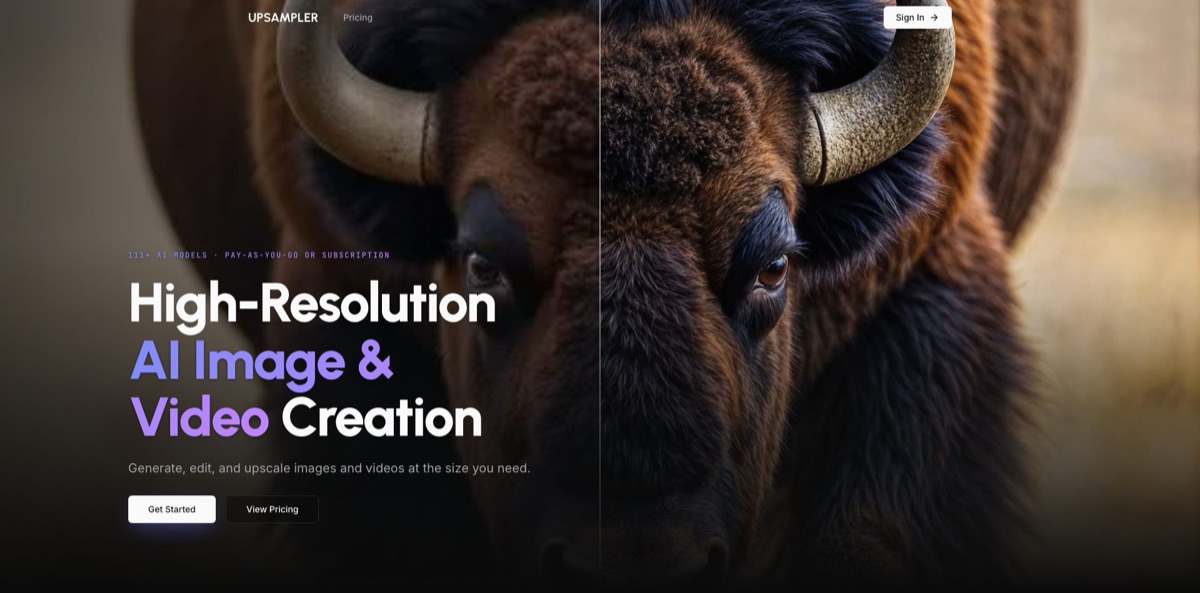
Upsampler is a browser-based studio built around one job: getting images and video to the size you actually need. It launched in 2024 as a diffusion-powered upscaler that adds new detail while enlarging a picture to as much as 100 megapixels, and it now bundles five tools on a single credit balance: Image Upscale, Image Edit, Image Generate, Video Generate and Video Upscale, backed by more than 100 in-house and third-party models. Upscaling is still the core. Creative models regenerate texture under a creativity slider, while faithful models enlarge a file without redrawing faces, logos or text. The weak spot is predictability, since creative passes take some experimenting and every run costs credits. It suits AI artists, print sellers, photographers and developers who need high-resolution output without owning a powerful GPU.
How to start using Upsampler?
Before creating an account, open the free no-signup image upscaler on upsampler.com. It runs Seed VR 2 Small, GAN and Real-ESRGAN on a shared GPU with a daily allowance of GPU minutes, accepts JPG, PNG and WebP files up to 2048 px per side, and adds no watermark. When you want the full model list, click Get Started, register and choose a plan. Pay as you go has no monthly fee, so you can buy a credit pack and skip the subscription entirely. The pricing page lists no free credits for new accounts, so the free tools serve as your trial.
A typical first job is taking an AI generation or a soft photo to print size. Open Image Upscale, upload a PNG, JPG, WebP, AVIF or BMP file, and choose between two model families. Creative models (Flux, Stable Diffusion and Krea 2) regenerate the image and add plausible new detail, with Flux and Stable Diffusion listed at up to 4x. Faithful models (P Image Upscale, Seed VR 2 and GAN) go up to 6x and keep the original content intact. Upsampler’s own guides suggest 2x for albums and the web, 4x for wall prints, and a faithful model for headshots or anything with text and logos.
The creative side is where the controls matter. You get a prompt field, a Creativity slider, a Detail slider and Regional Creativity, which lets you paint the background with high creativity and the subject with low creativity. The Stable Diffusion model adds a Resemblance control, and the Enhance Faces toggle restores faces that are small in the frame while leaving a frame-filling portrait alone. Every tool shows the exact credit cost before you run it, so watch that number as you change the scale, because image upscaling is billed per megapixel of output.
Check the result against the original at full zoom, starting with faces, hands and small text, which reveal both the gains and any invented detail. If one region came out wrong, send the image to Image Edit, mask that area, redo only that part and upscale again. Jobs that fail on Upsampler’s side refund their credits automatically. For production work, open the Developer API page, generate a key and call the same models over REST with webhooks; API jobs are deleted after 7 days, and result URLs expire after 3 hours, so download outputs promptly.
Who is it for?
AI artists
Midjourney, Flux and Stable Diffusion outputs usually stop somewhere between 1024 and 2048 pixels, which is too small for posters or book covers. The creative upscalers re-render the image at higher resolution and repair soft faces and garbled background text along the way. You get a hi-res fix without building a ComfyUI node graph.
Print-on-demand and marketplace sellers
Customer artwork and generated designs rarely meet 300 DPI at the final print size. Faithful upscaling to 100 MP keeps lettering and symbols legible, and per-megapixel pricing makes the cost of each order easy to calculate. Check small text closely whenever you use a creative model.
Portrait and wedding photographers
Hero frames, tight crops from group shots and slightly soft files need more pixels before they go on a wall. Faithful models enlarge without redrawing features, and Enhance Faces only acts when faces are small in the frame. A frame that badly missed focus stays soft, so treat it as a resolution tool rather than a focus fix.
Architects, interior designers and game artists
Renders, sprites, textures and concept art gain crisper edges and extra material detail. Regional Creativity lets you push the background harder while protecting the lines and shapes that must not move. Faithful models cover drawings where every line has to stay put.
Developers and e-commerce teams
The REST API covers image upscaling, video upscaling and utilities such as background removal, with webhooks, idempotency keys and signed payloads. Every plan includes API access with no separate API fee, so batch jobs draw on the same credits as the web app.
Video creators
AI-generated clips and older footage can be pushed to 4K, with frame interpolation for playback at up to 60 FPS. SeedVR 2 handles heavily degraded sources, while cheaper models such as FlashVSR or GAN suit footage that already looks decent.
Upsampler pricing
Everything on Upsampler draws from one credit balance. Generating or editing an image costs a fixed number of credits set by the model, from 1 to 15 per image. Upscaling an image is charged per megapixel of output, from 0.25 to 1 credit per MP. Video generation costs 0.4 to 17 credits per second of clip, and video upscaling costs 0.1 to 2.5 credits per output megapixel for each second. Plans differ only in included monthly credits, the price of extra credits and how many jobs run at once; every plan gets the same tools, full API access and a commercial license. Prices are listed in US dollars, and the terms note that sales tax may be added depending on your location.
Credits cost 4 cents each, never expire and are sold in one-time packs that start at $10. You can run 2 jobs at a time with 25 more in the queue. The pricing page’s own example puts a 2048 × 2048 upscale with P Image Upscale at about 1 credit.
Includes 1,000 monthly credits renewed on your billing date, extra credits at 1.5 cents each, 4 concurrent jobs and a queue of 50.
Includes 2,300 monthly credits, extra credits at 1.3 cents each, 6 concurrent jobs and a queue of 75.
Includes 8,000 monthly credits, extra credits at 1.2 cents each, 15 concurrent jobs and a queue of 100. Custom concurrency and queue limits are available on request.
To put the per-megapixel model in perspective, a 100 MP output from the Flux creative upscaler costs 100 credits, which is $4 on Pay as you go or about $1.50 worth of Pro credits. Monthly plan credits reset every billing cycle and do not roll over, while credits you buy separately never expire. Auto-refill can top up your balance whenever it drops below a threshold you set. You can cancel in one click from the billing page, and plan changes apply immediately with no proration for unused days. Subscription refunds are possible within 7 days of the latest payment if you have not used a significant share of that month’s credits, and unused one-time credits can be refunded within 30 days. No annual billing option is listed.
Upsampler key features
Creative and faithful upscaling up to 100 MP
Flux, Stable Diffusion and Krea 2 regenerate detail, with Flux and Stable Diffusion rated at up to 4x, while P Image Upscale, Seed VR 2 (Small and Large) and GAN enlarge up to 6x without inventing content. Upsampler’s 2026 comparison guide lists a 50 MP ceiling for the Stable Diffusion model and 100 MP for the others.
Granular control over invented detail
Creative upscales accept a prompt plus Creativity and Detail sliders, and Regional Creativity lets you paint different creativity levels onto different parts of the frame. The Stable Diffusion model adds Resemblance, and Enhance Faces restores small faces in group shots. This turns one upscaler into anything from a gentle hi-res fix to a full reimagining of the image.
Image editing at full resolution
Describe a change in plain English with models such as Nano Banana, Flux Kontext, Qwen Edit or GPT Image, or mask an area with Flux Fill Pro to redo only that part. You can extend the frame, remove backgrounds or objects and add new elements, and the result comes back at your photo’s original size. Utilities include BiRefNet background removal, Depth Anything V2 depth maps and Colorize.
Image and video generation from many vendors
One balance covers generators from Google, OpenAI, Black Forest Labs, ByteDance and others, with images up to 4K on every model. Video models such as Veo 3.1, Kling 3.0, Seedance and Runway Gen 4.5 produce clips up to 1080p at 60 FPS, and costs are shown per image or per second before you run anything.
Video upscaling to 4K
Five models range from RTX VSR at 0.1 credits per megapixel-second to SeedVR 2 at 2.5, with optional frame interpolation for smooth playback up to 60 FPS. LTX 2.5 redraws skin, hair and fabric but can alter small faces and logos, so SeedVR 2 or FlashVSR is the safer pick for footage that must stay as filmed.
A developer-friendly REST API
Jobs run asynchronously with webhooks signed by HMAC-SHA256, Idempotency-Key headers prevent double charges on retries, and upscaling endpoints allow 90 requests per minute and 6,000 per hour. GET /models returns live credit rates, and a failed job is refunded automatically. API access comes with every plan, including Pay as you go.
61 free tools with no sign-up
Of these, 41 AI tools such as the image and video upscalers, face restoration, background remover and photo-to-anime converter come with daily free usage, and 20 browser tools run without limits. The free upscalers add no watermark, which makes the free tier a genuine way to judge quality before paying.
Upsampler Pros & Cons
Pros
Upsampler gives you both kinds of upscaling in one place: creative models that rebuild texture in AI art and soft photos, and faithful ones that enlarge product shots, scans and portraits without redrawing them. Output reaches 100 MP, far beyond what most image generators produce natively. Pricing is flexible for this category, with 4-cent credits and no subscription required, purchased credits that never expire, automatic refunds for failed jobs, and API access plus a commercial license on every plan. A SourceForge reviewer calls it cheaper than other creative upscalers. Having generation, editing and upscaling on one balance also replaces the usual chain of separate subscriptions. Test new kinds of source images in the free tools first, then buy credits only for the model that wins.
Cons
Creative upscaling is a dial rather than a button. A SourceForge reviewer mentions a learning curve with the parameters, and higher creativity settings can change faces, logos and small text. Independent feedback is thin: Product Hunt and AlternativeTo show no written reviews, and Trustpilot has a single rating, a one-star complaint that the image editor silently stopped accepting images after a handful of edits. New accounts receive no free credits, so trying the premium models means paying first. The model catalog changes often, and the service runs only in the browser, so every file passes through Upsampler’s servers, with English as the only listed interface language. Keep faithful models for client work and inspect faces and text at 100% zoom before delivery.
Use Upsampler if you want…
- Upscale AI-generated art to print resolution.
- Enlarge product photos without redrawing logos or labels.
- Add realistic skin and fabric detail to soft images.
- Pay per credit without committing to a monthly subscription.
- Edit photos with text prompts at full resolution.
- Upscale AI video clips to 4K at 60 FPS.
- Plug image upscaling into your app through a REST API.
- Compare several image generators from one credit balance.
Upsampler alternatives
 KreaRead review →
 VanceAIRead review →
 Deep-Image.aiRead review →
 HitPaw FotorPeaRead review →
 ClipdropRead review →
Upsampler Reviews
An art director on SourceForge uses it daily after Midjourney and calls it easy to use and cheaper than other creative upscalers, though getting the parameters right takes some experimentation.
On TopAI.tools, 13 of 15 voters recommend Upsampler, mostly for value for money and ease of use, while the two negative votes point to missing integrations and inconsistent results.
Commenters on the founder’s 2024 Reddit launch post wanted to test the upscaler before paying and were put off when signing up did not include even one free upscale.
A one-star Trustpilot review from February 2026 says the image editor stopped accepting new images after about six edits without any warning, and that a model the reviewer hoped to try free required payment first.
FAQ
Is Upsampler free to use?
Partly. Upsampler offers 61 free tools with no sign-up, including an image upscaler with a daily allowance of GPU time and no watermark. The premium tools need credits, which you can buy on Pay as you go with no monthly fee.
Do Upsampler credits expire?
Credits you buy as a one-time purchase or through auto-refill never expire. The monthly credits included in Pro, Premium and Business refresh on your billing date and do not roll over.
What is the maximum output resolution?
Image upscaling reaches 100 megapixels on most models and 50 MP on the Stable Diffusion creative upscaler. Generated images go up to 4K, generated videos up to 1080p at 60 FPS, and video upscaling up to 4K.
Can I use Upsampler images commercially?
Yes. Every plan, including Pay as you go, comes with a full commercial license for the images and videos you create, and the terms assign ownership of generated images to you.
Does Upsampler have an API?
Yes. A public REST API covers image upscaling, video upscaling and utilities, with asynchronous jobs, signed webhooks and a status endpoint. It uses the same credits as the web app and is included on every plan.
Which file formats does Upsampler accept?
Image tools take PNG, JPG, WebP, AVIF and BMP files. Video tools take MP4, WebM and MOV for upscaling and extending clips.
What happens to the images I upload?
The terms grant Upsampler a limited license to process your uploads only to provide and improve the service, and say your content will not be sold or used for unrelated commercial purposes. API jobs and their results are deleted 7 days after submission, and sexually explicit content is blocked on every plan.
Can I cancel my subscription and get a refund?
You can cancel in one click from the billing page and keep access until the period ends. Subscription refunds can be requested within 7 days of the latest payment if you have not used a significant part of the credits, and unused one-time credits within 30 days.
Similar tools
 Picture to DrawingBrowser tool that turns photos into pencil, charcoal, ink or watercolor drawings, cartoons and coloring pages, with free daily tries and one-time
 Retouch4meAI retouching plugins and cloud apps that automate skin cleanup, dodge and burn, culling and color grading for photographers and video editors.
 Pixelfox AIBrowser-based AI photo and video editor for object removal, background cutouts, upscaling, virtual try-on and AI video on one shared credit balance.