

Vast.ai
Developer ToolsUpdated October 21, 2026
GPU cloud marketplace where independent hosts and data centers rent out NVIDIA GPUs by the second for AI training, inference and rendering.
We may earn a commission when you sign up through our links. It does not affect our reviews.
What is Vast.ai?
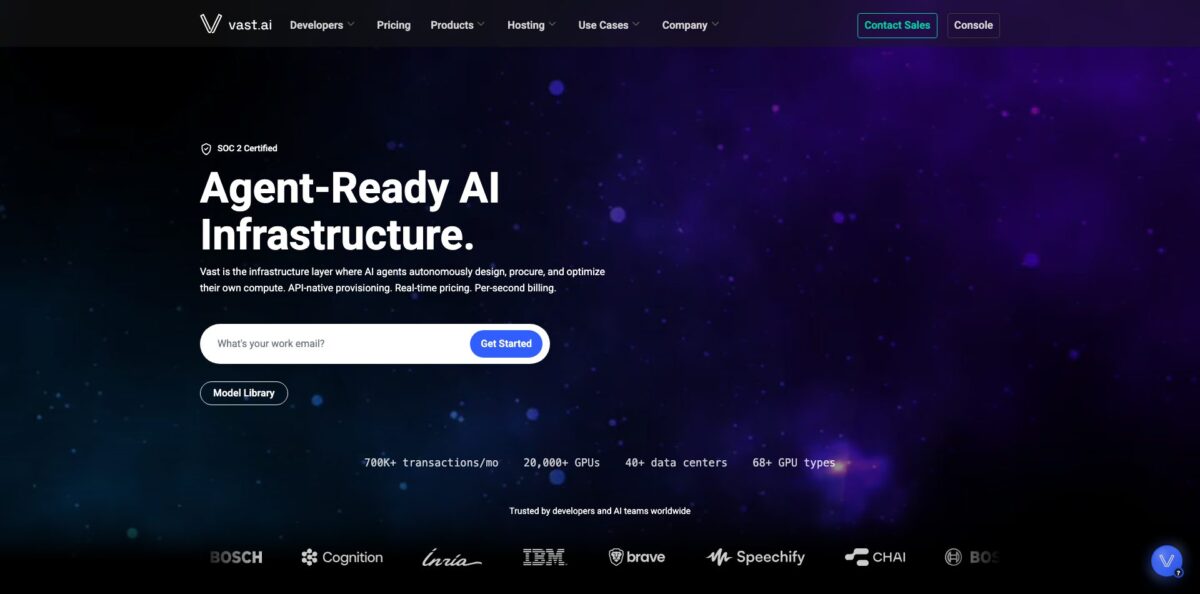
Think of it as an open market for GPU time. Independent hosts, from hobbyists with a spare RTX 3090 to ISO-certified data centers, list their machines, set their own hourly price, and you rent the exact card you want inside a Docker container billed by the second. The platform counts 20,000+ GPUs across 40+ data centers and 68+ GPU types, and everything can be provisioned from a web console, a CLI, a Python SDK or a REST API. The result is that a consumer card often costs a fraction of what the big clouds charge for comparable work. The weak spot is consistency: quality depends on the host you pick, and cheap unverified machines can drop offline or underdeliver on bandwidth. It suits ML engineers, researchers and indie AI builders who want cheap GPUs and are willing to filter hosts carefully.
How to start using Vast.ai?
Create an account at cloud.vast.ai and verify your email, because you cannot rent a machine until the address is confirmed. Then open Billing, click Add Credit and top up with a credit card through Stripe, BitPay or Crypto.com. The minimum deposit is $5, and the platform is prepaid, so nothing starts until you have a balance. If you plan to run long jobs, switch on autobilling with a threshold close to your daily spend so an empty balance does not stop your instance mid-run.
Next, prepare how you will connect. For terminal work, generate an SSH key pair and paste the public key on the Keys page. For notebooks, install the TLS certificate Vast provides for Jupyter; on macOS the browser will block Jupyter until you trust it in Keychain Access. Then go to Templates and pick a ready setup such as PyTorch, TensorFlow or ComfyUI. Templates are wrappers around
docker run, and the official Vast base images tend to start fast because many hosts have them cached.The Search page is the screen that decides your cost and your sanity. Filter by GPU model, GPU count, RAM, CPU, network speed and price, choose between on-demand and interruptible, and hover over any price to see the split between GPU, storage and bandwidth charges. Tick the Secure Cloud filter for vetted data centers, check the host reliability score and the maximum rental duration on the offer card, and size the disk generously: disk size is fixed at creation and cannot be changed later.
Click Rent, wait for the image to load (cached images start quickly, fresh pulls can take 10 to 60 minutes), then press Open to reach the Instance Portal, Jupyter or SSH. When you finish, remember the difference between Stop and Delete. Stop releases the GPU and ends compute billing, but storage keeps charging until you delete the instance. Copy your results to cloud storage first, then destroy the instance.
Who is it for?
ML engineers and researchers
You need an A100 or H100 for a fine-tuning run, not a year-long cloud contract. Vast lets you rent one for a few hours, pay by the second, and walk away. Checkpointing your training loop turns cheap interruptible GPUs into real savings.
Indie AI app builders
You serve an image or LLM model to a growing user base and cloud bills eat your margin. Serverless endpoints on Vast scale workers up and down across mixed hardware at the same per-second price as regular instances. You pay for cold workers only in storage, not GPU time.
Hobbyists running Stable Diffusion, ComfyUI or local LLMs
Your laptop cannot hold a 24 GB model, but an RTX 3090 or 4090 for well under a dollar an hour can. One-click templates mean you do not have to build a Docker image first. Weekend projects stop requiring a new graphics card.
Students and academic labs
Grant budgets are small and queues on shared clusters are long. Cheap consumer cards with DLPerf scores help you pick enough speed for coursework or a paper’s experiments. You get results this week instead of waiting for cluster time.
Teams running agent-driven or automated pipelines
Vast publishes a CLI, SDK, REST API and agent plugins for Claude Code, Codex and Cursor, so a script or coding agent can search offers, launch a box and tear it down. Infrastructure becomes just another function call in your workflow.
GPU owners with idle hardware
The same marketplace lets you list your own machines as a host and set your price. Idle cards earn money while renters handle the workloads.
Vast.ai pricing
There are no subscription plans. Hosts set their own rates, prices move with supply and demand, and you pay three separate meters: GPU compute per hour (charged per second while running), storage per GB per hour (charged while the instance exists, even when stopped), and bandwidth per TB transferred. Storage and bandwidth rates vary from host to host, so check the breakdown before you rent. The figures below are live marketplace rates shown on the official pricing page on October 18, 2026; they change hourly, so treat them as a snapshot, not a quote.
Credits are prepaid, with no contract or sales call needed to start.
host-set price, no interruptions, per-second billing, spin up or down anytime.
you bid, and the pricing page says it runs 50%+ cheaper than on-demand (the docs FAQ cites 50 to 80% savings), but an instance can be paused when outbid.
up to 50% off for prepaying 1, 3 or 6 month terms on a specific instance, with partial refunds if you cancel early.
from $0.05/hr, median $0.08/hr.
from $0.12/hr, median $0.21/hr.
from $0.23/hr, median $0.49/hr.
from $0.21/hr, median $0.68/hr.
from $0.40/hr, median $0.80/hr.
from $0.43/hr, median $0.80/hr.
from $1.73/hr, median $2.40/hr.
from $4.34/hr, median $4.67/hr.
B300 listed from $9.94/hr.
no separate tier. You pay the underlying instance cost; active and loading workers are billed for GPU, while creating and inactive workers are billed only for storage and bandwidth.
Custom. Multi-node clusters with InfiniBand networking, SLAs and premium support are quote-based through sales.
Vast.ai key features
Live GPU marketplace with detailed filters
Every offer shows GPU model, VRAM, host reliability, location, network speed, maximum rental duration and a price breakdown you can hover over. You can sort by price or narrow to Secure Cloud data centers certified to ISO 27001 or Tier 3/4. This is how you trade a little cost for much better uptime.
Three rental types
On-demand gives exclusive, uninterrupted GPU control at the host’s price, interruptible uses bidding for the lowest cost, and reserved converts an existing on-demand instance into a prepaid discount through the green badge on the instance card.
Templates and Vast base images
Official templates for PyTorch, TensorFlow, ComfyUI and popular open models start from cached base images with CUDA libraries, TLS and token-protected services through the Instance Portal. Thousands of community templates and a PROVISIONING_SCRIPT hook let you customize without building your own image. VM templates exist for workloads that need nested Docker or kernel modules.
CLI, Python SDK and REST API
vastai search offers and vastai create instance cover the whole lifecycle from a terminal, and the same endpoints power scripts and CI jobs. Scoped API keys, teams with roles and audit logs make it workable for small groups, not just solo users.
Serverless endpoints with benchmark-driven scaling
Vast benchmarks your workload across GPU classes, then recruits the best price-performance workers from the marketplace and removes the worst ones first as demand drops. Endpoints expose an OpenAI-compatible API and ship guides for vLLM, TGI and ComfyUI. You get autoscaling without paying a serverless markup.
Agent skills and plugins
A vastai skill installs into Claude Code, Cursor, GitHub Copilot, Windsurf, Cline and other agents, while native plugins for Claude Code and Codex add setup, status, cost and search commands. Your coding agent can check burn rate and projected 24-hour spend before launching anything large.
Data movement tools
Cloud Sync connects instances to Google Drive, S3, Backblaze, Dropbox and Hugging Face, and you can copy data instance to instance or schedule backups. That matters on a marketplace where a host can go offline or a rental can expire.
Vast.ai Pros & Cons
Pros
Price is the headline. On the pricing page an RTX 3090 started at $0.12 an hour and an A100 SXM4 at $0.40 on the day of this review, rates that are hard to match on traditional clouds, and per-second billing means short experiments cost cents. The choice of hardware is wide, from Pascal-era cards to B200 and B300, so you can match VRAM to the model instead of overpaying. Developer tooling is strong: a scriptable CLI, SDK, REST API and agent plugins make Vast easy to automate. Users on Trustpilot often praise the live chat support and low bandwidth costs. Start with the official templates and the Secure Cloud filter to get most of the savings with fewer surprises.
Cons
Reliability is uneven because every machine belongs to a different host. Recent Trustpilot reviews describe instances going offline mid-job, advertised network speeds far above what was delivered, and wasted credits on boxes that never became reachable. Storage keeps billing on stopped instances, spent credits are not refundable, and an empty balance without a saved card can lead to your data being deleted. There is no Windows and no remote desktop, only Linux Docker containers or VMs. Reserved credits are locked to one host. Keep checkpoints in external storage, save a backup card, and avoid long jobs on new or low-reliability hosts.
Use Vast.ai if you want…
- Rent an RTX 4090 for well under a dollar.
- Fine-tune open LLMs on A100 or H100 by the hour.
- Run Stable Diffusion or ComfyUI without buying hardware.
- Cut GPU bills with interruptible, checkpointed batch jobs.
- Deploy autoscaling inference endpoints without a serverless markup.
- Script GPU provisioning from a CLI, SDK or API.
- Let a coding agent launch and destroy GPU instances.
- Earn money by renting out your idle GPUs.
Vast.ai alternatives



Vast.ai Reviews
Fine-tuning a mid-sized LLM on rented H100s went smoothly, and the reviewer would use the same setup again for models around 27B parameters.
Live chat is always available and the GPU selection is wide, and bandwidth costs much less than on AWS.
A machine marked verified promised gigabit-class networking but delivered a tiny fraction of it, and support blamed shared bandwidth rather than fixing the listing.
Servers disconnected again and again and delivered less CPU power and bandwidth than listed, which meant lost work and wasted credits.
Reliability was rough at first, but it improved over a few months; still, be ready to switch providers when the best cards are rented out everywhere.
FAQ
Does Vast.ai have a free plan or free trial?
No. Vast is prepaid, so you add credit before renting, with a minimum deposit of $5. Because billing is per second, a short test on a cheap GPU costs only cents.
How much does it cost to rent a GPU on Vast.ai?
Prices are set by hosts and change hourly. On October 18, 2026 the official pricing page showed an RTX 4090 from $0.23/hr, an A100 SXM4 from $0.40/hr and an H100 SXM from $1.73/hr, plus separate storage and bandwidth charges.
Am I charged when my instance is stopped?
Stopping ends GPU billing, but storage is charged for as long as the instance exists. Delete the instance when you are done to stop all charges.
Is my data safe on Vast.ai?
Renters run in isolated, unprivileged Docker containers, and the GPU Cloud page lists SOC 2 Type II compliance. Physical security still varies by host, so use the Secure Cloud filter for ISO 27001 or Tier 3/4 data centers and encrypt sensitive data.
Can I get a refund on credits?
Spent credits are not refundable. Unspent credits can usually be refunded by asking support through the website chat, except for legacy Coinbase Commerce purchases.
Which payment methods are accepted?
Major credit cards through Stripe, plus crypto through BitPay and Crypto.com. PayPal is not supported, and autobilling works with credit cards only.
Does Vast.ai support Windows or remote desktop?
No. Instances are Linux Docker containers, mostly Ubuntu-based, or Linux VMs, accessed through SSH, Jupyter, the Instance Portal or command-only mode.
Is there an API?
Yes. Vast offers a REST API, a Python SDK installed with pip install vastai and a CLI, all able to search offers, create instances and manage serverless endpoints.
Similar tools
 Novita AIDeveloper cloud with one API for 200+ open-weight AI models, plus GPU instances, dedicated endpoints and isolated sandboxes for AI agents.
 You.comDeveloper platform of web search, content extraction, cited research and model inference APIs that feed AI agents and RAG apps real-time web
 QodoAI code review platform that runs specialized agents on every pull request, enforces team rules and checks changes against tickets and linked