

Veryfi
Data AnalysisUpdated November 21, 2026
Document AI platform whose OCR APIs turn receipts, invoices, checks and bank statements into JSON, with built-in fraud checks and a mobile capture SDK.
We may earn a commission when you sign up through our links. It does not affect our reviews.
What is Veryfi?
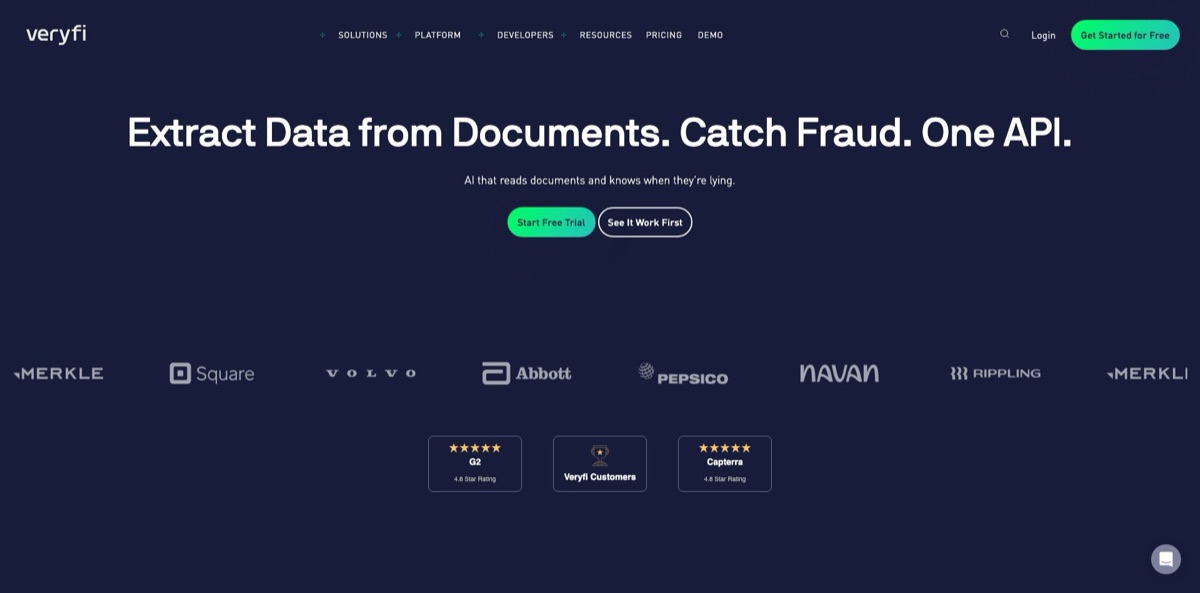
Veryfi is a document AI platform from Veryfi, Inc. that turns photos, scans and PDFs of receipts, invoices, checks, bank statements, tax forms and IDs into structured JSON through a REST API. Its models are trained and run on the company’s own NVIDIA hardware, a standard extraction returns in under three seconds, and fraud signals such as tampering, duplicates and AI-generated documents can come back in the same response. Around the API it sells Lens, a capture SDK for iOS, Android and the browser, a newer Document to Markdown endpoint for LLM pipelines, and a separate expense app for small businesses. The weak spot is the price step: after 100 free documents a month, self-serve billing starts at $500 a month in credits, which is a lot for low volumes. It suits product teams in fintech, accounts payable, lending and loyalty that process financial documents at scale.
How to start using Veryfi?
Create an account from the Start free button on the pricing page or the Start Free Trial link on the homepage. The 14-day trial needs no credit card, and when it ends the account continues on the Free plan with up to 100 documents a month. Inside the web app, open Settings and then Keys: the API Auth Credentials block holds your CLIENT_ID, CLIENT_SECRET, environment URL and API keys. New integrations should create Bearer API keys, which can be full-access or scoped to specific routes with an expiry date, while the older username and API key pair still works.
For a first real job, install one of the free SDKs and send a receipt or invoice to the documents endpoint. Python, Node.js, Java, C#, Go, Ruby, PHP and several other languages are covered on GitHub, along with samples and Postman collections. You can upload the file as multipart form data, send it as base64, pass a public URL, or zip several images and process them as one document. Requests are synchronous by default, so the JSON with vendor, date, totals, taxes and line items comes back in the same response.
The settings that shape production behaviour sit in the same Keys area. If you switch batch jobs to async processing, set a webhook URL there or per Bearer key, and make your handler idempotent, because the docs warn that webhook delivery is not guaranteed to be exactly once. For invoices that post straight into an ERP, ask support to enable Thinking Mode, then add the thinking parameter set to light or deep so AI agents review and correct the extraction at the cost of a few extra seconds. Mobile teams can drop in the Lens SDK, which is free with a small Powered by Veryfi badge.
Before going live, run a sample of real documents and read the results field by field. If your plan includes fraud detection, check the meta.fraud block: each file gets a green, yellow or red color, a score and a list of reasons, and Veryfi says most teams automate green, review yellow and hold red. Compare extracted totals against the originals on your worst photos, since reviewers report misses on faint text and low-light scans, and set your routing thresholds from what you see.
Who is it for?
Fintech and spend-management product teams
Your users snap a receipt and expect the numbers to appear before they put the phone away. The receipt API reads merchant, totals, taxes, tips and line items across 91 currencies and 38 languages, and Lens handles cropping and glare inside your own app. Navan and Rippling appear in Veryfi’s customer list, which shows the API is built to live inside someone else’s product.
Accounts payable and ERP developers
Vendor invoices arrive in thousands of layouts, and someone still keys them in by hand. The invoice and purchase order APIs return line items, tax and payment terms for three-way matching, and one charge covers a document of up to 15 pages. Thinking Mode adds an agent review pass for invoices that post without a human check.
Loyalty, rebate and CPG marketing teams
Receipt-based promotions attract edited and recycled receipts. Veryfi checks for duplicates, screenshots, photos of screens and AI-generated receipts in the same call that reads the purchase, so a cashback claim can be approved or held in seconds. PepsiCo and Abbott loyalty programs are listed among its customers.
Lenders, banks and underwriters
Bank statements and checks are the documents fraudsters edit most carefully. The statement and check APIs extract transactions, balances, routing and account numbers, while PDF forensics looks for edits inside the file’s layers, which helps you catch a changed balance before a credit decision.
Engineers building LLM and RAG pipelines
Generic PDF parsers flatten tables and lose track of where text came from. The Document to Markdown endpoint accepts 23 file formats up to 20 MB, splits combined PDFs, and returns Markdown with optional bounding boxes, so an answer can be traced back to its spot on the page.
Small business owners and contractors
If you want an app rather than an API, the Veryfi expense app scans receipts, tracks projects and syncs to QuickBooks or Xero for $19.99 per active user a month. It caps OCR at 300 documents a month and 10 line items per document, so heavy users end up on the API instead.
Veryfi pricing
API billing is per document, not per page. One request covering a document of up to 15 pages counts as a single charge, so a five-page invoice costs the same as a one-page invoice. Plans are billed monthly in advance in US dollars, and add-ons such as the browser extension, WhatsApp bot, Embedded forms, Product Intelligence and Workflows are priced separately. The expense management app has its own per-user price.
Up to 100 documents a month after a 14-day trial with no credit card. You get API access to all 100+ document types, the SDKs and email support, which is enough to prototype on real files.
Covers up to 10,000 documents a month at $0.08 per receipt, $0.16 per invoice or form, and $0.25 per bank check or statement, and usage above $500 is billed at the same rates. A 12-month commitment takes one cent off every document, so receipts drop to $0.07. It adds the Document to Markdown and Document to JSON APIs, unlimited users, limited storage, and email plus Slack support.
Custom. Aimed at 10,000+ documents a month. It adds document classification, the PDF splitter, custom model training, fraud detection and the GenAI detector, on-premise or hybrid deployment, a US, EU or APAC data region, custom or zero data retention, SAML SSO, SCIM, a BAA on request, custom SLAs and a dedicated account manager.
Includes receipt and invoice OCR, QuickBooks and Xero sync, bank feed reconciliation and expense reports, with a 300-document monthly OCR limit and up to 10 line items per document.
The Lens capture SDK is free with Veryfi branding, and white-label Lens goes through sales. Document types outside the calculator’s three price groups, and credit card capture, are priced on request.
Veryfi key features
Pre-trained APIs for 100+ document types
Receipts, invoices, purchase orders, checks, bank statements, W-2s, W-9s, passports, driver’s licenses, bills of lading and more each have a model that returns field-level JSON. The receipt and invoice models cover 91 currencies and 38 languages, with line items, taxes and vendor recognition from logos. You skip template setup and get structured data from the first call.
Fraud detection in the extraction response
Documents are checked for digital tampering, handwritten edits, math that does not add up, screenshots, photos of screens, duplicates and AI-generated images, and PDF forensics reads the file’s internal layers. The verdict arrives under meta.fraud as a color, a score and a list of reasons. Your app can route on that color without a second API call.
Lens capture SDK
Lens is an AI camera for iOS, Android and the web that finds the document, corrects perspective and glare, and can read it with on-device OCR even without a signal. Adding Lens also feeds device signals, such as emulator detection and submission velocity, into the fraud checks. It is free with a Powered by Veryfi badge.
Document to Markdown for LLMs
The parse endpoint takes 23 formats, including PDF, HEIC, DOCX, XLSX, CSV and EML, up to 20 MB each, and splits combined PDFs into classified documents. A layout model labels 16 block types such as tables, checkboxes, stamps and signatures, and barcodes are decoded. Set details to true and every line comes back with bounding boxes you can cite.
Thinking Mode
Add a thinking value of light or deep to a receipt or invoice request, and a team of AI agents reviews and corrects the extraction before it returns. It adds a few seconds per document, so it suits batch and back-office jobs rather than live capture. Support has to enable it for your account first.
Compliance and deployment options
Veryfi says it is SOC 2 Type II certified and compliant with HIPAA, GDPR and CCPA, signs BAAs, and logs every API call. Growth customers can run it in the cloud, hybrid or on-premise and pick a US, EU or APAC data region.
Custom models for unusual documents
If your form is not in the catalog, the AnyDocs option uses Blueprints, and Veryfi’s data science team fine-tunes a model on its own NVIDIA DGX H100 machines. Custom model training is part of the Growth plan. This is the path for industry-specific paperwork that off-the-shelf models miss.
Veryfi Pros & Cons
Pros
Veryfi reads financial documents in depth instead of just returning text. Reviewers on G2, Capterra and GetApp repeatedly credit its accuracy on receipts and invoices, down to store numbers, transaction IDs, line items and rough handwriting, and developers describe the API and docs as easy to integrate. Extraction is machine-only and synchronous by default, so results arrive in the same call, and documents can be deleted after processing. Fraud checks, a mobile capture SDK and LLM-ready Markdown come from one vendor and one set of keys, which saves stitching services together. Per-document billing with up to 15 pages per document is kind to long invoices. Start with the receipt or invoice endpoints, where the models are most mature.
Cons
The gap between the Free plan and Starter is wide: past 100 documents a month you move to $500 in monthly credits, and several reviewers call Veryfi expensive for startups and small businesses. Custom model training, data region choice, SSO and, according to the pricing page, fraud detection sit behind the quote-based Growth plan. Users also mention occasional outages, a dated dashboard, slow search, and misses on faint or low-light text. The consumer expense app draws harsher App Store reviews about miscategorized vendors, slow support for small accounts and document caps that were not obvious at purchase. Budget for the price jump and test your hardest documents first.
Use Veryfi if you want…
- Extract line items from receipts and invoices into JSON.
- Flag edited, duplicate or AI-generated receipts at upload.
- Add a document scanning camera to your mobile app.
- Automate invoice entry for accounts payable workflows.
- Verify bank statements and checks before approving loans.
- Feed clean Markdown from PDFs into RAG pipelines.
- Validate purchase receipts for loyalty and cashback campaigns.
- Pay per document instead of per page.
- Sync scanned business receipts to QuickBooks or Xero.
Veryfi alternatives



Veryfi Reviews
A G2 reviewer who had also used AWS and Google Vision said Veryfi returns more data points from receipts, including retailer and product details, but mentioned occasional service outages and a price that runs higher than the big cloud OCR services.
A small API customer on Software Advice praised the simple, well-documented API, instant machine-only processing and the option to delete documents right after extraction, while wishing for a cheaper entry tier for low volumes.
Capterra reviewers in 2025 and 2026 rate invoice and receipt accuracy and support highly, but some call the service expensive for startups, find the dashboard dated or slow to search, and report missed words on faint text and low-light scans.
The Veryfi Receipts iPhone app averages about 4.7 stars from roughly 1,800 App Store ratings; long-time users like its line-item parsing, while recent reviews complain about miscategorized vendors, slow support for small accounts and scan limits on subscriptions.
Xero marketplace reviewers of the expense app report receipts processed within seconds and hours of data entry saved each month, though some want income transactions and mileage to sync to Xero as well.
FAQ
Is there a free version of Veryfi?
Yes. New accounts get a 14-day trial with no credit card, and after that the Free plan covers up to 100 documents a month with API access to all document types, the SDKs and email support.
How much does Veryfi charge per document?
On Starter, receipts cost $0.08, invoices and forms $0.16, and bank checks or statements $0.25, drawn from a $500 monthly credit. A 12-month commitment lowers each rate by one cent, and volumes above 10,000 documents a month move to custom Growth pricing.
What counts as one document?
One API request for a document of up to 15 pages, so a five-page invoice is a single charge. Longer documents need a custom account setup through support.
Is my data secure with Veryfi?
Veryfi states it is SOC 2 Type II certified and compliant with HIPAA, GDPR, CCPA and PIPEDA, and it signs a BAA on request. Extraction runs on machines without human review, and Growth customers can choose a data region or zero data retention.
Which languages and currencies does Veryfi support?
The receipt and invoice APIs handle 91 currencies and 38 languages. The Document to Markdown endpoint lists support for more than 100 languages.
Does Veryfi integrate with accounting software?
The expense app syncs with QuickBooks and Xero. For the API you build the integration yourself with SDKs for Python, Node.js, Java, C#, Go, PHP and other languages, and G2 reviewers describe connecting it to NetSuite.
Can Veryfi detect fake or AI-generated receipts?
Yes. Its fraud checks flag tampering, duplicates, screenshots, photos of screens and documents generated with tools such as ChatGPT or Midjourney, and return a color, a score and reasons in the same JSON response.
Can I cancel or change my Veryfi plan?
The pricing page says you can change plans or cancel anytime. On Starter, usage above the $500 credit is simply added to your next invoice at the same per-document rates.
Similar tools
 RossumIntelligent document processing platform that uses a proprietary transactional LLM to capture, validate and export data from invoices and orders.
 SprigEnterprise survey platform where AI agents design studies, run adaptive surveys across email, panels and apps, and turn responses into reports.
 AirROIShort-term rental analytics platform with ML revenue estimates, Airbnb market data for 190+ countries and a pay-per-call pricing API.